 102
GeForce x60: History, Benchmarks, Image Quality
NVIDIA Q&A »DLSS
You've all heard of DLSS (Deep Learning Super Sampling)—NVIDIA's upscaling technology designed to improve performance with minimal compromises in image quality. It renders frames at a lower resolution, then reconstructs them to native size using a deep learning model. The result is higher frame rates with minimal loss in visual detail. Especially in the x60 segment this is a very important capability, because you're looking for way to hit 60+ FPS, and ideally want to trade as little image quality for it as possible.With GeForce 40-series, NVIDIA introduced a new DLSS mechanism called "Frame Generation," which doesn't upscale the frame, but generates an intermediate frame, effectively doubling the frame rates before upscaling even comes into play. With GeForce 50-series, this was expanded further to "Multi Frame Generation," which generates more than one frame, so x3 and x4 frame generation is possible.
Image Quality Compromises
But let's go back to pre-DLSS days first. In the past, when new games were released, entry-level GPUs often struggled to run them at decent frame rates (60+) with maximum settings. The only viable compromise was to lower the detail settings in-game. Below, I will show a few examples of how this affected image quality, using the GTX 960.To achieve this, I will adjust the settings profiles in the game, gradually lowering them until I reach 60 FPS. Once I've achieved this, I'll provide a comparison screenshot with the maximum settings, allowing you to visually examine the differences.
Battlefield 1
BF1 ran pretty well on the GTX 960, so only going down to "medium" was needed to reach over 60 FPS. Still, there's some noticeable loss in quality, especially geometry in the background suffers.
Crysis 3
Crysis 3 ran terrible back in the day, even with a GTX 960, two years after the release of the game, you got 29 FPS, and the settings profile scaling wasn't very good. Running at the lowest "low" profile only increased FPS to 49, which is still well below our target of 60 FPS—and it definitely looks worse.
Witcher 3
In Witcher 3, you could only get 28 FPS at maximum settings with the GTX 960, but it looked mighty impressive for a game released in 2015, ten years ago. The settings scaling in this title is better, so at "low" settings, you could achieve over 60 FPS, though with some compromises in image quality. Just like in most other games, the lowered graphics didn't affect the actual gaming experience though, which remained excellent.
DLSS Image Quality
With DLSS, the approach is different. Instead of lowering settings, your first step should be to enable DLSS Quality. This feature renders the game at a lower resolution and then upscales it. When using the "Transformer" algorithm, introduced earlier this year, the output appears almost as good as native resolution. In some cases, it might even look better than native because DLSS bypasses the poor TAA implementations that some games use. Another key benefit of DLSS upscaling is the reduction in VRAM consumption due to the game running at a lower resolution, which greatly lowers the chance of exhausting the available VRAM, which would result in stutter or even game crashes.In virtually all cases it's also a good idea to enable x2 frame generation. While that does slightly increase latency, the FPS gained by DLSS Quality offset this and the end result is that you get smoother gameplay at virtually the same latency. Enabling x3 and x4 frame generation, which adds more latency, will depend on your base FPS and the game itself. It's worth testing to see what you prefer—even smoother frames or more direct input—if the difference is even noticeable. What is important here is that you now have more options to balance graphics quality vs FPS—beyond the in-game settings profiles.
Especially in the GeForce x60 segment, I consider ray tracing an optional feature. You should enable it only if you have extra FPS to spare and want enhanced visuals. DLSS is useful in this situation, too, as it can help you gain the additional FPS needed to enable ray tracing. This gives you the flexibility to adjust settings according to your preferences, rather than being restricted by the options provided by the game developer.
The tests below use RTX 5060, which supports all the DLSS features we want to test in modern games, while tests above used GTX 960 and older games to illustrate the compromises that had to be made back in the day.
Cyberpunk 2077
At max settings with ray tracing off, the RTX 5060 gives you a comfortable 105 FPS, which I think is pretty impressive for a card in that segment and a game as demanding as Cyberpunk. No doubt, at this point you'll be like "maybe I should enable ray tracing?" That will drop you down to 47 FPS—close enough to 60 that you might think "alright, I'll play it like that." Without DLSS as option that would be your only choice. Setting DLSS to "Quality" will boost you up to 75 FPS with virtually no loss in rendering quality, but the smoothness vs 47 FPS will make a huge difference for your gaming experience. Adding Frame Generation on top further multiplies the FPS.
Borderlands 4
Borderlands 4 doesn't have separate ray tracing support (it uses Unreal Engine 5's Lumen, which is a software-based approach to RT). At the highest "Badass" settings profile we're getting a meager 24 FPS. Going down to "Medium," which get 55 FPS (close enough to 60) comes with a loss in image quality that's not monumental, but still feels a bit like "I'm not getting the best." Here, too, without DLSS that is the end of the road. With DLSS Quality you can enable the "High" profile and get a slightly better look. Frame gen will get you way over 100 FPS.
DOOM: The Dark Ages
DOOM: The Dark Ages runs very well out of the box, maximum settings on the RTX 5060 gives you 68 FPS. Enabling DLSS Quality brings that up to 97 FPS, and it looks the same for all intents and purposes within normal gameplay. If you peep at pixels you can see that DLSS Quality has slightly worse textures, but the high-contrast geometry near and behind the gate definitely looks better.
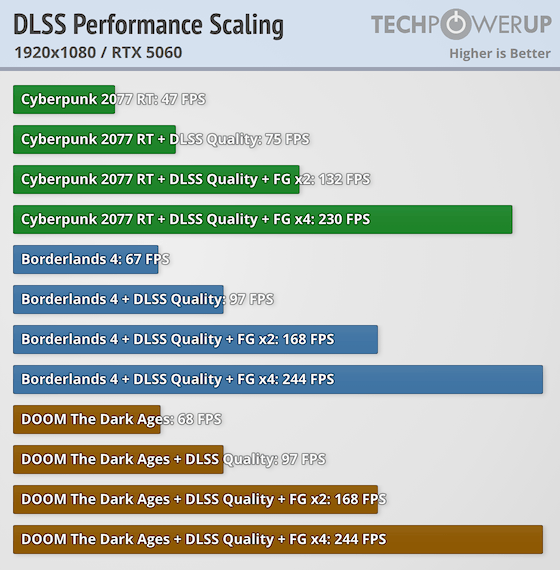
The chart above shows what you can expect from DLSS in terms of FPS gains. Especially DLSS Quality and Frame Generation x2 are something worth considering in every game, and from here on you have a lot of additional options to fine-tune beyond what the often-limited settings in-game enable you to do.
Nov 24th, 2026 21:07 CST
change timezone
Latest GPU Drivers
New Forum Posts
- TPU's F@H Team (20570)
- Can you guess Which game it is? (352)
- The time has come to upgrade...my desktop (13)
- Ryzen Owners Zen Garden (8562)
- WarpCoreBench scores! (99)
- Asus Rog Maximus Z890 Extreme. (Various questions). (34)
- What are you playing? (26253)
- Which ryzen am5 cpu ? (210)
- Your PC ATM (36503)
- X79 and/or rampage IV OC'ing thread for those of us still left.... (2453)
Popular Reviews
- ASRock X870E Challenger Wi-Fi White Review
- Microsoft Surface Laptop Ultra Review - The Next-gen Arm Laptop
- Upcoming Hardware Launches 2027 (Updated Nov 2026)
- VZMORE AX9 Max Review
- AMD Ryzen 7 9800X3D Review - The Best Gaming Processor
- Corsair RM1200e (Second Generation) Review
- AMD Zen 6 Technical Deep Dive
- Phantom Blade Zero Performance Benchmark Review - 35 GPUs Tested
- Pulsar Office Tour & First Look at P1 Dual-Sensor Mouse
- Ocypus lota P1000 Review
TPU on YouTube
Controversial News Posts
- Jensen Huang Reinstated as CEO of NVIDIA (534)
- NVIDIA Co-Founder and CEO Jensen Huang Officially Resigns (492)
- Report: Jensen Huang Eyes NVIDIA Comeback (281)
- Open Letter Asking NVIDIA to Reinstate Jensen Huang Passes 115,000 Signatures (184)
- OpenAI CEO Argues Home PCs Waste the World's Limited DRAM Supply (152)
- NVIDIA Launches Investigation Into Jensen Huang's Relationship With Suspected Chinese Spy (136)
- Intel "Raptor Lake Next" 16-Core and 20-Core CPUs Surface (130)
- Intel Razor Lake Gets a 12 P-Core bLLC Chip With No E-Cores, Per Leak (94)