 29
Gigabyte X870E Aero X3D Wood Review
Performance »SSD Temperatures
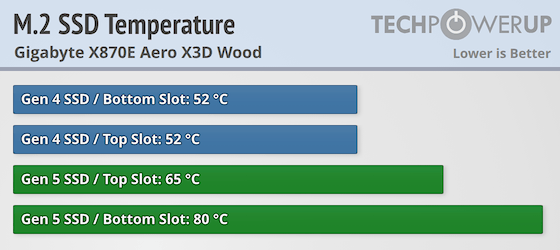
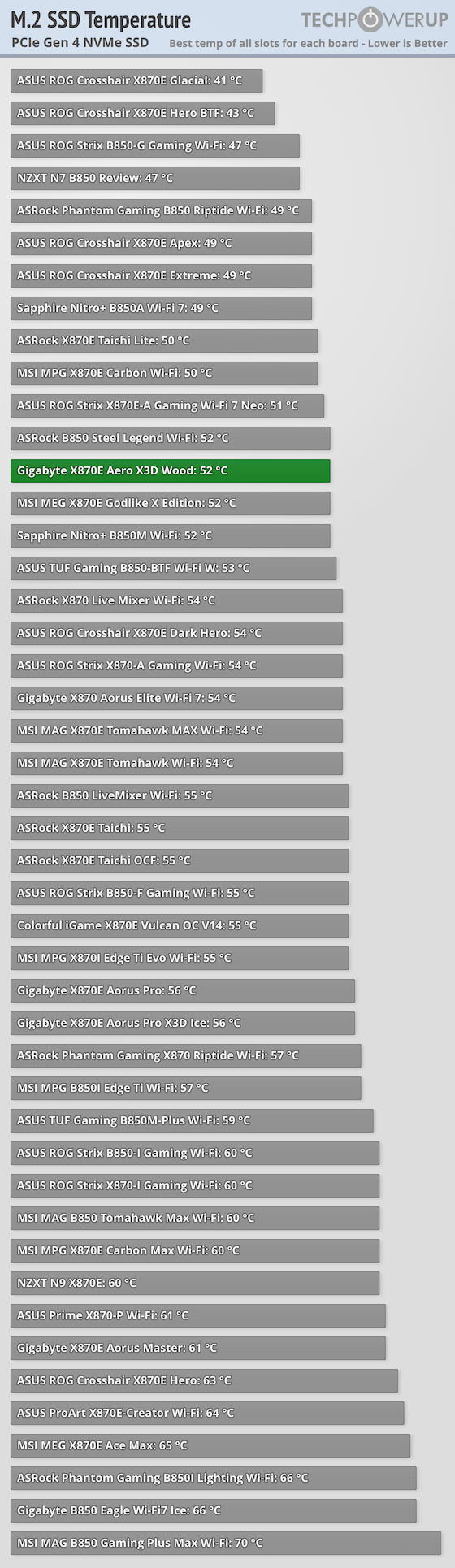
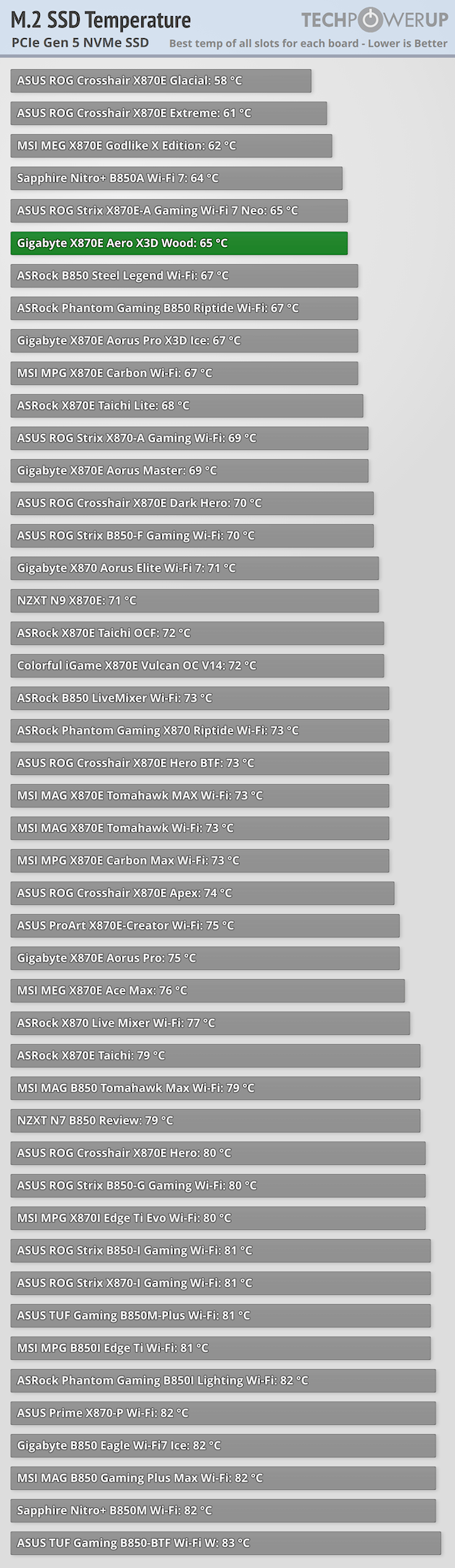
As we've seen before, Gigabyte's M.2 EZ-Flex M.2 underside heatsink that shifts to cater to single-sided and double-sided SSDs works well and performed much better out of the box than the ASUS ROG Strix X870E-A Gaming Wi-Fi 7 Neo with a peak PCIe Gen 5 SSD temperature of 65°C and matched it once we'd fiddled around with the ASUS board's thermal pads. The same was true of our PCIe Gen 4 SSD with a result well up into the top half of the graph and also no difference on that SSD between upper and lower heatsinks so take your pick. The lower PCIe Gen 5 M.2 port was a different story as lacking underside cooling will hurt any double-sided SSD like ours.Still, the addition of underside supports to ensure good contact with the thermal pad above did just about stave off throttling, which would have been guaranteed on most other boards. A single-sided PCIe Gen 5 SSD would therefore be a very good idea if you plan to use it in the second slot, although as the slot sits at the bottom of the PCB, you can also remove the lower M.2 heatsink entirely and use a large third party M.2 heatsink to keep things in check.
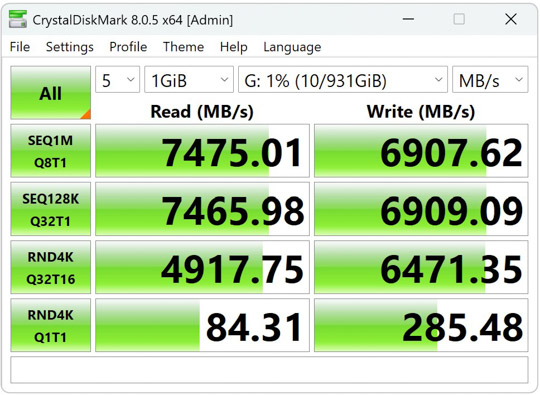
PCIe Gen 4 Performance (Samsung 990 Pro)
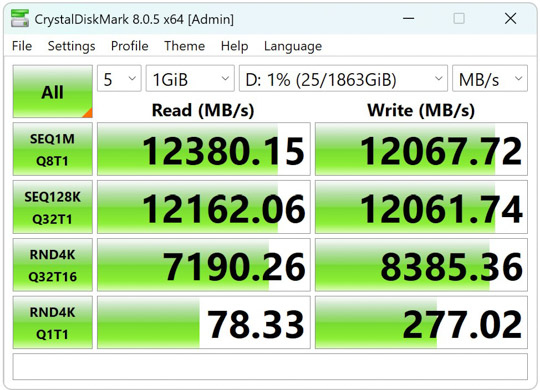
PCIe Gen 5 Performance (Team Group T-Force Z540)
Nov 21st, 2026 23:42 PST
change timezone
Latest GPU Drivers
New Forum Posts
- How to prevent OLED burn damage due to PC freezes or power outtages? (53)
- Your PC ATM (36447)
- Honestly, do you care about GTA VI? (238)
- SATA drive 1.4 GBps with Intel X25-E on Windows 98! (41)
- TPU's Nostalgic Hardware Club (22191)
- Ryzen or Intel system (11)
- AI generated images... (231)
- RX 9000 series GPU Owners Club (2252)
- Introducing DST Bench : one of the most advanced disk benchmark and storage analyzer real-time software (7)
- UPS what one to get? (26)
Popular Reviews
- Microsoft Surface Laptop Ultra Review - The Next-gen Arm Laptop
- Corsair RM1200e (Second Generation) Review
- Pulsar Office Tour & First Look at P1 Dual-Sensor Mouse
- Upcoming Hardware Launches 2027 (Updated Nov 2026)
- Ugreen NASync DXP4800 GT Review
- AMD Ryzen 7 9800X3D Review - The Best Gaming Processor
- Biwin Black Opal NV7400 2 TB Review
- AMD Zen 6 Technical Deep Dive
- Phantom Blade Zero Performance Benchmark Review - 35 GPUs Tested
- AMD Ryzen 7 5800X3D 10th Anniversary Review
TPU on YouTube
Controversial News Posts
- NVIDIA Co-Founder and CEO Jensen Huang Officially Resigns (492)
- Report: Jensen Huang Eyes NVIDIA Comeback (262)
- Open Letter Asking NVIDIA to Reinstate Jensen Huang Passes 115,000 Signatures (184)
- OpenAI CEO Argues Home PCs Waste the World's Limited DRAM Supply (152)
- NVIDIA Launches Investigation Into Jensen Huang's Relationship With Suspected Chinese Spy (136)
- Intel "Raptor Lake Next" 16-Core and 20-Core CPUs Surface (130)
- NVIDIA GeForce RTX 50-Series Scheduled for up to $500 Price Hike This Week (89)
- Intel Razor Lake Gets a 12 P-Core bLLC Chip With No E-Cores, Per Leak (86)