 13
INNOCN 45C1R Review - Two QHD Screens, Zero Bezels
The Package »Introduction

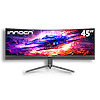
When people think of 32:9 super ultrawide monitors, they usually think of one size, 49 inches. Samsung's Odyssey lineup made the format famous, and most manufacturers followed with the same diagonal and the same massive desk footprint. The INNOCN 45C1R takes a slightly different route. It uses a 44.5-inch VA panel (INNOCN rounds it up to 45 inches in the product name) with the same 5120×1440 resolution, so you still get the full dual QHD workspace, just in a noticeably more manageable body.
The easiest way to understand this format is to split it down the middle. 5120×1440 is exactly two 2560×1440 screens placed side by side. On the 45C1R, each of those halves is the size of a 24.5-inch QHD monitor, so what you are really getting is a pair of 24.5-inch 1440p displays without the bezels between them. The active area is roughly 109 cm (42.8 in) wide and 30.6 cm (12 in) tall, and the pixel density works out to about 120 PPI. That's higher than the ~109 PPI you get on 49-inch 32:9 models or on a standard 27-inch 1440p monitor, which means text is slightly smaller at 100% scaling but also slightly crisper. The trade-off is just as simple. You gain width, not height. Vertically, the 45C1R shows exactly as many pixels as any 1440p monitor, so tall documents and long vertical lists don't benefit from the format at all.
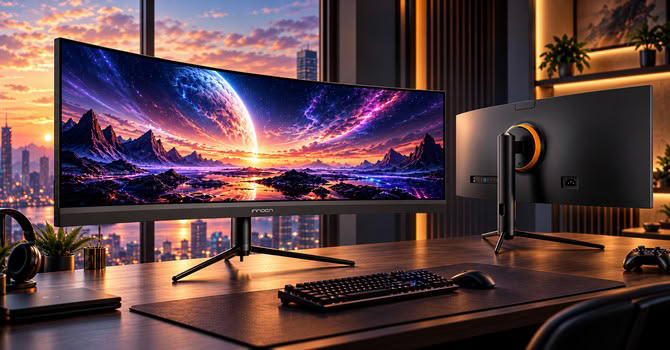
The 1500R curvature is not there for looks. A panel this wide would be very uncomfortable to use if it were flat. At a typical viewing distance of around 70 cm, the edges of a flat 109 cm wide screen would sit roughly 38° off-axis. The 1500R curve pulls the edges almost 10 cm toward you and cuts that angle roughly in half, to about 20°, which keeps the far left and far right sides of the desktop within comfortable reach of your eyes without constant head turning. This matters even more on a VA panel, since VA technology performs worse at extreme viewing angles than IPS or OLED.
The rest of the spec sheet reveals where INNOCN's priorities lie. The refresh rate tops out at 120 Hz over DisplayPort 1.4 and USB-C, while the two HDMI 2.1 ports are limited to 60 Hz at native resolution. The USB-C port supports DisplayPort Alt Mode and power delivery; there's a USB hub, a 100 Mbps RJ45 Ethernet port, a 3.5 mm audio output, and a pair of 5 W speakers built into the lower bezel. INNOCN also lists PiP/PbP support and a KVM switch. That's obviously the feature set of a desktop hub for a laptop, not of a gaming monitor.
The 45C1R has been on the market for a while, and INNOCN now officially rates its USB-C Power Delivery at 65 W. I'll get to what the port actually delivers in the connectivity section. The monitor currently sells for just under $550 in the US.
Specifications
| INNOCN 45C1R | |
|---|---|
| Screen Size | 44.5" (marketed as 45") |
| Native Resolution | 5120×1440 (32:9), ~120 PPI |
| Panel Technology | VA, 8-bit |
| Refresh Rate | 120 Hz (DisplayPort, USB-C), 60 Hz (HDMI) |
| Curvature | 1500R |
| Supported Adaptive Synchronization | Adaptive-Sync |
| Brightness | 400 cd/m² (typical) |
| Contrast | 3,000:1 (static) |
| Color Gamut | 99% sRGB, 95% DCI-P3 (claimed) |
| Response Time | 4 ms GtG (with overdrive), 1 ms MPRT |
| HDR | VESA DisplayHDR 400 |
| Adjustability | Height (95 mm), tilt (-5° to +13°), swivel (±13°) |
| Video Inputs | 2× HDMI 2.1, 1× DisplayPort 1.4 |
| USB-C | USB-C with DP Alt Mode and power delivery (65 W per spec sheet) |
| USB Hub | 2× USB 5 Gbps Type-A, 1× USB 5 Gbps Type-B |
| Network | 1× RJ45 (100 Mbps) |
| Audio | 1× 3.5 mm audio output |
| Speakers | 2× 5 W |
| VESA Mounting | 100×100 mm |
| Dimensions & Weight | 1083.4 × 554.5 × 316.2 mm with stand, 8.6 kg |
| Extras | PiP/PbP, KVM |
Nov 27th, 2026 14:56 CST
change timezone
Latest GPU Drivers
New Forum Posts
- The TPU UK Clubhouse (27302)
- Anthrophics IPO (47)
- Exit Adobe - PDF reader, and PDF editor recommendations (9)
- Mouse Pad advice - Shidenkai out of production? (20)
- What's your main Black Friday / Cyber Monday purchase? (38)
- Samsung TV screen care: check the finish before choosing a cleaning method (3)
- -18C on GPU by moving it to the front of the case. (11)
- Unigine Superposition on Linux (20)
- Making a game in Godot engine (23)
- TPU's WCG/BOINC Team (34814)
Popular Reviews
- VZMORE AX9 Max Review
- Upcoming Hardware Launches 2027 (Updated Nov 2026)
- ASRock X870E Challenger Wi-Fi White Review
- AMD Ryzen 7 9800X3D Review - The Best Gaming Processor
- Microsoft Surface Laptop Ultra Review - The Next-gen Arm Laptop
- AMD Zen 6 Technical Deep Dive
- Montech CyberFlow ARGB 360 Review
- Phantom Blade Zero Performance Benchmark Review - 35 GPUs Tested
- ORICO Obook15 AI Review
- Corsair RM1200e (Second Generation) Review
TPU on YouTube
Controversial News Posts
- Jensen Huang Reinstated as CEO of NVIDIA (622)
- NVIDIA Co-Founder and CEO Jensen Huang Officially Resigns (492)
- Report: Jensen Huang Eyes NVIDIA Comeback (281)
- Open Letter Asking NVIDIA to Reinstate Jensen Huang Passes 115,000 Signatures (184)
- OpenAI CEO Argues Home PCs Waste the World's Limited DRAM Supply (152)
- NVIDIA Launches Investigation Into Jensen Huang's Relationship With Suspected Chinese Spy (136)
- Intel Razor Lake Gets a 12 P-Core bLLC Chip With No E-Cores, Per Leak (94)
- NVIDIA GeForce RTX 50-Series Scheduled for up to $500 Price Hike This Week (89)