 194
Intel Core Ultra 7 270K Plus Review - Intel's Fastest Gaming CPU
Performance Summary »Clock Frequencies
The following chart shows how well the processor sustains its clock frequency and which boost clock speeds are achieved at various thread counts. This test uses a custom-coded application that mimics real-life performance—it is not a stress test like Prime95. Modern processors change their clocking behavior depending on the type of load, which is why we provide three plots with classic floating point math, SSE SIMD code, and modern AVX vector instructions. Each of the three test runs calculates the same result using the same algorithm, just with a different CPU instruction set.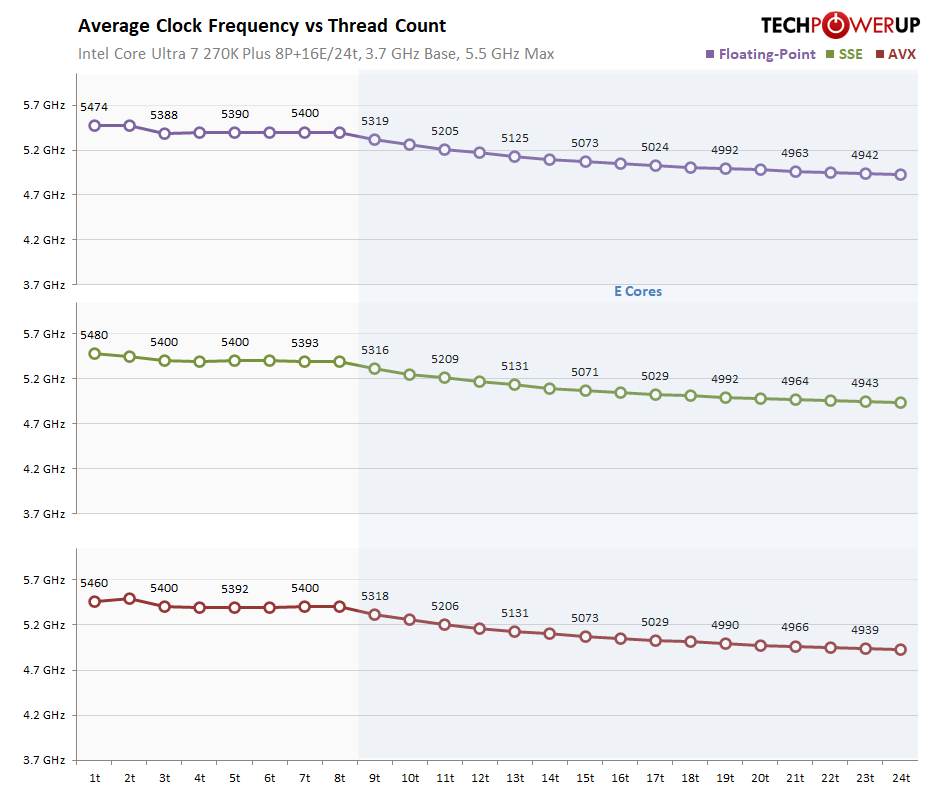
Note that the P-Cores are always clocked close to their maximum, even when multiple P-Cores are active. The gradual drop toward the right side is a little bit misleading, because we keep adding more E-Cores to the mix, which run at a lower frequency, dragging down the average.
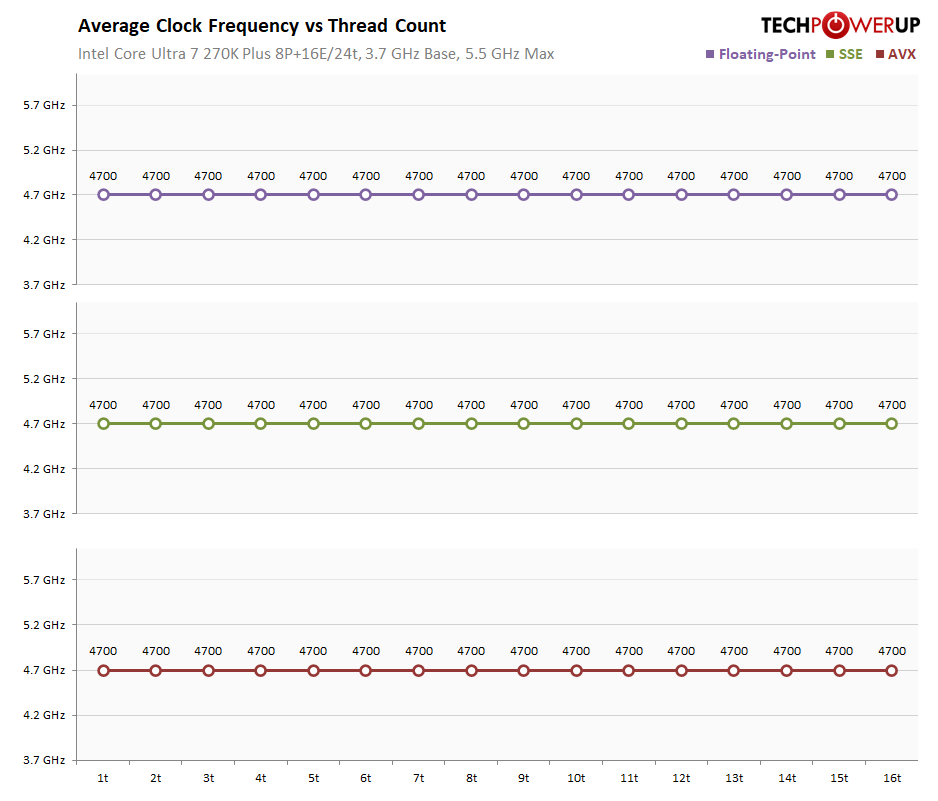
In this E-Cores only chart you can clearly see that the E-Cores are always running at 4.7 GHz when not idle, no matter how many of them are active.
Overclocking
Overclocking the Intel Core Ultra 7 270K Plus is pretty easy, thanks to the unlocked multiplier. While temperatures and keeping them away from the throttle point have been a big gotcha with pre-Arrow Lake processors, this isn't a big deal anymore—the processor is easy to keep cool. Intel has also increased the TjMax to 105 °C, which adds an extra +5 °C in thermal headroom. You can manually increase this limit to 115 °C. On AMD AM5 CPUs the limit is 95 °C, with no option to increase.
With Arrow Lake (and Arrow Lake Plus), you can adjust the voltage for the P-Cores and E-Cores separately, and also their overclocking frequencies. On top of that there are additional dials for the inter-tile clock frequency and others.
The OC testing in this review is designed to represent what a typical user can achieve without in-depth knowledge of secret overclocking techniques or dozens of hours to tweak the system for a long time. I set the voltage offsets to +100 mV for both core types and started increasing the CPU multiplier for the P-Cores only.
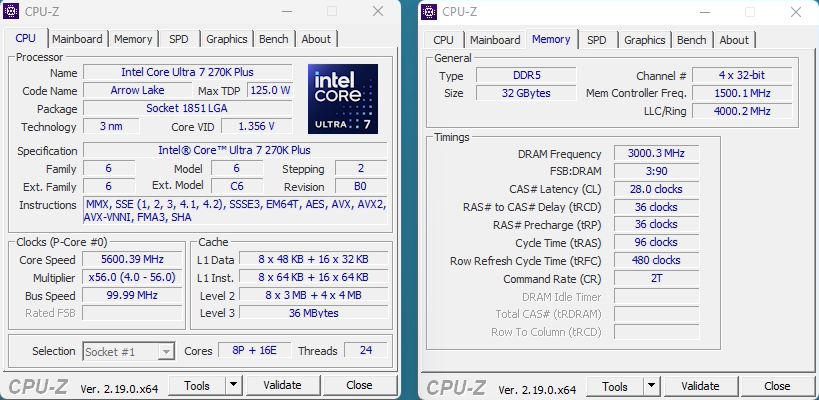
The maximum P-Core OC frequency that I got was 5.6 GHz on all cores, which is 100 MHz higher than the maximum Boost on two cores (5.5 GHz). This does require a bump in voltage though, +100 mV was stable, +75 mV was not. This seriously increases power consumption and heat output, I had to raise the thermal limit from 105 °C to 115 °C to avoid throttling during peak loads.
Next, I started working on the E-Cores. However, I first lowered the P-Cores' multiplier to ensure that any instability wouldn't disrupt the E-Core overclocking.
E-Core overclocking topped out at 5.1 GHz—400 MHz higher than the out-of-the-box config—this definitely gains some extra performance. The cooling requirements went up even further now due to 100 mV offset on both core types—bring good watercooling.
Nov 15th, 2026 03:40 CST
change timezone
Latest GPU Drivers
New Forum Posts
- WebXPRT 4 performance scores (46)
- Optical Disc Drive owners club (213)
- Honestly, do you care about GTA VI? (46)
- "Legacy Control Panel" won't install (3)
- Power supply noise stops when I move the mouse (0)
- Ryzen Owners Zen Garden (8558)
- WarpCoreBench scores! (46)
- Bought MAX-P495 - Which model? (32)
- Tell me about your favourite graphics card (84)
- Planning for Prolonged High Prices and Maintaining What You Already Have (72)
Popular Reviews
- AMD Zen 6 Technical Deep Dive
- ASUS ROG Strix B850-I Gaming Wi-Fi7 W Review
- Corsair HX1000i Shift Crystal Review
- Upcoming Hardware Launches 2027 (Updated Nov 2026)
- Montech King 95 3D PRO Review
- NZXT C1200 Platinum Review
- NZXT H7 RGB+ Review
- NZXT H5 Review
- Phantom Blade Zero Performance Benchmark Review - 35 GPUs Tested
- AMD Ryzen 7 9800X3D Review - The Best Gaming Processor
TPU on YouTube
Controversial News Posts
- NVIDIA Co-Founder and CEO Jensen Huang Officially Resigns (408)
- OpenAI CEO Argues Home PCs Waste the World's Limited DRAM Supply (152)
- NVIDIA Launches Investigation Into Jensen Huang's Relationship With Suspected Chinese Spy (136)
- Intel "Raptor Lake Next" 16-Core and 20-Core CPUs Surface (130)
- Legendary Game Studio BioWare Shuts Down Following EA Layoffs (104)
- Dell CEO Says the Memory Shortage Will Get Worse in 2027 (95)
- NVIDIA GeForce RTX 50-Series Scheduled for up to $500 Price Hike This Week (89)
- Modder Fits RTX 5090 With Four 8-Pin Connectors, Halving Current per Wire (80)