 11
Kamrui GK3 Plus Mini-PC Review
Workstation Performance »Adobe Photoshop
PugetBench for Photoshop simulates a variety of real-world creative tasks, such as applying filters, working with large images, using adjustment layers, and combining multiple effects. It's a good benchmark for gauging whether a system can handle light to moderate photo editing without bogging down.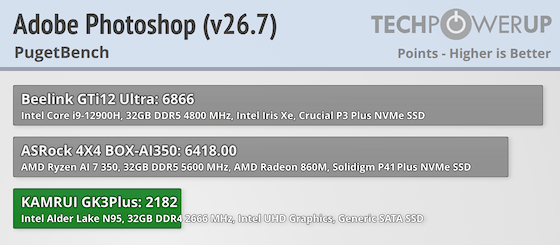
In this test, the Kamrui GK3 Plus scored 2,182 points, which is less than one-third of what we saw on the higher-end Beelink GTi12 Ultra (6,866) and the ASRock 4X4 BOX-AI350 (6,418). That wide gap is expected, since Photoshop benefits heavily from both CPU horsepower and fast NVMe storage. The N95's four basic cores and SATA SSD simply don't have the throughput to keep up when layers stack or high-resolution files are involved.
Even so, the GK3 Plus result isn't unusable. For lightweight editing like cropping, resizing, adjusting color levels, or working with web-resolution images, the system feels fine, and 16 GB of RAM helps keep smaller projects responsive. Where it struggles is with larger RAW files or anything that requires GPU acceleration. Even simple filters applied to multi-layered documents might experience delays, which means this machine isn't meant for creative professionals.
Blender
This test measures how quickly a system can render complex 3D scenes, making it a good stress test for both CPU and GPU performance.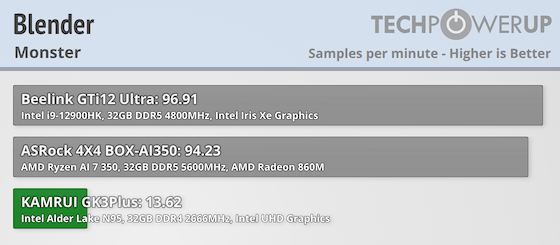
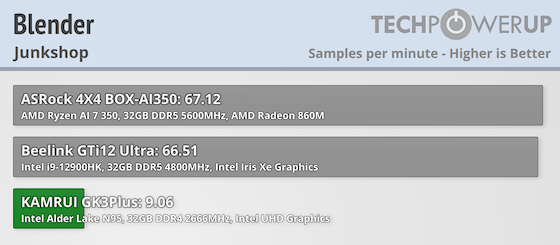
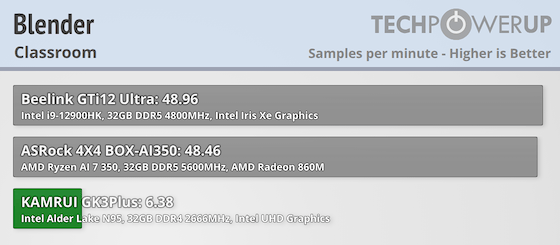
In all three Blender scenes, the GK3 Plus came in well behind the Beelink and ASRock systems, which was expected given the hardware gap. It managed just 13.6 samples per minute in Monster, 9.1 in Junkshop, and 6.4 in Classroom. In every case, this was about 85 percent slower than the leaders. For context, the Beelink and ASRock scored in the 90s and 40s respectively. The gap between low-power mini PCs and performance-oriented systems is very noticeable here.
These results are consistent with what the GK3 Plus is meant for. It was never designed for heavy 3D rendering or content creation, and the numbers make that clear. Where it does fit is everyday use such as office tasks, media playback, and light multitasking, not Blender or other pro-grade work.
Media Encoding
Encoding or transcoding video is a popular workload, we're using HandBrake to measure how quickly a short 1080p clip is transcoded using the x264 codec, giving us a clear look at how fast the CPU can chew through a heavy, everyday workload.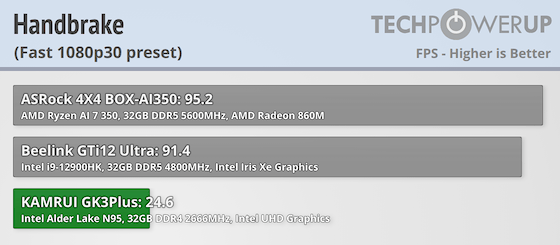

Looking at the results, the Intel N95 system crawled along at about 24 FPS, taking just over a minute to finish, while the ASRock's Ryzen AI 7 350 and Beelink's Intel i9-12900H blazed through the same job in around nine seconds each. This huge gap highlights just how limited the little N95 is for media tasks.
Nov 26th, 2026 10:33 CST
change timezone
Latest GPU Drivers
New Forum Posts
- Post your CrystalDiskMark speeds (659)
- What's your main Black Friday / Cyber Monday purchase? (18)
- Wireless Internet sharing between PC and router both-ways, is it possible? (24)
- Can you guess Which game it is? (366)
- Making a game in Godot engine (20)
- X79 and/or rampage IV OC'ing thread for those of us still left.... (2459)
- Exploring Local LLMs: Models, Hardware and Setup Experiences (4)
- Linpack Xtreme Released (513)
- Claude credits purchased on or after Dec. 7 now have an expiry date (20)
- Acer TravelMate P414-51 (i5-1135G7): CPU stuck at x4 / ~200 MHz effective under 100% load, no throttle flags. How to find who's clamping it? (1)
Popular Reviews
- ASRock X870E Challenger Wi-Fi White Review
- VZMORE AX9 Max Review
- Upcoming Hardware Launches 2027 (Updated Nov 2026)
- Microsoft Surface Laptop Ultra Review - The Next-gen Arm Laptop
- AMD Ryzen 7 9800X3D Review - The Best Gaming Processor
- AMD Zen 6 Technical Deep Dive
- Corsair RM1200e (Second Generation) Review
- Phantom Blade Zero Performance Benchmark Review - 35 GPUs Tested
- Montech CyberFlow ARGB 360 Review
- Pulsar Office Tour & First Look at P1 Dual-Sensor Mouse
TPU on YouTube
Controversial News Posts
- Jensen Huang Reinstated as CEO of NVIDIA (587)
- NVIDIA Co-Founder and CEO Jensen Huang Officially Resigns (492)
- Report: Jensen Huang Eyes NVIDIA Comeback (281)
- Open Letter Asking NVIDIA to Reinstate Jensen Huang Passes 115,000 Signatures (184)
- OpenAI CEO Argues Home PCs Waste the World's Limited DRAM Supply (152)
- NVIDIA Launches Investigation Into Jensen Huang's Relationship With Suspected Chinese Spy (136)
- Intel "Raptor Lake Next" 16-Core and 20-Core CPUs Surface (130)
- Intel Razor Lake Gets a 12 P-Core bLLC Chip With No E-Cores, Per Leak (94)