 32
Kioxia Exceria Pro G2 4 TB Review
Rendering, Virtualization & File Synchronization »Thermal Throttling
Due to the compact form factor, M.2 drives lack the ability to actively cool themselves, usually having to rely on passive airflow instead. All vendors include some form of thermal throttling on their drives as a safeguard, which limits throughput once a certain temperature is exceeded.On this page, we will investigate whether the tested drive has such a mechanism, how high temperatures get, and what effect this has on performance. We will test the drive in a typical case, installed in the M.2 slot between the CPU and graphics card.
Each of the charts has time moving from left to right, showing transfer speeds in MB/s and also reporting the drive's temperature in degrees Celsius (measured using SMART).
Real-Life Temperatures
This thermal testing approach simulates typical SSD workloads using PCMark10 storage traces, which replay real-world disk usage without executing the full applications. It helps us create consistent, realistic usage patterns, not just primitive synthetic "random read" or "random write" operations. We can also reduce idle gaps in the trace playback to make the SSD work harder, but not unrealistically so. The recorded activity comes from apps like Adobe and Office, as well as gaming and file transfers. We repeat the entire test sequence three times to extend the total workload duration, followed by a cool-down period to observe how the SSD dissipates heat.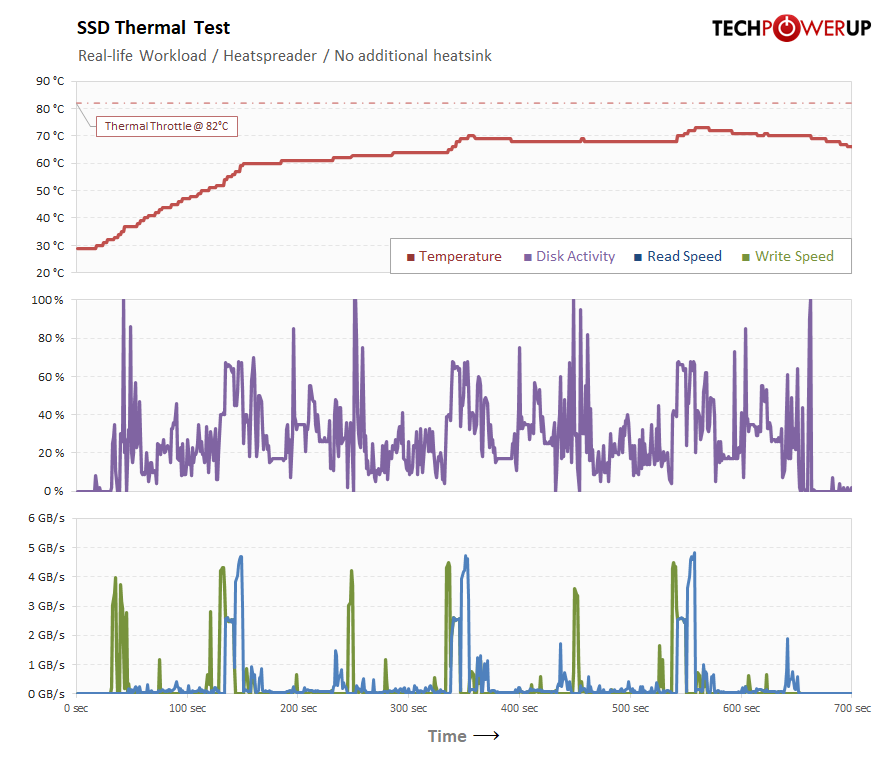
Even as a bare drive, with no heatsink, the Exceria Pro G2 peaks at 73°C in this test—comfortably below the 82°C point of thermal throttling. In typical usage you won't run into thermal throttling at all, which is remarkable for a PCIe Gen 5 drive.
Thermal Stress Test
In these tests, the SSD is hammered by nonstop incoming writes to simulate worst-case thermal stress under the heaviest possible load. The test also checks how the drive deals with thermal throttling and whether it continues to function normally.Drive with Small Thermalright Heatsink
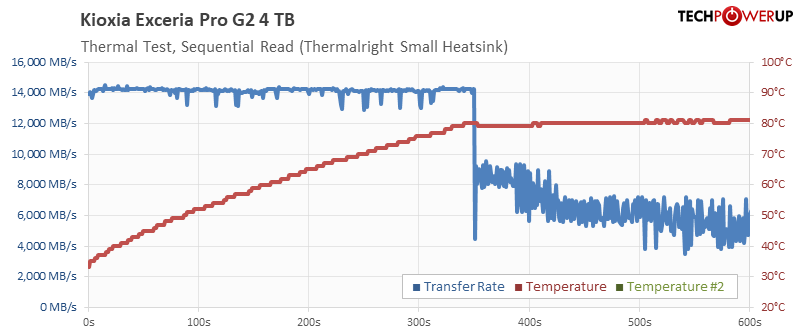
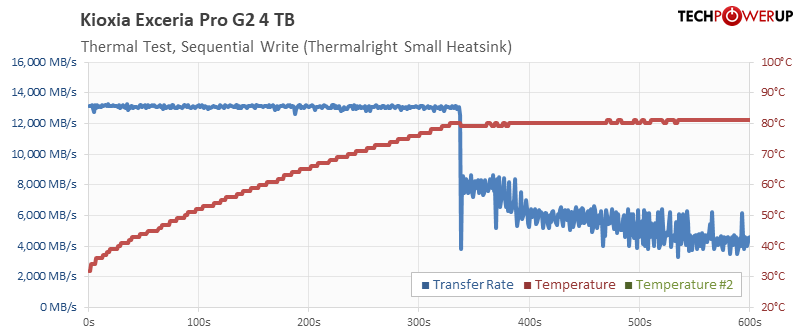
First, I installed a Thermalright TR-M2, which is a compact full-metal heatsink. The drive runs at full speed for around five and a half minutes of nonstop reads or writes before it reaches 82°C and starts throttling, after which transfer rates bounce around between 4 and 8 GB/s. That's a lot of activity—but it does show that a small heatsink isn't enough if you plan to put the drive under the heaviest of loads.
Drive with Big Thermalright Heatsink
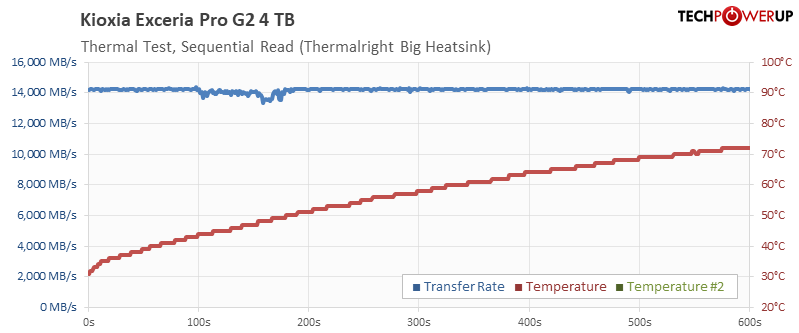
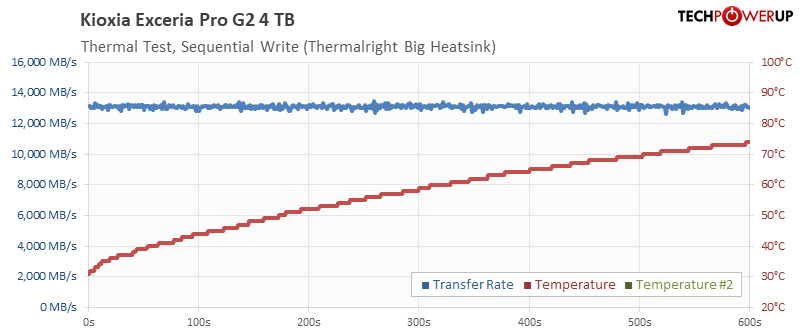
With the much bigger Thermalright HR-10, there is no more throttling at all. The drive runs the full ten minutes of nonstop transfers at unchanged speed, and temperature climbs to only 73°C by the end of the run.
Thermal Image & Hot Spot
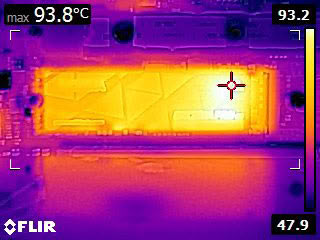
For this thermal image, we deliberately ran the drive without a heatsink, to reveal where the heat concentrates on the PCB. Peak temperature is 94°C, while the drive's SMART temperature monitoring reports 82°C. Thermal throttling is confirmed to be functioning properly to protect the drive.
Nov 14th, 2026 18:41 CST
change timezone
Latest GPU Drivers
New Forum Posts
- Honestly, do you care about GTA VI? (12)
- What is in your fleet, size and contents? (28)
- WarpCoreBench scores! (33)
- 9070 GRE 3.9ghz validation reached. (10)
- X79 and/or rampage IV OC'ing thread for those of us still left.... (2452)
- Can you guess Which game it is? (317)
- What can the FX 8320 do today? Here is the answer. (43)
- Ryzen 7 8700G OC (8)
- auto-closed by somethings by actions (2)
- [Community Benchmark] MrH OpenCL Benchmark 2.0e (Windows Only – CPU & GPU) (2)
Popular Reviews
- AMD Zen 6 Technical Deep Dive
- ASUS ROG Strix B850-I Gaming Wi-Fi7 W Review
- Corsair HX1000i Shift Crystal Review
- Upcoming Hardware Launches 2027 (Updated Nov 2026)
- Montech King 95 3D PRO Review
- NZXT C1200 Platinum Review
- NZXT H7 RGB+ Review
- NZXT H5 Review
- Phantom Blade Zero Performance Benchmark Review - 35 GPUs Tested
- AMD Ryzen 7 9800X3D Review - The Best Gaming Processor
TPU on YouTube
Controversial News Posts
- NVIDIA Co-Founder and CEO Jensen Huang Officially Resigns (406)
- OpenAI CEO Argues Home PCs Waste the World's Limited DRAM Supply (152)
- NVIDIA Launches Investigation Into Jensen Huang's Relationship With Suspected Chinese Spy (136)
- Intel "Raptor Lake Next" 16-Core and 20-Core CPUs Surface (130)
- Legendary Game Studio BioWare Shuts Down Following EA Layoffs (104)
- Dell CEO Says the Memory Shortage Will Get Worse in 2027 (95)
- NVIDIA GeForce RTX 50-Series Scheduled for up to $500 Price Hike This Week (89)
- Modder Fits RTX 5090 With Four 8-Pin Connectors, Halving Current per Wire (80)