 7
Lenovo IdeaPad Slim 3i 15IRH10 Review - Intel Can't Catch Ryzen
Measured Temperatures & Clocks »Battery Life Test Methodology
How we test battery life:- The screen is set to 180 nits of brightness
- If the device has an iGPU-only mode, this is activated
- If not, the test will be executed with the standard NVIDIA Optimus / Advanced Optimus / Auto mode settings
- All battery-saving features that don't decrease visual quality are applied.
- This includes:
- Best Power Efficiency mode and Energy Saver mode in the Windows Power & Battery Menu
- Variable Refresh Rate (if present, that's a display/laptop dependent extra)
- Panel Self Refresh (if present, that's a display/laptop dependent extra)
- The most energy-efficient mode is selected by the manufacturer's own software that controls the notebook's power
Settings Used


To maximize the battery life of this gaming beast, you could use the following settings:
- Select the Battery Saver in the Lenovo Vantage app
- Apply Best power efficiency + Energy Saver Mode in the Windows Battery menu
- Variable Refresh Rate is enabled
- Screen is set to 180 nits
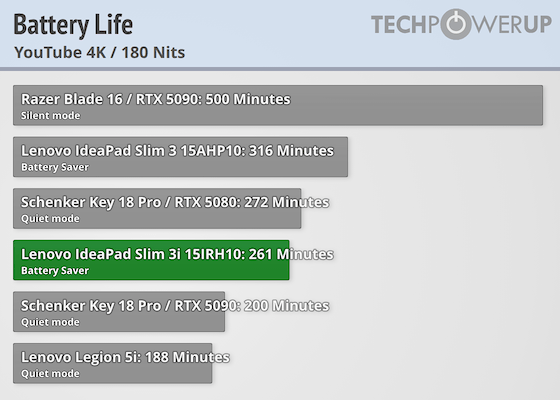
The same 50 Wh battery lasts almost an hour less in this laptop compared to the 8840HS version. It looks like the 13420H is thirstier or that Lenovo's fine-tune isn't optimal.
Nov 13th, 2026 10:21 PST
change timezone
Latest GPU Drivers
New Forum Posts
- Microsoft Exchange/365 outages? (50)
- inside Case Mod gallery, non modded cases are posted? (1)
- Debunking 10-Year-Old Myths: How a Properly Tuned FX-8320 (4.21 GHz) Beats i5-8400, i7-4770, Ryzen 5 1500X, and Even a 4.92 GHz FX-9590 in 3DMark Time (7)
- WarpCoreBench scores! (27)
- The TPU Darkroom - Digital SLR and Photography Club (4496)
- TPU's Nostalgic Hardware Club (22154)
- To AiO CPU Cooler users? (9)
- Dual B70 or Dual R9700 Pro on Linux (3)
- Slow SSD read speeds - help! (3)
- I won't download games that are larger than 30–40 GB. (108)
Popular Reviews
- AMD Zen 6 Technical Deep Dive
- Corsair HX1000i Shift Crystal Review
- NZXT C1200 Platinum Review
- Upcoming Hardware Launches 2027 (Updated Nov 2026)
- Montech King 95 3D PRO Review
- NZXT H7 RGB+ Review
- NZXT H5 Review
- Phantom Blade Zero Performance Benchmark Review - 35 GPUs Tested
- XPG NIMBUS PLUS Review - Mid-range Chair With Strong Competitors
- Gigabyte Z890I Aorus Ultra Review
TPU on YouTube
Controversial News Posts
- NVIDIA Co-Founder and CEO Jensen Huang Officially Resigns (358)
- OpenAI CEO Argues Home PCs Waste the World's Limited DRAM Supply (152)
- NVIDIA Launches Investigation Into Jensen Huang's Relationship With Suspected Chinese Spy (136)
- Intel "Raptor Lake Next" 16-Core and 20-Core CPUs Surface (130)
- Legendary Game Studio BioWare Shuts Down Following EA Layoffs (104)
- Dell CEO Says the Memory Shortage Will Get Worse in 2027 (95)
- NVIDIA GeForce RTX 50-Series Scheduled for up to $500 Price Hike This Week (89)
- Modder Fits RTX 5090 With Four 8-Pin Connectors, Halving Current per Wire (80)