 1
Microsoft Surface Laptop Ultra Review - The Next-gen Arm Laptop
Agentic AI »NVIDIA RTX Spark Architecture

Before we get to the laptop itself, let's take a quick look under the hood. The heart of the Surface Laptop Ultra is the N1X, which NVIDIA calls a superchip. In practice, that's two pieces of silicon (tiles) sitting side by side in one package and talking over NVLink C2C, a chip-to-chip link rated at 600 GB/s with bidirectional coherency. Both tiles are made on TSMC's 3 nm process.

You can make out the two tiles here, each with NVIDIA's own markings. Look closely near the arrows; you can see the split where they sit together.

The first tile is the Blackwell GPU. It packs 6,144 CUDA cores across 48 streaming multiprocessors, 5th-generation Tensor cores good for 1 PFLOP of NVFP4 AI performance, 4th-generation RT cores, 24 MB of L2 cache, and the video engine with 4:2:2 encoding and decoding plus AV1 UHQ. In other words, it's a proper RTX 50-series class GPU, with full support for CUDA, DLSS 5, Multi Frame Generation, and Ray Reconstruction. No compromises on the software side.

The second tile was built together with MediaTek, and it holds everything else: the 20-core Grace CPU, the memory controller, the NPU, the display outputs, and the I/O, including PCIe Gen 5, USB4, and Wi-Fi 7. One interesting detail here is that the memory controllers sit on the CPU tile. So, every byte the GPU pulls out of the shared memory has to cross the C2C link first. If the 600 GB/s figure is the sum of both directions, each direction gets about 300 GB/s, which matches the peak bandwidth of the memory. That's my reading, not NVIDIA's, but it looks like the link was sized to carry exactly what the memory can deliver.
Two Versions of N1X
RTX Spark comes in two flavors, and Microsoft offers both in the Surface Laptop Ultra.
The bigger chip gets 11% more CPU cores and exactly 20% more GPU cores, but both versions share the same memory interface. Keep in mind that the 45–80 W range covers the CPU and the GPU together, so it can't be compared directly with the TGP of a discrete laptop GPU, which only covers the graphics card. NVIDIA's own lineup chart ties the smaller chip to the 24 and 32 GB configurations, meant for gaming, content creation, and agents that rely on cloud models. The 20-core version covers everything, including local AI models, large 3D scenes, and video generation.
The CPU Cores

This is the die shot of the 20-core Arm-based CPU. Unlike Qualcomm's Snapdragon X chips with their custom Oryon cores, NVIDIA uses existing Arm CPU IP: the Cortex-X925 for performance and the Cortex-A725 for efficiency. Both are ARMv9.2 cores without SMT, so 20 cores also means 20 threads. The X925 was originally meant for the flagship phones of 2025, where it runs at much lower clocks. Here, it gets proper laptop cooling and clocks reach 4.0 GHz. And as you'll see on the clocks page, the Surface Laptop Ultra keeps them there under full load. The A725 isn't a tiny background core either, Arm classifies it as "Premium Efficiency," which can be translated as a medium core. It runs at up to 2.8 GHz and does real work in multithreaded loads. The two clusters get 16 MB of L3 cache each.
This design approach is very different from Intel's approach. Panther Lake leans on up to eight small Darkmont E-cores, paired with four large Cougar Cove P-Cores, and four more Darkmont Low-Power-Efficient cores, while NVIDIA goes half-and-half, which gives N1X a much bigger pool of large cores.
Unified Memory

NVIDIA N1X uses LPDDR5X on a 256-bit, 16-channel interface rated at up to 9,400 MT/s. That works out to roughly 300 GB/s of peak bandwidth, shared by the CPU and the GPU. That's ahead of AMD's Ryzen AI Max+ 395 and Qualcomm's Snapdragon X2 Elite, roughly level with Apple's M5 Pro, and about half of what the M5 Max offers.
Bandwidth decides how fast a language model writes text, while capacity decides whether a model fits at all. NVIDIA's favorite chart shows exactly that. Jobs like large AI agents, video generation, and huge render scenes need tons of memory, and a laptop with a regular discrete GPU simply can't reach them at any power level. RTX Spark can, at just 45–80 W.

Microsoft also did its part. Windows now gives the GPU a larger, more adaptive share of system memory and supports larger memory pages for demanding workloads. If you'd rather decide yourself, the NVIDIA App has a GPU memory allocation slider under 'System,' then 'Advanced.' Just keep in mind that every change requires a restart.
Windows on Arm / Prism Emulation
The last piece of the puzzle is software. Since the RTX Spark CPU cores are not x86 compatible, they need an operating system that fully supports these Arm cores. Microsoft has been shipping Windows on Arm for Qualcomm laptops, and NVIDIA is the second Arm CPU vendor that gets to use that operating system.Microsoft made sure that existing applications—32-bit or 64-bit x86—run fine on Arm, thanks to Prism, their emulation layer, which translates x86 and x64 code into Arm instructions on the fly. But that costs some performance, which is why there's a growing list of third-party programs running natively on Arm. Blender, DaVinci Resolve, Affinity, and Adobe Photoshop all have Arm builds.
Microsoft tuned Prism for RTX Spark, and only the CPU part gets emulated. GPU work always runs natively, which is why emulated x86 games often perform just fine. CPU-heavy x64 apps are another story, and you'll see that clearly in our CPU benchmarks.
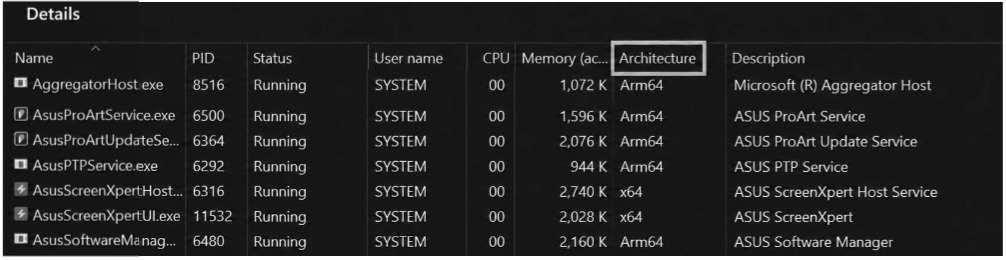
If you want to know what you're dealing with, open Task Manager, go to Details, and enable the Architecture column. ARM64 means native, x64 means emulated, and ARM64EC is a mix of both.
Nov 20th, 2026 11:30 PST
change timezone
Latest GPU Drivers
New Forum Posts
- Can i play GTA 6 now? (Joke) (10)
- Honestly, do you care about GTA VI? (188)
- Anthrophics IPO (15)
- Very unusual two gaming-pc scenarios. (31)
- Last game you purchased? (1410)
- TechPowerUp Screenshot Thread (MASSIVE 56K WARNING) (4387)
- How to prevent OLED burn damage due to PC freezes or power outtages? (44)
- SATA drive 1.4 GBps with Intel X25-E on Windows 98! (35)
- RX 9000 series GPU Owners Club (2245)
- Zen 3 IF/IMC degradation (238)
Popular Reviews
- AMD Zen 6 Technical Deep Dive
- Ugreen NASync DXP4800 GT Review
- Corsair RM1200e (Second Generation) Review
- Acemagic Retro X3 Review
- Microsoft Surface Laptop Ultra Review - The Next-gen Arm Laptop
- Upcoming Hardware Launches 2027 (Updated Nov 2026)
- Pulsar Office Tour & First Look at P1 Dual-Sensor Mouse
- Biwin Black Opal NV7400 2 TB Review
- AMD Ryzen 7 9800X3D Memory Performance Scaling
- AMD Ryzen 7 9800X3D Review - The Best Gaming Processor
TPU on YouTube
Controversial News Posts
- NVIDIA Co-Founder and CEO Jensen Huang Officially Resigns (490)
- Report: Jensen Huang Eyes NVIDIA Comeback (246)
- Open Letter Asking NVIDIA to Reinstate Jensen Huang Passes 115,000 Signatures (184)
- OpenAI CEO Argues Home PCs Waste the World's Limited DRAM Supply (152)
- NVIDIA Launches Investigation Into Jensen Huang's Relationship With Suspected Chinese Spy (136)
- Intel "Raptor Lake Next" 16-Core and 20-Core CPUs Surface (130)
- Legendary Game Studio BioWare Shuts Down Following EA Layoffs (104)
- Dell CEO Says the Memory Shortage Will Get Worse in 2027 (95)