 3
Montech HS02 PRO Review
A Closer Look - Inside »A Closer Look - Outside

Out of the box, the case looks quite clean with its straight edges and thicker black band at the bottom vs. the top. The front corners have a bit of a curve to them which the Montech HS02 Pro forms using a curved edge on the glass on one side and traditional case body strip on the other. While the tight curve on the glass is super nice, Montech did split the entire glass into two portions to reduce production cost.


Looking at the front, the glass clearly lets you view the interior with black bands at bottom and top of it. At the bottom, you will find a symmetrical arrangement of IO ports including the usual pair of USB-A with one USB-C port. On top of that, the ARGB control button is shaped like the USB-C port to maintain symmetry. The one issue here is the fact that neither of the audio plugs can be distinguished from each other, so you guess is as good as mine, which is an output vs. input. The reason for this focus on symmetry and lack of labels is the fact that the HS02 Pro can be flipped over, meaning these ports will suddenly be at the top of the chassis.
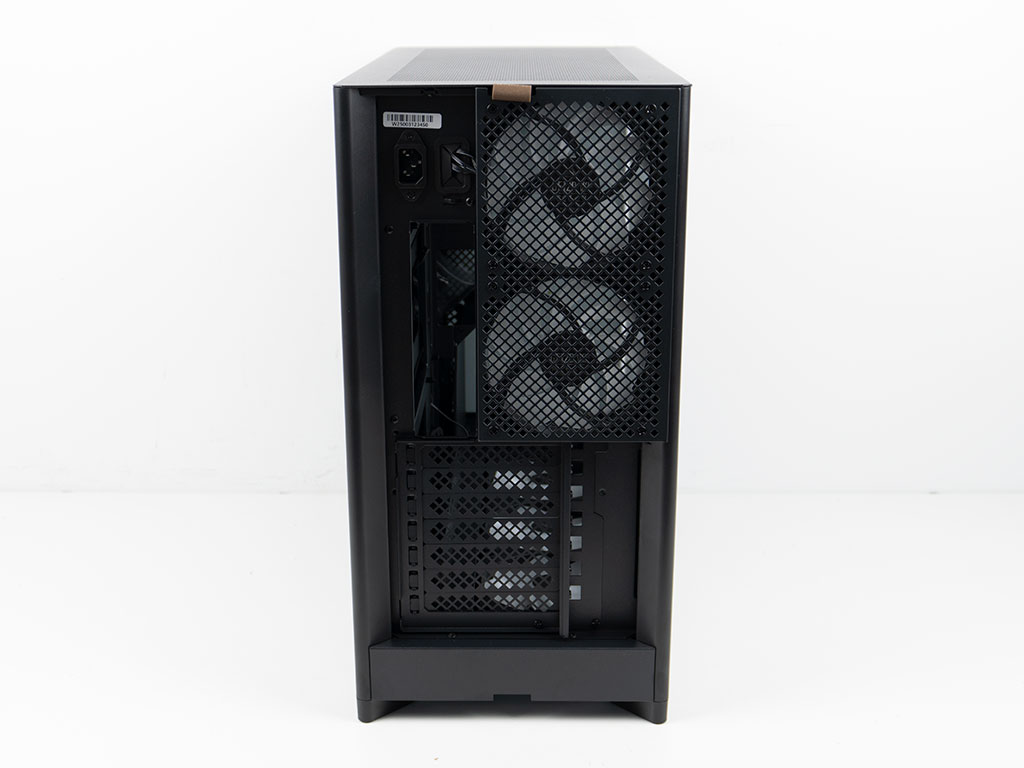
In the rear, the case has its expansion ports at the very bottom and two 120 mm fan placements at the top. As this is the Pro variant, you will find two pre-installed 120 mm ARGB units here set to push hot air out the back of the chassis. As the PSU bay has been moved to the front, Montech has included a passthrough cable and plug in the top right corner of the chassis.


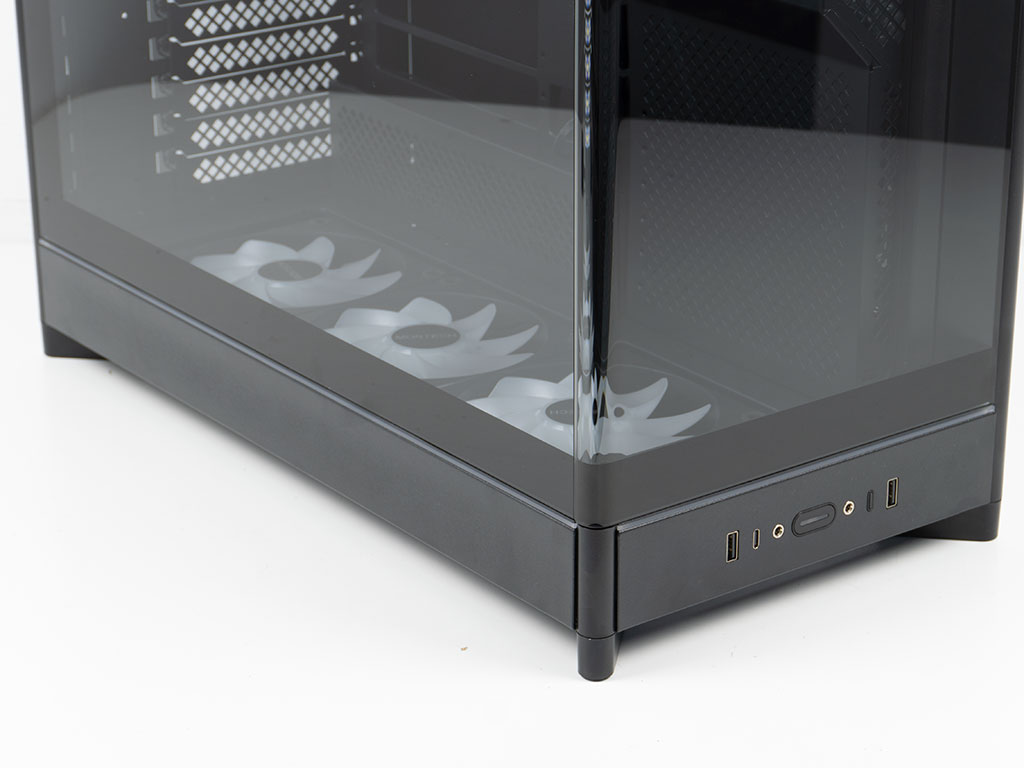
The main side panel is made of all glass as well and continues with the same black stripes to match the front portion of the case. On the other side, you will find a metal panel with a vented section around the PSU and storage areas of the HS02 Pro. On top of all these details, the chassis comes with an embedded ARGB strip along the bottom edge of the chassis between the solid and glass portions, which is a really cool touch. Naturally, if you opt to flip the chassis around, this strip would be at the top as a result.


The seven expansion slots are protected by individual, reusable covers. It can be flipped to accommodate a vertical GPU setup as well. Above that, the two fans are actually installed on the exterior of the case body, with a cover to make sure it all looks clean while also acting as a protective barrier so nothing gets caught in the fan blades. The wires are routed through a small opening to the left of this cover. While that is perfectly fine, Montech could have extended the cover in that area to hide this too, but odds are that would have increased tooling costs for very little tangible benefit. You may unscrew the cover to gain access to these fan placements if you want to exchange them. Even though you have two 120 mm units here, the rear of the chassis can only accommodate a 120 mm radiator setup, as there isn't enough clearance for a 240 mm variant.


In the ceiling, there is a metal cover with a large air vent and a nifty leathery tab to pull the cover off with. It is held in place by magnets, which is a nice touch. Underneath, you will find room for three 120 mm fans or a 360 mm AIO, as well as large cutouts to aid in cable management. You also should remove the cover to allow for easy removal of all three exterior panels.

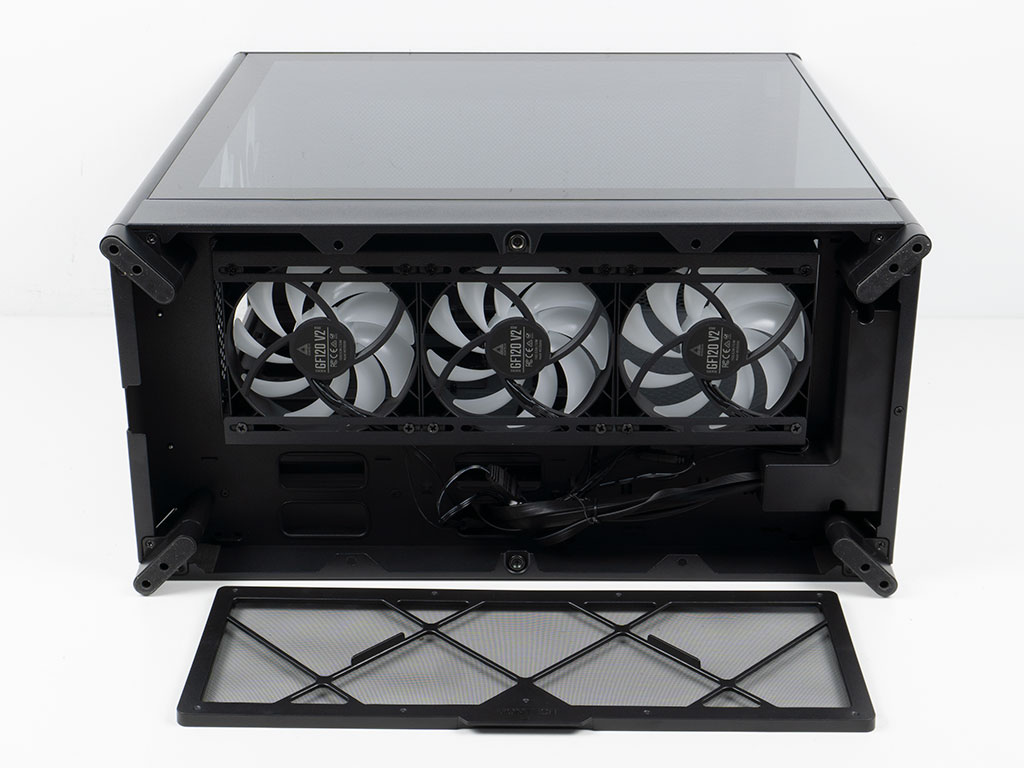
Underneath the case, you will find a fine mesh dust filter protecting three intake ARGB equipped intake fans. If you look closely, you will also notice that the four feet are their own pieces and not part of the chassis body. These are held in place by screws so that you may detach them when flipping the case over.
Nov 22nd, 2026 20:13 CST
change timezone
Latest GPU Drivers
New Forum Posts
- Increasing Power Limit? (8)
- DTS DCH Driver for Realtek HDA [DTS:X APO4 + DTS Interactive] (2818)
- Honestly, do you care about GTA VI? (266)
- What are you playing? (26240)
- UPS what one to get? (48)
- Your PC ATM (36458)
- Gacha Games - Discussions, Pulls, Updates, etc. (1157)
- Last game you purchased? (1414)
- Making a game in Godot engine (19)
- Intel D270 (5)
Popular Reviews
- Microsoft Surface Laptop Ultra Review - The Next-gen Arm Laptop
- Corsair RM1200e (Second Generation) Review
- Upcoming Hardware Launches 2027 (Updated Nov 2026)
- Pulsar Office Tour & First Look at P1 Dual-Sensor Mouse
- Ugreen NASync DXP4800 GT Review
- AMD Ryzen 7 9800X3D Review - The Best Gaming Processor
- AMD Zen 6 Technical Deep Dive
- AMD Ryzen 7 5800X3D 10th Anniversary Review
- Phantom Blade Zero Performance Benchmark Review - 35 GPUs Tested
- Biwin Black Opal NV7400 2 TB Review
TPU on YouTube
Controversial News Posts
- NVIDIA Co-Founder and CEO Jensen Huang Officially Resigns (492)
- Report: Jensen Huang Eyes NVIDIA Comeback (266)
- Open Letter Asking NVIDIA to Reinstate Jensen Huang Passes 115,000 Signatures (184)
- OpenAI CEO Argues Home PCs Waste the World's Limited DRAM Supply (152)
- NVIDIA Launches Investigation Into Jensen Huang's Relationship With Suspected Chinese Spy (136)
- Intel "Raptor Lake Next" 16-Core and 20-Core CPUs Surface (130)
- NVIDIA GeForce RTX 50-Series Scheduled for up to $500 Price Hike This Week (89)
- Intel Razor Lake Gets a 12 P-Core bLLC Chip With No E-Cores, Per Leak (86)