 32
MSI Claw 8 EX AI+ CG3EM Review - Panther Lake FTW
Ports, Wireless Performance, & Battery Life »Cooling and Thermals
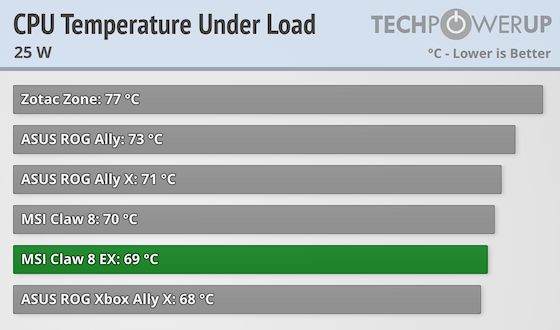
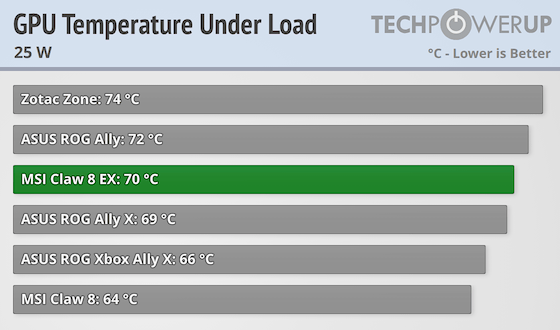
| Temperature Comparison (25 W) | ||||||||
|---|---|---|---|---|---|---|---|---|
| Idle | Gaming | |||||||
| GPU | CPU | GPU | CPU | |||||
| ASUS ROG Ally | 37°C | 38°C | 72°C | 73°C | ||||
| ASUS ROG Ally X | 35°C | 36°C | 69°C | 71°C | ||||
| ASUS ROG Xbox Ally X | 32°C | 35°C | 66°C | 68°C | ||||
| MSI Claw 8 | 42°C | 43°C | 64°C | 70°C | ||||
| MSI Claw 8 EX | 37°C | 39°C | 70°C | 69°C | ||||
| Zotac Zone | 42°C | 44°C | 74°C | 77°C | ||||
The cooling setup, consisting of two relatively large fans and two thick heatpipes, does an excellent job of keeping the Claw 8 EX cool. As you can see, after 20 minutes of Cyberpunk at 25 W in a room with an ambient temperature of 24°C, the CPU reached 69°C while the B390 GPU topped out at 70°C. Overall, that's an excellent result.
That said, we did notice the CPU reaching and exceeding 90°C at 30 W during heavy CPU loads (Cinebench, shader compilation, and so on), which is less than ideal. On the other hand, the GPU portion of the chip stays cool even under maximum load at 35 W and doesn't go above ~80°C.
Fan Noise
Noise levels are recorded with a Uni-T UT353 noise meter. Measurements are taken 30 cm from the console at a 90° angle towards the console, which resides in a horizontal position.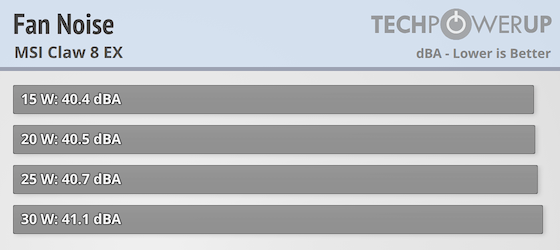
The Claw 8 EX isn't a particularly loud handheld. In fact, it's very quiet even at higher TDP settings.
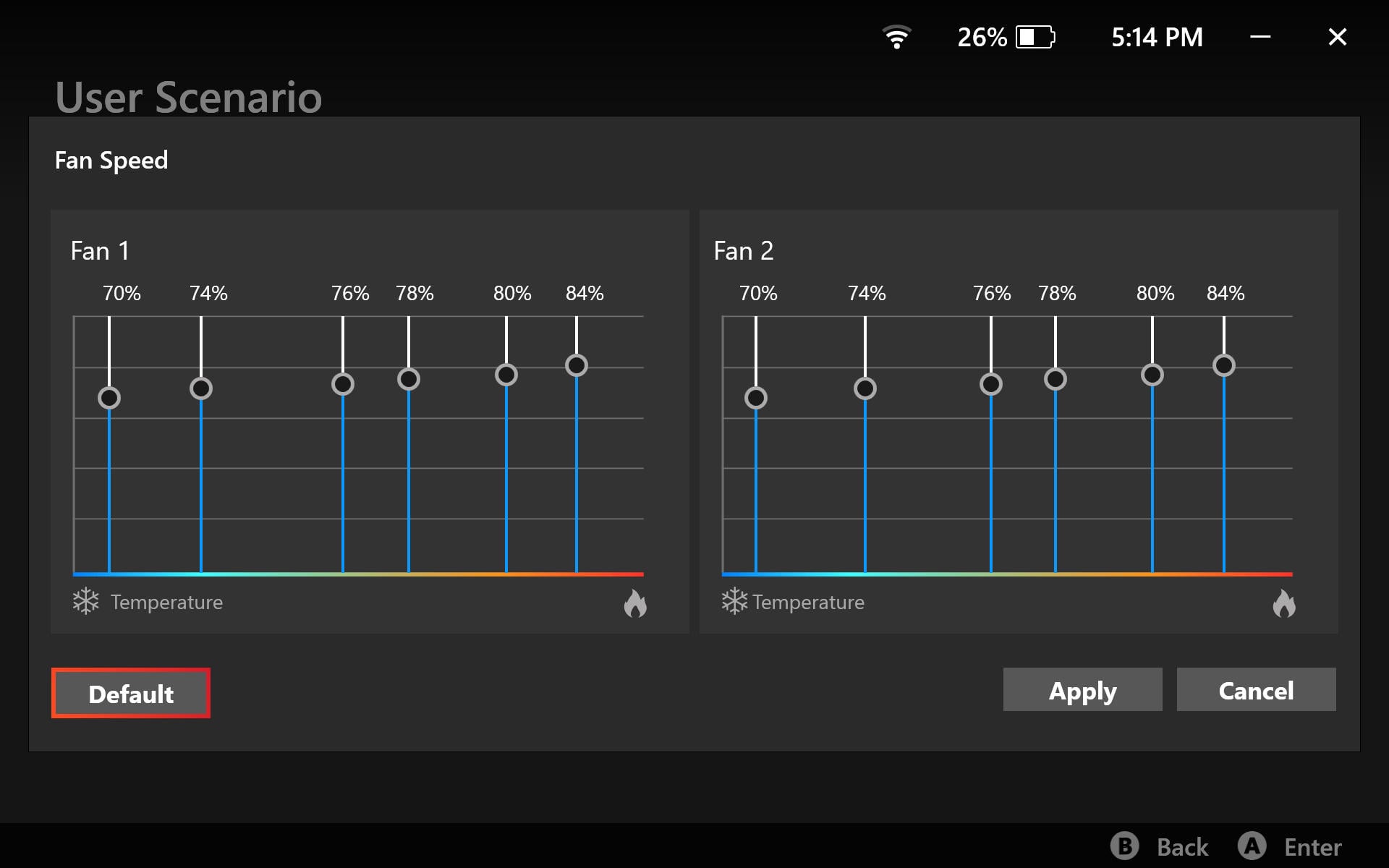
The issue, though, is that while the fan noise itself is relatively subdued, the default fan curve is quite aggressive, as you can see in the screenshot above. The two fans work overtime and are audible even at low TDP settings, as our chart shows. That said, you can create a more lenient custom fan curve, but we still hope MSI will provide an update that reins the fans in soon.
Nov 15th, 2026 20:33 CST
change timezone
Latest GPU Drivers
New Forum Posts
- GPU Temperatures Rise Very Quickly in FurMark – Is This Normal? (2)
- Your PC ATM (36434)
- Will zen 6 mobos have anything extra vs current ones? (45)
- It’s been fascinating times in Retro agian r36s isn’t even worth 50-65 dollars no more and newly listed Rm36 64gb 4in IPS models for only 34 dollars. (6)
- Power supply noise stops when I move the mouse (10)
- Can you guess Which game it is? (320)
- What is the latest game you finished or 100% (203)
- HP Office Jet 7740 Pro - Supply system problem with replacement cartridge (4)
- What are you playing? (26224)
- WarpCoreBench scores! (55)
Popular Reviews
- ASUS ROG Strix B850-I Gaming Wi-Fi7 W Review
- Corsair HX1000i Shift Crystal Review
- AMD Zen 6 Technical Deep Dive
- Upcoming Hardware Launches 2027 (Updated Nov 2026)
- Montech King 95 3D PRO Review
- NZXT C1200 Platinum Review
- Phantom Blade Zero Performance Benchmark Review - 35 GPUs Tested
- AMD Ryzen 7 9800X3D Review - The Best Gaming Processor
- NZXT H7 RGB+ Review
- NZXT H5 Review
TPU on YouTube
Controversial News Posts
- NVIDIA Co-Founder and CEO Jensen Huang Officially Resigns (430)
- Open Letter Asking NVIDIA to Reinstate Jensen Huang Passes 115,000 Signatures (184)
- OpenAI CEO Argues Home PCs Waste the World's Limited DRAM Supply (152)
- NVIDIA Launches Investigation Into Jensen Huang's Relationship With Suspected Chinese Spy (136)
- Intel "Raptor Lake Next" 16-Core and 20-Core CPUs Surface (130)
- Legendary Game Studio BioWare Shuts Down Following EA Layoffs (104)
- Dell CEO Says the Memory Shortage Will Get Worse in 2027 (95)
- NVIDIA GeForce RTX 50-Series Scheduled for up to $500 Price Hike This Week (89)