 111
MSI MEG X670E ACE Review
(111 Comments) »Introduction

Some time has passed since the launch of AMD's new platform and Ryzen processors. Being in fierce competition with Intel, AMD brings forth PCIe Gen 5 and DDR5 support to this new platform. Waiting a additional year after Intel gives AMD the benefit of a more mature product readily available to the consumer. With the new Ryzen processor series comes a number of changes that may upset some long time AMD fans, shaking up the market. The first noteworthy change is the socket. All previous desktop Ryzen processors (1000, 2000, 3000, 5000 series, minus Threadripper) used the AM4 PGA (Pin Grid Array) socket. AMD has made the transition to LGA (Land Grid Array) for this new AM5 (LGA 1718) socket. AMD has historically proven it uses the same CPU socket for multiple generations, starting a fresh cycle with the Ryzen 7000 series and beyond. What this means for consumers is that there is no Zen 4 upgrade path for AM4 based platforms. If you want these new processors, they require a brand new motherboard. The platform change also requires new memory too, since the AM5 socket exclusively uses DDR5 for its system memory.
This new AM5 socket carries a host of options for connecting high speed devices that just weren't previously available to AMD customers. As mentioned above, going forward, AMD Ryzen CPUs on this new platform will now support DDR5 memory, PCIe Gen 5.0 and M.2 Gen 5. With 24 PCIe Gen 5.0 lanes from the CPU available, motherboard manufacturers now have an opportunity to innovate and create products catered towards users with high bandwidth needs. Along with more PCIe lanes provided by the processors, are four different chipset configurations; B650, B650E, X670 and X670E. The "E" stands for Extreme and any motherboard carrying this title will have PCIe Gen 5 support. The ones without will forgo PCIe Gen 5 support in favor of the current PCIe Gen 4 standard. Moreover, the B series, like the previous AM4 iterations, feature fewer connections for USB, M.2 and PCIe lanes, designed to be more budget friendly. The X670 and X670E use the same chipset, with two X670 chips daisy-chained together, sharing a PCIe 4.0 x4 link to the CPU. X670E will offer the most high bandwidth lanes, storage options and external connections out of the available AM5 platform chipsets. With that, make sure to read TechPowerUp's AMD Ryzen 7600X, 7700X, 7900X and 7950X reviews, for more in depth coverage.

MSI has come prepared with multiple product lines from the entry-level MAG Pro B650 to the flagship MEG X670E Godlike. The MEG naming convention serves as MSI's upper-mid to high-end line for AMD and Intel motherboards. Generally offering expanded performance compared to the MPG series as well as some additional premium features, the MEG lineup typically comprises three models: the Unify, Ace, and Godlike. The MSI MEG X670E ACE lands in the middle of the MEG family, catering to consumers interested wanting the best the platform has to offer, only to be outdone by the MSI flagship MEG Godlike motherboard.
The MSI MEG X670E ACE features a robust VRM designed to handle any current and future Ryzen processor with a 22+2+1 setup. Using the X670E chipset, this motherboard is designed for PC enthusiasts and gamers alike. The E variation includes a PCIe Gen 5 ready solution for future graphics cards that will take advantage of the additional bandwidth. Additionally, the X670 Chipset offers eight additional PCIe Gen 4 lanes over the B650 Chipset, which in turn allows MSI to offer more external and internal connections in various configurations. The ACE features the newest WiFi 6E technology along with 10 Gb LAN for those who need to transfer data quickly across a network. Internally, six M.2 sockets are available for those large creative projects or extensive game libraries. There is a lot to cover in this review, so let's take a closer look at the MSI MEG X670E ACE.
Specifications
| Specifications | |
|---|---|
| CPU Support: | Supports AMD Socket AM5 Ryzen 7000 Series Processors |
| Power Design: | CPU Power:22-phase (90 A) SoC Power: 2-phase (70 A) VDD_MISC: 1-phase (30 A) |
| Chipset: | AMD X670E |
| Integrated Graphics: | Dependent on installed CPU DisplayPort 1.4 over USB-C with HBR3 supports a maximum resolution of 4K 120Hz) |
| Memory: | Supports DDR5 memory up to 6600+(OC) 4x DDR5 DIMM Slots, supporting up to 128GB Support for non-ECC, un-buffered memory Support for AMD EXPO and Intel XMP Profiles • 1DPC 1R Max speed up to 6666+ MHz • 1DPC 2R Max speed up to 6000+ MHz • 2DPC 1R Max speed up to 6400+ MHz • 2DPC 2R Max speed up to 4000+ MHz |
| BIOS: | 2x 256Mb Windbond |
| Expansion Slots: | 1x PCIe 5.0 x16 slots 1x PCIe 5.0 x16 slot (Wired x8) 1x PCIe 5.0 x16 slot (x4 Mode) |
| Storage: | 4x SATA 6 Gb/s ports (X670 Chipset) 2x SATA 6 Gb/s ports (ASM1061) 1x M.2 Sockets (PCIe Gen 5 x4) 3x M.2 Sockets (PCIe Gen 4 x4)) 2x M.2 Sockets (PCIe Gen 5 x4) (Add-on Card) |
| Networking: | 1x Marvell AQC113CS-B1-C 10Gb LAN 1x AMD Wi-Fi 6E |
| Rear Ports: | 1x Clear CMOS button 1x Flash BIOS button 1x Smart button 2x USB 3.2 Gen 2x2 20 Gbps Type-C port 1x USB 3.2 Gen 2 10 Gbps Type-C port (Display Alt) 8x USB 3.2 Gen 2 10 Gbps Type-A ports 1x 10GbE LAN (RJ45) port 2x Wi-Fi antenna connectors 5x OFC audio jacks 1x Optical S/PDIF out connector |
| Audio: | Realtek ALC4082 + ESS ES9280AQ Combo DAC Supports up to 32-bit/384kHz playback on front panel Supports S/PDIF output |
| Fan Headers: | 1x CPU 4-Pin 2x Pump_Fan 4-Pin 5x System Fan 4-Pin |
| Power Connectors: | 1x 24-Pin ATX 2x EPS 8-Pin 2x PCIe PEG 6-Pin |
| Form Factor: | E-ATX Form Factor: 277 mm x 305 mm |
| Unique Features: |
|
Packaging and Contents


Looking at the MSI MEG X670E ACE box we can see that it is going with a more premium vibe. The front of the box clearly indicates what you are buying in bold white lettering, along with a depiction of the motherboard itself. If you are unsure which chipset this AMD motherboard deploys, in the bottom right corner is AMD branding that clearly says X670E, with smaller text below that stating the chipset supports overclocking, PCIe Gen 5 and DDR5. Flip the Box around and there's a whole host of information regarding this particular motherboard. On the left side is another depiction of the motherboard. To the right is five highlighted motherboard features including a 22+2+1 power delivery system, high speed USB ports and support for four onboard M. 2 sockets. Below the highlights is a diagram of the rear IO, with a specification table on the left. Overall, if you were to come across this box in the store, MSI does an excellent job in providing the consumer with all the information necessary to make a decision on the spot.


Being that the MSI MEG X670E ACE is a premium tier motherboard, the accessories are fairly extensive. the highlight here is the M.2 Xpander-Z card Which allows for two additional Gen 5 NVMe SSDs with active cooling. Unfortunately, with MSI, like many other manufacturers, the trend now is to not include a user manual for the product anymore. Instead, you must venture to the website and download a digital version. This would not have been criticized so much if the USB drive included a copy as well; but it does not.
The full list of accessories includes:
Documentation:
- 1x Quick installation guide
- 1x European Union regulatory notice
- 1x USB drive with drivers & utilities
- 4x SATA 6 Gb/s cables
- 1x JRGB extension cable (1 to 2)
- 1x JARGB extension cable
- 1x Front Panel cable
- 2x Thermistor cables
- 1x M.2 Xpander-Z Gen 5 Dual card
- 1x Wi-Fi antenna set
- 1x Cable sticker
- 3x EZ M.2 clip packages (1 set/pack)
- 1x M.2 plate screw package
Board Layout


MSI, like any sensible manufacturer is moving with the current market. Motherboards, like every other consumer product shifts with current trends and is dropping the RGB glory that is often associated the "gamer vibe" in favor of a more stylish presentation, while still keeping some elements like RGB lighting, just less "in your face." This shift overall has a wider appeal, first seen with MSI AMD X570S chipset refresh in 2021.
Similar to a fair number of AMD X670E based motherboards, the size has increased here as well. While not a requirement to use this larger E-ATX format, many motherboard vendors are dealing with space being restricted, due to the dual X670 chipset taking up precious real estate. The downside of using this E-ATX form factor is it will have an impact when it comes to choosing a computer case. Installation of E-ATX motherboards often come with challenges due to the extended width. Along with a new, paired chipset, the CPU socket has physically changed. Together with firmware and design changes, this also physically prevents previously released Ryzen CPUs (Zen1, Zen2, Zen3) from being installed, which will not be compatible moving forward.
Flipping it around, we can see that the entire back is covered by a backplate designed to relieve stress in a uniform manner, and provide additional cooling using thermal pads sandwiched in between. This isn't just for show, serving a purpose outside of being a hazard guard.


AMD's changes to the socket also comes with some compatibility challenges as well. Many brands currently selling AM4 CPU coolers already have forwards compatibility, but not all will work. What changed is the backplate, which was previously removable for the AM4 (PGA) socket, and is now an integral part of this new AM5 (LGA) socket. This means any cooler that has its own backplate as part of the installation will be incompatible, unless a an adapter is available from the manufacturer.
MSI does an excellent job here allowing for maximum cooler compatibility in terms of physical restraints dealing with height and width. The surrounding VRM heatsinks are quite tall, which can the restrict air-cooler orientation. However, they are far enough away from the socket to not interfere with the majority of AIO coolers on the market.
Note: AMD recommends 240-280 mm AIO (or better) for the Ryzen R9 7950X/7900X to keep the turbo frequency on target. Thermal observations from using the AMD Ryzen 7950X during this review place the CPU at 95°C, which is perfectly normal. The AIO solution isn't a requirement if heavy multi-threaded application performance is a priority, though it will provide the highest boost clocks overall. Undervolting and using PBO is also an option, to circumvent CPU cooler thermal limitations. For more information regarding Ryzen 7000 cooling requirements, TechPowerUp has a great article covering this specific topic. Article Link.


The MSI MEG X670E ACE offers three PCI Express x16 slots, with all three being reinforced for extra stress support. Each slot is PCIe Gen 5 certified, with a total of 20 (16+4) lanes coming from the CPU. PCIe slot one can either operate at x16 or x8. Slot 2 is wired for PCIe Gen 5 x8 and will split the available lanes with the first slot when populated. The third slot has the wiring for Gen 5 x8 as well, but is limited to x4 mode. It is unclear whether future CPUs will allow for the full x8 bandwidth. For the Ryzen 7000 series at least, this third PCIe slot will not operate above Gen 5 x4. When this third slot is also occupied, one of the USB-C 20 Gbps ports on the rear IO is disabled due to sharing the same PCIe lanes, so it cannot be used simultaneously.

After removing the heatsink, we can get a closer look at the X670E chipsets in tandem (PCH).


Between the PCIe slots is three Gen4 x4 M.2 sockets. These all have heatsinks as well that provides passive cooling.

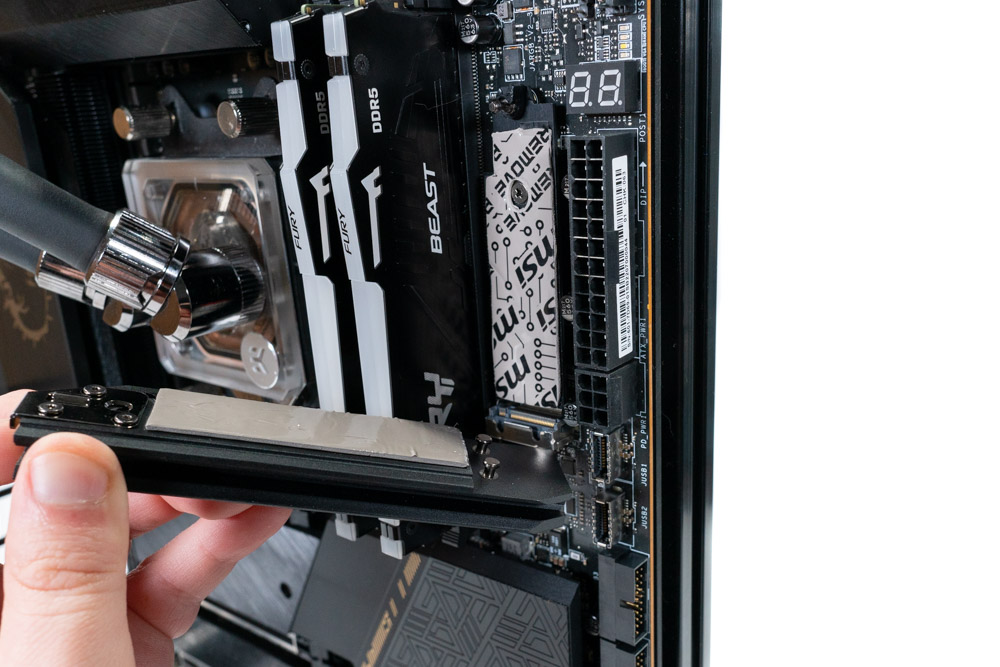
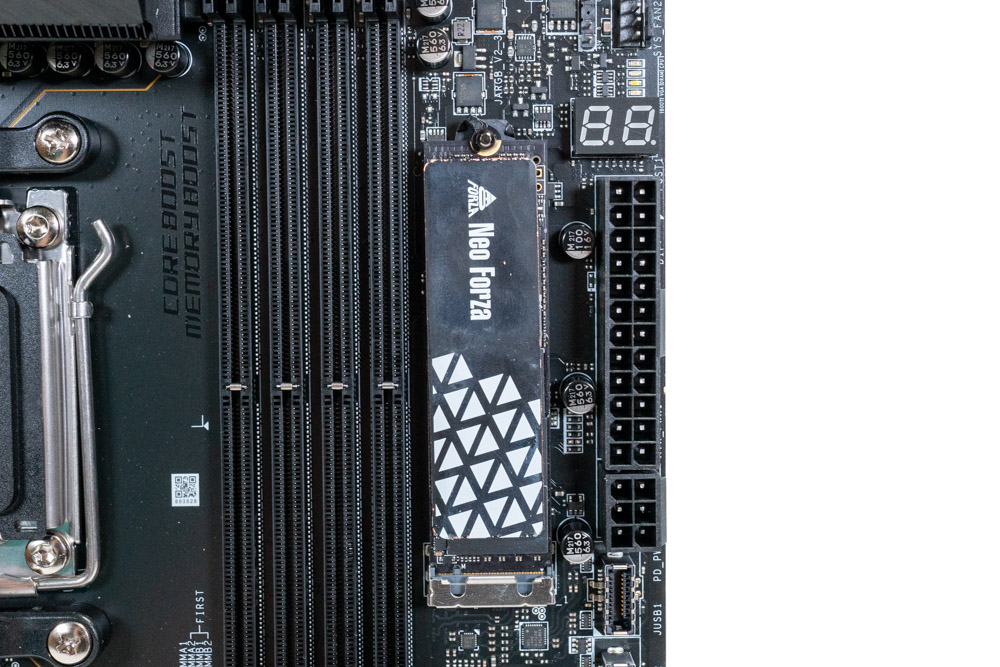
Next to the memory DIMM slots is a single M.2 socket. This is the only Gen 5 x4 M.2 socket on the motherboard itself, but also does not require screws for the heatsink. This heatsink latches from the top, which is extra convenient for installation of NVMe drives, as it is not stuck below a graphics card.


Included with the MSI MEG X670E ACE is a M.2 add-on card named "M.2 Xpander-Z." This supports two Gen 5 M.2 with sizes up to M.2 25110. The card is designed around maximum cooling, with large heatsink and fan in the middle. This is great to see and will be extra important as the first generation of Gen 5 M.2 SSDs are expected to be exceptionally warm and potentially could thermal throttle during large file transfers if not properly cooled.

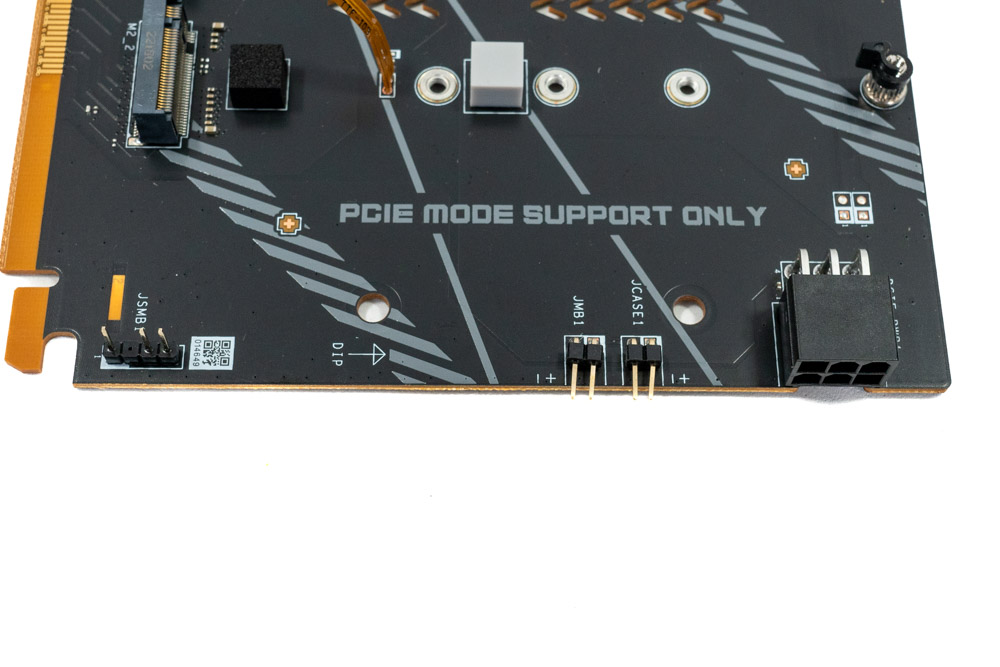


MSI didn't just make a simple M.2 add-on card, rather it has thermal sensors and additional headers that can be connected to the motherboard, allowing for fan control and showing hard drive access stats from the case panel itself. If you do not want to connect the extra cables, the card will still function, as long as it has power through the 6-pin PEG connector. The front of the card has two blue lights, each of which indicates one M.2 SSD is installed. Next to that is an array of LEDs that change colors based on the temperature from the thermal probes, both of which can be turned off with switches on the card itself.
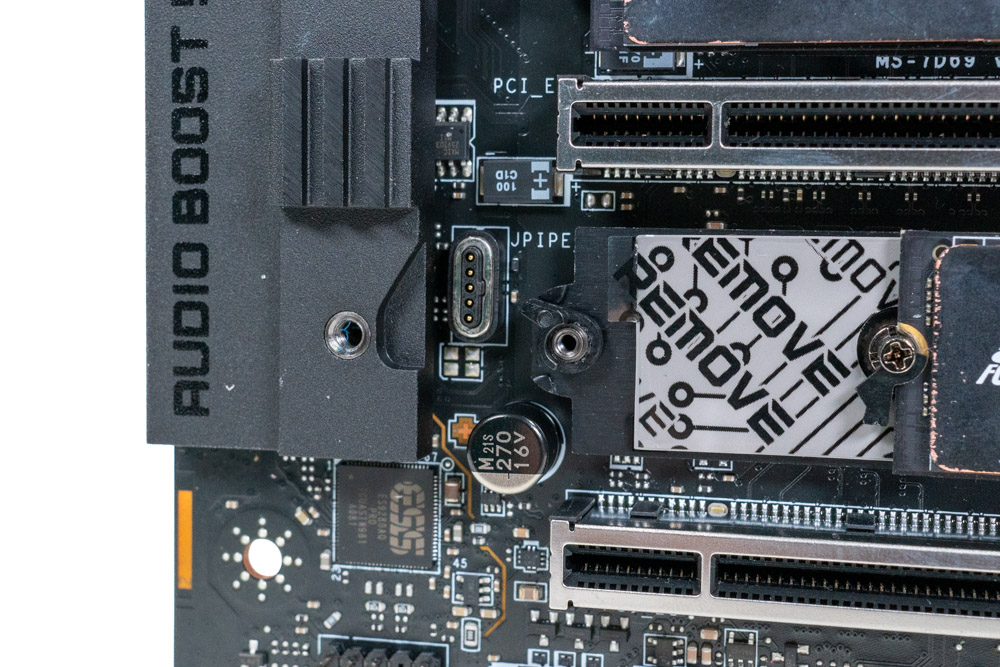
A quick look at the bottom M.2 heatsink. MSI has a contact connection for the RGB lighting and power instead of having wires that could potentially be ripped out of the connector If you are not careful during disassembly. A nice little addition the MEG X670E ACE has going for it.

In the bottom right corner of the motherboard is the power and reset button. The reset button can be reprogrammed in the BIOS to turn off the MSI Mythic lighting, or as a safe boot instead of the default reset function.

The MSI MEG X670E ACE includes a post code debugger and startup LEDS for easier troubleshooting. Considering that the AM5 socket is new to everyone, it is always good to get a readout of what stage the boot process is on, or what it may be stuck on. First boot after clearing the CMOS or installing new memory will take anywhere from two to six minutes, depending on the configuration.

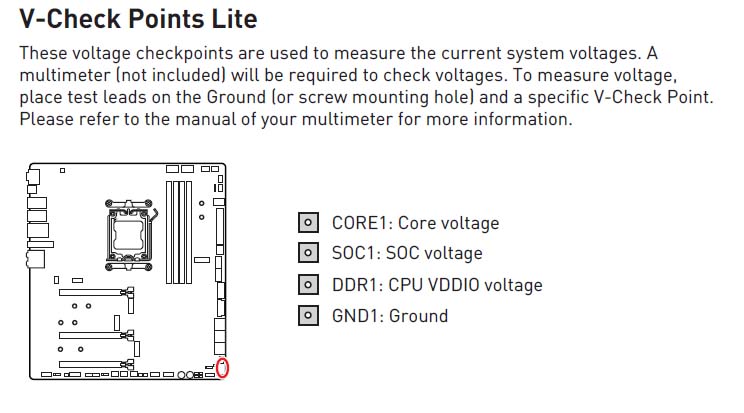
MSI has included V-Check read points. These can be helpful for a quick diagnostics of the voltage for Vcore and SoC. It is not necessary to have these available when overclocking, but it is appreciated when software readings are inaccurate.
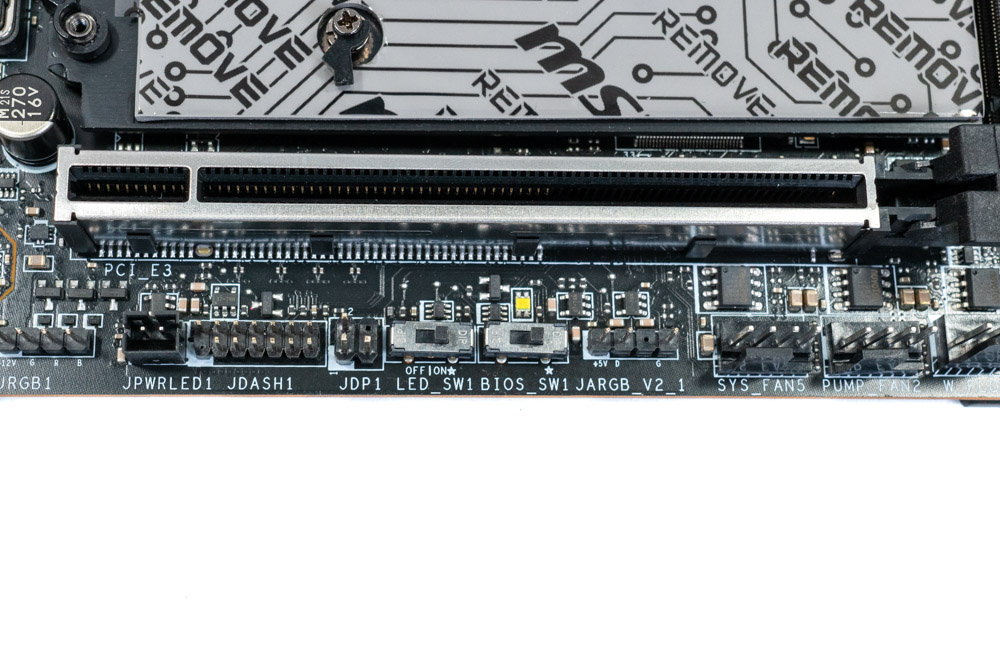

Below the third PCIe slot is the BIOS and LED switches. Besides that is a special header for the optional tuning controller. Unfortunately this controller is not something you can buy separately, and only comes with select overclocking motherboards.

Hidden behind the Rear-IO panel is the Marvell AQC113CS-B1-C 10Gb LAN.

Among the many headers sprawled across the bottom is the water flow meter and the thermal sensor connector to be used with the thermistor cable (included).


The MSI MEG X670E ACE uses a two 8-Pin EPS connector for higher power management. Next to the 24-Pin is an extra 6-Pin PEG to supply additional power to USB peripherals, M.2 sockets and PCIe slots.

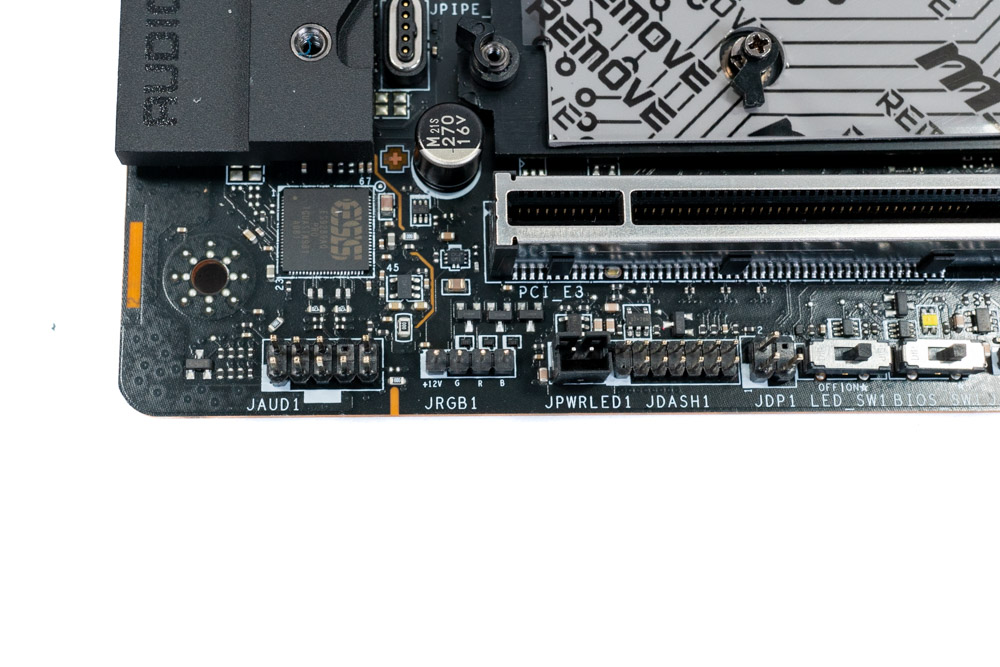
In two places on the bottom and near the LED debug lights is the RGB headers for a total of four. A single 12 V (4-pins) next to the audio section and three ARGB 5 V (3-pins) header in various places.
| Connector | RGB LED Header | ARGB LED Header |
|---|---|---|
| Maximum Current | 12V / 3 A | 5V / 3 A |
| Maximum Power | 36W | 15W |
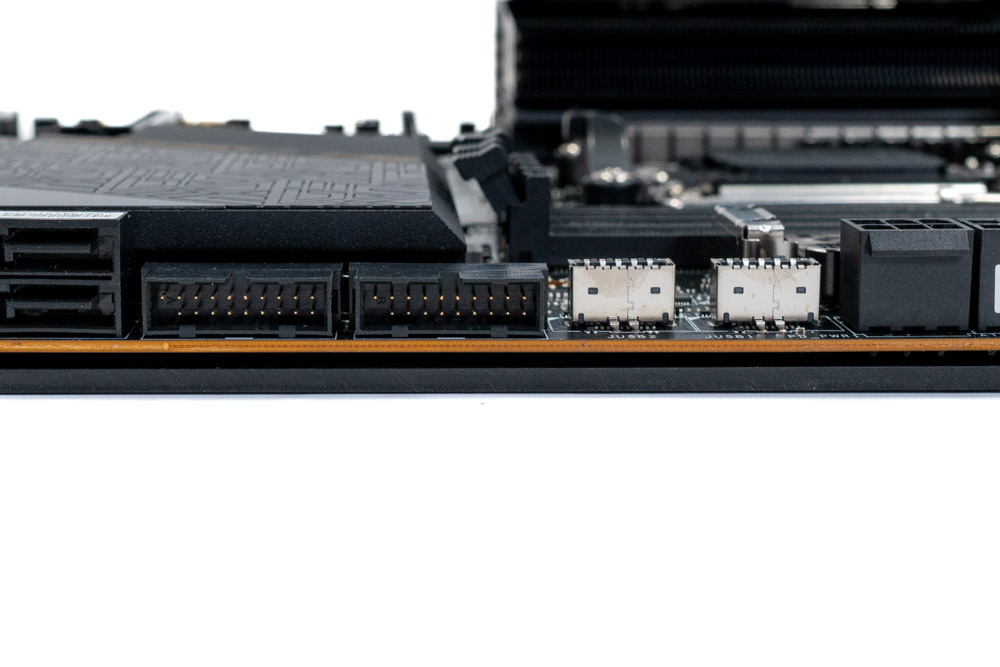


One of the major differences you'll see between the X670 and B650 chipset is the amount of internal USB headers and external high-speed connections. This is because the B650 only has one chipset, with less overall PCIe lanes available to be allocated towards SATA ports, USB and PCIe slots. With the MSI MEG X670E ACE, we get two USB 3.2 Gen 1 (5 Gbps), USB-C 20 Gbps and a second USB-C 10 Gbps internally placed on the motherboard. Two additional USB 2.0 headers are spotted as well.

Each X670 PCH can supply up four 6 Gb/s SATA ports natively. Here we can see MSI has used a 4 + 2 Configuration. These additional two 6 Gb/s SATA ports are attached to a ASM1061 controller and do not support the RAID function.
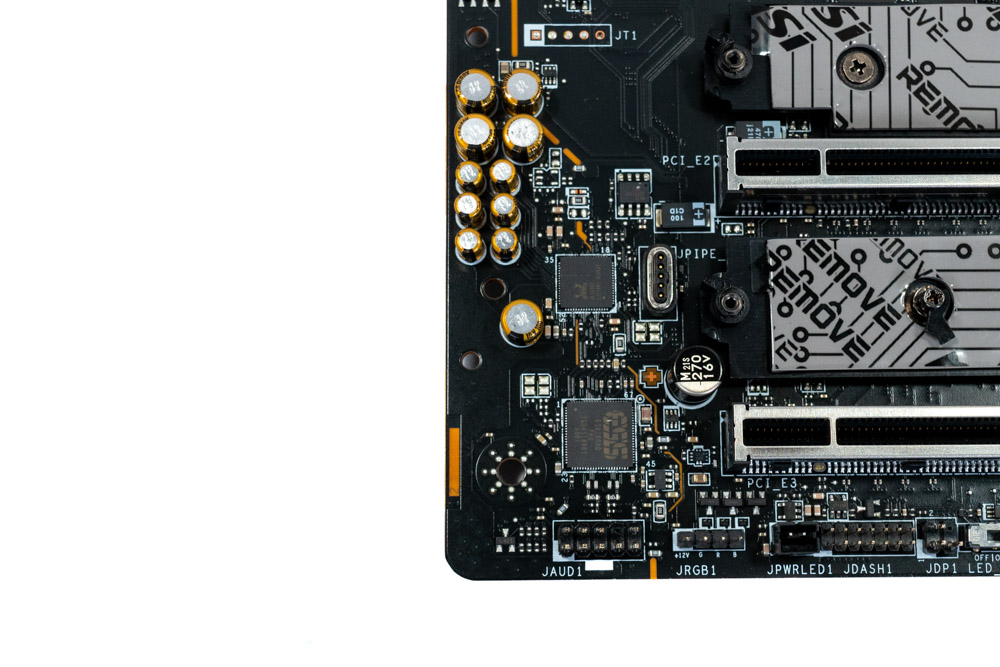
MSI has used the Realtek ALC4082 Codec + ESS ES9280AQ Combo DAC/HPA Codec for it's on-board audio solution. This supports up to 32-bit/384kHz playback.
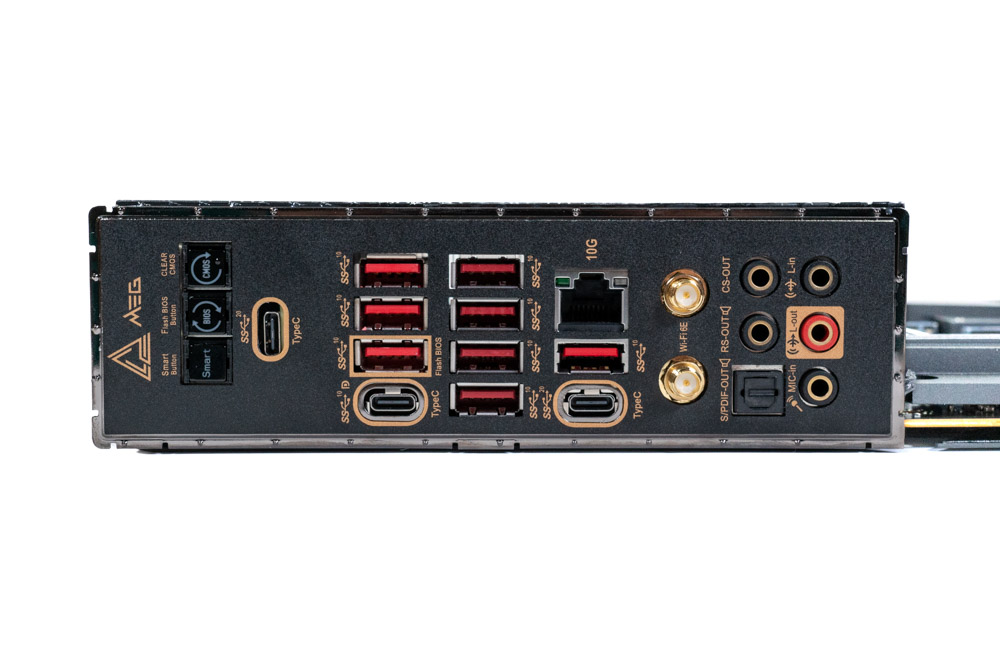

A closer inspection of the Rear IO panel reveals quite a lot of USB 3.2 Type-A 10 Gbps ports (RED). MSI has done an excellent job of labeling these ports for quick identification, with a small number next to each. Since all Ryzen 7000 (X) CPUs (currently) support onboard graphics, among these is three USB-C ports, one USB-C is secretly doubling as a DisplayPort for the onboard graphics, if needed. The other two are rated for 20 Gbps, with one of those actually sharing the bandwidth with the 3rd PCIe slot, and will not be active if the slot is populated. Along with the high speed USB ports is a 10 Gb LAN and WiFi 6E for networking.
Moving along, MSI has included a Clear CMOS button for when the overclock has locked the system up and it becomes necessary to revert back to stock settings, without needing to remove the battery. Next is the BIOS Flashback button which allows the motherboard BIOS to be flashed without a processor present. This feature is built into the AM5 platform, so there's no reason for manufacturers not to take advantage of it. Lastly is the Smart Button. This is a multi-key button that can be configured to Reset the system, turn Mystic Lights on/off, Turbo Fan Mode or as a Safe Boot button. The Safe Boot has some issues on AMD platforms. From trial and error, using the function is good for safe booting if the EXPO memory configuration does not work. However, some BIOS voltage settings cannot be recovered from, and must be resolved by clearing the CMOS.
- 1x Clear CMOS button
- 1x Flash BIOS button
- 1x Smart button
- 2x USB 3.2 Gen 2x2 20 Gbps Type-C port
- 1x USB 3.2 Gen 2 20 Gbps Type-C port (Display Alt)
- 8x USB 3.2 Gen 2 10 Gbps Type-A ports
- 1x 10GbE LAN (RJ45) port
- 2x Wi-Fi antenna connectors
- 5x OFC audio jacks
- 1x Optical S/PDIF out connector
Our Patreon Silver Supporters can read articles in single-page format.
Nov 13th, 2026 07:47 PST
change timezone
Latest GPU Drivers
New Forum Posts
- Dual B70 or Dual R9700 Pro on Linux (0)
- To AiO CPU Cooler users? (6)
- Microsoft Exchange/365 outages? (40)
- I won't download games that are larger than 30–40 GB. (107)
- Slow SSD read speeds - help! (2)
- Any other old-timers here planning to play WoW Forever? (150)
- Requesting original VBIOS for Gigabyte RX 5700 XT GAMING OC 8G Rev 2.0 (Micron) (0)
- Home page search by category (6)
- Windows 11 General Discussion (7727)
- Warning for Windows 10 and 11 users running newer AMD GPU drivers (58)
Popular Reviews
- AMD Zen 6 Technical Deep Dive
- Corsair HX1000i Shift Crystal Review
- NZXT C1200 Platinum Review
- Upcoming Hardware Launches 2027 (Updated Nov 2026)
- Montech King 95 3D PRO Review
- NZXT H7 RGB+ Review
- NZXT H5 Review
- Phantom Blade Zero Performance Benchmark Review - 35 GPUs Tested
- XPG NIMBUS PLUS Review - Mid-range Chair With Strong Competitors
- Gigabyte Z890I Aorus Ultra Review
TPU on YouTube
Controversial News Posts
- NVIDIA Co-Founder and CEO Jensen Huang Officially Resigns (353)
- OpenAI CEO Argues Home PCs Waste the World's Limited DRAM Supply (152)
- NVIDIA Launches Investigation Into Jensen Huang's Relationship With Suspected Chinese Spy (136)
- Intel "Raptor Lake Next" 16-Core and 20-Core CPUs Surface (130)
- Legendary Game Studio BioWare Shuts Down Following EA Layoffs (104)
- Dell CEO Says the Memory Shortage Will Get Worse in 2027 (95)
- NVIDIA GeForce RTX 50-Series Scheduled for up to $500 Price Hike This Week (89)
- Modder Fits RTX 5090 With Four 8-Pin Connectors, Halving Current per Wire (80)