 34
MSI MPG 322UR QD-OLED X24 Review - Less Expensive and Even Better
Response Time, Input Lag & Motion Blur »Picture Quality
The MSI MPG 322UR QD-OLED X24 is built around a 31.5-inch 16:9 QD-OLED panel developed by Samsung Display. It uses the 4th-generation QD-OLED technology. This generation brings two meaningful upgrades over the third generation panel used in the MPG 322URX. The first is an updated panel structure with increased surface hardness, moving from 2H to 3H through DarkArmor Film, which also improves light absorption and reduces the purple tinting visible on earlier QD-OLEDs under ambient light. The second is a five-layer tandem OLED architecture with EL Gen 3 emissive materials, which increases brightness and efficiency.The native resolution of 3840×2160 results in a pixel density of about 140 PPI. The panel uses a triangular RGB subpixel layout, and while you can theoretically spot minor color fringing if you deliberately search for it, the effect is negligible at this pixel density. I used this monitor for extended text-heavy workloads and fringing never drew my attention. Overall image sharpness is excellent, making the MPG 322UR QD-OLED X24 one of the best OLED monitors I've used for productivity work.
The blue OLED light source is built from several emissive layers stacked on top of each other instead of a single one. The load is shared across those layers, so the panel can reach higher SDR and HDR brightness with less electrical stress on each individual layer. This improves energy efficiency and slows visible aging, while still enabling strong HDR highlights and higher full-screen SDR brightness than earlier QD-OLED generations.
As with other OLED monitors, there is no traditional backlight. Each pixel emits its own light, so you get effectively infinite contrast, true black levels, and extremely fast response times without haloing around bright objects.
The panel has a glossy finish with an advanced anti-reflective treatment. Reflection handling is very solid, although, as on all QD-OLED displays, ambient light still influences perceived black depth because the technology does not use a polarizer. In a bright room, blacks can lift slightly and lose some of their inky appearance, but the DarkArmor Film and 4th-generation structure reduce purple tinting and haze compared with earlier QD-OLEDs. In moderate to low ambient light the panel delivers excellent perceived contrast and very rich color.
To test picture quality, I used an X-Rite i1Display Pro colorimeter with both Calman Ultimate, the industry-standard suite for display testing and calibration, and DisplayCAL—a free, powerful display calibration and profiling tool. Testing was carried out on firmware version 009, which was the latest available at the time of the review.
Picture Quality at Factory Settings

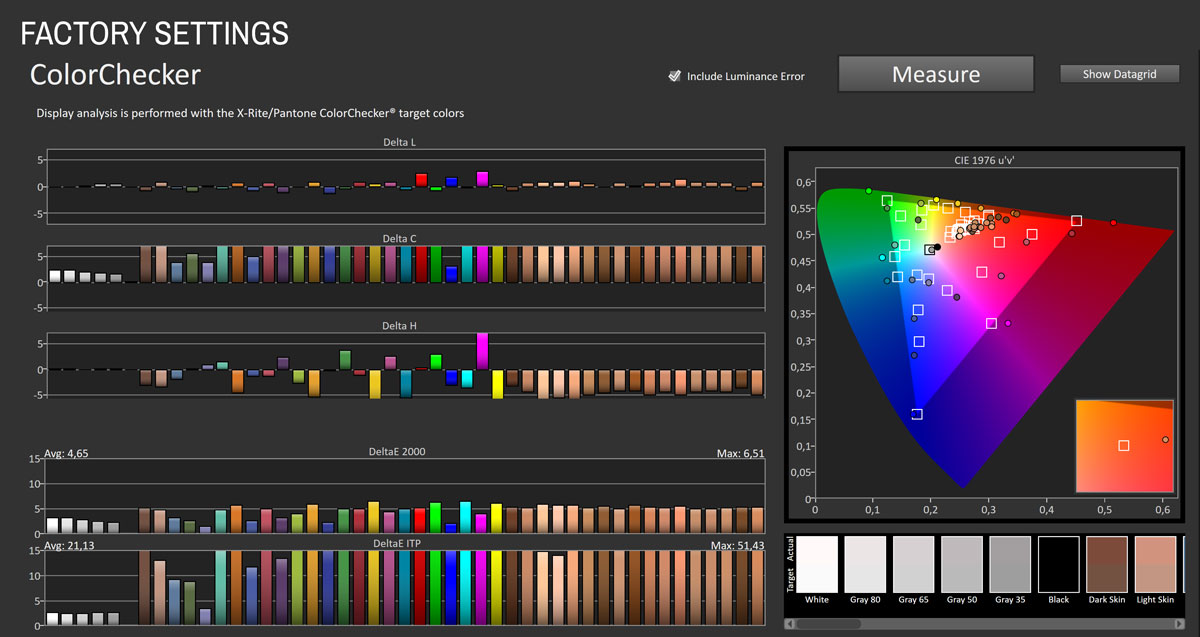
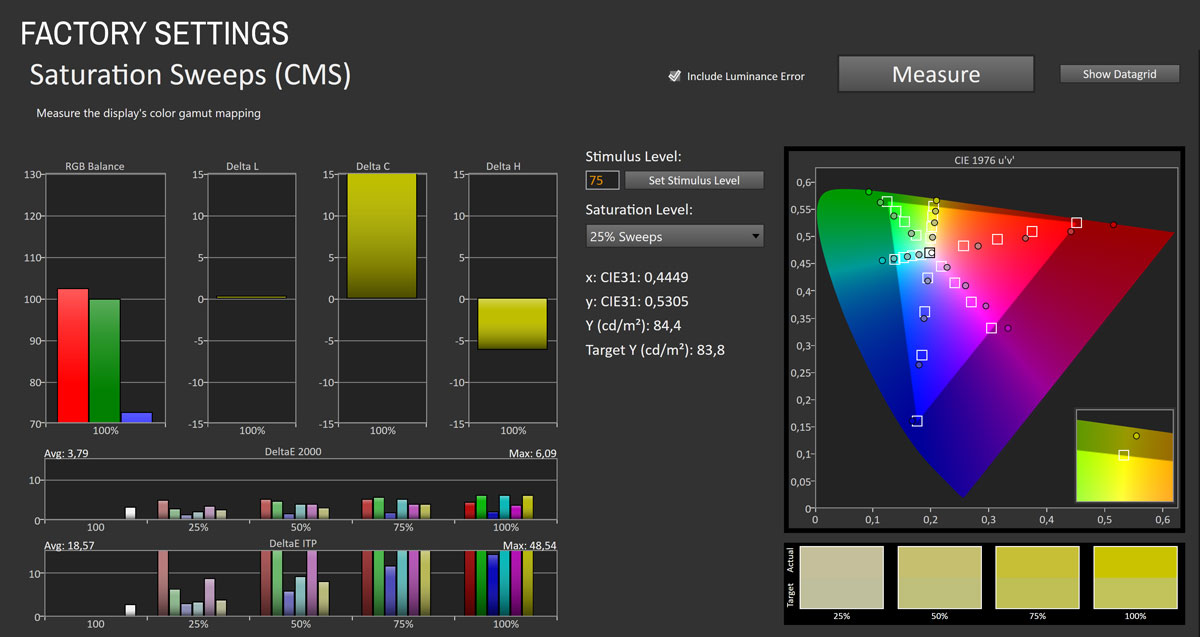
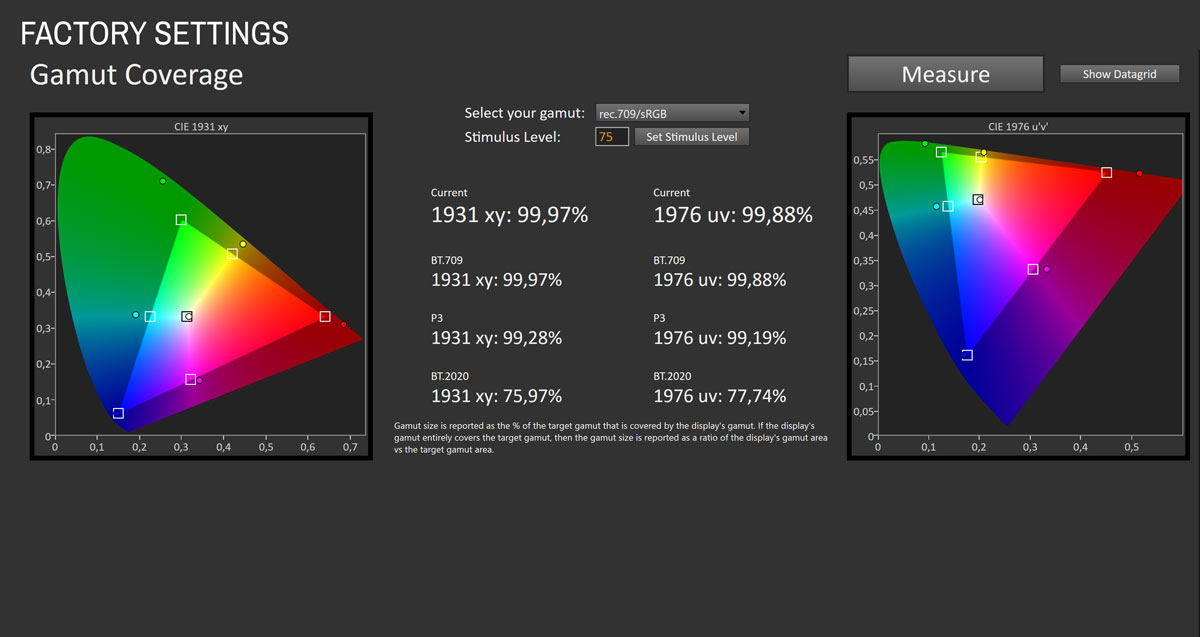
Out of the box, the MPG 322UR QD-OLED X24 defaults to the Eco picture profile. At factory settings, the monitor targets a wide color gamut and does so successfully. Gamut coverage measures at 99.97% of sRGB with very strong extension toward wider color spaces, reaching 99.28% of DCI-P3 and 75.97% of BT.2020. Saturation sweep results show that primary and secondary colors extend well beyond sRGB, producing the saturated, high-impact look associated with QD-OLED panels. Average saturation ∆E sits at 3.79 with a maximum of 6.09, driven mainly by oversaturation at higher chroma levels rather than hue errors.
The color accuracy test paints a similar picture. Average ∆E sits at 4.65 with a maximum of 6.51, meaning color accuracy is acceptable for general use but not suitable for color-critical sRGB work without profiling. Most of the error comes from the native wide-gamut behavior pushing saturated tones beyond their sRGB targets. Grayscale tracking is good overall but leaves room for refinement. Average grayscale ∆E is 2.42 with a maximum of 3.15, and the RGB balance graph shows elevated red in the mid-to-upper IRE range. Maximum luminance in the factory Eco profile reaches 173.73 cd/m², which is conservative but appropriate for the power-saving intent of the preset.

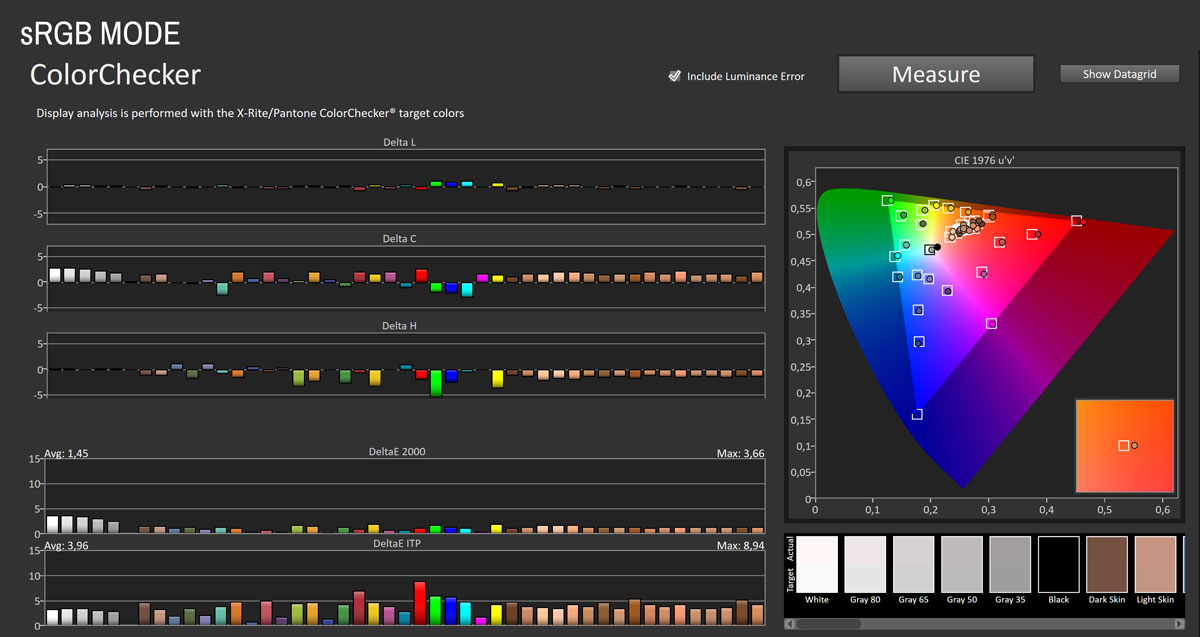
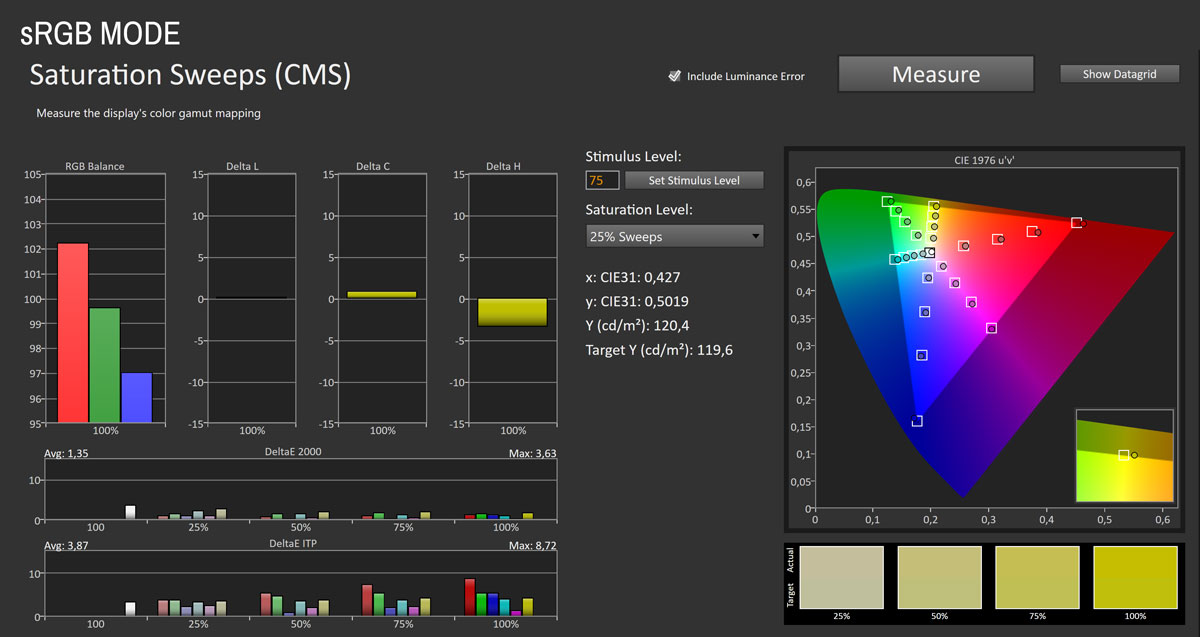
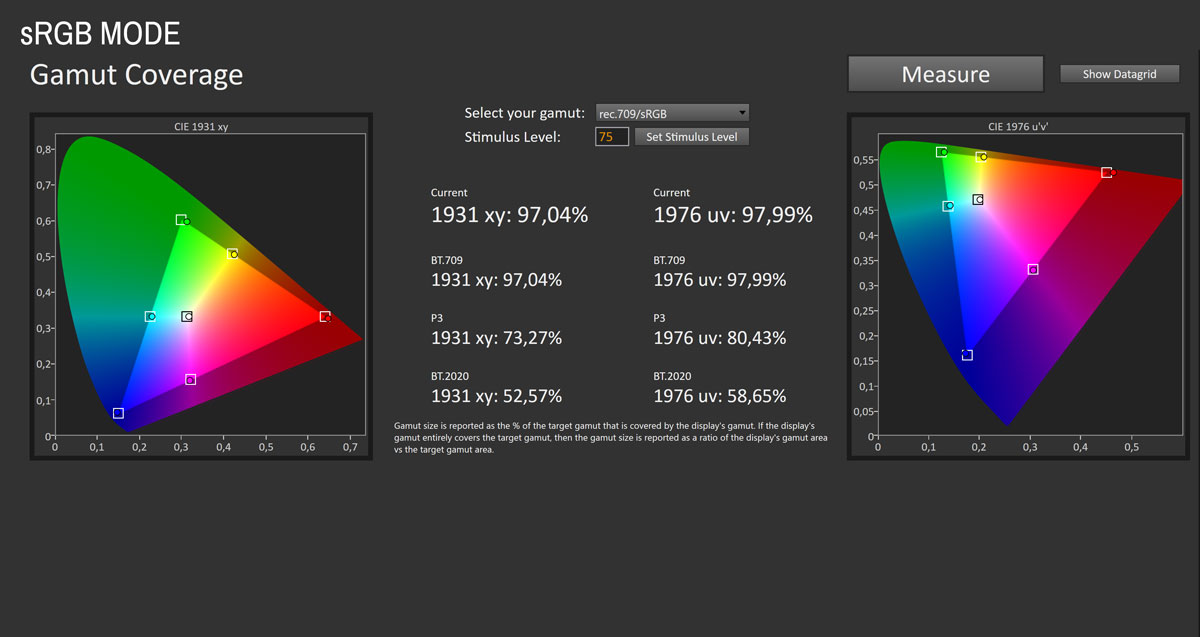
Enabling the monitor's sRGB mode (Mode > sRGB) reins in the native QD-OLED wide gamut to better match the smaller sRGB color space used by most desktop content and SDR games. The clamp works well, though not perfectly. Measured gamut coverage drops to 97.04% of sRGB, showing a slight undersaturation in the green region, while DCI-P3 coverage falls to 73.27%, confirming the gamut restriction is active.
Color accuracy in sRGB mode is very good. Average ∆E drops to 1.45 with a maximum of 3.66, which places the MPG 322UR QD-OLED X24 in the range where most errors are difficult to notice without side-by-side comparison. Saturation sweeps also tighten significantly, with average ∆E falling to 1.35 and the worst patch staying at 3.63. Skin tones are rendered naturally, and the overall impression is of a well-controlled sRGB image.
Grayscale performance in sRGB mode is acceptable but not exceptional. Average ∆E is 2.36 with a maximum of 3.67. Red remains slightly elevated in the RGB balance, producing a mild warm shift. Maximum luminance reaches 246.43 cd/m², which is notably bright for an sRGB clamp mode and provides good headroom for bright-room use.
Picture Quality with Modified Settings
Most users will want to keep the panel's wide gamut active rather than enabling the sRGB clamp. To maximize performance in this mode, I made a few targeted adjustments in the OSD while cross-referencing measurements in real time:Mode > User > Brightness > 83
Mode > User > Color Temperature > Customize > R 95/G 97/B 100

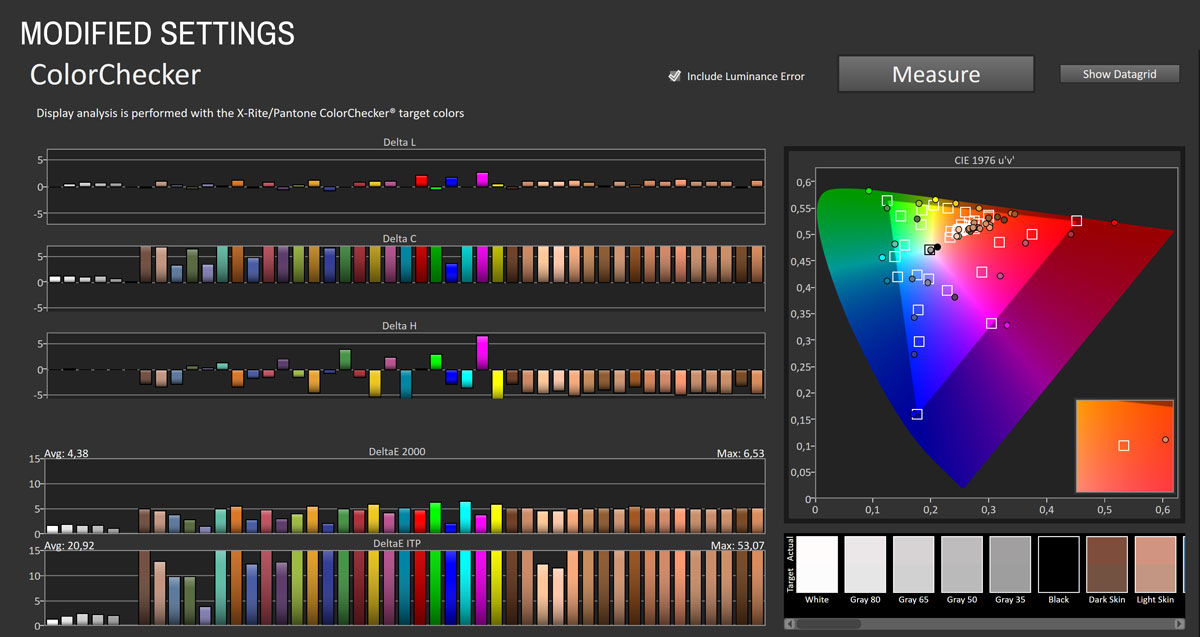
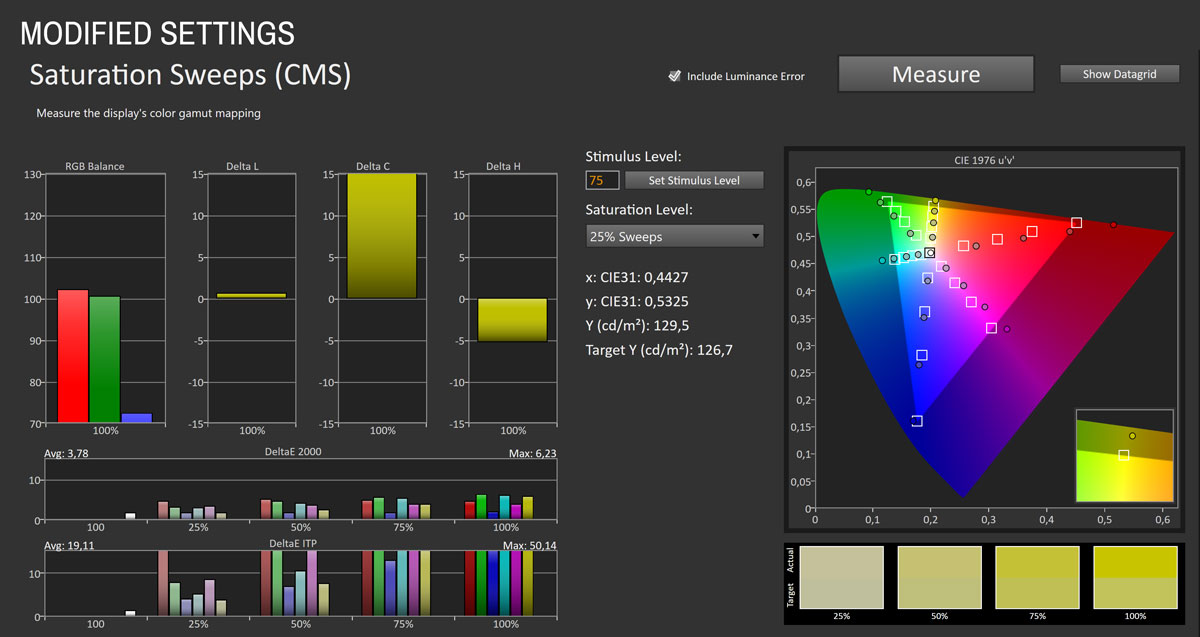
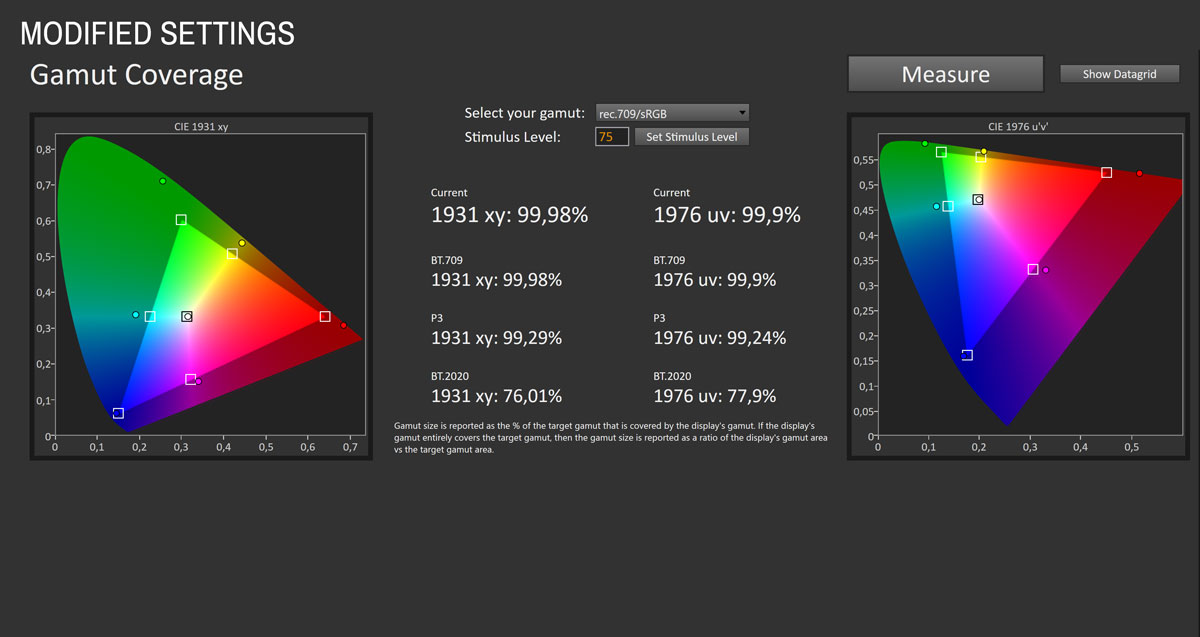
After these simple OSD adjustments the MPG 322UR QD-OLED X24 moves into a much more neutral and well-balanced state while keeping the full wide color gamut active. Grayscale accuracy improves substantially. Average grayscale ∆E drops to 1.54 with a maximum of 2.48, and the RGB balance graphs confirm that red, green, and blue track much more closely across the full luminance range. The mild warm cast seen at factory defaults is gone, and the white point stabilizes close to the 6,500 K target.
Wide gamut reproduction remains intact. Measured gamut coverage stays at 99.98% of sRGB with significant extension toward DCI-P3 (99.29%) and BT.2020 (76.01%), which is exactly what you want when working or playing in wide gamut. Color accuracy results also show improvement. Average ∆E comes in at 4.38 with a maximum of 6.53. The remaining errors are concentrated in highly saturated tones at the edge of the native gamut, which is expected when measuring a wide gamut display against the smaller sRGB target. Saturation sweep performance remains essentially unchanged, with an average ∆E of 3.78 and a maximum of 6.23.
Luminance behavior at brightness 83 reaches 262.57 cd/m², providing comfortable SDR brightness for most rooms while keeping ABL behavior predictable. Subjectively, the image looks crisp, neutral, and clean, with whites free of pink or green bias and skin tones appearing natural. With minimal effort in the OSD you can achieve very good grayscale accuracy while enjoying the full vibrancy of the panel's native gamut. For most home users, this is the way to go.
Luminance, Contrast, and Color Uniformity
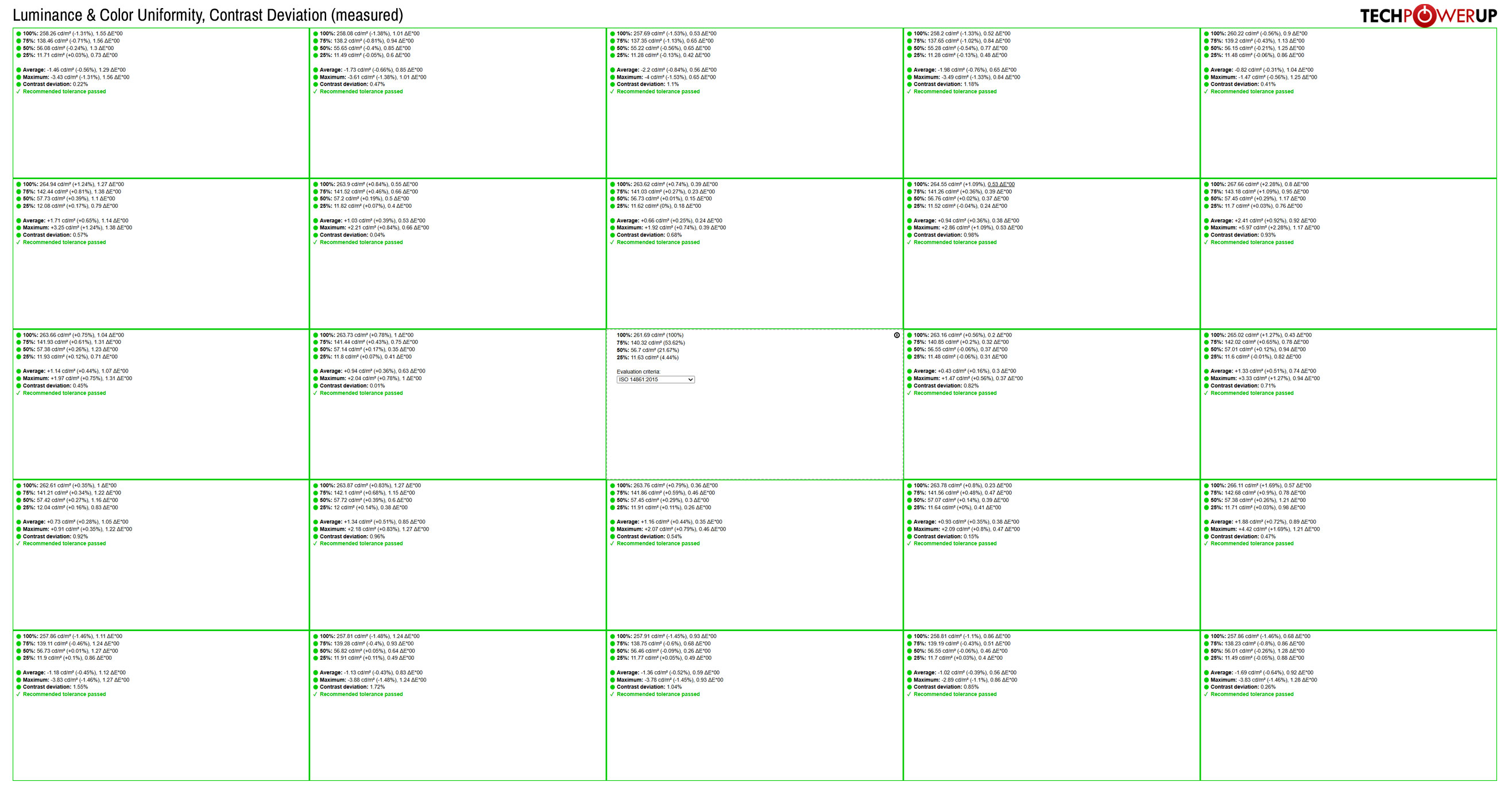
Panel uniformity of the MPG 322UR QD-OLED X24 is very good for a 32-inch QD-OLED. Brightness variation stays tight across the entire screen, with most zones deviating by only 1 to 3% from the center. All zones pass the recommended tolerance, and no section shows meaningful uniformity issues in real-world use. Color uniformity is equally well controlled, with average ∆E values staying low throughout the measurement grid. Even the weakest areas remain comfortably within acceptable limits. Contrast deviation numbers are low, which is expected from OLED's per-pixel light emission and lack of backlight bleed or clouding. There is no visible banding or dirty-screen effect, even on mid-gray slides. The result is a panel that looks consistent across its full area regardless of content type.
HDR Performance
The MSI MPG 322UR QD-OLED X24 supports HDR10 format and carries VESA DisplayHDR True Black 500 certification, an upgrade from the True Black 400 on the MPG 322URX. When HDR is enabled, the monitor switches to a dedicated set of settings designed exclusively for high dynamic range content. Once HDR is disabled, the monitor automatically returns to SDR settings without any need for manual adjustment.There are several HDR picture profiles to choose from, including True Black 500, Peak 1000 nits, and EOTF Boost. MSI also provides customizable HDR modes that let you manually define the target peak luminance and how aggressively the display rolls off brightness across different window sizes through the Uniform Luminance feature, giving you fine-grained control over ABL behavior.
Here are what the peak luminance measurements look like across various window sizes with the "Peak 1000" HDR profile applied.
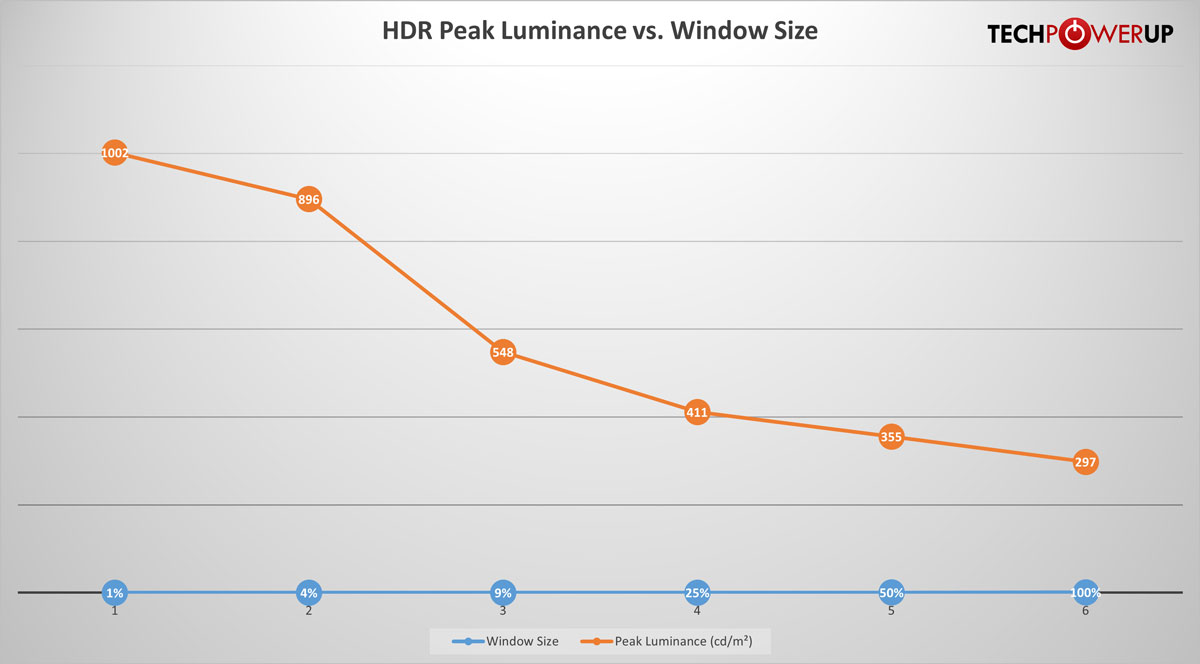
Measured HDR brightness shows the expected QD-OLED falloff pattern, starting strong and tapering as window size increases. A 1% window reaches 1,002 cd/m², and a 4% window delivers 896 cd/m². ABL becomes more apparent at around 9% window size, where brightness drops to 548 cd/m². From there it continues to fall: 411 cd/m² at 25%, 355 cd/m² at 50%, and 297 cd/m² at a full-screen white field.
These numbers represent a meaningful improvement over the third generation panel in the MPG 322URX, particularly in sustained mid-range window sizes. At 25%, for example, the X24 delivers 411 cd/m² compared to 379 cd/m² on the 322URX, and at 50% the gap widens to 355 vs 320 cd/m². Full-screen output of 297 cd/m² also exceeds the 322URX's 265 cd/m². In practice, HDR content looks brighter and more consistent, with less aggressive dimming in scenes that contain large bright areas. Small highlights are punchy, mid-range scenes retain more luminance, and the overall HDR experience is a clear step forward.
Viewing Angles
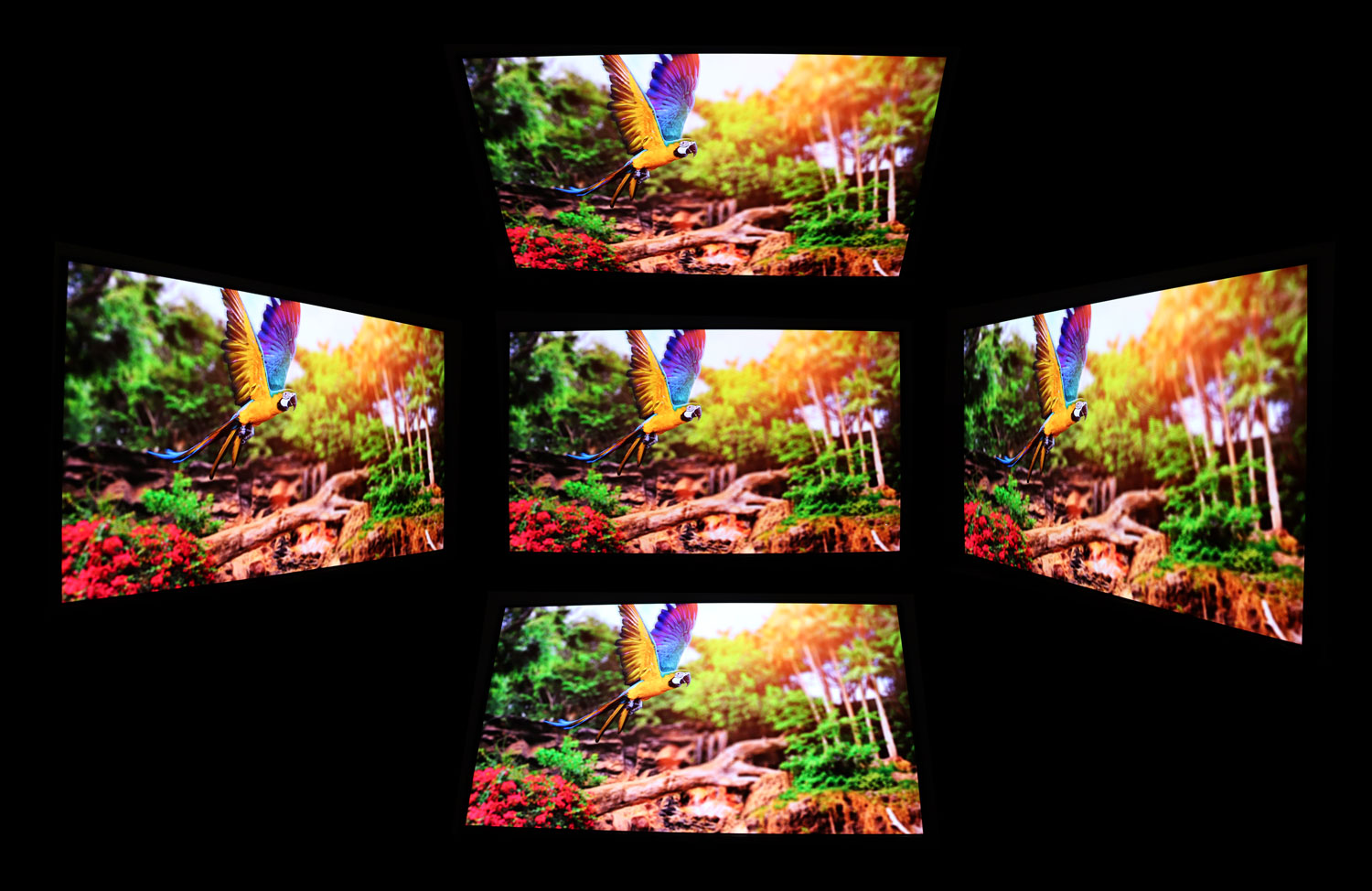
The viewing angles of the QD-OLED panel built into the MSI MPG 322UR QD-OLED X24 are excellent. There are no visible shifts in colors from any sitting position or when changing positions.
OLED Burn-in Prevention Features
The MSI MPG 322UR QD-OLED X24 offers multiple OLED burn-in prevention algorithms through OLED Care 3.0. They are found in the MSI OLED Care menu within the OSD and can be toggled off, should you opt to not use them.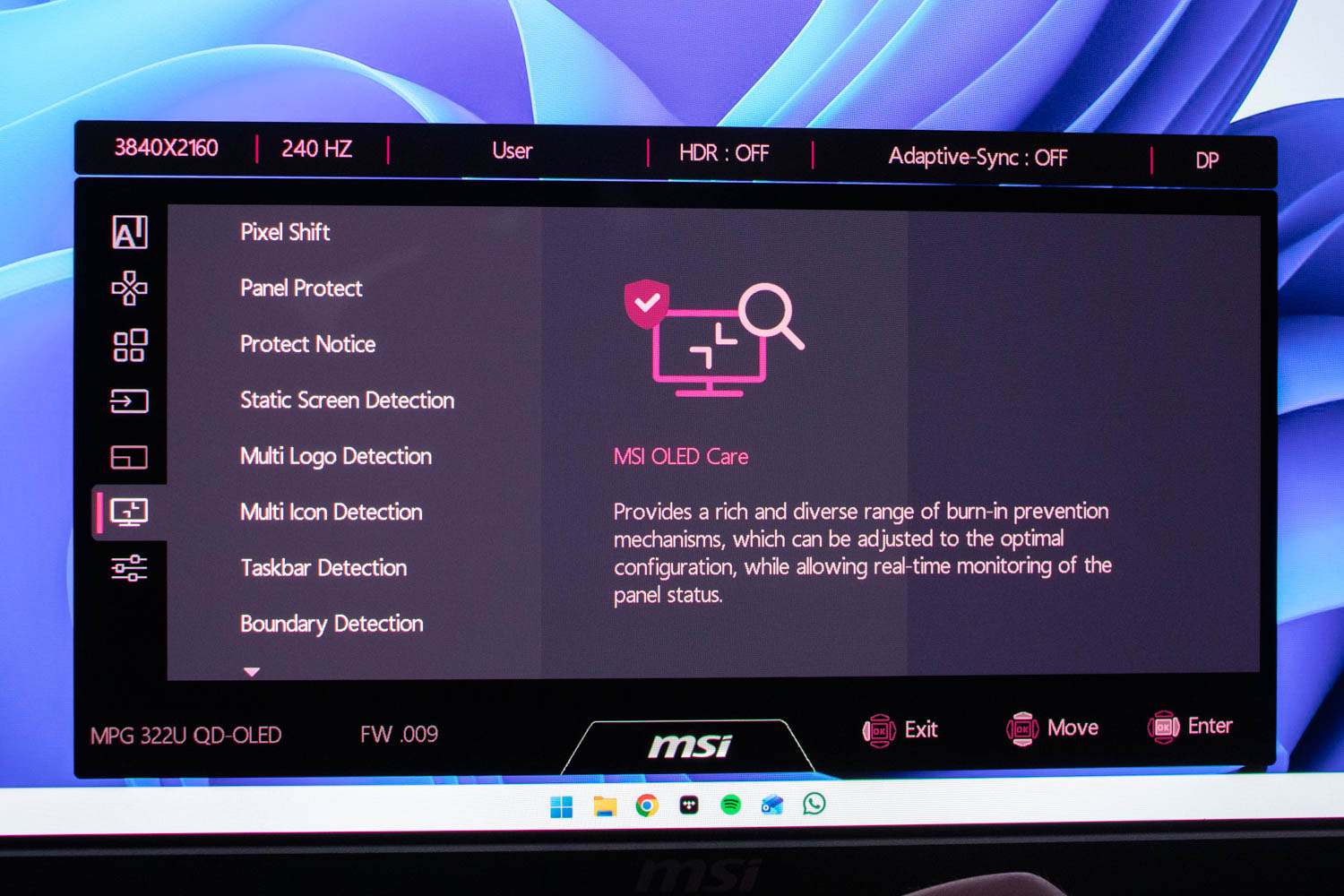
Pixel Shift - The monitor subtly shifts the entire image at regular intervals, so no pixel displays the exact same static content for long. The movement is very small and invisible during normal use. Its purpose is to reduce localized wear by distributing static image elements across a slightly wider pixel area.
Panel Protect - This is MSI's automatic pixel refresh cycle. When the monitor has been active for four hours, it prompts the user to run a compensation routine that recalibrates the organic material and helps equalize pixel wear. The process takes a couple of minutes and should not be interrupted. You can extend the activation interval to 24 hours if the default schedule is disruptive.
Static Screen Detection - If the monitor detects that a large portion of the screen has not changed for a defined period, it automatically lowers brightness. This reduces stress on static UI elements such as application toolbars, documents, and paused game screens.
Multi Logo Detection - This algorithm monitors the screen for multiple static logos or HUD elements. If detected, it dims only those specific shapes and patterns. This is useful for games with static HUDs, news tickers, streaming overlays, and application icons.
Multi Icon Detection - The monitor looks for clusters of smaller static elements such as desktop shortcuts, launcher rows, or on-screen indicators. When it detects that these icons stay in the same position over time, it selectively lowers their brightness while leaving the rest of the image unchanged.
Taskbar Detection - When a Windows taskbar or similar on-screen element is detected, the monitor dims only that region. This is one of the most common sources of burn-in on desktop OLEDs, so automatically reducing its brightness meaningfully slows pixel wear.
Boundary Detection - Bright vertical or horizontal boundaries, like sidebars or pillarboxing, can accelerate uneven aging. The monitor identifies these boundaries and reduces their luminance to lessen the contrast between static regions and the rest of the image.
V-Split Detection - The monitor detects situations where the screen content is split into distinct left and right regions. If one side contains mostly static content, it slightly reduces luminance on that region while preserving brightness on the other side.
Auto DIM Control - The monitor automatically reduces overall screen brightness when it recognizes prolonged static or near-static usage patterns. It increases brightness again once motion or content changes resume.
For additional peace of mind, MSI includes burn-in protection under the product's three-year warranty.
Nov 20th, 2026 15:09 PST
change timezone
Latest GPU Drivers
New Forum Posts
- WarpCoreBench scores! (82)
- RX 9000 series GPU Owners Club (2248)
- Honestly, do you care about GTA VI? (209)
- Logitech Headsets Modded Driver — Unlock Dolby in G HUB (23)
- 1 - 5 person file storage server equivalent accasible from anywhere + general VM server. (1)
- How to prevent OLED burn damage due to PC freezes or power outtages? (48)
- When you could finally run Crysis maxed out? (63)
- GTA VI (20)
- Anthrophics IPO (25)
- GeekMagic Ultra Smart WiFi Weather Station (8)
Popular Reviews
- AMD Zen 6 Technical Deep Dive
- Microsoft Surface Laptop Ultra Review - The Next-gen Arm Laptop
- Ugreen NASync DXP4800 GT Review
- Corsair RM1200e (Second Generation) Review
- Acemagic Retro X3 Review
- Upcoming Hardware Launches 2027 (Updated Nov 2026)
- Pulsar Office Tour & First Look at P1 Dual-Sensor Mouse
- Biwin Black Opal NV7400 2 TB Review
- AMD Ryzen 7 9800X3D Memory Performance Scaling
- AMD Ryzen 7 9800X3D Review - The Best Gaming Processor
TPU on YouTube
Controversial News Posts
- NVIDIA Co-Founder and CEO Jensen Huang Officially Resigns (490)
- Report: Jensen Huang Eyes NVIDIA Comeback (256)
- Open Letter Asking NVIDIA to Reinstate Jensen Huang Passes 115,000 Signatures (184)
- OpenAI CEO Argues Home PCs Waste the World's Limited DRAM Supply (152)
- NVIDIA Launches Investigation Into Jensen Huang's Relationship With Suspected Chinese Spy (136)
- Intel "Raptor Lake Next" 16-Core and 20-Core CPUs Surface (130)
- Legendary Game Studio BioWare Shuts Down Following EA Layoffs (104)
- Dell CEO Says the Memory Shortage Will Get Worse in 2027 (95)