 17
MSI MPG 322URX QD-OLED Review - Top-tier 4K Gaming
Controls & OSD »Connectivity
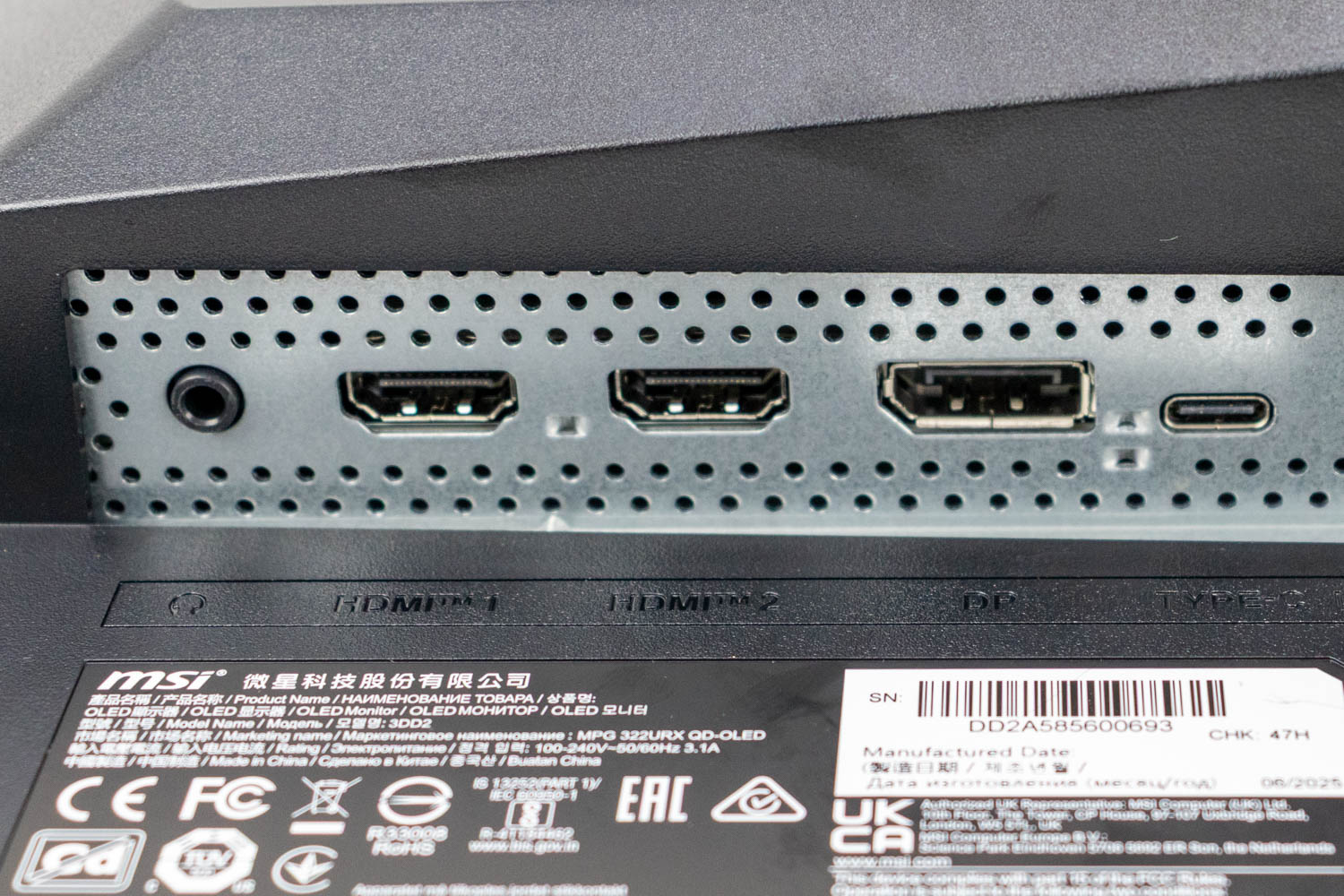
On the video input front, you get two HDMI 2.1 ports capable of delivering a full 48 Gbps FRL 12x4 signal, which allows consoles and PCs to output a 4K 240 Hz image without chroma subsampling. That's the highest data transfer mode supported by the HDMI 2.1 specification. The DisplayPort connection is even more advanced. MSI uses a DP 2.1a interface with UHBR20 bandwidth, providing up to 80 Gbps of raw throughput. This is enough to carry an uncompressed 4K 240 Hz signal with 10-bit color, and it ensures the monitor is compatible with higher bitrate formats that will eventually appear in the GPU cycle. The USB-C port supports DisplayPort Alt Mode and can deliver a 4K image at 240 Hz, while simultaneously supplying up to 98 W of USB Power Delivery to a connected device, such as a laptop. The monitor also includes a 3.5 mm audio output for those who want to route sound through external speakers or headphones.
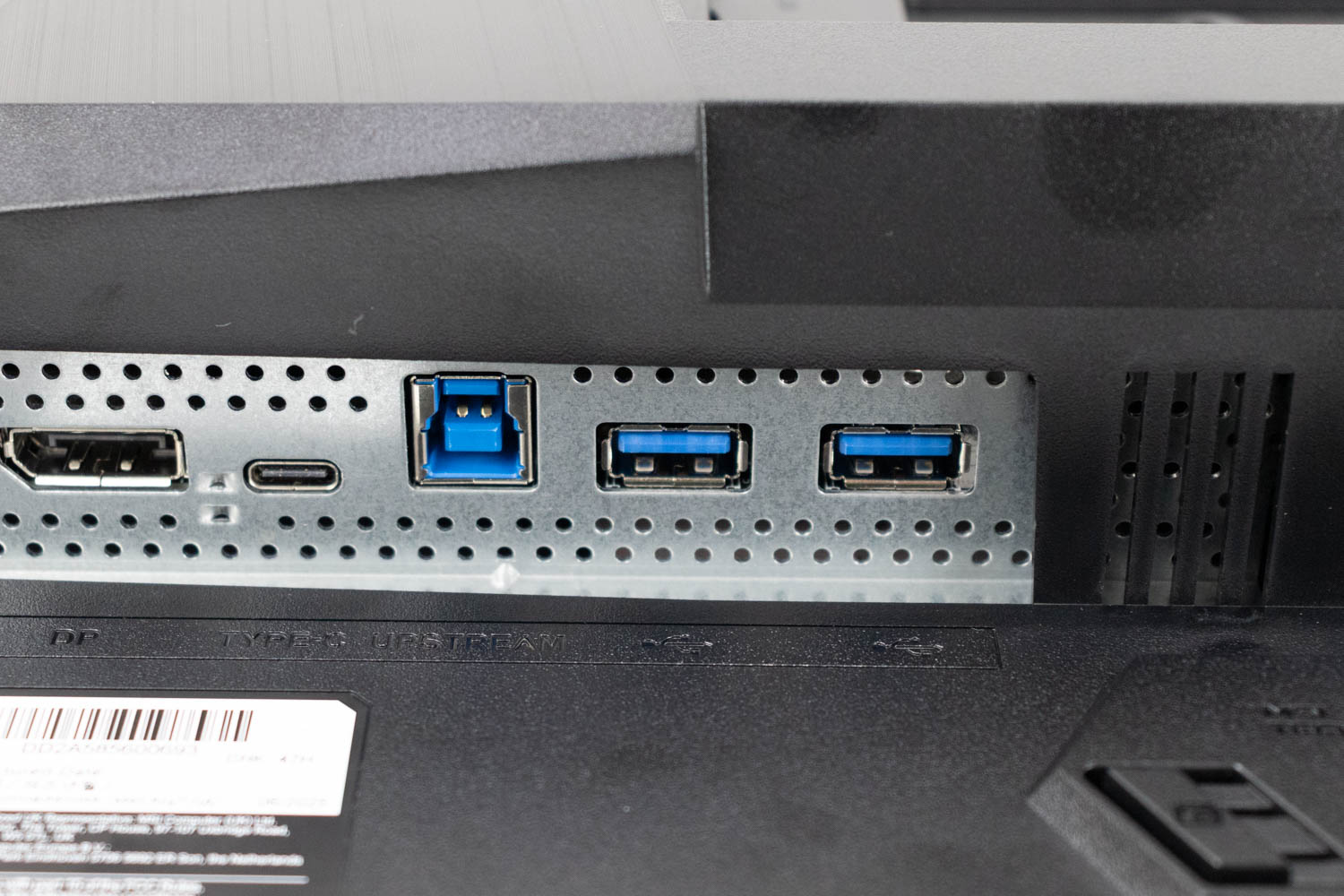
The monitor includes two USB 3.1 Gen 1 Type-A ports for peripherals and a USB Type-B upstream port that links the hub to your PC. All ports operate at 5 Gbps, which is enough for devices like keyboards, mice, and external SSDs that don't require Thunderbolt-class bandwidth. The USB-C port serves a dual purpose, carrying a DisplayPort Alt Mode video signal while providing up to 98 W of USB Power Delivery, which makes the monitor a viable docking solution for most laptops.
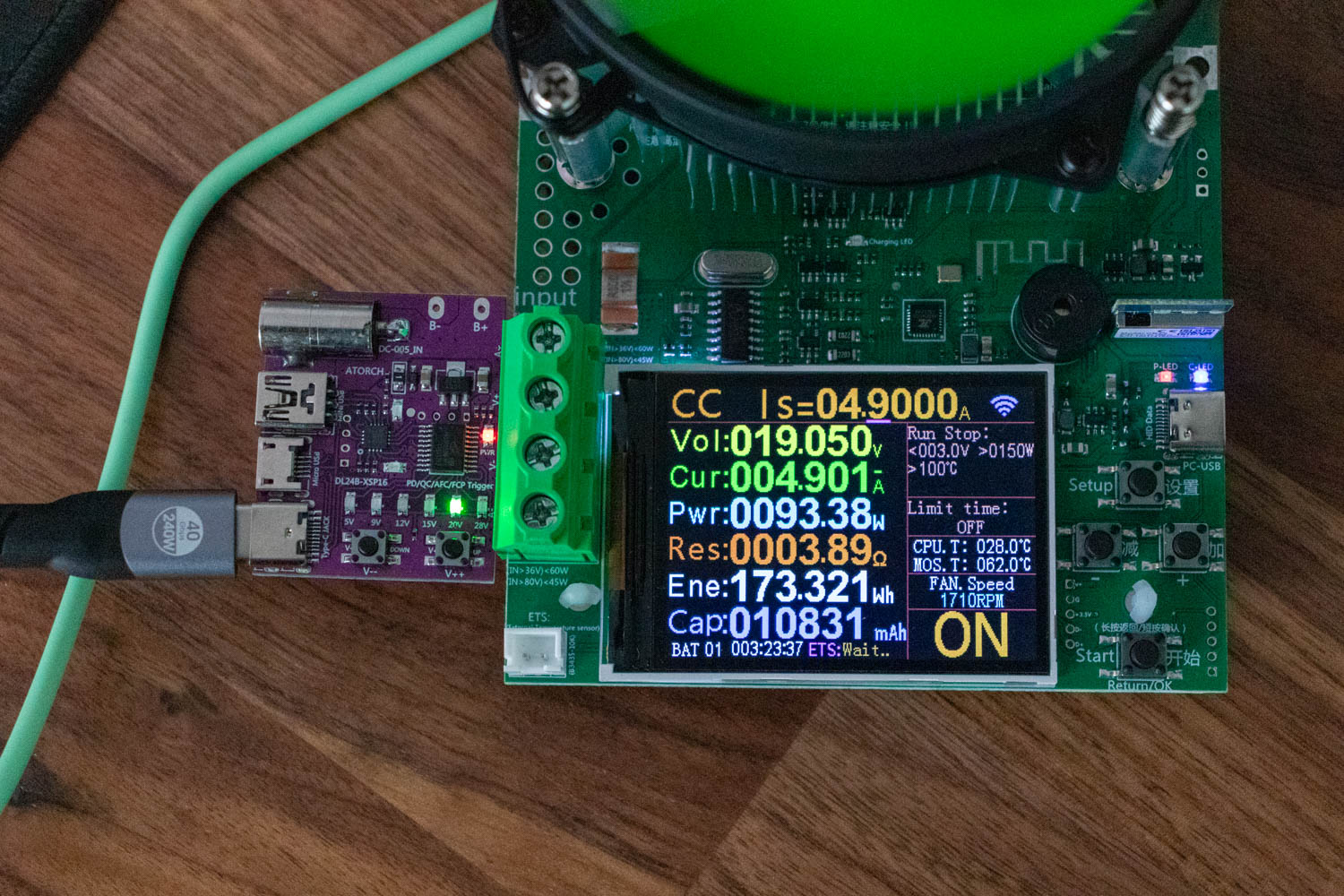
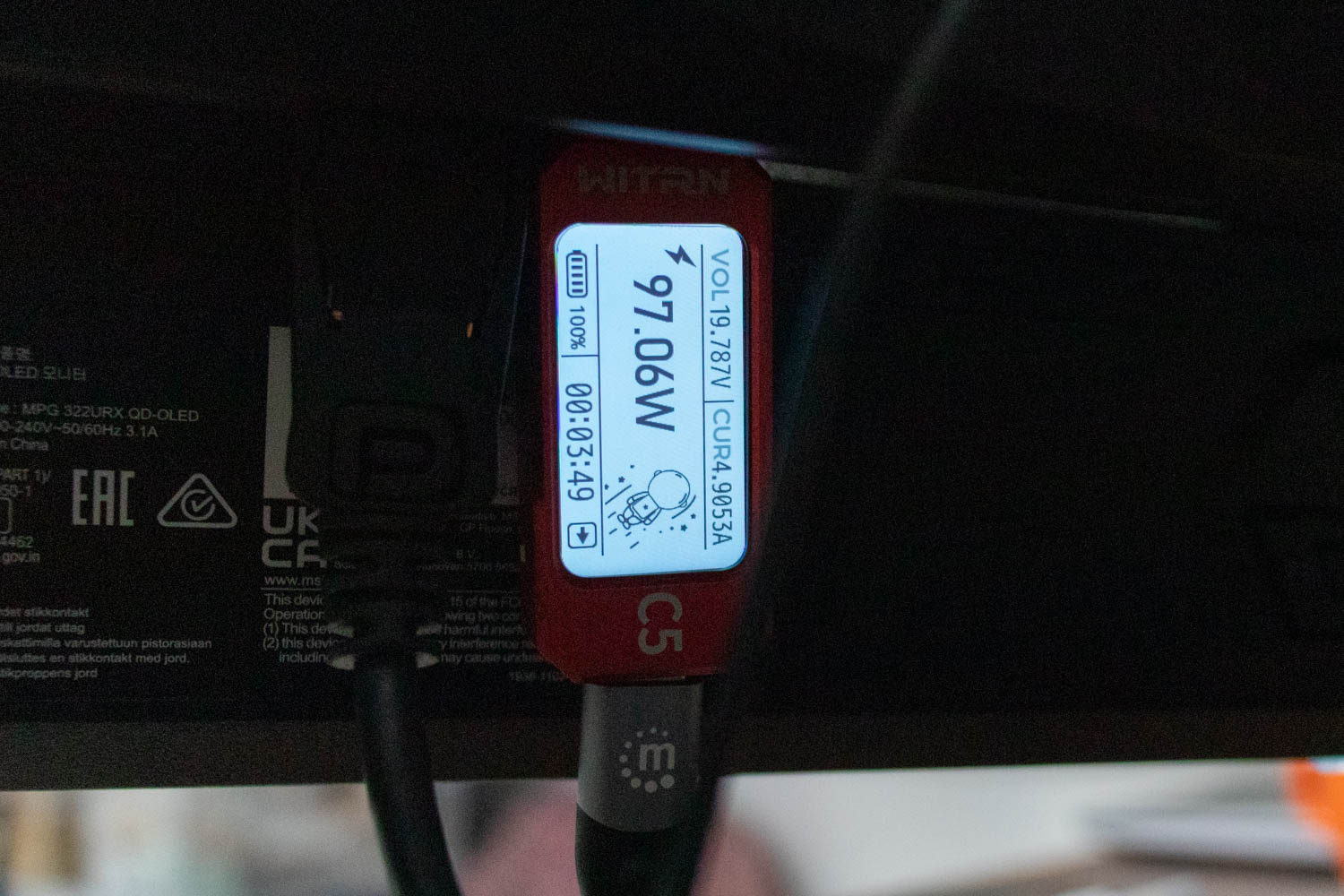
To test the USB-C port's rated 98 W power delivery, I used a combination of the WITRN C5 USB voltage/current meter—connected directly to the monitor's USB-C port—and the ATORCH BW150 electronic load with a PD 3.1 trigger module. The two devices were linked using a high-quality Thunderbolt 4 (40 Gbps, 240 W) cable. In my testing, the MSI MPG 322URX QD-OLED was able to sustain a 20 V/4.92 A load, at which point it delivered 97.42 W of power through its USB-C interface. The ATORCH BW150 registered 93.49 W on the receiving end, with the difference primarily due to cable losses.
Power Consumption
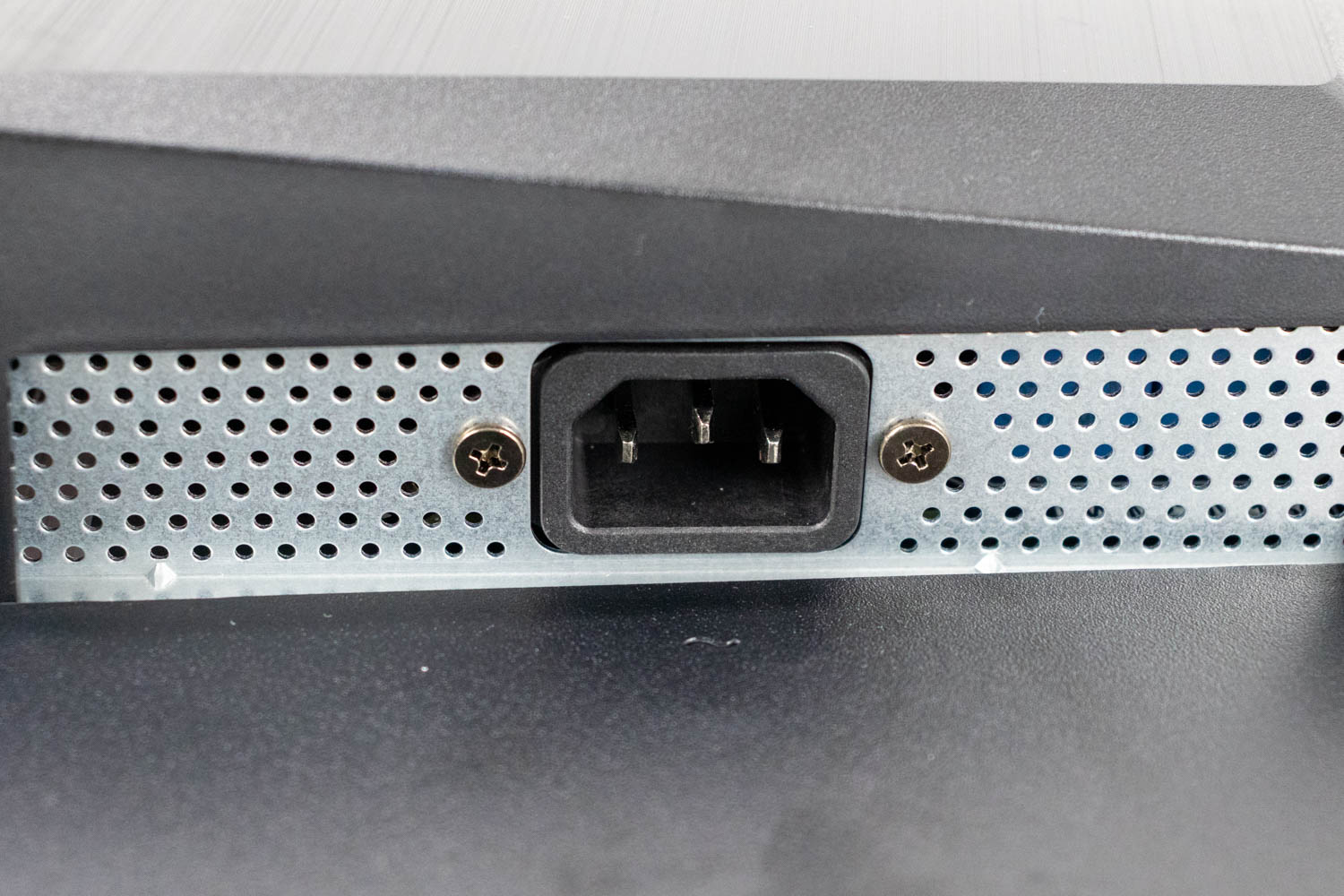
The MSI MPG 322URX QD-OLED uses an integrated power supply, meaning there's no bulky external power brick to deal with, a welcome design choice for aesthetics, but this does mean a faulty or worn out power supply can't be easily replaced.
To test power consumption, I used the Meross MSS315 Matter Smart Wi-Fi Plug and its companion app to measure draw at different brightness levels. All measurements were taken after resetting the monitor to factory defaults. Out of the box, the monitor uses the "Eco" picture profile with brightness set to 6 (out of 50). There is no ABL toggle to enforce full consistency, but I used an identical background across all tests to keep the readings comparable.
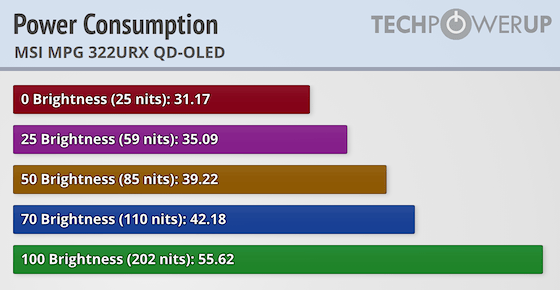
The power consumption of the MPG 322URX is typical for a 32-inch QD-OLED panel and shows the usual characteristics of self-emissive technology. At low- and mid-brightness levels the monitor is very efficient because only the lit pixels draw power, so operation in the 30–120 nit range keeps overall consumption modest. As brightness increases the power draw rises sharply, which explains the noticeable jump when moving toward the upper end of the SDR range. This matches what we see on other large OLED monitors, where pushing the panel to its maximum full screen luminance is the point at which efficiency drops. In practical use the monitor remains economical as long as you are not driving large, bright windows for extended periods. For desktop work, where average picture levels tend to stay low, power usage stays well below that of comparably sized LCD models with full array local dimming. During gaming or HDR playback the draw fluctuates with scene content rather than holding a fixed value, but even then it remains in line with expectations for a high-end 4K OLED.
Nov 25th, 2026 20:53 CST
change timezone
Latest GPU Drivers
New Forum Posts
- What's your main Black Friday / Cyber Monday purchase? (10)
- Smokin Hot Lappy (10)
- Gacha Games - Discussions, Pulls, Updates, etc. (1165)
- Linpack Xtreme Released (511)
- Sexy Hardware Close-Up Pic Clubhouse. (10345)
- AAF Optimus Modded Driver For Windows 10 & 11 - Only for HDAUDIO Chips [WINDOWS 11 RECOMMENDED] (1155)
- Which ryzen am5 cpu ? (219)
- {NA} 2026 Black November prices / deal (7)
- TPU's Nostalgic Hardware Club (22208)
- UPS what one to get? (74)
Popular Reviews
- ASRock X870E Challenger Wi-Fi White Review
- VZMORE AX9 Max Review
- Upcoming Hardware Launches 2027 (Updated Nov 2026)
- Microsoft Surface Laptop Ultra Review - The Next-gen Arm Laptop
- AMD Ryzen 7 9800X3D Review - The Best Gaming Processor
- AMD Zen 6 Technical Deep Dive
- Corsair RM1200e (Second Generation) Review
- Phantom Blade Zero Performance Benchmark Review - 35 GPUs Tested
- Pulsar Office Tour & First Look at P1 Dual-Sensor Mouse
- Ocypus lota P1000 Review
TPU on YouTube
Controversial News Posts
- Jensen Huang Reinstated as CEO of NVIDIA (573)
- NVIDIA Co-Founder and CEO Jensen Huang Officially Resigns (492)
- Report: Jensen Huang Eyes NVIDIA Comeback (281)
- Open Letter Asking NVIDIA to Reinstate Jensen Huang Passes 115,000 Signatures (184)
- OpenAI CEO Argues Home PCs Waste the World's Limited DRAM Supply (152)
- NVIDIA Launches Investigation Into Jensen Huang's Relationship With Suspected Chinese Spy (136)
- Intel "Raptor Lake Next" 16-Core and 20-Core CPUs Surface (130)
- Intel Razor Lake Gets a 12 P-Core bLLC Chip With No E-Cores, Per Leak (94)