 7
MSI MPG Z890I Edge Ti Wi-Fi Review
Component Analysis »Board Layout


The first thing to note is CPU cooler compatibility, and there are good and bad points here. On the plus side, the usual issues with the towering M.2 heatsink is mostly solved by a deep sloping edge that means the likes of large AIO liquid coolers such as Arctic's Liquid Freezer III have plenty of space. The main issue, though, is the lip of the left hand VRM heatsink that sits on top of the chokes, which sits very close to the CPU socket. This can foul some CPU cooler brackets that use elaborate mounting mechanisms such as Noctua's, where if you mount a tower cooler with the fan expelling air over the I/O shroud as usual. Rotating the brackets and cooler solves the issue, but you'll be pointing the fan towards your graphics card or over the top of the board. Not necessarily an issue given the many differing layouts the board will face, and low profile coolers such as Noctua's NH-L12Sx77, which otherwise fits fine, won't make any difference anyway.


The various extra connectors for the various daughter boards are on full display here, with no less than four catering for the USB stack on the rear I/O panel, M.2 stack and 5-in-one Xpander. Interestingly none of the four M.2 ports and only two of the four fan headers are visible without the extra components attached, although one of those M.2 ports is on the rear of the PCB as usual. There's no bandwidth sharing to worry about here, so you can use all the ports without anything stealing lanes from or disabling something else.


The 5-in-one Xpander card is how MSI has crammed four M.2 ports onto the PCB. The M.2 port here is limited to single-sided and heatsink-less models, so is perfect for a cheap PCIe Gen 3/4 model. It will sit close to the memory modules, which is the main reason for MSI saying heatsinks are not supported here. On the other side to the M.2 port we have two SATA ports, a USB 3.2 Gen 2x2 20 Gbps Type-C header with 27 W power delivery, the system speaker header and also a Type-C port that can be converted into a USB 3.0 header using an included adaptor.


The card is a little unsightly but is one of the compromises required to cram in so many features. The fan headers offer a decent amount of power with the CPU_FAN1 and PUMP_SYS1 headers you can see here offering 24 W/2 A and 36 W/3 A respectively. The other two headers are limited to the usual 12 W/1 A.
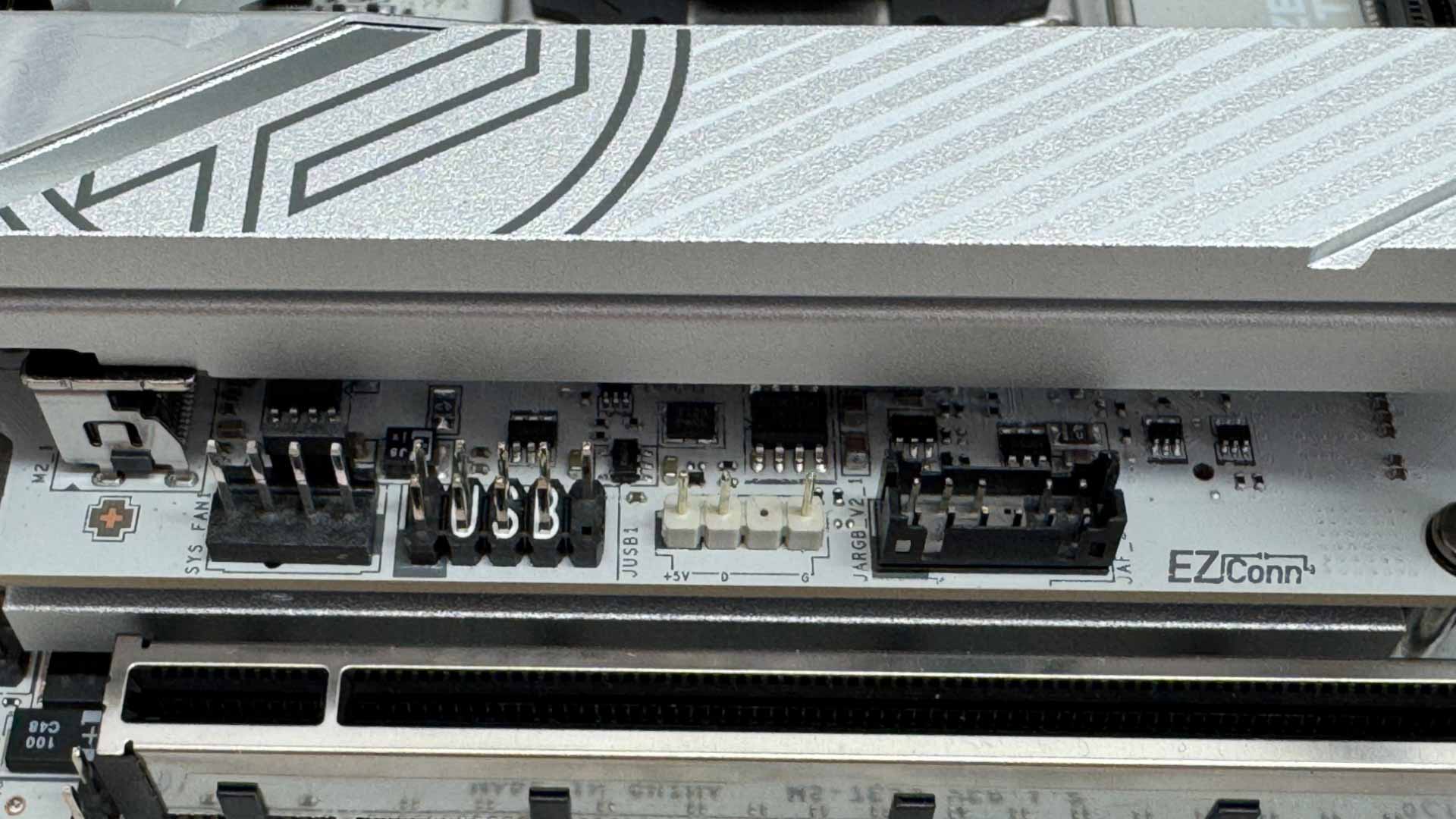
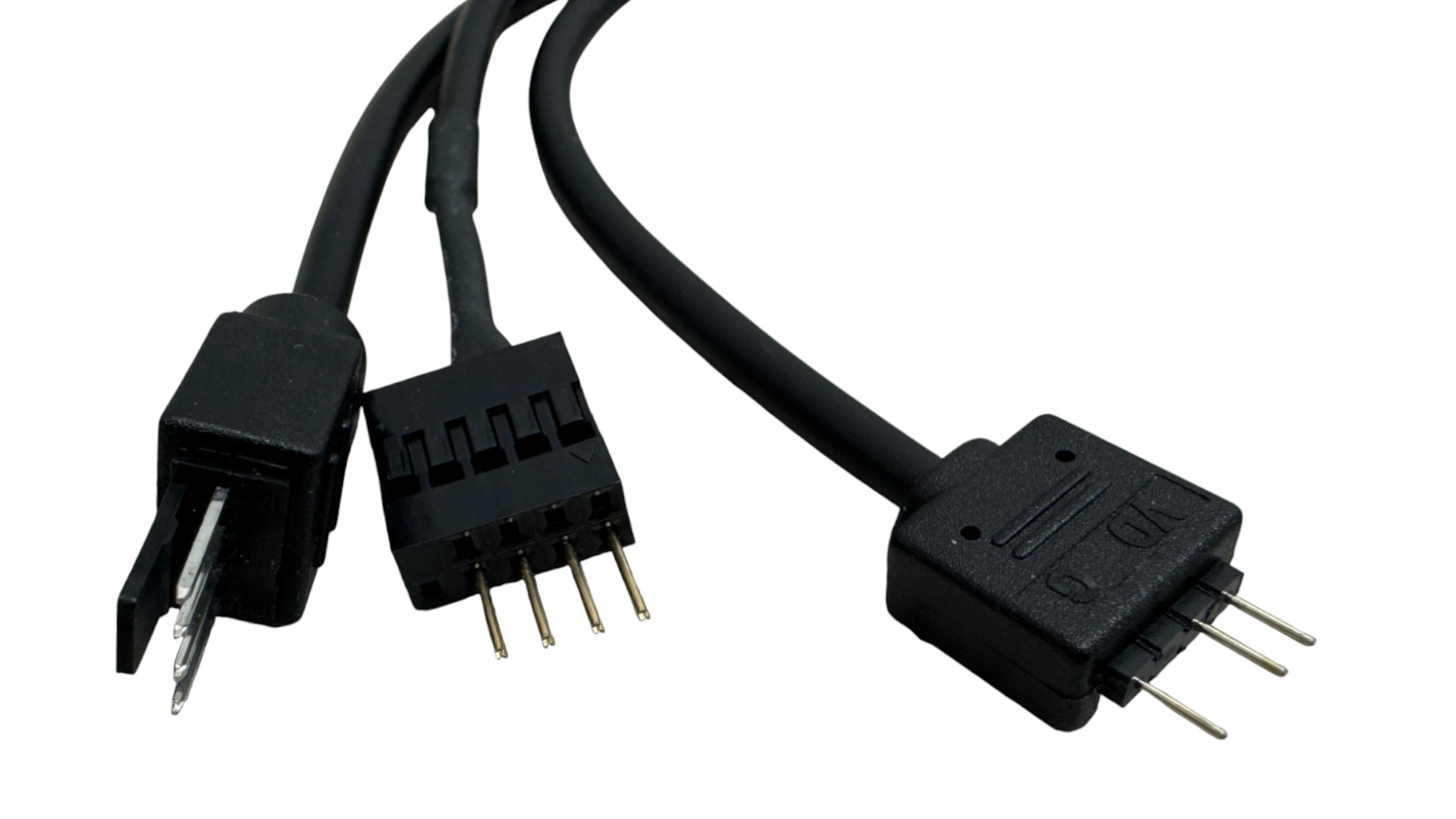
The third and fourth fan headers are both located on the upper deck of the M.2 stack by way of a 4-pin header and the header for MSI's EZ Connector, which uses the included cable to split out into a 4-pin fan header, USB 2.0 header and 3-pin ARGB header. There's another 3-pin header here along with another USB 2.0 header.
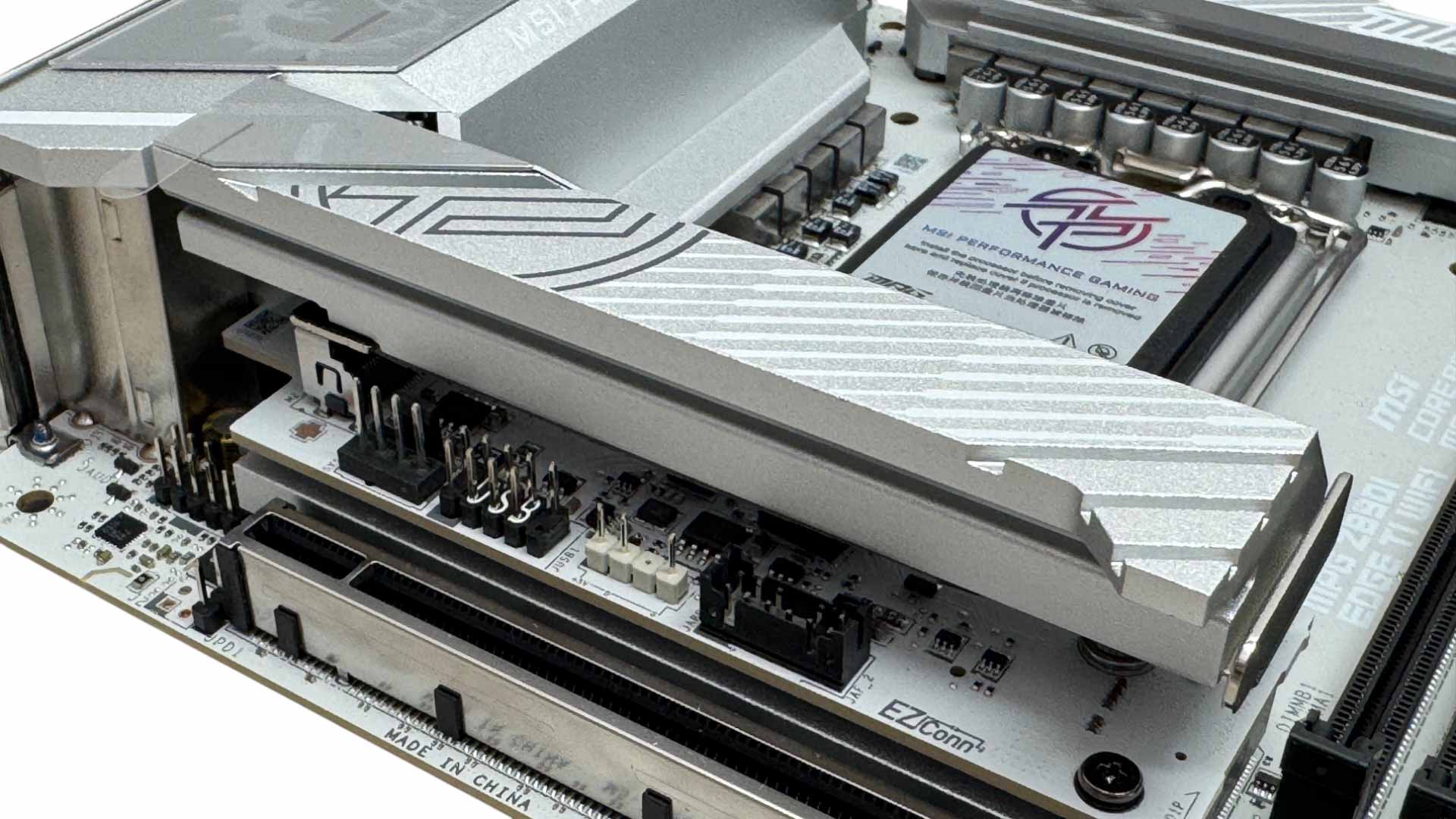
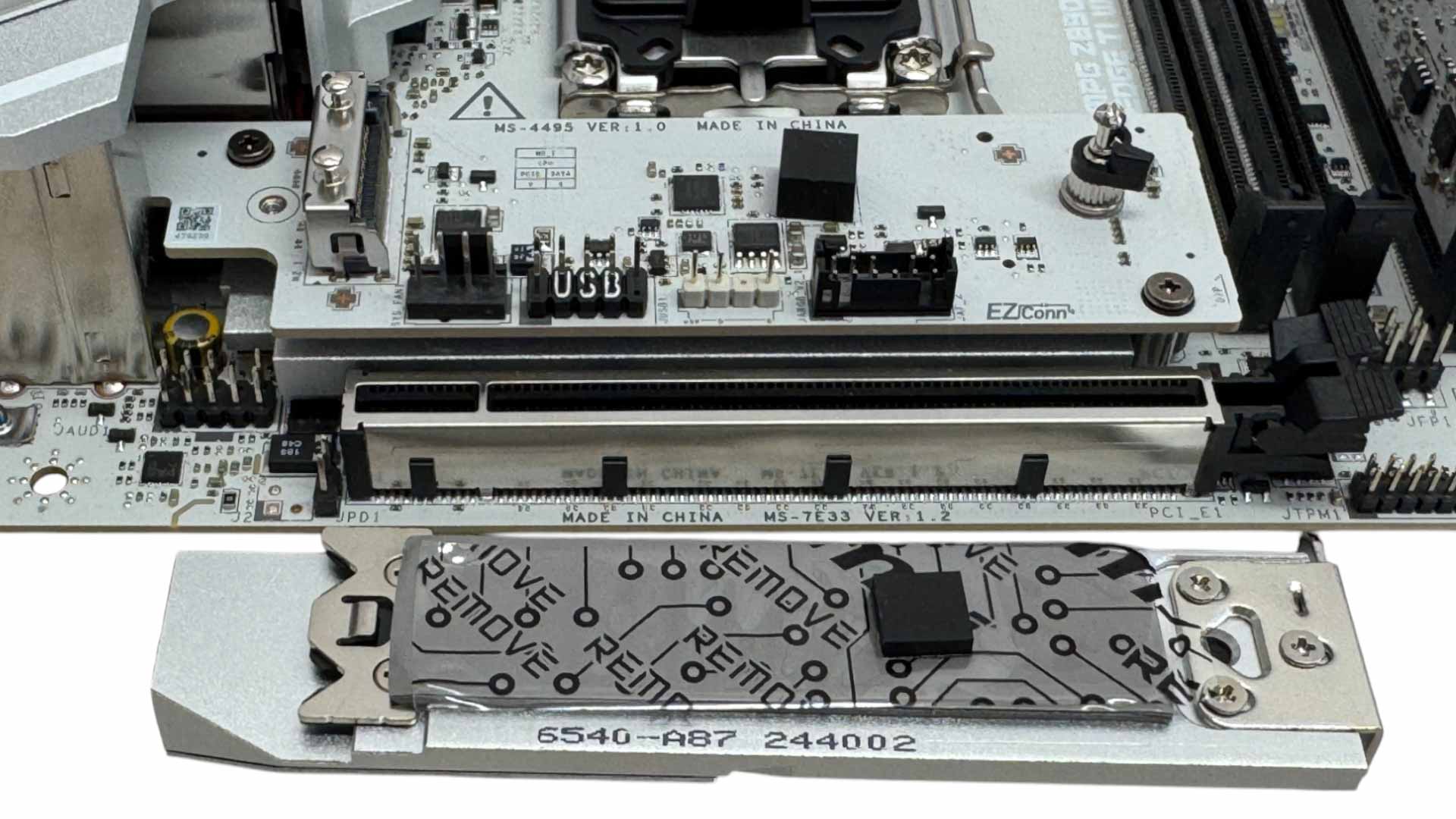
The top M.2 heatsink is fairly large and is also tool-free, which makes things a lot easier when dealing with tight spaces. It's a shame that the PCIe slot lacks any enhanced GPU release. It's easy enough to get your finger down to the lever, but a push-button like Gigabyte includes on its Mini-ITX boards would have been very useful. The port is the single PCIe Gen 5 M.2 port and SSDs here are only cooled on the top side, whereas they get double-sided treatment on the MSI MPG B850I Edge Ti Wi-Fi.

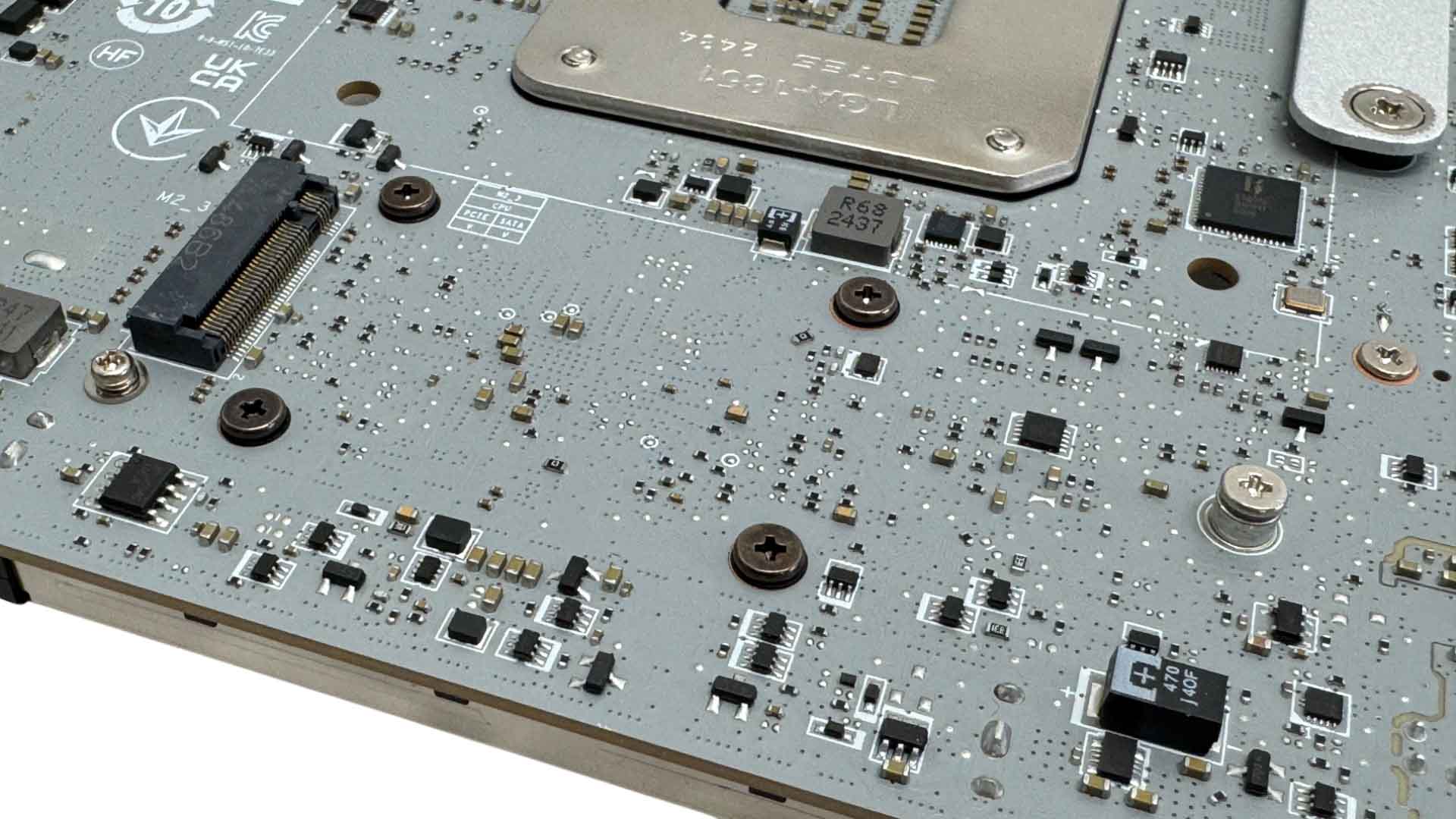
The second M.2 port is flipped so the top faces downwards onto a second heatsink that's shared with the chipset and is again cooled on one side. It's not too tricky to get to, but you do need to remove two screws and detach the daughterboard here. The third M.2 port is located as usual on the underside of the PCB, but should be accessible if your case has a CPU area cut out.

The rear I/O panel is impressive, with dual Thunderbolt 4 40 Gbps ports and seven Type-A USB 3.2 Gen 2 10 Gbps ports, giving it an advantage over the ASUS ROG Strix Z890-I Gaming Wi-Fi. We also have an HDMI port in addition to the DisplayPort-capable Thunderbolt ports and a third Type-C port that offers USB 3.2 Gen 2 10 Gbps speed. There are three buttons with a smart button included on top of the usual CMOS clear and USB BIOS Flashback. This can be configured in the EFI to reset, LED on and off, or safe boot. We also have 5 Gbps Ethernet and connectors for the Wi-Fi 7 module, which support standard threaded antennas, but also MSI's push-fit antenna included in the box. The audio is the usual pair of mini jacks and an optical output.
Nov 27th, 2026 17:01 CST
change timezone
Latest GPU Drivers
New Forum Posts
- What's your main Black Friday / Cyber Monday purchase? (41)
- -18C on GPU by moving it to the front of the case. (16)
- Exit Adobe - PDF reader, and PDF editor recommendations (10)
- The TPU UK Clubhouse (27308)
- Wireless Internet sharing between PC and router both-ways, is it possible? (34)
- Gigabyte RX 6800 XT Gaming OC and I would like to test the BIOS version 020.001.000.071.000000. (18)
- Mouse Pad advice - Shidenkai out of production? (21)
- Anthrophics IPO (47)
- Which Xfinity modem/router setup supports network printing/scanning between a wired PC and a Wi-Fi Brother MFC-L8900CDW printer? (0)
- Unigine Superposition on Linux (20)
Popular Reviews
- VZMORE AX9 Max Review
- Upcoming Hardware Launches 2027 (Updated Nov 2026)
- AMD Ryzen 7 9800X3D Review - The Best Gaming Processor
- ASRock X870E Challenger Wi-Fi White Review
- Microsoft Surface Laptop Ultra Review - The Next-gen Arm Laptop
- AMD Zen 6 Technical Deep Dive
- Montech CyberFlow ARGB 360 Review
- Phantom Blade Zero Performance Benchmark Review - 35 GPUs Tested
- Moaiplay Ora Pro G1 850 Review
- ORICO Obook15 AI Review
TPU on YouTube
Controversial News Posts
- Jensen Huang Reinstated as CEO of NVIDIA (623)
- NVIDIA Co-Founder and CEO Jensen Huang Officially Resigns (492)
- Report: Jensen Huang Eyes NVIDIA Comeback (281)
- Open Letter Asking NVIDIA to Reinstate Jensen Huang Passes 115,000 Signatures (184)
- OpenAI CEO Argues Home PCs Waste the World's Limited DRAM Supply (152)
- NVIDIA Launches Investigation Into Jensen Huang's Relationship With Suspected Chinese Spy (136)
- Intel Razor Lake Gets a 12 P-Core bLLC Chip With No E-Cores, Per Leak (94)
- NVIDIA GeForce RTX 50-Series Scheduled for up to $500 Price Hike This Week (89)