 20
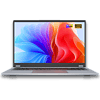
Ninkear YBOOK 15 Review - Budget 2-in-1 with Caveats
(20 Comments) »Value and Conclusion
- At the time of writing, the Ninkear YBOOK 15 goes for €459 - not bad for a 2-in-1 laptop. Just keep in mind that you might find versions with only 8 GB of RAM. Single-channel memory will tank the performance even further, turning the machine into a total slouch.
- You can use discount code NINKEARYBOOK15 on this page for a €40 discount.
- One of the cheapest 2-in-1 laptops on the market right now
- Backlit keyboard with large Arrows and a NumPad
- Decent touchpad
- Stable main body
- 360-degree hinge
- Supports laptop, tent, stand, and tablet modes
- Good enough system performance for basic usage
- 2x SODIMMs
- 1080p IPS touchscreen with decent color coverage and accuracy
- Low weight for a 15.6-inch machine
- Quiet fan
- Pleasant external temperatures during full CPU stress
- 2-core Raven Ridge CPU in 2026
- SATA SSD
- 3x USB 2.0 ports
- The audio quality is not good
Build Quality
The quality of the plastic build is actually quite okay. The lid is a bit spongy, but nothing too extreme. The base is solid even when pressed down hard. Pretty handy for office use or even for long typing sessions. Plus, the matte finish handles fingerprints quite well. Overall, not bad for a budget gadget.
Keyboard and Touchpad
The backlit keyboard is also reasonably good for the class. It offers decent key travel, large keycaps, full-sized Arrows, and a NumPad. That's a good multipurpose combination for daily tasks, normal work, or school. The touchpad is big, and its precision is above average. It's not that smooth, and the physical clicks are loud, but no one is perfect.
Display
The 1080p touchscreen is something like a double-edged sword. As I said earlier, given the low price tag of the machine, I was expecting a 50%-ish sRGB coverage, but we ended up with almost 73%. Add the good color accuracy after calibration into the mix, and we have a decent display in terms of picture quality. However, the 193-nit max brightness was a major letdown. It's rare to see a screen this dim in 2026.
Audio
Well, the speakers are there, and they work. If you're not too picky, they'll get the job done for casual use. Still, the low max volume and noticeable distortion above 90% could be a dealbreaker if you plan on watching high-quality movies or listening to music.
Fan Noise
What happens when you combine an old 2-core CPU with a single fan? Not much, apparently. The fan barely spins up even when "torturing" the processor with a 100% multicore workload in Cinebench 2024. Regardless of the preset, noise levels stay low, which is great for those who value a quiet workspace.
External Temperatures
Much like the fan noise, external temperatures stay well under control. The rear exhaust does cross the 50°C mark, but that's perfectly fine. The keyboard gets a little warm in the middle, but again, that's to be expected. The rest of the chassis stays even cooler, so there's nothing to worry about here.
Upgrades
The upgradability is okay. No soldered memory, you have two SODIMMs at your disposal. Because of the aging Raven Ridge APU, you're stuck with slower 2400 MT/s memory. Just make sure you buy a unit with dual-channel RAM, or performance will suffer. The M.2 slot is only compatible with 2280 SATA units - yes, you heard that right: SATA! The drive speeds are typical for that interface. The Wi-Fi 5 card is soldered.
CPU Performance
Web browsing with 5–6 tabs, 1440p YouTube videos, or basic Office work - that's the limit here. Forget about heavy multitasking; this CPU only has four threads.
Benchmarking this thing was a pain. By the end, I thought that I needed therapy or had to do some yoga, but I realized this would be pointless. The damage done to my nervous system is irreversible. Sad but true.
GPU Performance
The AMD Radeon RX Vega 3 was just a basic iGPU back in 2020. Now, six years later, things have changed drastically. Most of the modern entry-level and mid-range iGPUs are miles ahead, not to mention the AMD Radeon 8060S or the Intel Graphics 4 Xe3. On the positive side, you can try some old-school games like CS 1.6, Need for Speed: Most Wanted, or some Call of Duty from the early 2000s.
Battery Life
Battery life is disappointing. Despite the small 38Wh capacity, a bit more than 2 hours of 4K videos isn't something to write home about. On top of that, we are talking about a system with a non-thirsty APU and a 1080p screen. Some extra manufacturer optimization could definitely help to prolong the autonomous life. Maybe this can be resolved with a future BIOS update, but who knows?
Ports
At first glance, the I/O looks solid: four USBs, HDMI, and Ethernet. However, the two USB Type-A ports on the right are just USB 2.0! Even weirder - the Type-C port on the left is also USB 2.0. This is the first time I've seen a USB 2.0 Type-C port on a laptop. Your only "fast" option is the single 5 Gbps blue port on the left.
Overall Impressions
The Ninkear YBOOK 15 is a decent option for undemanding users who want a 2-in-1 for casual web browsing in bed. It stays cool and quiet no matter the load, and the solid keyboard and large touchpad make it pleasant to use daily. However, that aging CPU platform and the dim screen might be a dealbreaker for most, even at this price.

The quality of the plastic build is actually quite okay. The lid is a bit spongy, but nothing too extreme. The base is solid even when pressed down hard. Pretty handy for office use or even for long typing sessions. Plus, the matte finish handles fingerprints quite well. Overall, not bad for a budget gadget.
Keyboard and Touchpad
The backlit keyboard is also reasonably good for the class. It offers decent key travel, large keycaps, full-sized Arrows, and a NumPad. That's a good multipurpose combination for daily tasks, normal work, or school. The touchpad is big, and its precision is above average. It's not that smooth, and the physical clicks are loud, but no one is perfect.
Display
The 1080p touchscreen is something like a double-edged sword. As I said earlier, given the low price tag of the machine, I was expecting a 50%-ish sRGB coverage, but we ended up with almost 73%. Add the good color accuracy after calibration into the mix, and we have a decent display in terms of picture quality. However, the 193-nit max brightness was a major letdown. It's rare to see a screen this dim in 2026.
Audio
Well, the speakers are there, and they work. If you're not too picky, they'll get the job done for casual use. Still, the low max volume and noticeable distortion above 90% could be a dealbreaker if you plan on watching high-quality movies or listening to music.
Fan Noise
What happens when you combine an old 2-core CPU with a single fan? Not much, apparently. The fan barely spins up even when "torturing" the processor with a 100% multicore workload in Cinebench 2024. Regardless of the preset, noise levels stay low, which is great for those who value a quiet workspace.
External Temperatures
Much like the fan noise, external temperatures stay well under control. The rear exhaust does cross the 50°C mark, but that's perfectly fine. The keyboard gets a little warm in the middle, but again, that's to be expected. The rest of the chassis stays even cooler, so there's nothing to worry about here.
Upgrades
The upgradability is okay. No soldered memory, you have two SODIMMs at your disposal. Because of the aging Raven Ridge APU, you're stuck with slower 2400 MT/s memory. Just make sure you buy a unit with dual-channel RAM, or performance will suffer. The M.2 slot is only compatible with 2280 SATA units - yes, you heard that right: SATA! The drive speeds are typical for that interface. The Wi-Fi 5 card is soldered.
CPU Performance
Web browsing with 5–6 tabs, 1440p YouTube videos, or basic Office work - that's the limit here. Forget about heavy multitasking; this CPU only has four threads.
Benchmarking this thing was a pain. By the end, I thought that I needed therapy or had to do some yoga, but I realized this would be pointless. The damage done to my nervous system is irreversible. Sad but true.
GPU Performance
The AMD Radeon RX Vega 3 was just a basic iGPU back in 2020. Now, six years later, things have changed drastically. Most of the modern entry-level and mid-range iGPUs are miles ahead, not to mention the AMD Radeon 8060S or the Intel Graphics 4 Xe3. On the positive side, you can try some old-school games like CS 1.6, Need for Speed: Most Wanted, or some Call of Duty from the early 2000s.
Battery Life
Battery life is disappointing. Despite the small 38Wh capacity, a bit more than 2 hours of 4K videos isn't something to write home about. On top of that, we are talking about a system with a non-thirsty APU and a 1080p screen. Some extra manufacturer optimization could definitely help to prolong the autonomous life. Maybe this can be resolved with a future BIOS update, but who knows?
Ports
At first glance, the I/O looks solid: four USBs, HDMI, and Ethernet. However, the two USB Type-A ports on the right are just USB 2.0! Even weirder - the Type-C port on the left is also USB 2.0. This is the first time I've seen a USB 2.0 Type-C port on a laptop. Your only "fast" option is the single 5 Gbps blue port on the left.
Overall Impressions
The Ninkear YBOOK 15 is a decent option for undemanding users who want a 2-in-1 for casual web browsing in bed. It stays cool and quiet no matter the load, and the solid keyboard and large touchpad make it pleasant to use daily. However, that aging CPU platform and the dim screen might be a dealbreaker for most, even at this price.
Nov 26th, 2026 19:21 CST
change timezone
Latest GPU Drivers
New Forum Posts
- Dell Dimension E510 Retro Gaming PC Upgrade & Modification (0)
- Can you guess Which game it is? (371)
- ASUS Prime 5060 ti 16gb x4 instead of x8 PCIe (12)
- Kerbal Space Program Retooled (0)
- Exploring Local LLMs: Models, Hardware and Setup Experiences (6)
- Post your CrystalDiskMark speeds (663)
- 26.11.2 Adrenalin Edition is out (1)
- WarpCoreBench scores! (115)
- Acer TravelMate P414-51 (i5-1135G7): CPU stuck at x4 / ~200 MHz effective under 100% load, no throttle flags. How to find who's clamping it? (3)
- [Community Benchmark] MrH OpenCL Benchmark 2.0f (Windows Only – CPU & GPU) (5)
Popular Reviews
- VZMORE AX9 Max Review
- Upcoming Hardware Launches 2027 (Updated Nov 2026)
- ASRock X870E Challenger Wi-Fi White Review
- AMD Ryzen 7 9800X3D Review - The Best Gaming Processor
- Microsoft Surface Laptop Ultra Review - The Next-gen Arm Laptop
- AMD Zen 6 Technical Deep Dive
- Montech CyberFlow ARGB 360 Review
- Phantom Blade Zero Performance Benchmark Review - 35 GPUs Tested
- Corsair RM1200e (Second Generation) Review
- Pulsar Office Tour & First Look at P1 Dual-Sensor Mouse
TPU on YouTube
Controversial News Posts
- Jensen Huang Reinstated as CEO of NVIDIA (612)
- NVIDIA Co-Founder and CEO Jensen Huang Officially Resigns (492)
- Report: Jensen Huang Eyes NVIDIA Comeback (281)
- Open Letter Asking NVIDIA to Reinstate Jensen Huang Passes 115,000 Signatures (184)
- OpenAI CEO Argues Home PCs Waste the World's Limited DRAM Supply (152)
- NVIDIA Launches Investigation Into Jensen Huang's Relationship With Suspected Chinese Spy (136)
- Intel Razor Lake Gets a 12 P-Core bLLC Chip With No E-Cores, Per Leak (94)
- NVIDIA GeForce RTX 50-Series Scheduled for up to $500 Price Hike This Week (89)