 94
NVIDIA DLSS 4.5 Ray Reconstruction Review - Transformer Improved
Ray Reconstruction Technology »Supported Games

NVIDIA lists 30 supported titles at launch, and the ones you'd expect are all there: Cyberpunk 2077, Alan Wake 2, DOOM: The Dark Ages, Indiana Jones and the Great Circle, Hogwarts Legacy, Star Wars Outlaws, Marvel's Spider-Man 2, Resident Evil Requiem, Avatar: Frontiers of Pandora, Portal with RTX and Half-Life 2 RTX among them.
But that got me wondering... that somehow sounds like "all the games supporting Ray Reconstruction?" So I checked with NVIDIA's master RTX support table and that really seems to be the case. That's actually a more interesting result than a list of names, because it tells us how the model works.
NVIDIA is not doing per-game training, per-game tuning, or any special per-game anything here (even though I'm sure they test them for issues). The DLSS 4.5 RR update applies to all RR games and just works. It's one algorithm that replaces the denoiser in any game that already exposes a Ray Reconstruction integration, and it behaves the same way regardless of what that game is.
Preset D, Preset F: What's with all those DLSS Preset Letters?
NVIDIA doesn't version its DLSS models with numbers, they use letters instead. Each trained model (or each variation?) gets a preset letter, and higher letters generally mean newer models. What makes things more complicated is that the newest model is not the best one for every scenario, so there's already some confusion about that out there and things won't get better.Until today, Ray Reconstruction was a checkbox for all gamers—on or off. But now we're getting "Profile D" and "Profile F." Where's A, B, C? What about E? Also, every DLSS feature seems to have its own preset list of letters, which overlap. The same letter means two entirely different things depending on which dropdown you're looking at.
Just to spell it out: the model launching today is Ray Reconstruction Preset F. The model it replaces is Ray Reconstruction Preset D. Neither has anything to do with the upscaling Super Resolution Presets F or D, which are old pre-transformer models. The newest upscaling models are currently Preset J and K for DLSS 4 and Preset L and M for DLSS 4.5.
What I think will train people to understand it is that the NVIDIA App makes the separation visible: Frame Generation, Super Resolution and Ray Reconstruction each get their own row and their own dropdown, with different letters offered in each. It is still unclear that these letters are independent alphabets and what they mean.
How to Enable DLSS 4.5 Ray Reconstruction
There are several ways to enable DLSS 4.5 RR.- The first is obviously native game support, which means the game will offer the option in its menu. Enable it, done.
- The second is through NVIDIA App Overrides.
- Open the NVIDIA App.
- Go to the game entry you want to override.
- Click on "Settings" and go to the "Driver Settings" section.
- Now click on "Model Presets" and select "Custom."
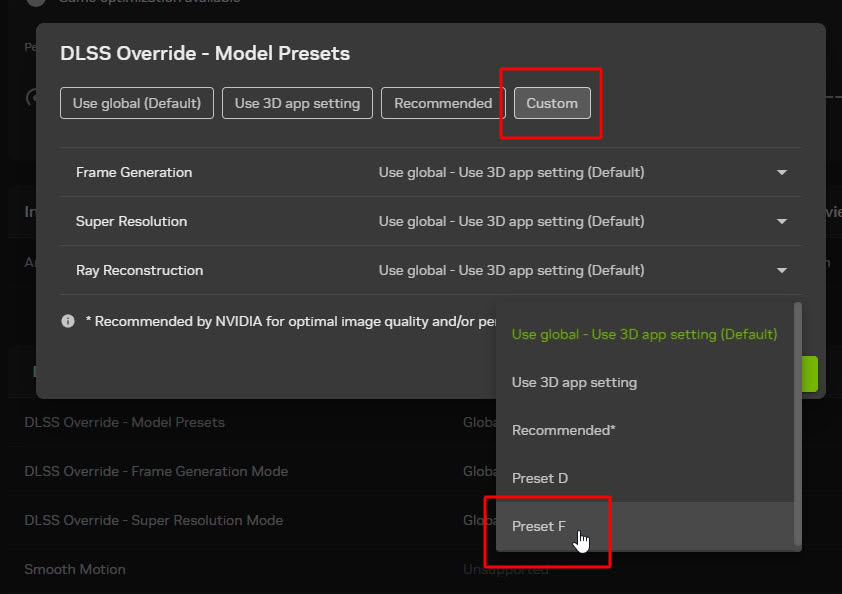
- Then select the preset you'd like to use.
- Last but not least, you can manually drop in the new DLL file into the game's data to force it to use the new one.
- Navigate to the game's installation folder and find the folder which has the game exe.
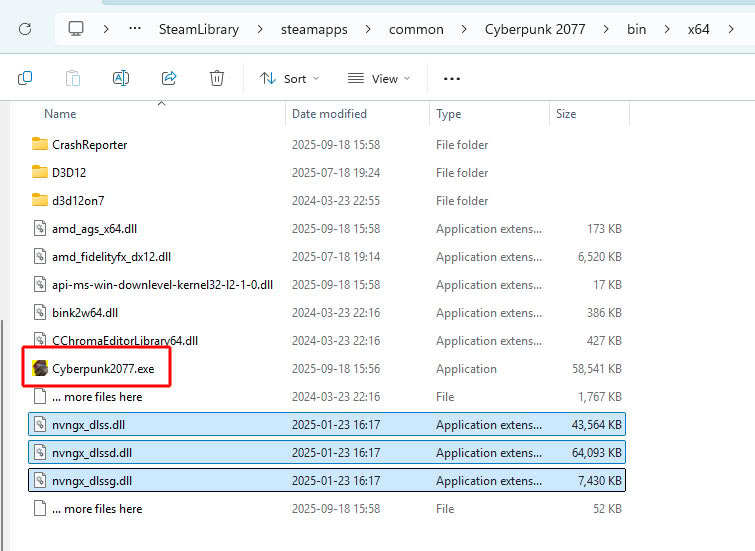
Then copy the DLL file into this folder, overwriting the existing file.
Nov 15th, 2026 04:58 CST
change timezone
Latest GPU Drivers
New Forum Posts
- What can the FX 8320 do today? Here is the answer. (53)
- Honestly, do you care about GTA VI? (55)
- Can you guess Which game it is? (319)
- Is this anyhow possible, that a GPU (ROG Strix RX480 O8G) can crash the whole PC after "ReFlash" in normal Mode? (0)
- AI generated images... (227)
- WebXPRT 4 performance scores (46)
- Optical Disc Drive owners club (216)
- "Legacy Control Panel" won't install (3)
- Power supply noise stops when I move the mouse (0)
- Ryzen Owners Zen Garden (8558)
Popular Reviews
- AMD Zen 6 Technical Deep Dive
- ASUS ROG Strix B850-I Gaming Wi-Fi7 W Review
- Corsair HX1000i Shift Crystal Review
- Upcoming Hardware Launches 2027 (Updated Nov 2026)
- Montech King 95 3D PRO Review
- NZXT C1200 Platinum Review
- NZXT H7 RGB+ Review
- NZXT H5 Review
- Phantom Blade Zero Performance Benchmark Review - 35 GPUs Tested
- AMD Ryzen 7 9800X3D Review - The Best Gaming Processor
TPU on YouTube
Controversial News Posts
- NVIDIA Co-Founder and CEO Jensen Huang Officially Resigns (408)
- OpenAI CEO Argues Home PCs Waste the World's Limited DRAM Supply (152)
- NVIDIA Launches Investigation Into Jensen Huang's Relationship With Suspected Chinese Spy (136)
- Intel "Raptor Lake Next" 16-Core and 20-Core CPUs Surface (130)
- Legendary Game Studio BioWare Shuts Down Following EA Layoffs (104)
- Dell CEO Says the Memory Shortage Will Get Worse in 2027 (95)
- NVIDIA GeForce RTX 50-Series Scheduled for up to $500 Price Hike This Week (89)
- Modder Fits RTX 5090 With Four 8-Pin Connectors, Halving Current per Wire (80)