 9
NZXT H2 Mini PC Review
Value & Conclusion »Power and Noise Levels
Power and efficiency can be just as important as raw performance in a more compact system, so I measured how much the H2 Mini-PC draws under CPU stress, during GPU-heavy tests, and while gaming. These measurements were captured using a Shelly smart power relay, taking advantage of its API-based logging to track real-time wattage and build accurate per-second consumption profiles. I also monitored the system's noise levels while idle and when under sustained load.CPU and GPU Power Draw
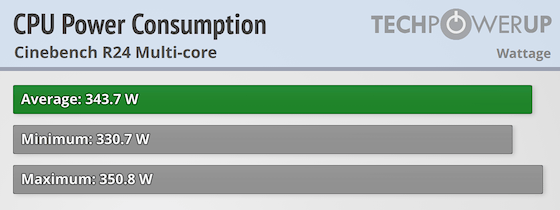
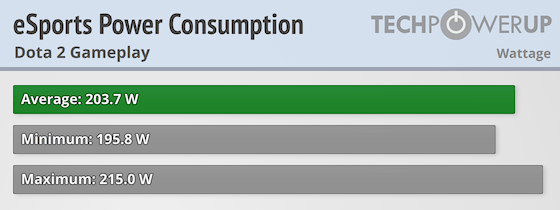
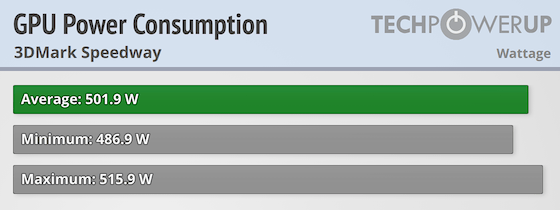
We evaluated three different power scenarios to see how the system behaves under varying types of load: an esports gaming run with Dota 2 to observe real-world gaming power and consistency, a GPU-focused pass using 3DMark Speedway to show how the system ramps under heavy graphics demand, and a Cinebench multicore run that fully loads the CPU to measure sustained power delivery over time.
Cinebench Multicore
During Cinebench multicore, the NZXT H2 averaged 343.7 W, with a minimum of 330.7 W and a peak of 350.8 W. That's a substantial draw for a CPU-focused workload, but it makes sense given a high-end desktop processor running at full tilt alongside an active liquid cooling system and supporting components. The tight range shows the system holds steady under sustained load rather than bouncing around.
eSports gaming (Dota 2)
In Dota 2, power consumption averaged 203.7 W, dipping to 195.8 W and peaking at 215.0 W. That's actually very reasonable for a system with an RTX 5080, since esports titles typically don't fully load a flagship GPU, and the numbers likely mean the card isn't being pushed anywhere near its limits in lighter gaming scenarios.
3DMark Speedway
3DMark Speedway averaged 501.9 W, with a low of 486.9 W and a maximum of 515.9 W. This is the one run that loads the GPU hard and consistently, and a 500 W average under a heavy synthetic GPU benchmark is what I expected from the H2.
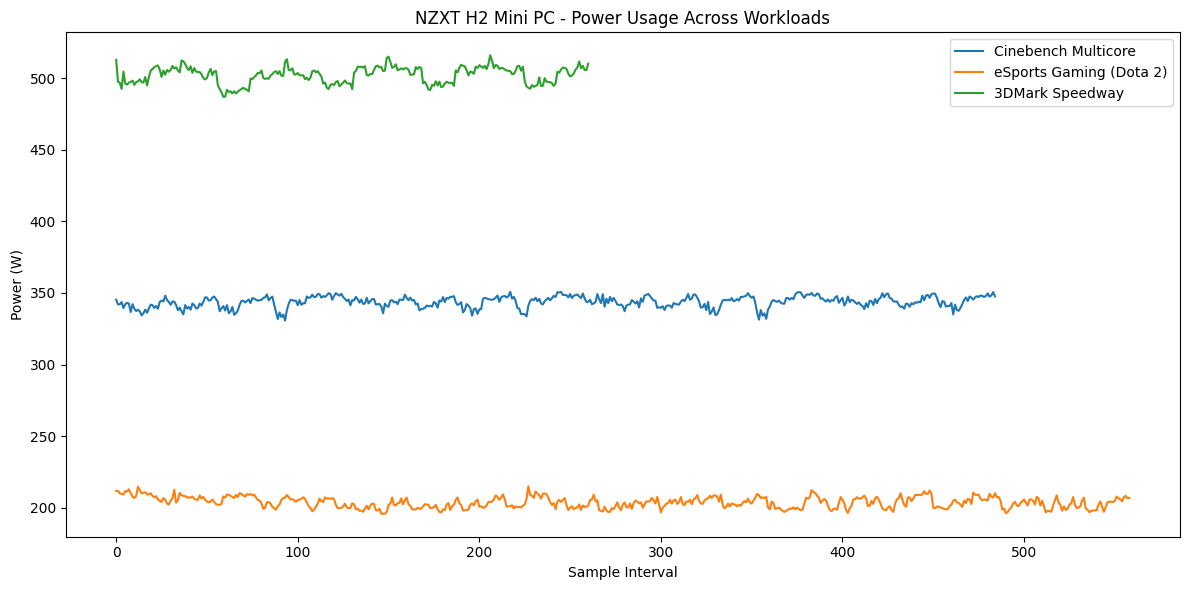
Here's a full view of the H2's power draw across all three profiles:
Noise Levels
Noise was measured using a digital sound level meter placed about 30 cm from the front of the case, all fan control set at default/auto. During light desktop use, web browsing, or general productivity work, the NZXT H2 remains relatively quiet for a performance-focused system, typically sitting in the low 40s dB(A) range. In a normal room with light ambient noise, it blends in comfortably and does not draw attention.Under heavier workloads, especially during extended CPU rendering or GPU-intensive benchmarks, the system ramps up as expected. For a configuration with a high-end desktop CPU and an RTX 5080 cooled by a 240 mm liquid cooler and multiple case fans, peak levels in the 46–48 dB(A) range are pretty common. At that point, you definitely hear it, but it comes across as steady airflow rather than an annoying high-pitched whine like some smaller systems produce. In my office, even during extended gaming sessions or long benchmark loops, it never crossed into distracting territory for me.
Nov 23rd, 2026 02:30 CST
change timezone
Latest GPU Drivers
New Forum Posts
- GTA VI (21)
- Honestly, do you care about GTA VI? (272)
- Youtube channel video downloader, not playlist. (2)
- Can you guess Which game it is? (347)
- Increasing Power Limit? (10)
- Last game you purchased? (1416)
- Anker SOLIX C2000 Gen 2 + PS400 Solarpanel (1)
- What are you playing? (26241)
- DTS DCH Driver for Realtek HDA [DTS:X APO4 + DTS Interactive] (2818)
- UPS what one to get? (48)
Popular Reviews
- Microsoft Surface Laptop Ultra Review - The Next-gen Arm Laptop
- Corsair RM1200e (Second Generation) Review
- Upcoming Hardware Launches 2027 (Updated Nov 2026)
- Pulsar Office Tour & First Look at P1 Dual-Sensor Mouse
- Ugreen NASync DXP4800 GT Review
- AMD Ryzen 7 9800X3D Review - The Best Gaming Processor
- AMD Zen 6 Technical Deep Dive
- AMD Ryzen 7 5800X3D 10th Anniversary Review
- Phantom Blade Zero Performance Benchmark Review - 35 GPUs Tested
- Biwin Black Opal NV7400 2 TB Review
TPU on YouTube
Controversial News Posts
- NVIDIA Co-Founder and CEO Jensen Huang Officially Resigns (492)
- Report: Jensen Huang Eyes NVIDIA Comeback (266)
- Open Letter Asking NVIDIA to Reinstate Jensen Huang Passes 115,000 Signatures (184)
- OpenAI CEO Argues Home PCs Waste the World's Limited DRAM Supply (152)
- NVIDIA Launches Investigation Into Jensen Huang's Relationship With Suspected Chinese Spy (136)
- Intel "Raptor Lake Next" 16-Core and 20-Core CPUs Surface (130)
- NVIDIA GeForce RTX 50-Series Scheduled for up to $500 Price Hike This Week (89)
- Intel Razor Lake Gets a 12 P-Core bLLC Chip With No E-Cores, Per Leak (86)