 43
NZXT Respire T40 Review
Value & Conclusion »Performance
Test System
| Test System | |
|---|---|
| Processor: | Intel Core i7-3960X ES @ 3.6 GHz & 4.1 GHz OC (Sandy Bridge-E) |
| Motherboard: | ASRock Fatal1ty Champion Intel X79 |
| Memory: | 4x 4096 MB G.Skill Ripjaws Z F3-17000CL9Q @ 2133 MHz 9-11-10-28 |
| Video Card: | AMD Radeon HD 5450 1 GB |
| Hard disk: | OCZ Vertex Plus R2 60GB SATA II SSD |
| Power Supply: | NZXT HALE82-650-M 650W |
| Case: | LIAN LI PC-T60B |
| Software: | Windows 7 64-bit Service Pack 1 |
| TIM: | Arctic Ceramique 2 |
The idle test will consist of the CPU sitting idle at the desktop for 15 minutes. This will allow for a stable temperature reading that will be recorded at the end of those 15 minutes.
AIDA64 and its CPU-stability test represent a typical multithreaded user load. It is run for 15 minutes before the highest reading during the test is recorded and taken as the result. This test lets enthusiasts know what temperatures they can expect to see with games and applications.
Prime95 is the multithreaded stress test I will use to find the cooler's temperatures at maximum load. This is done by using the "In-place large FFTs" setting to truly stress the cooler's ability at keeping temperatures in check. The test is run for 15 minutes, and the highest recorded temperature is taken as the result.
Fan noise testing is done at 20%, 50%, and 100% settings, and the dBA level is recorded by a Pyle PSPL25 sound pressure level meter at a distance of 30 cm. Fan RPM results are taken at the same 20%, 50%, and 100% settings.
Idle
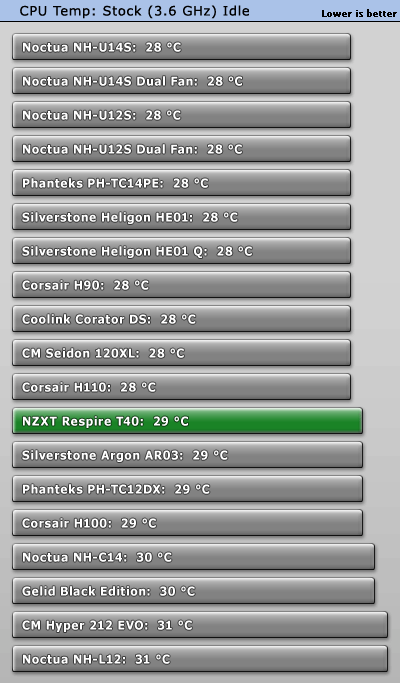
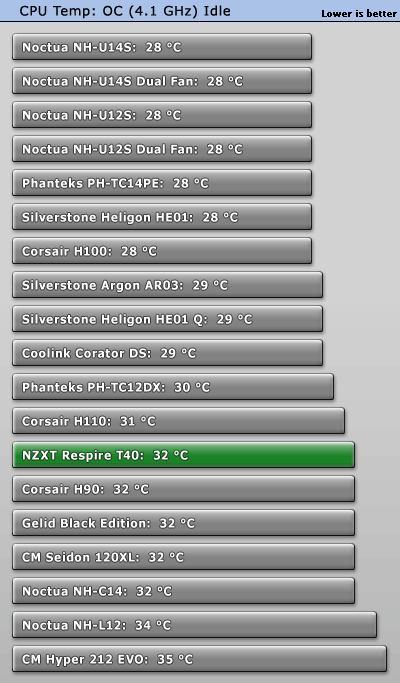
At idle, the NZXT Respire T40 falls toward the middle of the pack in both tests. While not setting any new idle temp records, everything is as it should be.
Typical Load
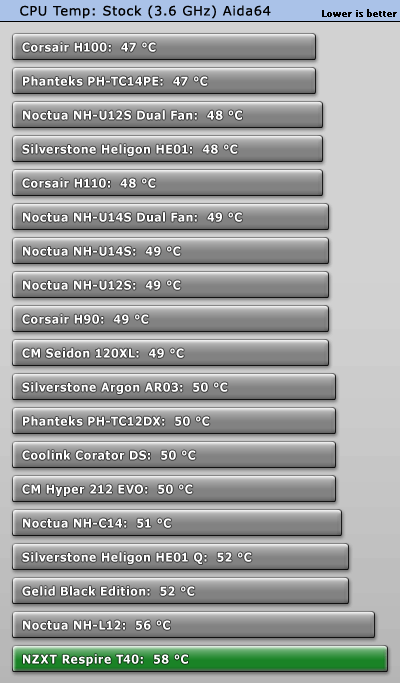
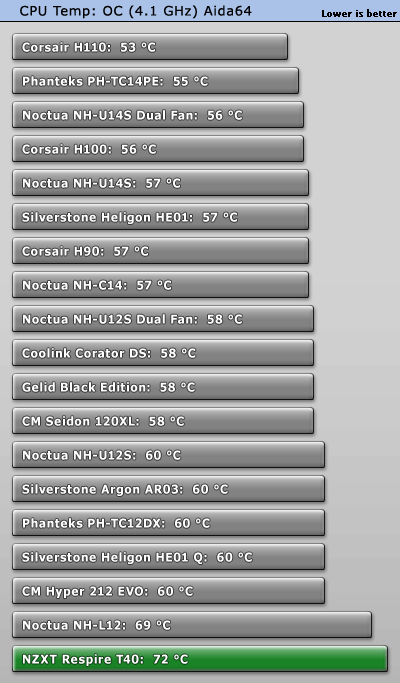
Things do not look so good for the NZXT Respire T40 at this point. It fell back to last place in both tests and was even beaten by the budget champion, the Cooler Master Hyper 212 EVO.
Max Load
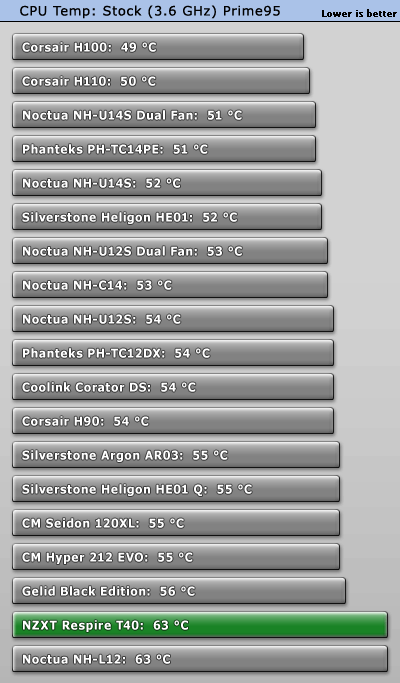
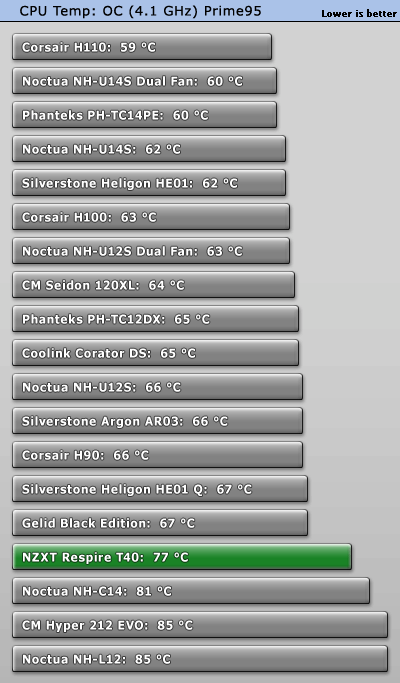
If you had asked me after the last test if the Respire T40 would sneak back up the chart, I would have said no. That said, I am impressed by its recovery here. At stock, the Respire T40 manages to tie the much more expensive Noctua NH-L12. Overclock testing also has it climb up three spots to beat out the Noctua NH-C14, Cooler Master Hyper 212 EVO, and the Noctua NH-L12. This is important because two of those three coolers are far more expensive than NZXT's Respire T40. Only the Hyper 212 EVO is a meager $5 cheaper, and it, as can be seen, loses rather handily to NZXT's cooler.
Fan Noise
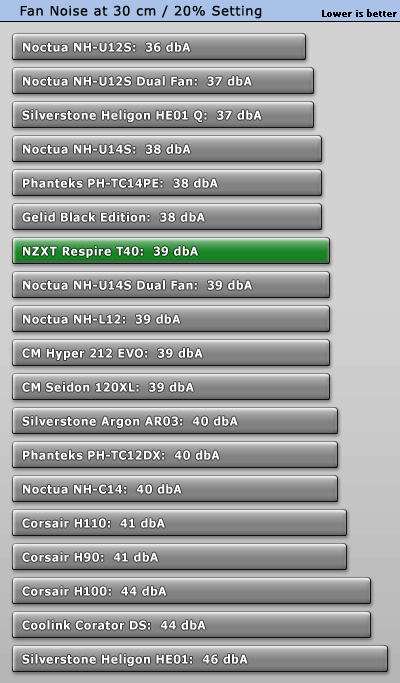
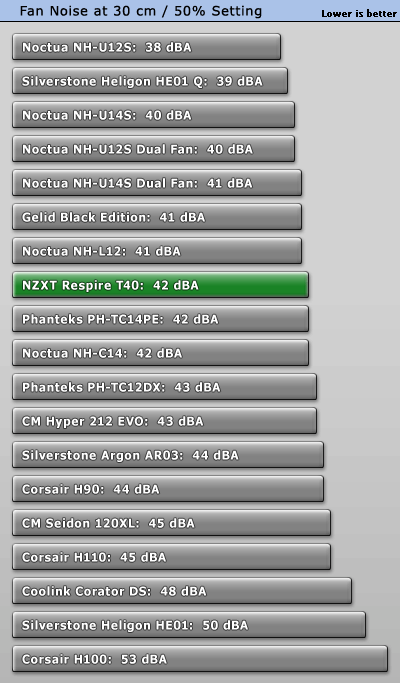
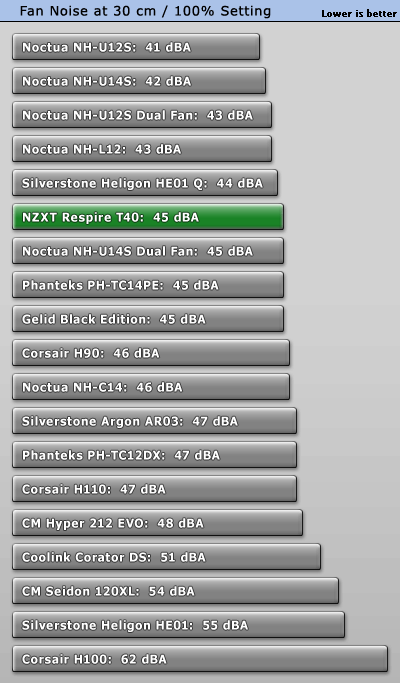
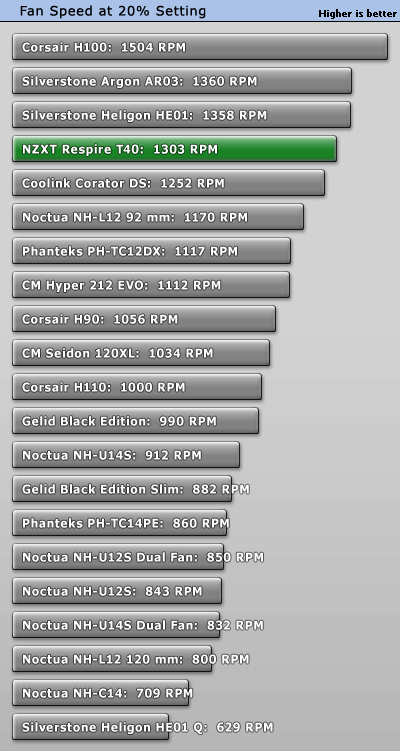
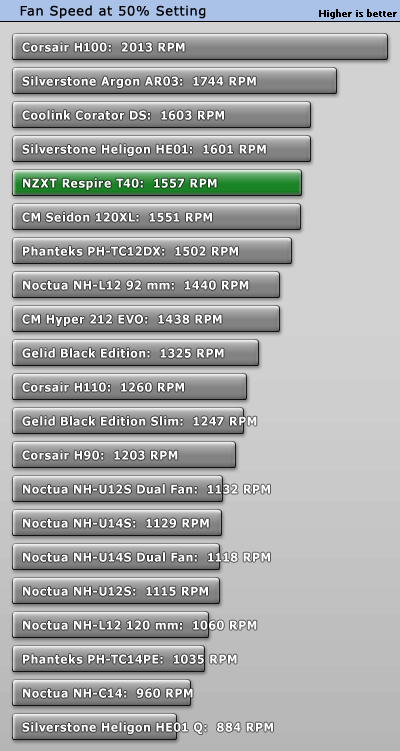
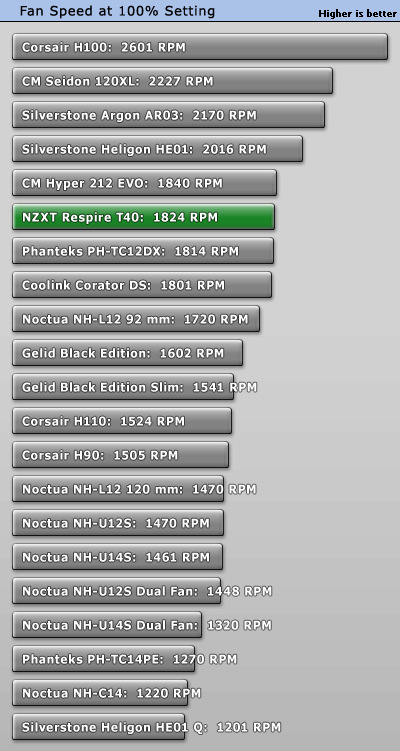
Considering NZXT has opted for a no-frills fan on the Respire T40, I must say I am impressed with its lack of noise output. It will not win any awards for silence, but the cooler is quiet enough to be unobtrusive in a quiet environment. At just 45 dBA under maximum load, the NZXT Respire T40 barely straggles behind the top five coolers for noise output.
Nov 21st, 2026 07:08 PST
change timezone
Latest GPU Drivers
New Forum Posts
- Cpu waterblock water shows some tinting = Bad? (18)
- GeekMagic Ultra Smart WiFi Weather Station (9)
- What's your latest tech Freebie? (87)
- UPS what one to get? (3)
- Differences i might've missed between these ultrawides to decide which to buy during BF. (0)
- Honestly, do you care about GTA VI? (220)
- Anthrophics IPO (31)
- Without Jensen, PC gaming will be (53)
- WarpCoreBench scores! (88)
- TPU's Nostalgic Hardware Club (22179)
Popular Reviews
- Microsoft Surface Laptop Ultra Review - The Next-gen Arm Laptop
- Ugreen NASync DXP4800 GT Review
- Corsair RM1200e (Second Generation) Review
- Pulsar Office Tour & First Look at P1 Dual-Sensor Mouse
- Upcoming Hardware Launches 2027 (Updated Nov 2026)
- Acemagic Retro X3 Review
- Biwin Black Opal NV7400 2 TB Review
- AMD Ryzen 7 9800X3D Review - The Best Gaming Processor
- AMD Zen 6 Technical Deep Dive
- Chieftec Iceberg PRO 360 DARK Review
TPU on YouTube
Controversial News Posts
- NVIDIA Co-Founder and CEO Jensen Huang Officially Resigns (491)
- Report: Jensen Huang Eyes NVIDIA Comeback (258)
- Open Letter Asking NVIDIA to Reinstate Jensen Huang Passes 115,000 Signatures (184)
- OpenAI CEO Argues Home PCs Waste the World's Limited DRAM Supply (152)
- NVIDIA Launches Investigation Into Jensen Huang's Relationship With Suspected Chinese Spy (136)
- Intel "Raptor Lake Next" 16-Core and 20-Core CPUs Surface (130)
- Legendary Game Studio BioWare Shuts Down Following EA Layoffs (104)
- NVIDIA GeForce RTX 50-Series Scheduled for up to $500 Price Hike This Week (89)