 17
Orbital Pathfinder Review
Value & Conclusion »Software


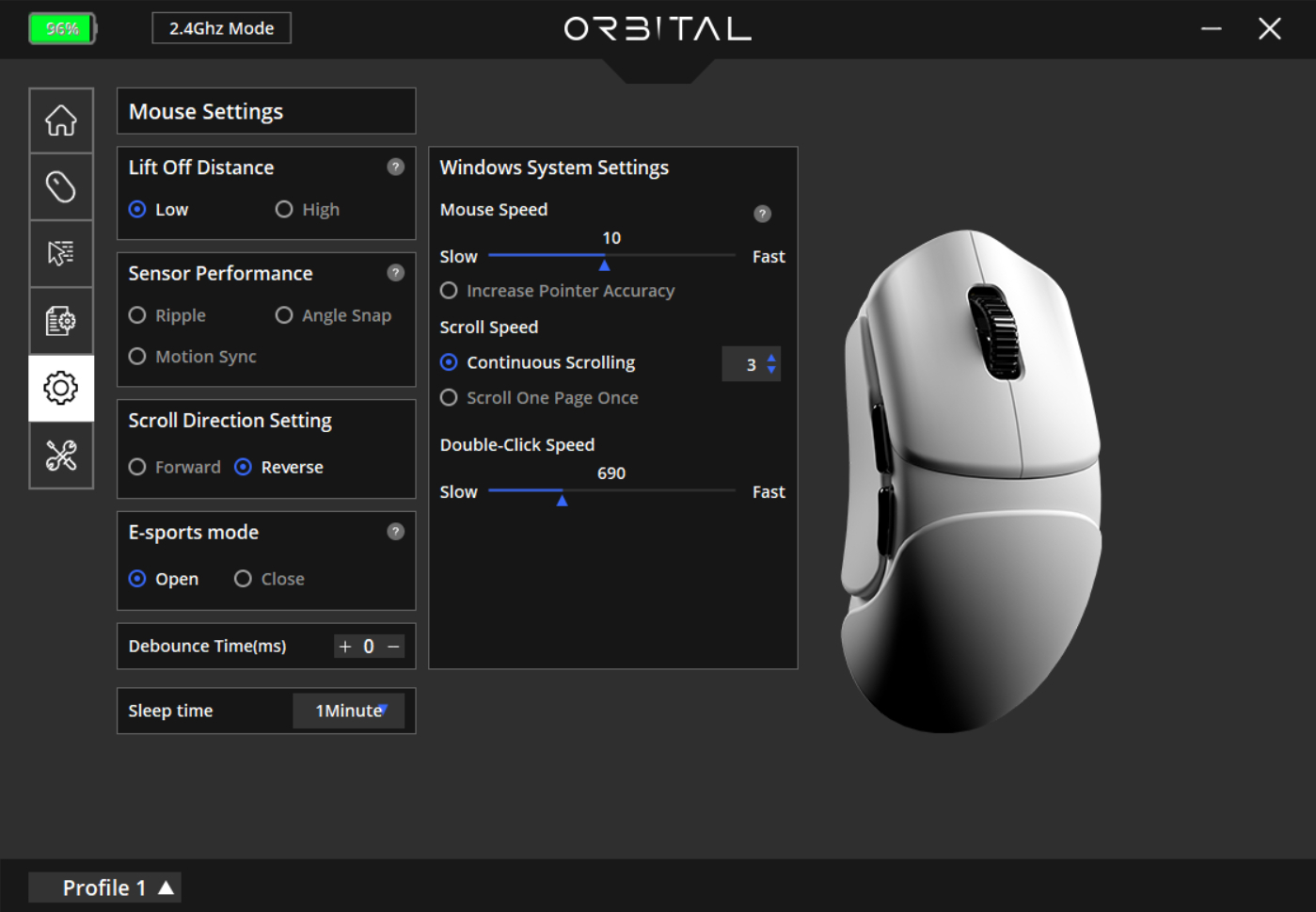
The Pathfinder comes with its own lightweight software. All settings are distributed across five different tabs. The first tab includes button remapping, allowing one to rebind all buttons to mouse, keyboard, media, or macro functions. The second tab contains CPI adjustment at a range from 100 to 30,000 CPI in increments of 50, for up to five color-coded levels. CPI values can be entered manually, and upon confirmation any non-native values are automatically truncated to the next native value. Furthermore, polling rate can be set to 125, 500, or 1000 Hz, with 2000, 4000, and 8000 Hz being exclusive to wireless operation. The third tab has a macro editor. On the fourth page, Windows pointer settings along with various other settings are present. Lift-off distance can be set to either low or high. A "very low" setting, which would be representative of the 0.7 mm mode of the PAW3950, is not present. Furthermore, "Ripple" can be enabled or disabled, which introduces smoothing at higher CPI levels in order to lessen jitter at the cost of added motion delay. Likewise, if enabled, "MotionSync" lowers SPI timing jitter at the cost of increased motion delay equal to up to an entire interval. "Angle Snap" may be enabled or disabled. "Debounce time" effectively controls click latency, with lower values decreasing latency but increasing the likelihood of so-called slam clicking. The selection ranges from 0 to 20 ms and can be adjusted in increments of 1, with 4 ms being the default. A so-called "E-sports mode" is present, which enables corded sensor mode at polling rates of 1000 Hz and lower. "Sleep Time" determines after how much idle time the mouse will enter sleep mode, and can be adjusted from 1 to 40 minutes. The fifth tab features miscellaneous software configuration options. Lastly, profile management is available, too.
All setting changes are saved live to the on-board memory, so the software does not need to be running (or be installed) all the time. On my system, the software had a RAM footprint of 22 MB on average when running in the foreground, which doesn't change when minimized, be it to the taskbar or system tray. Upon exiting the application, all processes are terminated, as they should be.
Battery Life
Orbital does cite battery life numbers, but uses "days," a metric that cannot and should not be taken verbatim, and therefore is ultimately arbitrary and non-descriptive. The software features a percentage-based battery life indicator with supposedly single-digit precision, though it is far from accurate and hence best ignored. For the record, after seven hours of usage at 8000, 2000, and 1000 Hz with corded mode enabled, the indicator still did not drop below 95%, which is impossible. As such, I'm unable to gauge expected battery life.Sleep mode is entered after one minute of inactivity by default, but this can be adjusted within the software.
Using the included USB Type-A to Type-C charging cable, I measured the charging speed during the constant current stage, which sits at 0.188 A when lifted and 0.175 A when not lifted. The battery has a capacity of 300 mAh (3.7 V) and utilizes a 3-pin JST connector.
Nov 26th, 2026 10:33 CST
change timezone
Latest GPU Drivers
New Forum Posts
- Post your CrystalDiskMark speeds (659)
- What's your main Black Friday / Cyber Monday purchase? (18)
- Wireless Internet sharing between PC and router both-ways, is it possible? (24)
- Can you guess Which game it is? (366)
- Making a game in Godot engine (20)
- X79 and/or rampage IV OC'ing thread for those of us still left.... (2459)
- Exploring Local LLMs: Models, Hardware and Setup Experiences (4)
- Linpack Xtreme Released (513)
- Claude credits purchased on or after Dec. 7 now have an expiry date (20)
- Acer TravelMate P414-51 (i5-1135G7): CPU stuck at x4 / ~200 MHz effective under 100% load, no throttle flags. How to find who's clamping it? (1)
Popular Reviews
- ASRock X870E Challenger Wi-Fi White Review
- VZMORE AX9 Max Review
- Upcoming Hardware Launches 2027 (Updated Nov 2026)
- Microsoft Surface Laptop Ultra Review - The Next-gen Arm Laptop
- AMD Ryzen 7 9800X3D Review - The Best Gaming Processor
- AMD Zen 6 Technical Deep Dive
- Corsair RM1200e (Second Generation) Review
- Phantom Blade Zero Performance Benchmark Review - 35 GPUs Tested
- Montech CyberFlow ARGB 360 Review
- Pulsar Office Tour & First Look at P1 Dual-Sensor Mouse
TPU on YouTube
Controversial News Posts
- Jensen Huang Reinstated as CEO of NVIDIA (587)
- NVIDIA Co-Founder and CEO Jensen Huang Officially Resigns (492)
- Report: Jensen Huang Eyes NVIDIA Comeback (281)
- Open Letter Asking NVIDIA to Reinstate Jensen Huang Passes 115,000 Signatures (184)
- OpenAI CEO Argues Home PCs Waste the World's Limited DRAM Supply (152)
- NVIDIA Launches Investigation Into Jensen Huang's Relationship With Suspected Chinese Spy (136)
- Intel "Raptor Lake Next" 16-Core and 20-Core CPUs Surface (130)
- Intel Razor Lake Gets a 12 P-Core bLLC Chip With No E-Cores, Per Leak (94)