 14
ORIGIN CODE Vortex DDR5-6000 192 GB CL26 Review
AMD Memory Overclocking »ORIGIN CODE Vortex Thermal Check


The unexpected addition of an independent cooling module during the unboxing prompted us to reconsider our usual review approach. With the Triple-Fan module included as part of this product, we were curious to determine if it was an essential component or merely an optional enhancement ORIGIN CODE tossed in the box. This distinction would influence our review and give some context and understanding of the potential for additional performance, particularly in terms of memory overclocking. Whether it is utilizing a motherboards 1-Click "Latency Killer" BIOS functions or engaging in full manual memory tuning, the cooling module's impact on DRAM temperatures could redefine what is achievable for those who are looking for a plug-n-play setup.

Our initial attempt at thermal testing took place in early 2025 with the DDR5 Thermal Testing & Analysis article. This provided significant insights into the crucial role thermals play in high-performance memory. Whether it's CAS latency or tREFi, the primary, secondary, and tertiary timings are influenced by the unique characteristics of each manufacturer's ICs—be it Samsung, SK hynix, or Micron—and how they react to temperature variations is different. We found two truths regardless of memory brand; voltage and memory frequency independently contribute to DRAM temperature.
In our initial assessment, we conducted a memory stress test lasting one hour at different fan speeds (RPM), logging the thermal data captured by the thermal couple attached. Measurements were taken from both the front and back of the PCB directly on top of one of the ICs. However, since the temperature variance was consistently within 1 °C for both, we present only Probe #1 data for our graphs. This probe is strategically positioned at the center of the four DIMMs, ensuring a representative of the "worst" thermal profile.
| Temperature Logging | ||||
|---|---|---|---|---|
| Manufacturer: | REED | |||
| Model: | Reed SD-947 | |||
| DRAM Front Thermal Couple: | REED Instruments TP-01 (K-Type) | |||
| DRAM Back Thermal Couple: | REED Instruments TP-01 (K-Type) | |||
| DRAM Thermal Pad Replacement: | Thermal Grizzly Minus Pad Advance 1.0 mm | |||
| Room Temperature: | 18–20 °C | |||
Thermal Testing
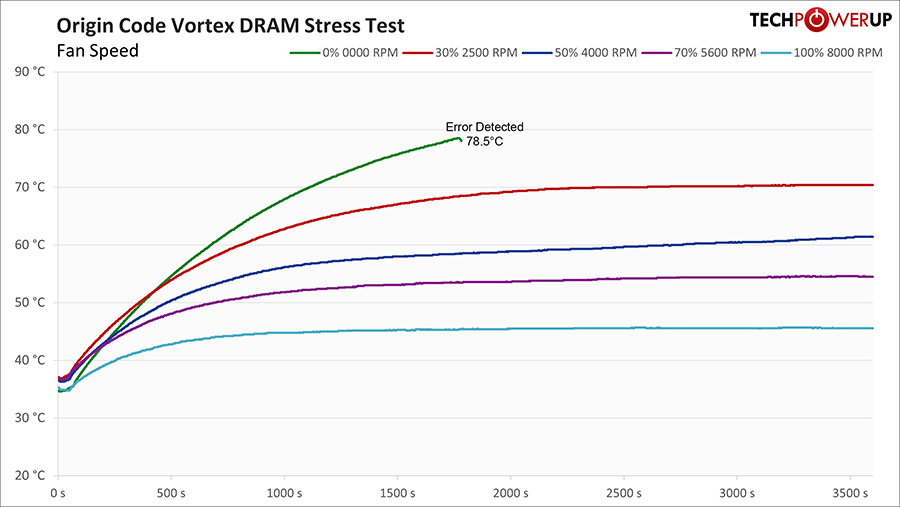
Now let's dive into the thermal performance of the memory under various fan speed scenarios. Starting with no fans active, the memory managed to hold on until the 28-minute mark before errors started cropping up, with temperatures peaking at 78.5 °C. Moving to a 30% fan speed setting, which translates to 2500 RPM, the system found its thermal balance at 70 °C after 38 minutes. At full throttle, with fans running at 100%, equilibrium was achieved remarkably quickly, stabilizing just 15 minutes into the test. Meanwhile, both 50% and 70% fan speeds showed a more gradual increase in temperature, steadily climbing until the conclusion of the test but very close to that equilibrium.
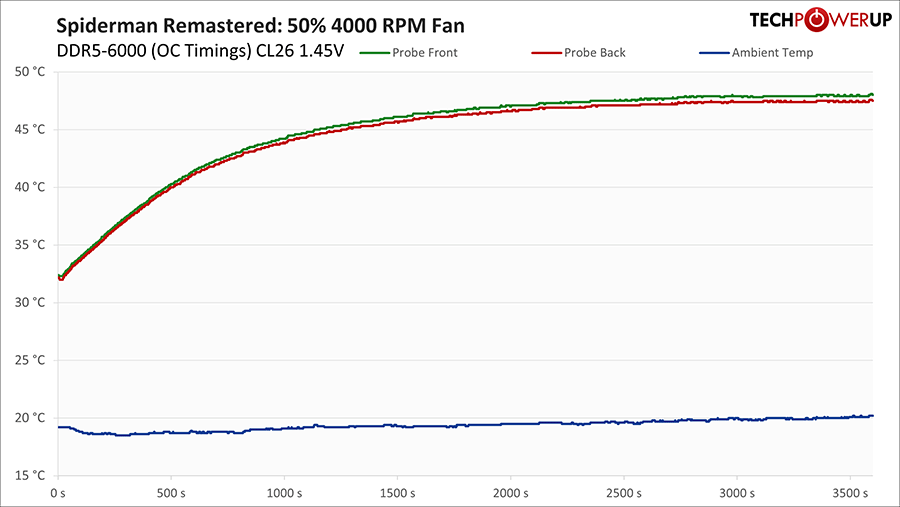
The next graph provides a real-world snapshot of actual temperatures during gaming with a medium overclock, which was emphasizing sub-timings rather than pushing for high frequency. More details on this overclock can be found in the following section. For now, the key point is that this graph illustrates the thermal impact of a memory-tuned overclock in a gaming scenario. We stuck with 50% fan speed because it was not audible over the system and video card fans while the system is under load. It stabilized around 13 °C lower than our stress test.
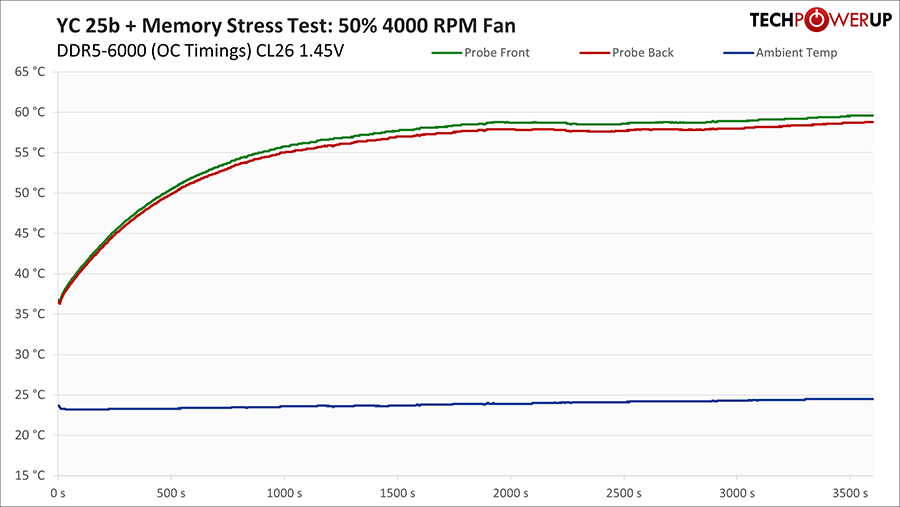
Our final graph uses the same medium overclock, with a continued focus on sub-timings. For this, we recorded thermals following our own Y-Cruncher validation method, which is performed for each review during the overclock portion. We start by running y-cruncher, directly followed by the memory stress testing software Karhu for one hour. This process ensures that the system memory overclock is stable for typical use cases. Setting the fans to 50% resulted in a thermal profile ended up being very similar to our initial fan assessment without the overclock. This indicates that with the cooling module running at 50% (2500 RPM), the peak DRAM temperature stabilizes in the low 60s, even under "worst-case" scenarios using the XMP/EXPO profile of DDR5-6000 and applied voltage of 1.45 V.
Nov 11th, 2026 17:29 CST
change timezone
New Forum Posts
- WarpCoreBench scores! (14)
- Warning for Windows 10 and 11 users running newer AMD GPU drivers (49)
- Bought MAX-P495 - Which model? (29)
- GeekMagic Ultra Smart WiFi Weather Station (3)
- DTS DCH Driver for Realtek HDA [DTS:X APO4 + DTS Interactive] (2809)
- Rare GPUs / Unreleased GPUs (2271)
- Samsung 870 EVO - Beware, certain batches prone to failure! (1486)
- Windows new update 26H2 - Throttlestop (10)
- When you could finally run Crysis maxed out? (42)
- TPU's F@H Team (20569)
Popular Reviews
- AMD Zen 6 Technical Deep Dive
- Upcoming Hardware Launches 2027 (Updated Nov 2026)
- Gigabyte Z890I Aorus Ultra Review
- XPG NIMBUS PLUS Review - Mid-range Chair With Strong Competitors
- INNOCN 45C1R Review - Two QHD Screens, Zero Bezels
- NZXT H7 RGB+ Review
- Phantom Blade Zero Performance Benchmark Review - 35 GPUs Tested
- Gears of War: E-Day Performance Benchmark Review - 35 GPUs Tested
- NZXT H5 Review
- be quiet! Light Mount TKL Keyboard Review
TPU on YouTube
Controversial News Posts
- OpenAI CEO Argues Home PCs Waste the World's Limited DRAM Supply (152)
- NVIDIA Launches Investigation Into Jensen Huang's Relationship With Suspected Chinese Spy (136)
- Intel "Raptor Lake Next" 16-Core and 20-Core CPUs Surface (130)
- Legendary Game Studio BioWare Shuts Down Following EA Layoffs (104)
- Dell CEO Says the Memory Shortage Will Get Worse in 2027 (95)
- NVIDIA GeForce RTX 50-Series Scheduled for up to $500 Price Hike This Week (89)
- Modder Fits RTX 5090 With Four 8-Pin Connectors, Halving Current per Wire (80)
- AMD Radeon Owners Can Now Run Nearly Every DLSS Feature Through Fan-Made Mod (80)