 5
PELADN H05 HX 370 Review
A Look Inside »Design and Build

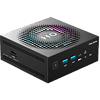
The H05 uses a compact, all-black plastic enclosure that felt pretty solid when I was handling it. The front panel layout keeps frequently used connections easy to reach, including the power button, a 3.5 mm audio jack, two USB 3.2 Gen 2 Type-A ports (which are spaced far enough apart to avoid crowding wider plugs) and a front-facing USB-C port, which works well for fast external storage, quick accessories, or connecting a portable monitor without having to reach around the back of the system.


One of the more distinctive design elements on the H05 is its integrated LED lighting. A textured light ring runs around the top of the chassis, forming a stylized outline around the "H05" branding, and it gives the system more visual presence than the typical Mini-PC you see on a desk.
The lighting can be adjusted by gently pressing the center of the top panel, cycling through several modes. These include a static glow, a slow circular motion, and multicolor effects, including a rainbow option. For users who prefer a cleaner look, the lighting can also be turned off entirely, allowing the system to blend in more easily with a work-focused setup. It has no impact on performance, but it does add a bit of visual personality that you do not often see in this category.


Around the rear, the H05 houses most of its connectivity, including a HDMI 2.0 port, a DisplayPort, dual 2.5 GbE Ethernet ports, two USB 2.0 Type-A ports for peripherals, and the DC power input. Venting along the rear and side panels provides a path for warm air to exit the enclosure.
Nov 20th, 2026 14:13 PST
change timezone
Latest GPU Drivers
New Forum Posts
- 1 - 5 person file storage server equivalent accasible from anywhere + general VM server. (0)
- WarpCoreBench scores! (81)
- How to prevent OLED burn damage due to PC freezes or power outtages? (48)
- Honestly, do you care about GTA VI? (208)
- When you could finally run Crysis maxed out? (63)
- GTA VI (20)
- Anthrophics IPO (25)
- GeekMagic Ultra Smart WiFi Weather Station (8)
- Very unusual two gaming-pc scenarios. (35)
- Can i play GTA 6 now? (Joke) (14)
Popular Reviews
- AMD Zen 6 Technical Deep Dive
- Ugreen NASync DXP4800 GT Review
- Microsoft Surface Laptop Ultra Review - The Next-gen Arm Laptop
- Corsair RM1200e (Second Generation) Review
- Acemagic Retro X3 Review
- Upcoming Hardware Launches 2027 (Updated Nov 2026)
- Pulsar Office Tour & First Look at P1 Dual-Sensor Mouse
- Biwin Black Opal NV7400 2 TB Review
- AMD Ryzen 7 9800X3D Memory Performance Scaling
- AMD Ryzen 7 9800X3D Review - The Best Gaming Processor
TPU on YouTube
Controversial News Posts
- NVIDIA Co-Founder and CEO Jensen Huang Officially Resigns (490)
- Report: Jensen Huang Eyes NVIDIA Comeback (255)
- Open Letter Asking NVIDIA to Reinstate Jensen Huang Passes 115,000 Signatures (184)
- OpenAI CEO Argues Home PCs Waste the World's Limited DRAM Supply (152)
- NVIDIA Launches Investigation Into Jensen Huang's Relationship With Suspected Chinese Spy (136)
- Intel "Raptor Lake Next" 16-Core and 20-Core CPUs Surface (130)
- Legendary Game Studio BioWare Shuts Down Following EA Layoffs (104)
- Dell CEO Says the Memory Shortage Will Get Worse in 2027 (95)