 3
Razer Cobra Hyperspeed Review
Value & Conclusion »Software
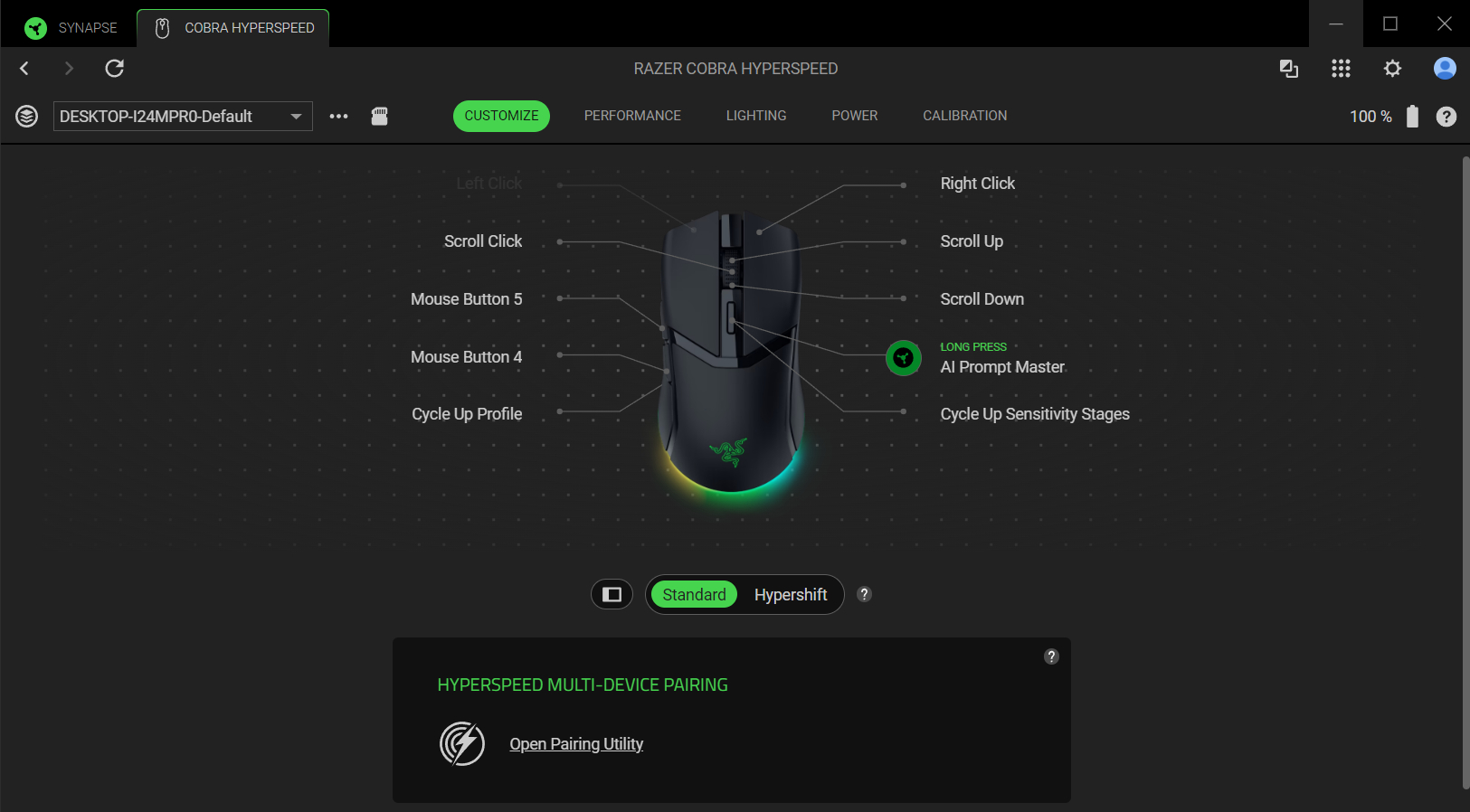
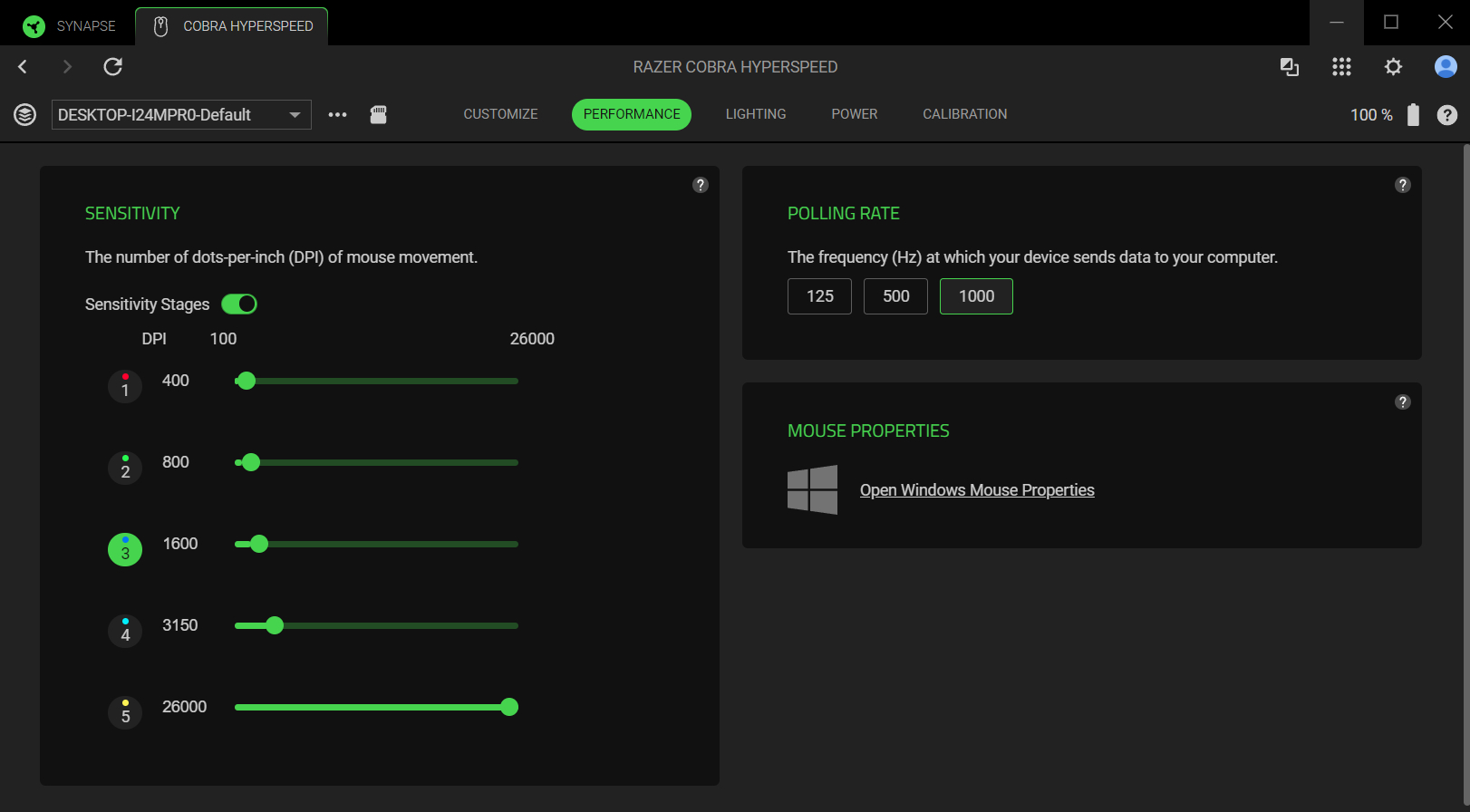


The Cobra Hyperspeed is exclusively compatible with Synapse 4. In terms of functionality, Synapse 4 is very similar to Synapse 3, but the basic structure has changed. "Razer Central" has been retired, and instead Synapse acts as a browser of sorts, with additional modules (such as macros) being provided across individual tabs. As with Synapse 3, an online account will be required for any profile-syncing, though proceeding with a guest account that will be restricted to local profile saving is still possible.
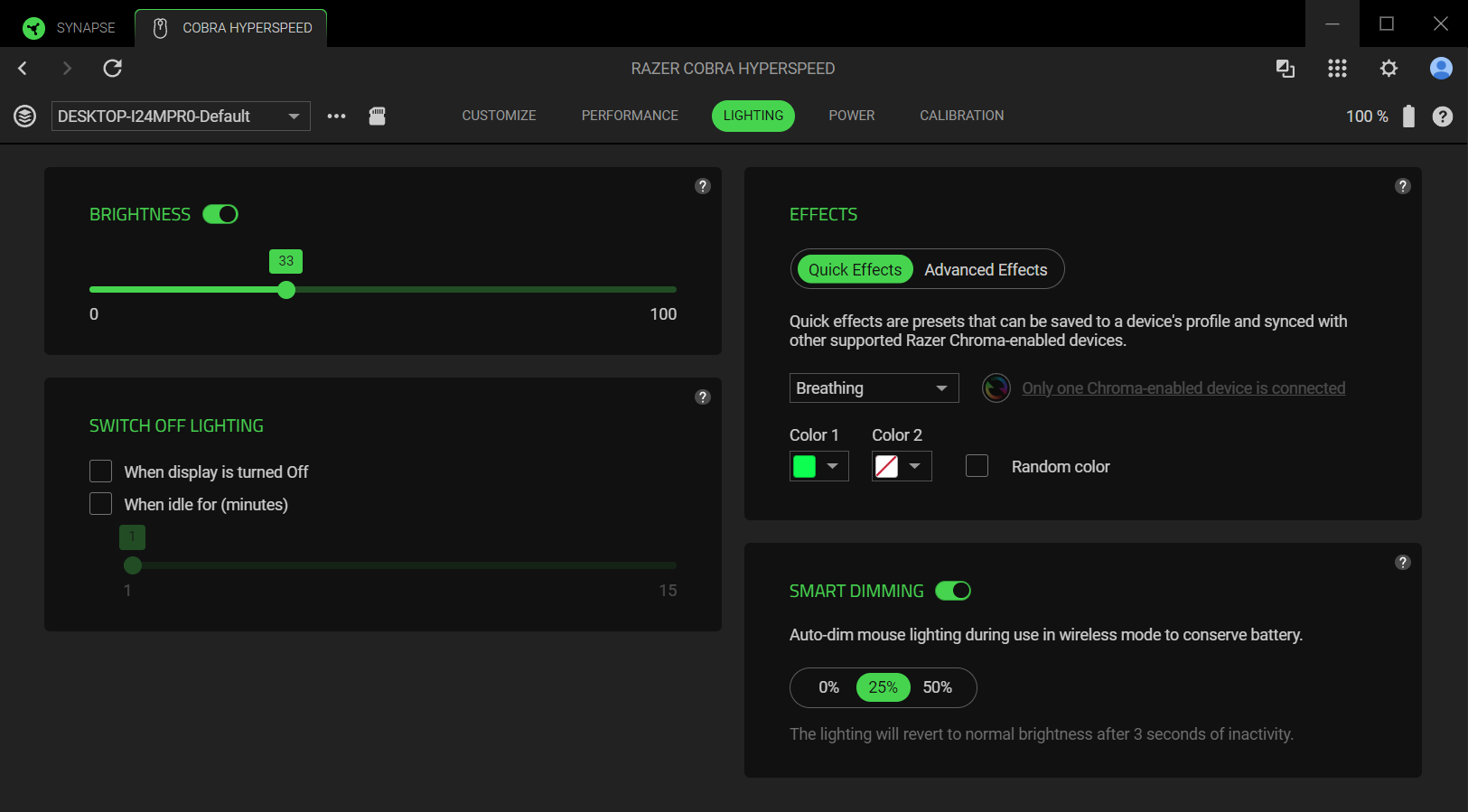
All settings are accessible through five tabs. "Customize" houses button remapping, which also includes a HyperShift function to enable a second set of button maps that can be accessed upon pressing a dedicated shift button. "Performance" is used to adjust CPI for up to five color-coded levels, ranging from 100 to 26,000 CPI in increments of 50. Any non-native values will be truncated to native ones. Polling rate can be set to 125, 500, or 1000 Hz. The "Lighting" tab is detailed below. The fourth tab, called "Power," enables one to set the idle time (in minutes) after which the mouse enters sleep mode, as well as the battery status percentage at which Low Power mode is engaged. "Calibration" allows one to adjust the lift-off distance between two presets (1/2 mm). Lastly, profile management is available, too.
All setting changes are applied immediately and saved to the on-board memory, so the software does not need to be running (or be installed) all the time. On my system, Synapse had a RAM footprint of 448 MB on average when running in the foreground and with the device tab selected, which doesn't change when minimized, be it to the taskbar or system tray. Upon exiting the application, several processes with an overall RAM footprint of 77 MB keep running. Remarkably, these processes continue to load even if Synapse is set to not auto-start with Windows. The most convenient way of terminating these processes is to run any recent Razer mouse firmware updater.
Lighting
The Cobra Hyperspeed has two physical lighting zones, which are the logo and underside at the back of the mouse. Eight pre-defined lighting effects are available: Audio Meter (lighting reacts to audio playback), Breathing, Reactive (lighting reacts to button inputs), Spectrum Cycling, Starlight, Static, Tidal, and Wave. Brightness can be adjusted, and for most effects, the colors are adjustable as well. By using Chroma Studio, creating more advanced effects is also possible. Additionally, the lighting can be configured to switch off in idle or when the display is turned off. Lastly, a new feature called "Smart Dimming" is present as well, which lowers brightness to the set percentage when moving the mouse, and restores the original brightness after not moving the mouse for three seconds. Flipping the switch above the brightness slider disables illumination altogether.Color accuracy and vibrancy are excellent throughout. Below is a short demonstration video in which I go through the Breathing, Spectrum Cycling, and Wave lighting effects. Please note that brightness has been set to 100%:
Battery Life
Razer cites a battery life of up to 110 hours using 2.4 GHz wireless at 1000 Hz and up to 170 hours using Bluetooth, presumably without illumination in both cases. The software includes a percentage-based battery life indicator with single-digit accuracy, though a fuel gauge IC is not present, which is why it is unsurprising that even after more than four hours of usage with illumination enabled at 1000 Hz, it still showed 99%. Thus, I'm unable to gauge expected battery life.After not moving the mouse for a period of time set in Synapse, the Cobra Hyperspeed enters a sleep mode from which it can be woken up by moving the mouse, but not by clicking a main button.
Using the included USB Type-A to Type-C charging cable, I measured the charging speed during the constant current stage, which typically sits at 0.198 A, though momentarily, it will drop to around 0.02 A. The battery has a capacity of 450 mAh (3.87 V) and utilizes a 3-pin JST connector.
Nov 26th, 2026 10:19 CST
change timezone
Latest GPU Drivers
New Forum Posts
- What's your main Black Friday / Cyber Monday purchase? (18)
- Wireless Internet sharing between PC and router both-ways, is it possible? (24)
- Can you guess Which game it is? (366)
- Post your CrystalDiskMark speeds (658)
- Making a game in Godot engine (20)
- X79 and/or rampage IV OC'ing thread for those of us still left.... (2459)
- Exploring Local LLMs: Models, Hardware and Setup Experiences (4)
- Linpack Xtreme Released (513)
- Claude credits purchased on or after Dec. 7 now have an expiry date (20)
- Acer TravelMate P414-51 (i5-1135G7): CPU stuck at x4 / ~200 MHz effective under 100% load, no throttle flags. How to find who's clamping it? (1)
Popular Reviews
- ASRock X870E Challenger Wi-Fi White Review
- VZMORE AX9 Max Review
- Upcoming Hardware Launches 2027 (Updated Nov 2026)
- Microsoft Surface Laptop Ultra Review - The Next-gen Arm Laptop
- AMD Ryzen 7 9800X3D Review - The Best Gaming Processor
- AMD Zen 6 Technical Deep Dive
- Corsair RM1200e (Second Generation) Review
- Phantom Blade Zero Performance Benchmark Review - 35 GPUs Tested
- Montech CyberFlow ARGB 360 Review
- Pulsar Office Tour & First Look at P1 Dual-Sensor Mouse
TPU on YouTube
Controversial News Posts
- Jensen Huang Reinstated as CEO of NVIDIA (586)
- NVIDIA Co-Founder and CEO Jensen Huang Officially Resigns (492)
- Report: Jensen Huang Eyes NVIDIA Comeback (281)
- Open Letter Asking NVIDIA to Reinstate Jensen Huang Passes 115,000 Signatures (184)
- OpenAI CEO Argues Home PCs Waste the World's Limited DRAM Supply (152)
- NVIDIA Launches Investigation Into Jensen Huang's Relationship With Suspected Chinese Spy (136)
- Intel "Raptor Lake Next" 16-Core and 20-Core CPUs Surface (130)
- Intel Razor Lake Gets a 12 P-Core bLLC Chip With No E-Cores, Per Leak (94)