 20
TerraMaster F4-424 Max Review - The fastest NAS we've tested so far
Value & Conclusion »Power
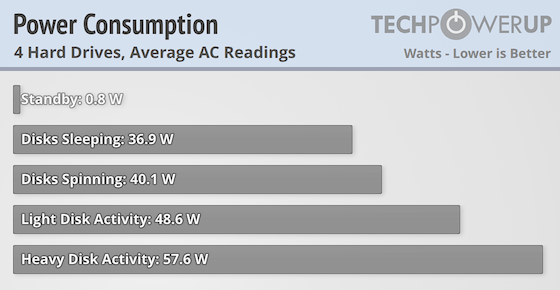
Intel's Core i5-1235U has a maximum turbo power of 55 watts and a base power rating of 15 watts, which shows straight away in the power consumption graph above. It makes the F4-424 Max the most power hungry NAS we've tested, at least when it's sitting around idle. However, as soon as some data is being copied, it's slightly more power efficient compared to the Ugreen NASync DXP4800 Plus, despite the Ugreen having half the CPU cores, although both CPUs have the same power ratings from Intel. Ideally we'd like to have seen better power efficiency with the drives sleeping, but after setting the drives to sleep after 10 minutes and then waiting for 20 minutes, the drives would still wake up from time to time. This means we couldn't quite get a good measurement with the drives asleep, which reflects on the noise levels below. With the new power meter, we did notice that the supplied power brick might not be the best in class, as in standby mode we saw a lot of fluctuation, with it going from 0 watts all the way up to 2.2 watts, but most of the time it was settling somewhere between 0.3 and 1.4 watts. This means that the supplied power brick doesn't meet the current EU regulations on standby power, even if it's only marginally worse.
Noise
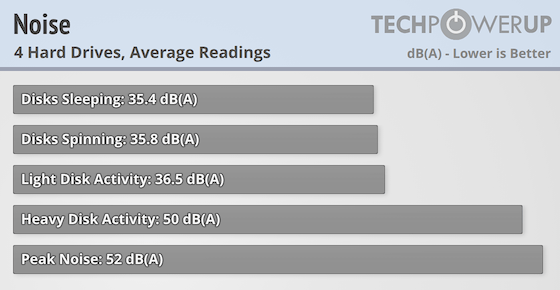
As pointed out above, the lowest noise level of the F4-424 Max isn't very good, but it wasn't because the fan was particularly noisy, but rather because the drives would keep spinning up, even when they were set to go to sleep when not used. Even waiting for 20 minutes, after setting them to sleep after 10 minutes of no activity didn't seem to make any difference. On the other hand, the noise level didn't go up that much when the drives where in use either, unless multiple write and read operations took place at once. Peak noise was also very reasonable, largely due to the single fan that was cooling the entire unit.
Temperature
As we saw in the F8 SSD Plus review, TOS 6 now offers temperature readings and the Core i5-1235U SoC was idling at around 49 degrees C in an ambient temperature of 25 degrees C and this was with the fan running at around 745-760 rpm. Under normal load, the temperature jumped up a bit, but it stayed under 60 degrees. We didn't see any crazy peak temperatures during our testing, although we would expect the SoC to run hotter when under heavy load. The fan normally stayed around 1000 rpm and during our testing, the hard drives seemed to produce more noise than the fan. The hard drives varied somewhat in temperature between 32 and 36 degrees when in use and the SSDs reached as high as 60 degrees, which is still well within the normal operating range for a modern NVMe SSD. Keep in mind that the temperature readings were done while copying files, using the F4-424 Max for other things, such as running Docker images or databases, could result in different temperatures.
Nov 14th, 2026 00:06 CST
change timezone
Latest GPU Drivers
New Forum Posts
- Tell me about your favourite graphics card (35)
- What are you playing? (26216)
- no "PhysX" workable (9)
- AI generated images... (224)
- Crimson Desert (31)
- RenoDX HDR - how to view the differnce Before&After in game? (0)
- Displayport DP80 3M (10ft) cable that can achieve 80gbps stable? (5)
- I'll flash a ASUS ROG Strix RX480 O8G in Cause of Code 43, as a Newbie (1)
- Opinion on Monitor Replacement (6)
- TMOG - post your benchmark results here (16)
Popular Reviews
- AMD Zen 6 Technical Deep Dive
- Corsair HX1000i Shift Crystal Review
- NZXT C1200 Platinum Review
- Upcoming Hardware Launches 2027 (Updated Nov 2026)
- ASUS ROG Strix B850-I Gaming Wi-Fi7 W Review
- Montech King 95 3D PRO Review
- NZXT H7 RGB+ Review
- NZXT H5 Review
- Phantom Blade Zero Performance Benchmark Review - 35 GPUs Tested
- XPG NIMBUS PLUS Review - Mid-range Chair With Strong Competitors
TPU on YouTube
Controversial News Posts
- NVIDIA Co-Founder and CEO Jensen Huang Officially Resigns (380)
- OpenAI CEO Argues Home PCs Waste the World's Limited DRAM Supply (152)
- NVIDIA Launches Investigation Into Jensen Huang's Relationship With Suspected Chinese Spy (136)
- Intel "Raptor Lake Next" 16-Core and 20-Core CPUs Surface (130)
- Legendary Game Studio BioWare Shuts Down Following EA Layoffs (104)
- Dell CEO Says the Memory Shortage Will Get Worse in 2027 (95)
- NVIDIA GeForce RTX 50-Series Scheduled for up to $500 Price Hike This Week (89)
- Modder Fits RTX 5090 With Four 8-Pin Connectors, Halving Current per Wire (80)