 32
TerraMaster F4-425 Plus Review
Value & Conclusion »Power
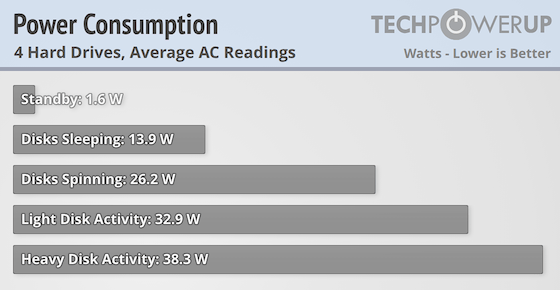
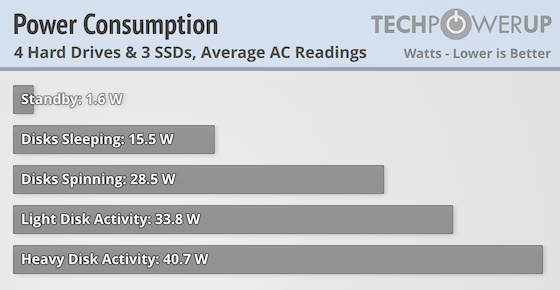
The Intel Processor N150 has a base power of a mere 6 watts, but Intel doesn't provide any other power data. As such, it's a bit hard to work out how much power the Intel SoC draws, but we ended up at a similar idle power draw as the one TerraMaster claims, which is around 14 W. Add three SSDs and you have an extra 1.5 W of power draw, which seemed to apply both at idle and all the different tested usage stages. TerraMaster advertises a 45 W power draw when in use, but our testing came in a few watts below that, even with the SSDs installed. The overall power usage of the F4-425 Plus is slightly lower or on par with the F4-424, suggesting that the Intel Processor N150 is a smidgen more power efficient than the Intel Processor N95, but not enough to really matter. Admittedly the two Realtek 5 Gbps Ethernet controllers draw a little bit more power than the 2.5 Gbps version, but even in full use, this wouldn't be more than a single watt. As such, the F4-425 Plus is pretty power efficient for the performance it can deliver and there's nothing that sticks out here.
Noise
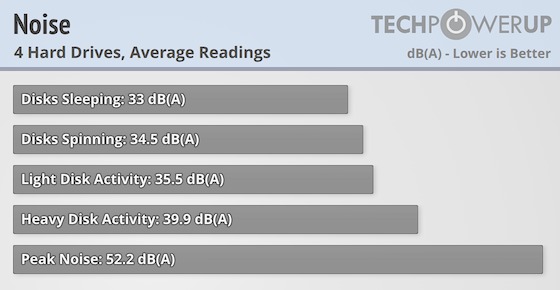
The one thing that didn't impress us was the fan noise of the F4-425 Plus. Noise is admittedly a very personal and subjective thing, but during our testing, the fan was audible as soon as there was any kind of load on the system that lasted longer than a handful of minutes. The peak noise is with the fan at full speed—it peaks at just over 1500 rpm—but most of the time, the fan operated somewhere between 650-1200 rpm. After an extended idle period, the fan would come to a stop, something we haven't noticed with other TerraMaster products. As always, the noise is tested just above the fan, so the noise measurements are not what you'll unless you have the NAS on a desk next to you. Even so, the F4-425 Plus came across as a lot noisier than the F4-424 to our ears, even if the measurements are quite similar. Admittedly there are some manual control options for the fan, but at the same time, forcing it to low speed could shorten the lifespan of your mechanical spinners. This is one of the last recurring problems that TerraMaster needs to fix, as a better quality fan would help a lot here. At least this time around, it's easy to do something about it on your own, courtesy of the standard fan header.
Temperature
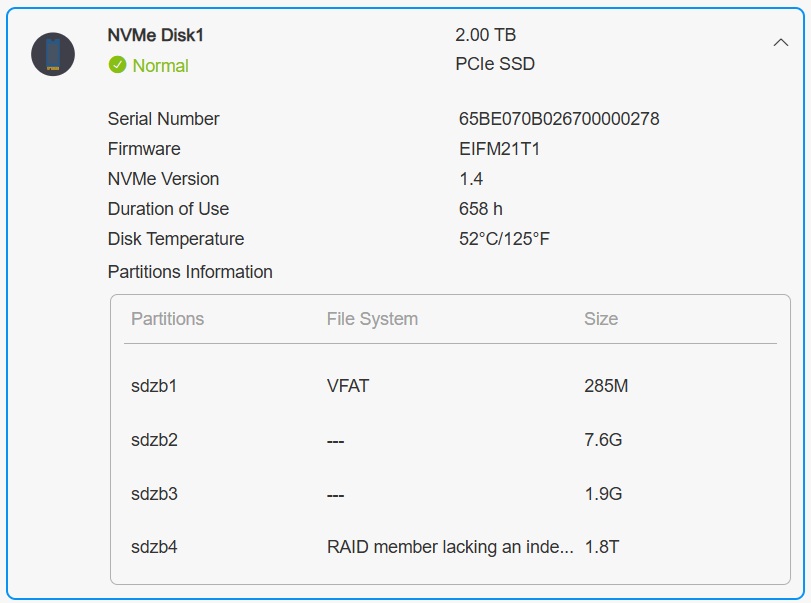
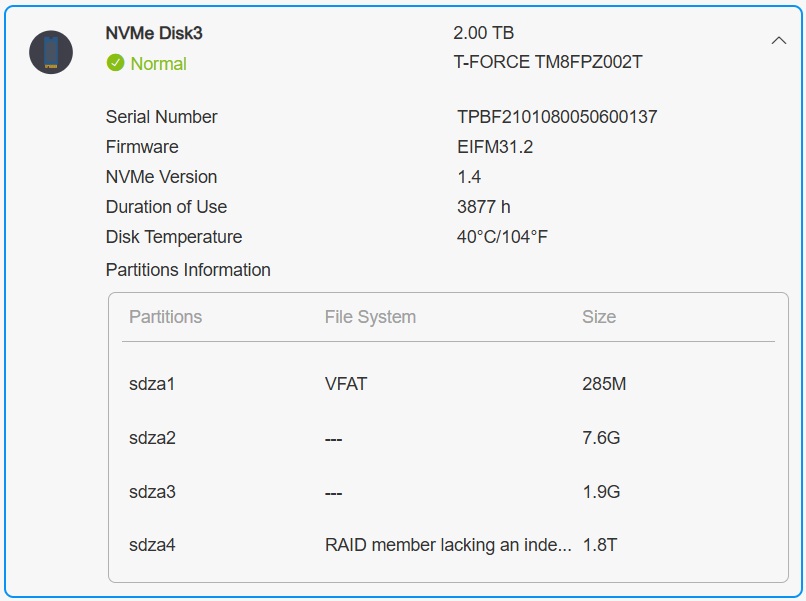
Idle CPU temps where at around 43 degrees Celsius in an ambient temperature of around 22 degrees Celsius, with the internal device temperature sensor at around 35 degrees Celsius. At light load, the CPU would sit around the 50 degree mark with the fan spinning at around 800 rpm and the hard drives around 30 degrees. As mentioned, there's now space for heatsinks on the SSDs, but you have to bring your own and anything over around 6 mm won't fit. Even so, the drive with had with a heatsink idled at 28 degrees vs. 38 degrees for the one without heatsink. As you can in the screenshots above, the first is of an SSD without heatsink, which hit 52 degrees during use, whereas the second screenshot is the temperature of an SSD with heatsinks, which only reached 40 degrees. Both drives where installed in the vertical M.2 slots on each side of the memory module for the thermal test. None of the SSD temperatures measured ended up being outside the normal operating range, but it's pretty clear that a heatsink makes a difference and there's no reason not to use one in your NAS if there's space.
Nov 14th, 2026 22:03 CST
change timezone
Latest GPU Drivers
New Forum Posts
- WarpCoreBench scores! (40)
- What can the FX 8320 do today? Here is the answer. (47)
- Tell me about your favourite graphics card (82)
- Recommendations Wanted - Affordable Enterprise SSD for Boot (3)
- Planning for Prolonged High Prices and Maintaining What You Already Have (71)
- [INTEL]-How To Update Your Microcode for Intel HX 13/14th Gen. CPUs Laptops/Mobile Easily. (260)
- [Intel AX1xx/AX2xx/AX4xx/AX16xx/BE2xx/BE17xx] Intel Modded Wi-Fi Driver with Intel® Killer™ Features (632)
- Optical Disc Drive owners club (208)
- Game Soundtracks You Love (1287)
- 9070 GRE 3.9ghz validation reached. (11)
Popular Reviews
- AMD Zen 6 Technical Deep Dive
- ASUS ROG Strix B850-I Gaming Wi-Fi7 W Review
- Corsair HX1000i Shift Crystal Review
- Upcoming Hardware Launches 2027 (Updated Nov 2026)
- Montech King 95 3D PRO Review
- NZXT C1200 Platinum Review
- NZXT H7 RGB+ Review
- NZXT H5 Review
- Phantom Blade Zero Performance Benchmark Review - 35 GPUs Tested
- AMD Ryzen 7 9800X3D Review - The Best Gaming Processor
TPU on YouTube
Controversial News Posts
- NVIDIA Co-Founder and CEO Jensen Huang Officially Resigns (408)
- OpenAI CEO Argues Home PCs Waste the World's Limited DRAM Supply (152)
- NVIDIA Launches Investigation Into Jensen Huang's Relationship With Suspected Chinese Spy (136)
- Intel "Raptor Lake Next" 16-Core and 20-Core CPUs Surface (130)
- Legendary Game Studio BioWare Shuts Down Following EA Layoffs (104)
- Dell CEO Says the Memory Shortage Will Get Worse in 2027 (95)
- NVIDIA GeForce RTX 50-Series Scheduled for up to $500 Price Hike This Week (89)
- Modder Fits RTX 5090 With Four 8-Pin Connectors, Halving Current per Wire (80)