 60
TerraMaster F8 SSD Plus Review - Compact and Quiet
Value & Conclusion »Power
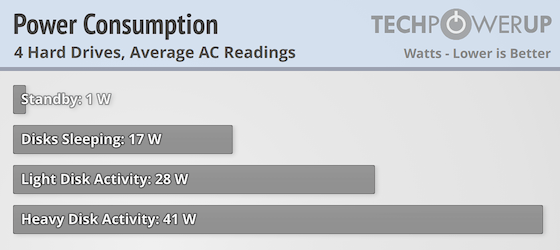
The power consumption of the Intel Core i3-N305 SoC is surprisingly similar to the Intel Processor N95, as both have a 15 W TDP rating and our test results suggest that the Core i3-N305 is pretty power efficient for an eight core SoC. However, a NAS is obviously using a lot more power than just the processor, but in this case we don't have any mechanical drives which you'd think would make the total power consumption a fair bit lower than your average NAS, however, this is not what we saw. Idle power consumption with the web UI being accessed was normally somewhere around 17 W, which jumped up to around 28-29 W when doing simple file copying and peaked at just over 41 W when heavily loaded. This is in line with the power consumption of the F4-424 with four WD Red Plus 4 TB hard drives installed. Also keep in mind that we only tested with half of the M.2 slots filled, so with more SSDs installed, it would draw a bit more power.
Sadly the only power controls are still hard drive sleep time, Wake on LAN, auto power on and a power on/off scheduler, but on the other hand the F8 SSD Plus runs so quiet—even at full load—that things like fan control aren't really needed.
Noise
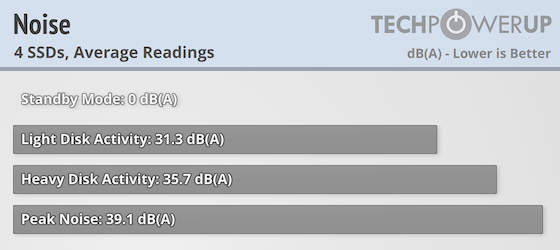
The F8 SSD Plus surprised us with how quiet it was during operation, as at no point could we hear the pair of 50 mm fans, despite them hitting 2,300 rpm when the NAS was under heavy load. TerraMaster rates the F8 SSD Plus noise output at 19 dB(A), with the measurement taken one meter away from the device, albeit in standby mode. Unfortunately our test equipment wasn't good enough to measure the noise in standby mode. In actual testing, placing the noise meter just above the fan, by placing the F8 SSD Plus on its side, we were obviously able to measure higher noise levels, because we placed the noise meter so close to the fans. However, in standby mode, the fans stop, hence the 0 dB(A) measurement here. With the fan spinning at around 1,400 rpm, we were pretty much measuring the room noise, if you consider that a quiet room at night is around 30 dB(A) and the noise meter used doesn't go lower than 30 dB(A). At full tilt, we didn't manage to measure noise over 40 dB(A), which is the equivalent of a quiet library, which translates to the F8 SSD Plus being whisper quiet even with the fans at 2,300 rpm. Yes, if you stick your ear to it, you can hear the fans, but at any distance from the NAS, it's largely inaudible, which makes it stand out from just about other NAS on the market.
Temperature
TOS 6 has finally gotten temperature readings and the Core i3-N305 SoC was idling at around 50-52 degrees C, which seems like a reasonable temperature. This was with the fans running at around 1,400 rpm and as noted above, this was inaudible about a meter away from the F8 SSD Plus. Under load, the temps jumped up by around 10 degrees during normal operation, but we saw peak temperatures in the lower 70's. This also resulted in higher fan speeds of around 2,300 rpm, but as mentioned, you have to be really close to the NAS to hear any kind of fan noise. This is quite surprising, considering that we're talking about a pair of 50 mm fans, which aren't normally the most quiet fans around. We should also note that the temperature dropped back quite quickly once write operations to the NAS stopped. There's also a device thermal sensor which stayed between 50–52 degrees for most of the time, peaking at 55 degrees. The SSDs were normally sitting at just under 40 degrees at idle and didn't get much warmer in regular usage, but we did see temperatures of above 50 degrees under heavy load, so the supplied heatsinks should be installed on drives without them to assure the longevity of the drives.
Nov 14th, 2026 02:28 CST
change timezone
Latest GPU Drivers
New Forum Posts
- Tell me about your favourite graphics card (38)
- AI generated images... (225)
- 3D Printer Club (850)
- Requesting original VBIOS for Gigabyte RX 5700 XT GAMING OC 8G Rev 2.0 (Micron) (1)
- What are you playing? (26216)
- no "PhysX" workable (9)
- Crimson Desert (31)
- RenoDX HDR - how to view the differnce Before&After in game? (0)
- Displayport DP80 3M (10ft) cable that can achieve 80gbps stable? (5)
- I'll flash a ASUS ROG Strix RX480 O8G in Cause of Code 43, as a Newbie (1)
Popular Reviews
- AMD Zen 6 Technical Deep Dive
- Corsair HX1000i Shift Crystal Review
- NZXT C1200 Platinum Review
- ASUS ROG Strix B850-I Gaming Wi-Fi7 W Review
- Upcoming Hardware Launches 2027 (Updated Nov 2026)
- Montech King 95 3D PRO Review
- NZXT H7 RGB+ Review
- NZXT H5 Review
- Phantom Blade Zero Performance Benchmark Review - 35 GPUs Tested
- XPG NIMBUS PLUS Review - Mid-range Chair With Strong Competitors
TPU on YouTube
Controversial News Posts
- NVIDIA Co-Founder and CEO Jensen Huang Officially Resigns (382)
- OpenAI CEO Argues Home PCs Waste the World's Limited DRAM Supply (152)
- NVIDIA Launches Investigation Into Jensen Huang's Relationship With Suspected Chinese Spy (136)
- Intel "Raptor Lake Next" 16-Core and 20-Core CPUs Surface (130)
- Legendary Game Studio BioWare Shuts Down Following EA Layoffs (104)
- Dell CEO Says the Memory Shortage Will Get Worse in 2027 (95)
- NVIDIA GeForce RTX 50-Series Scheduled for up to $500 Price Hike This Week (89)
- Modder Fits RTX 5090 With Four 8-Pin Connectors, Halving Current per Wire (80)