 1
Thermaltake ARGENT M5 Wireless RGB Review
Value & Conclusion »Software


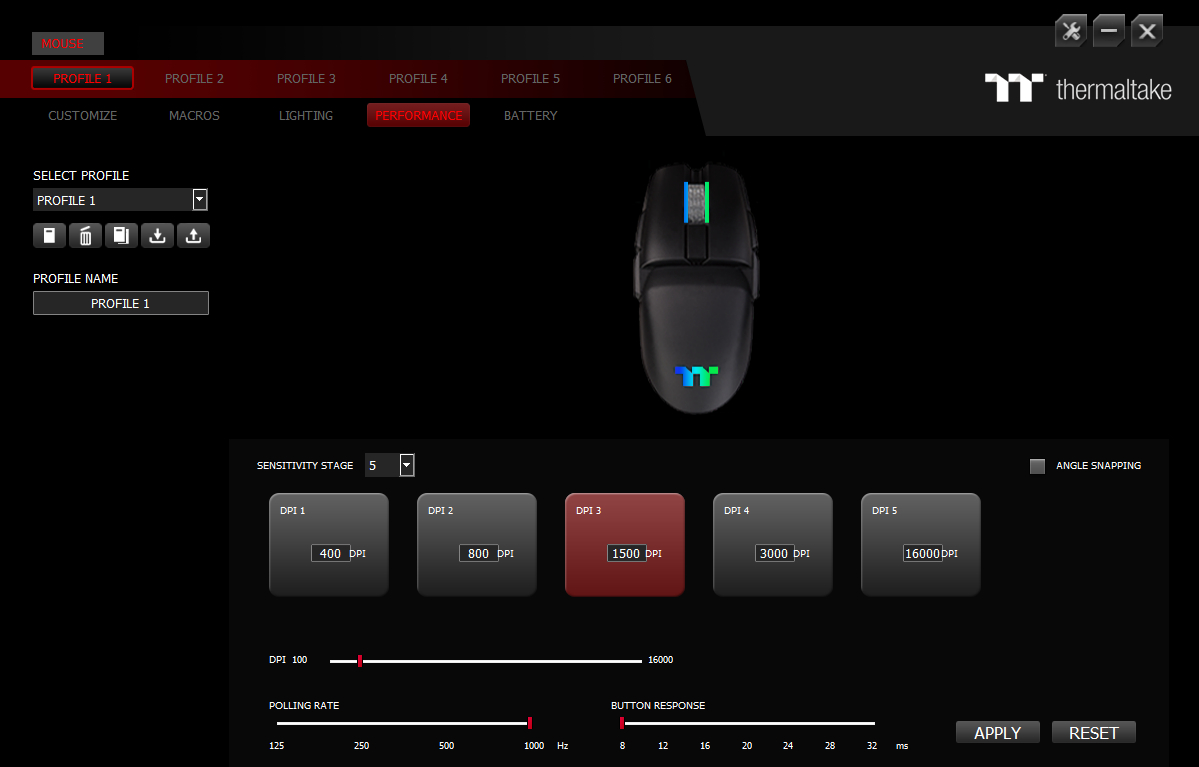

The ARGENT M5 Wireless RGB comes with its own software called iTAKE Engine, which also doubles as the software for the wired M5 RGB. Whereas the wired M5 didn't give me too much trouble, the ARGENT M5 Wireless RGB sure did. After plugging the mouse in for the first time, iTAKE prompted me to update the firmware. I tried doing so, but the mouse entered a seemingly infinite disconnect/reconnect loop, so I unplugged it only for iTAKE to immediately crash whenever I plugged the mouse in again. Next, I tried the M5 Wireless in 2.4 GHz mode, where iTAKE again prompted me to update the firmware. Much to anyone's surprise, this firmware update actually succeeded, but now I was prompted to plug in the cable for another firmware update. After having done so, iTAKE bugged out again, the infinite loop started, and I unplugged and re-plugged the mouse several times until I was suddenly able to regularly enter the software menu. There, several options were entirely broken, as seen below:
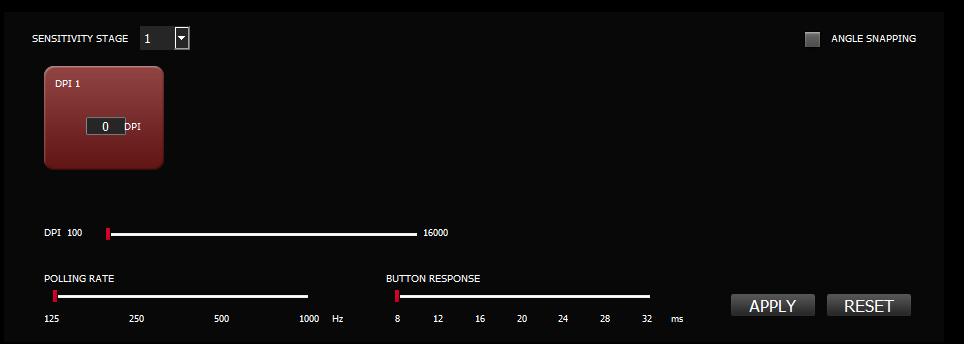
While I was able to fix them eventually, the overall experience can only be described as subpar. I don't even know whether the firmware update was properly applied as there is no mention of the current firmware version, or an update button.
All options are accessible through five different tabs. The first page allows for button remapping to mouse, keyboard, media, and macro functions, along with the option to switch to the left-handed button layout. The second page has the usual macro options. The third page concerns illumination and is detailed below. The fourth page houses CPI adjustment settings for up to six levels and a range of 100 to 16,000 CPI in increments of 100, independently for x and y-sensitivity. Any non-native values are truncated to native ones. Furthermore, options for polling rate adjustment (125/250/500/1000 Hz), angle snapping (on/off), and button response time (8–32 ms, increments of 4) are available. The polling rate slider isn't too reliable as it displays 125 Hz when resetting settings even though 1000 Hz are in fact applied instead. The fifth page features a battery life indicator and power-saving settings. One can specify the number of seconds that need to pass until the mouse enters sleep mode and the charge percentage at which a low power warning is given. There are five on-board configuration profiles as well as regular profile management. Switching on-board profiles takes several seconds, and some functions break at times afterwards. When applied, all settings are saved to the on-board memory, so the software does not need to be running (or be installed) all the time. On my system, the software had a RAM footprint of 78 MB on average when running in the foreground, which doesn't change when minimized to the system tray. On top of the RAM usage, the software also hogs the CPU quite a bit. Upon exiting the application, all processes are terminated, as they should be.
Lighting
The ARGENT M5 Wireless RGB has two logical and physical lighting zones: scroll wheel and logo at the back. Six pre-defined lighting effects in total are available in the software: Static, Pulse, Blink, Wave, RGB Spectrum, and Reactive. For most effects, setting custom colors and adjusting brightness, transition speed, and effect direction is possible for each zone individually. Furthermore, the lighting effects can be synchronized with other ARGENT or Razer Chroma enabled devices. Curiously, there is no dedicated option for turning RGB off, so one has to do it by lowering the brightness to zero.Color accuracy and vibrancy are excellent throughout. Here's a short demonstration video in which I go through the Pulse, Wave, and RGB Spectrum effects.
Battery Life
For Bluetooth operation, Thermaltake promises up to 200 hours of battery life without lighting enabled and 52 hours with lighting enabled. In 2.4 GHz mode, the battery is said to last up to 100 hours without illumination and up to 36 hours with illumination. While the software does features a battery life indicator, its reliability leaves a lot to be desired. The maximum charge level is either 99% or 95% when plugged in, but 100% in 2.4 GHz mode, apparently in 1% increments, but consumption rate wasn't linear. Still, after 9 hours of continuous use in 2.4 GHz mode, the battery life indicator stood at 81%, which suggests that Thermaltake's claims are at least within the realm of possibility.After a set and user-configurable duration of inactivity, the sensor enters a low-power state. Waking it up merely requires moving the mouse. Upon doing so, only the scroll wheel lights up in a single color at first, representing the current charge status, followed by the set lighting effect. The same happens whenever the mouse is first turned on.
Using the included USB Type-A to Micro-USB charging cable, I've measured the charging speed of the ARGENT M5 Wireless RGB during the constant current (bulk) stage to be around 0.460 A, which is just short of the USB current limit. Thermaltake claims the M5 Wireless RGB is capable of 12 V fast-charging at 0.8 A, though I did not test this. Based on my calculations, I estimate the battery to have a capacity of 1000 mAh.
Nov 15th, 2026 08:59 CST
change timezone
Latest GPU Drivers
New Forum Posts
- Recommendations Wanted - Affordable Enterprise SSD for Boot (5)
- budget home NAS – X79, X99 or another platform? (149)
- WireView Pro II GPU Alignment: Wired | Variant: Black (1)
- Planning for Prolonged High Prices and Maintaining What You Already Have (74)
- Technical Issues - TPU Main Site & Forum (2026) (409)
- What generation of Wi-Fi do you use at home (98)
- I'll flash a ASUS ROG Strix RX480 O8G in Cause of Code 43, as a Newbie (5)
- Honestly, do you care about GTA VI? (58)
- Is this anyhow possible, that a GPU (ROG Strix RX480 O8G) can crash the whole PC after "ReFlash" in normal Mode? (2)
- WarpCoreBench scores! (47)
Popular Reviews
- AMD Zen 6 Technical Deep Dive
- ASUS ROG Strix B850-I Gaming Wi-Fi7 W Review
- Corsair HX1000i Shift Crystal Review
- Upcoming Hardware Launches 2027 (Updated Nov 2026)
- Montech King 95 3D PRO Review
- NZXT C1200 Platinum Review
- NZXT H7 RGB+ Review
- NZXT H5 Review
- Phantom Blade Zero Performance Benchmark Review - 35 GPUs Tested
- AMD Ryzen 7 9800X3D Review - The Best Gaming Processor
TPU on YouTube
Controversial News Posts
- NVIDIA Co-Founder and CEO Jensen Huang Officially Resigns (412)
- OpenAI CEO Argues Home PCs Waste the World's Limited DRAM Supply (152)
- NVIDIA Launches Investigation Into Jensen Huang's Relationship With Suspected Chinese Spy (136)
- Intel "Raptor Lake Next" 16-Core and 20-Core CPUs Surface (130)
- Open Letter Asking NVIDIA to Reinstate Jensen Huang Passes 115,000 Signatures (110)
- Legendary Game Studio BioWare Shuts Down Following EA Layoffs (104)
- Dell CEO Says the Memory Shortage Will Get Worse in 2027 (95)
- NVIDIA GeForce RTX 50-Series Scheduled for up to $500 Price Hike This Week (89)