 0
Ugreen NASync DXP4800 GT Review
Value & Conclusion »Power
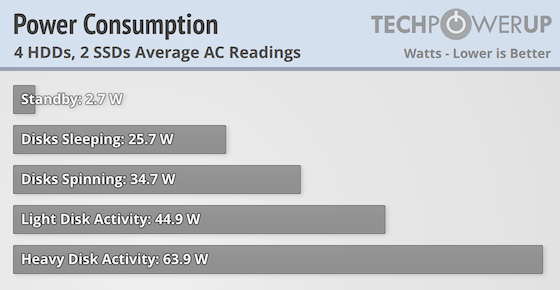
Power efficiency of the DXP4800 GT is decent, as even with a couple of NVMe SSDs installed, it uses slightly less power than the DXP4800 Plus in pretty much all situations. The exception being standby mode, where it's fluctuating a lot and the readings spanned between 0.1 W and 5 W, with the average ending up around 2.7 W, or at least that was a readout that was very common during the fluctuations. It's not massively more power efficient though—a few watts here and there—and it peaked at almost 74 W during heavy testing. In all fairness, we never managed to reach the 18.12 W of idle power that Ugreen claims, but it's rare that we hit the same power figures as the ones claimed by the manufacturer.
Overall things are not bad for this level of hardware though, especially with what technically should be hardware that isn't anywhere near as power efficient as that in the DXP4800 Plus, considering that the AMD Ryzen Embedded R2514 is produced on a 12 nm node vs. a 7 nm node for the Intel Pentium Gold 8505 in the DXP4800 Plus, as well as the GT using less power efficient RAM.
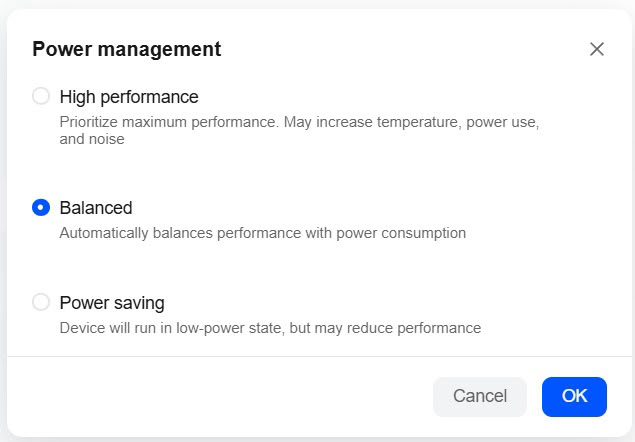
We're still hoping for some more advanced power controls, as the three options on offer don't give the user much control, but it seems to be somewhat par for course when it comes to NAS devices. If nothing else, we'd like to see a bit more detailed information as to what the various modes do, since they're not really telling us what changes are being applied.
Noise
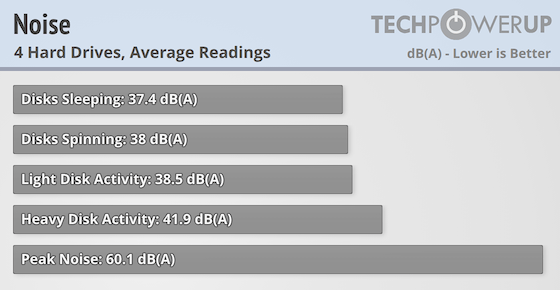
The noise levels were a tad on the high side at idle, although this is once again measured just above the exhaust fan, but with the fan set to auto, it didn't want to go below around 1090 rpm, despite the system having idled for a longer period of time. That said, the DXP4800 GT isn't really noticeable when it sits a couple of meters away from you. On the plus side, it was quieter than the DXP4800 Plus when it was being actively used, as even during quite heavy load it didn't go above 42 dB(A). That said, it was more or less just as loud when the fan was set to full speed, which makes the system fan hit 3950 rpm and the CPU fan 1650 rpm, speeds we never saw or heard during testing.
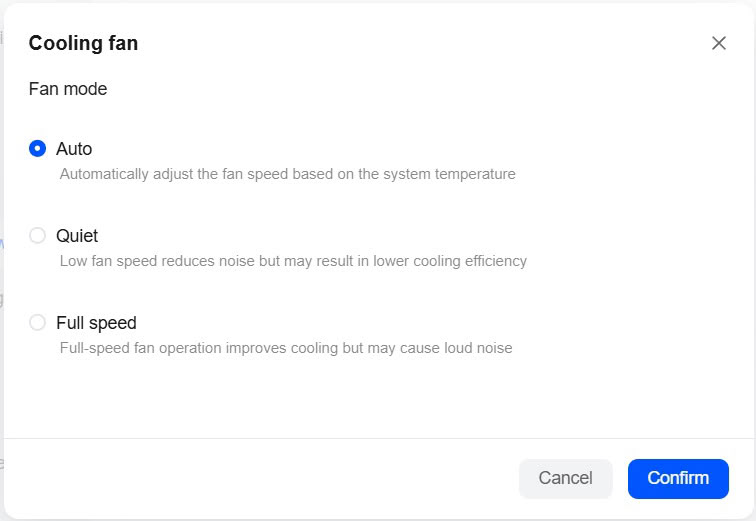
We'd really like to see some more advanced fan control options in UGOS, although the auto mode does work perfectly fine, but there will be situations where some manual control makes sense.
Temperature
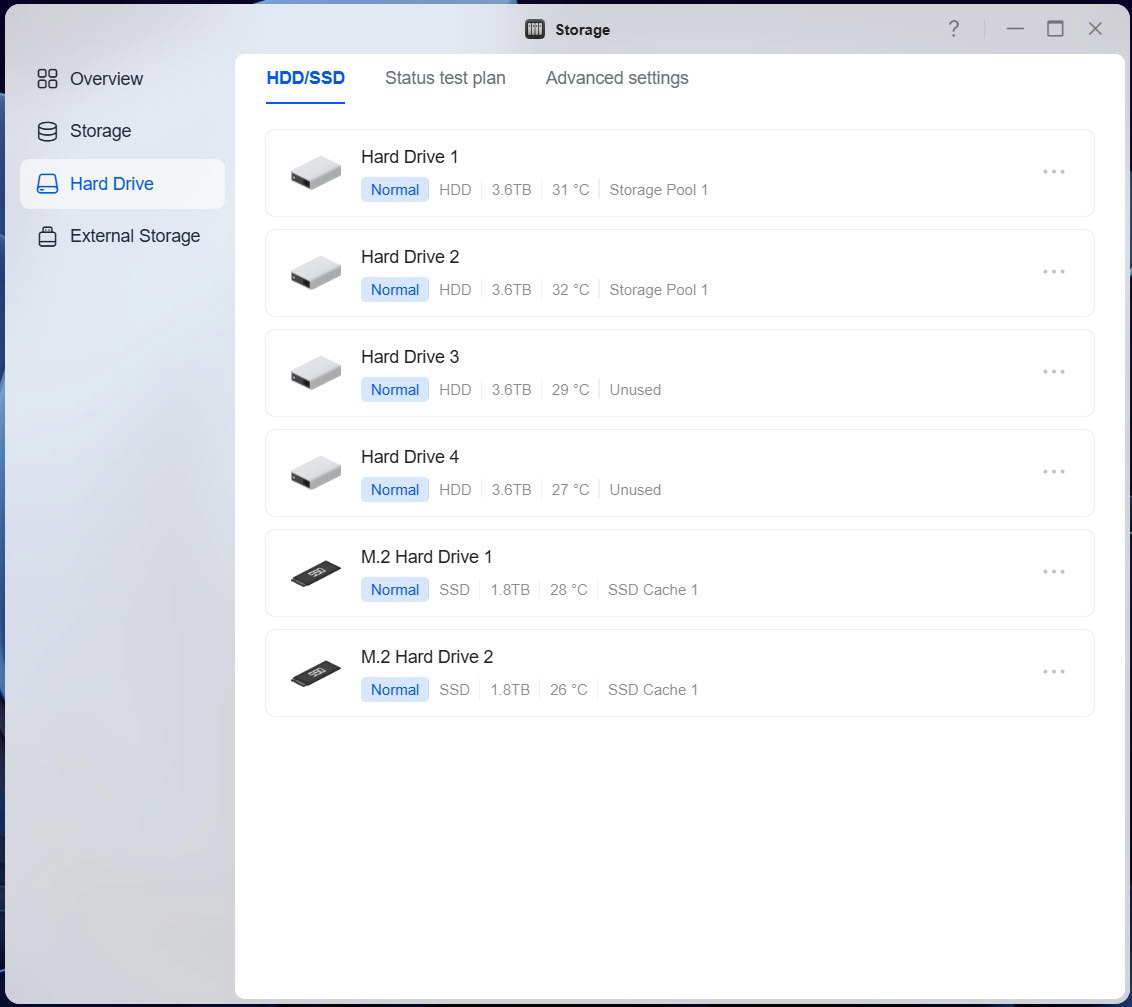
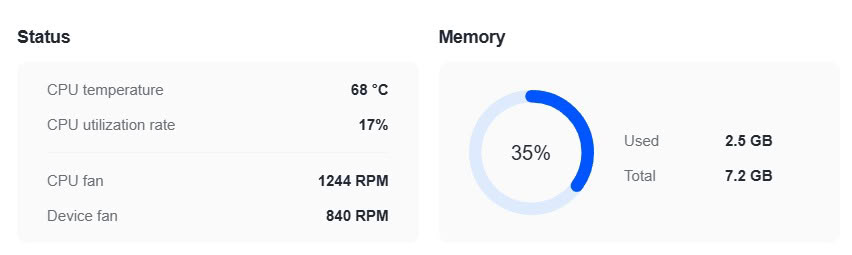
Drive temps were within the normal range that we'd expect to see from a 4-bay NAS and as always, a couple of drives are running a little bit warmer than the other two. The CPU was idling at around 45 °C, quickly hitting around 65–70 °C when applying some load to the system. The CPU fan wasn't spinning above 1300 rpm, while the system fan was operating at around 840 rpm, at load. This was with the fan speed set to "auto" and the performance setting of "balanced." The SSDs stayed around 40 °C during our testing, but whatever you do, don't forget to install the supplied thermal pads, as the SSDs will throttle if you don't.
Nov 18th, 2026 13:14 PST
change timezone
Latest GPU Drivers
New Forum Posts
- Can i play GTA 6 now? (Joke) (4)
- Very unusual two gaming-pc scenarios. (11)
- Dell Workstation Owners Club (3513)
- Any other old-timers here planning to play WoW Forever? (151)
- Time to upgrade CPU and MOBO (33)
- The Filthy, Rotten, Nasty, Helpdesk-Nightmare picture clubhouse (2876)
- WarpCoreBench scores! (67)
- Honestly, do you care about GTA VI? (144)
- Acer Predator BiFrost Radeon RX 9070 OC (9)
- DTS DCH Driver for Realtek HDA [DTS:X APO4 + DTS Interactive] (2814)
Popular Reviews
- Acemagic Retro X3 Review
- Upcoming Hardware Launches 2027 (Updated Nov 2026)
- AMD Zen 6 Technical Deep Dive
- ASUS ROG Strix B850-I Gaming Wi-Fi7 W Review
- Corsair HX1000i Shift Crystal Review
- Biwin Black Opal NV7400 2 TB Review
- Chieftec Iceberg PRO 360 DARK Review
- AMD Ryzen 7 9800X3D Review - The Best Gaming Processor
- Phantom Blade Zero Performance Benchmark Review - 35 GPUs Tested
- Pulsar Office Tour & First Look at P1 Dual-Sensor Mouse
TPU on YouTube
Controversial News Posts
- NVIDIA Co-Founder and CEO Jensen Huang Officially Resigns (478)
- Report: Jensen Huang Eyes NVIDIA Comeback (186)
- Open Letter Asking NVIDIA to Reinstate Jensen Huang Passes 115,000 Signatures (184)
- OpenAI CEO Argues Home PCs Waste the World's Limited DRAM Supply (152)
- NVIDIA Launches Investigation Into Jensen Huang's Relationship With Suspected Chinese Spy (136)
- Intel "Raptor Lake Next" 16-Core and 20-Core CPUs Surface (130)
- Legendary Game Studio BioWare Shuts Down Following EA Layoffs (104)
- Dell CEO Says the Memory Shortage Will Get Worse in 2027 (95)