 4
UPERFECT GR14BU Review - A Touch-Enabled OLED for the Road
Value & Conclusion »Gaming Performance
The UPERFECT GR14BU has a 120 Hz OLED panel without adaptive synchronization support. You get the full 120 Hz at native resolution only over USB-C, while HDMI tops out at 100 Hz, although 120 Hz is possible at lower resolutions. Console compatibility depends on the display modes exposed over HDMI. The Nintendo Switch 2 has to be connected through its dock's HDMI port, since a direct USB-C connection isn't supported. Keep that in mind if you plan to use the GR14BU with a console.Response Time and Overdrive
I tested the response time with the Open Source Response Time Tool Pro (OSRTT Pro), developed by Andrew McDonald of TechTeamGB. It's a nifty tool that, combined with the OSRTT Launcher app, measures panel response times and presents them through detailed graphs and easy-to-read heatmaps. You can find everything you might want to know about the OSRTT in its technical documentation and on the official website, where you can order your unit, too. The OSRTT Launcher gives us three interesting heat maps to observe.Perceived Response Time tells us how much time the panel took to transition from one color to another. This measurement is expressed in milliseconds and includes overshoot. In other words, if the panel exceeded the target value, the perceived response time also includes the time it took for the transition to recover from overshoot and stabilize on the target value. I'm running my tests with recommended settings, so with a fixed RGB 10 tolerance level and with gamma-corrected RGB values.
RGB Overshoot tells us how much a specific transition missed the target value. For example, if the panel was transitioning from RGB 51 to RGB 204, and it initially landed on RGB 212, the overshoot RGB value is 8. Overshoot can be both positive and negative, and it commonly occurs at extreme overdrive settings when pixels are driven by high voltage. In practice, an overshoot manifests as an afterimage or a halo around a moving object. It can be easily spotted even when doing something as basic as scrolling through a webpage.
Visual Response Rating is the most abstract heatmap generated by the OSRTT Launcher; in essence, it's an ever-evolving scoring system. To quote OSRTT's technical documentation, it is a finite score rather than a direct measurement. The calculation is pretty simple; it's: "100 - (Initial Response Time + Perceived Response Time)." Since both metrics use the same tolerance level, if a display doesn't overshoot, both times will be identical. This essentially rewards displays that are fast with a small amount of overshoot over displays that aren't as fast even if they don't overshoot at all - while still overall preferring ultra-fast, accurate monitors.
Here's how the UPERFECT GR14BU fares in the pixel response time test at 120 Hz over USB-C.
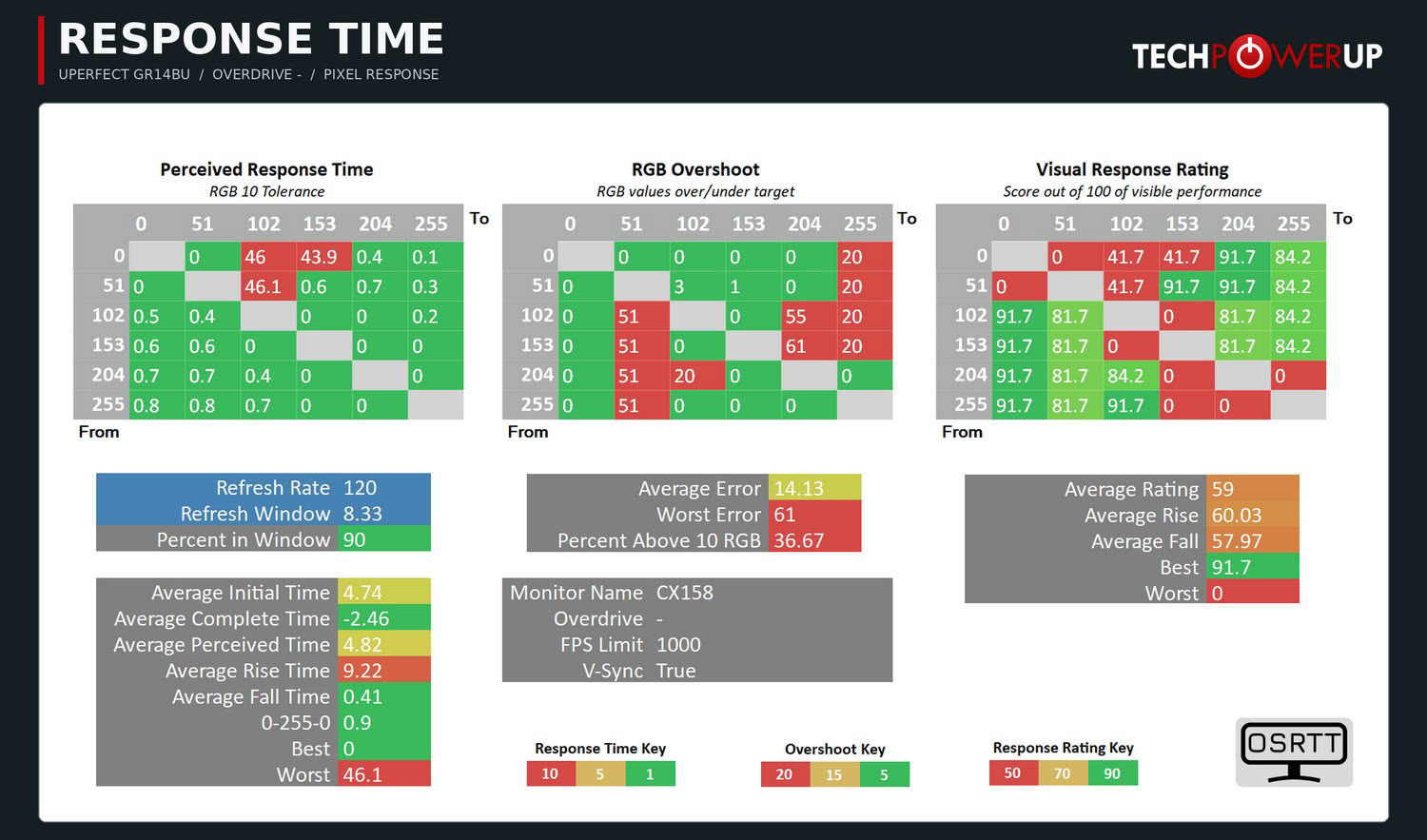
At first glance, these results make no sense for an OLED panel. Most transitions are practically instant, but 0 to 102, 0 to 153, and 51 to 102 supposedly take over 40 ms, the overshoot heatmap shows suspiciously round errors of 20, 51, 55, and 61 RGB levels, and the average complete time is negative. The explanation is in the raw data, and it's an important finding in its own right. The GR14BU's light output isn't continuous. The panel uses pulse-width modulation (PWM) to control brightness, switching its pixels off and on 240 times per second, and the modulation is deep, with luminance dropping by roughly 85 to 90% during each off phase in the OSRTT run. The OSRTT samples light with a photodiode, so each of those dips looks like a pixel that has lost its target value or swung past it, and the software can't tell the flicker apart from an actual transition. That's why the heatmaps above shouldn't be read the usual way.
Looking at the raw traces, the GR14BU behaves like you'd expect an OLED to behave. Transitions toward darker shades are practically instant, with an average fall time of 0.41 ms, and the full 0-255-0 swing takes 0.9 ms. Transitions from black and very dark shades toward brighter ones are where the panel shows a peculiarity. The pixels jump to roughly 70% of their target luminance immediately, but need about two PWM cycles, or a little over 8 ms, to reach the full target level. That's roughly one frame at 120 Hz. There's no real overshoot in any of the transitions, and the panel has no use for overdrive, which makes the OD toggle in the OSD redundant.
The 240 Hz PWM is a bigger issue than the response times. To see how it behaves across the brightness range, I filmed the screen with a phone camera, whose electronic shutter makes flicker visible as dark bands. A dark band appeared at every brightness setting I tried, so there's no level at which the GR14BU runs flicker-free. At higher brightness levels, the band is narrow, which means the off phase of each cycle is short. As you lower the brightness, the band grows taller, and at the lowest settings it stretches across almost the entire screen, which means the pixels spend most of each cycle switched off. In other words, the flicker gets worse the dimmer you set the screen, which is exactly how you'd use it in a dark room or on a plane at night. Low-frequency PWM is common on small OLED panels made for laptops and phones, and most people won't consciously notice it. However, users sensitive to flicker may experience eye strain or headaches during longer sessions, especially at low brightness. If you know you're sensitive to PWM, this is something to keep in mind before buying.
Input Lag
To measure the input lag of a monitor, I switched from using the LDAT V2 (Latency Display Analysis Tool), which I've covered extensively in my NVIDIA Reflex review, to the OSRTT Pro Tool. The OSRTT Pro Tool and the accompanying software include DirectX code developed by Andrew McDonald of TechTeamGB, which allows the OSRTT Launcher to track the events and capture the frame time, making it possible to isolate the monitor latency from other factors that come into play when using the click-to-photon testing methodology, namely the USB polling rate and game render time. For a deeper insight, I suggest you watch an excellent overview video made by Andy himself.Here's how the UPERFECT GR14BU holds up in terms of input lag after doing 100 iterations of the input lag test.
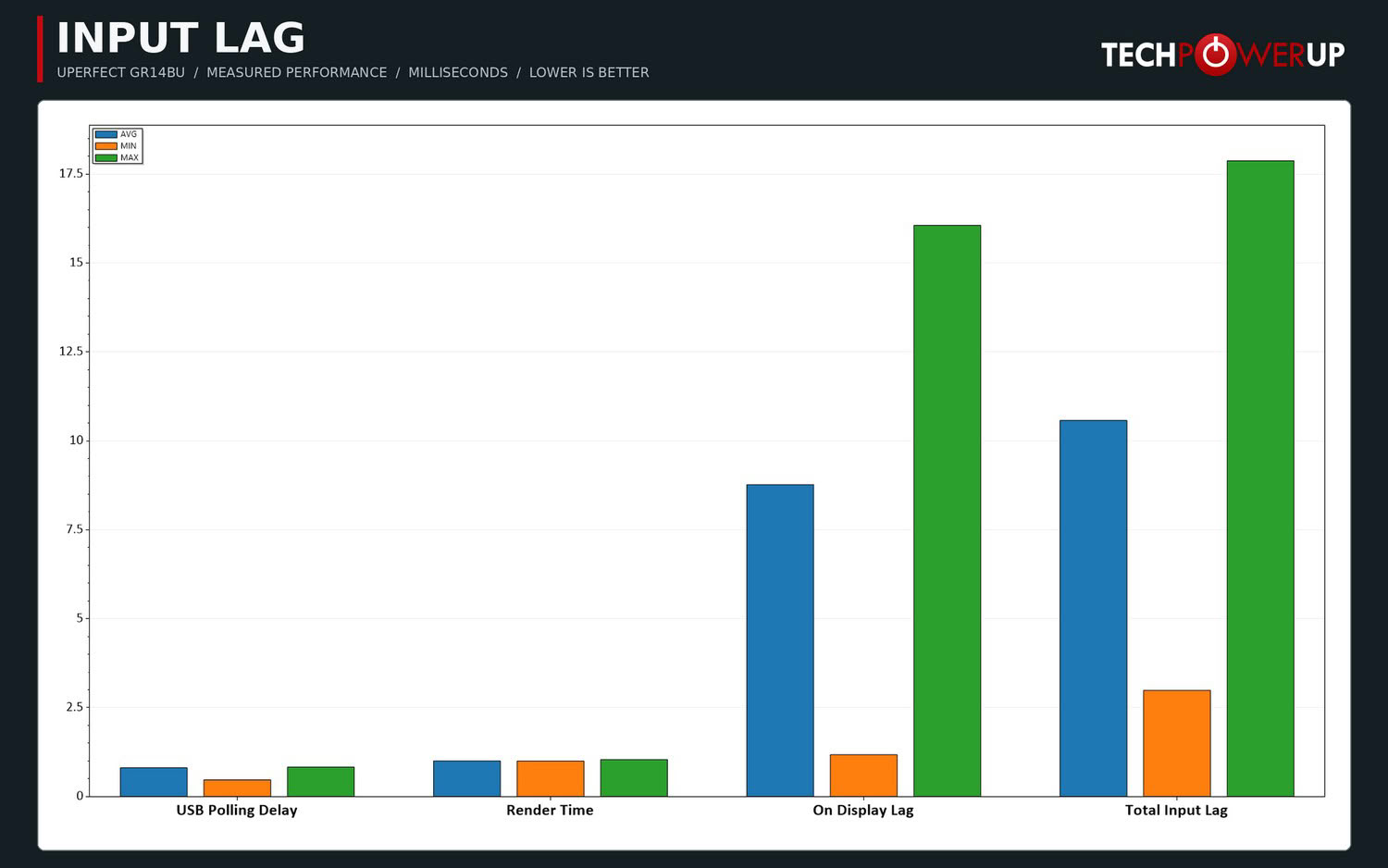
The measured on-display latency averages 8.8 ms, with individual results ranging from approximately 1.2 to 16 ms. This is relatively high for a 120 Hz OLED, although the measurement also includes refresh-cycle timing. For casual gaming, the result is unlikely to present a serious problem. For competitive shooters, there are better portable options.
Nov 18th, 2026 13:38 PST
change timezone
Latest GPU Drivers
New Forum Posts
- Can i play GTA 6 now? (Joke) (6)
- Very unusual two gaming-pc scenarios. (12)
- Dell Workstation Owners Club (3513)
- Any other old-timers here planning to play WoW Forever? (151)
- Time to upgrade CPU and MOBO (33)
- The Filthy, Rotten, Nasty, Helpdesk-Nightmare picture clubhouse (2876)
- WarpCoreBench scores! (67)
- Honestly, do you care about GTA VI? (144)
- Acer Predator BiFrost Radeon RX 9070 OC (9)
- DTS DCH Driver for Realtek HDA [DTS:X APO4 + DTS Interactive] (2814)
Popular Reviews
- Acemagic Retro X3 Review
- Upcoming Hardware Launches 2027 (Updated Nov 2026)
- AMD Zen 6 Technical Deep Dive
- ASUS ROG Strix B850-I Gaming Wi-Fi7 W Review
- Corsair HX1000i Shift Crystal Review
- Biwin Black Opal NV7400 2 TB Review
- Chieftec Iceberg PRO 360 DARK Review
- AMD Ryzen 7 9800X3D Review - The Best Gaming Processor
- Pulsar Office Tour & First Look at P1 Dual-Sensor Mouse
- Phantom Blade Zero Performance Benchmark Review - 35 GPUs Tested
TPU on YouTube
Controversial News Posts
- NVIDIA Co-Founder and CEO Jensen Huang Officially Resigns (478)
- Report: Jensen Huang Eyes NVIDIA Comeback (187)
- Open Letter Asking NVIDIA to Reinstate Jensen Huang Passes 115,000 Signatures (184)
- OpenAI CEO Argues Home PCs Waste the World's Limited DRAM Supply (152)
- NVIDIA Launches Investigation Into Jensen Huang's Relationship With Suspected Chinese Spy (136)
- Intel "Raptor Lake Next" 16-Core and 20-Core CPUs Surface (130)
- Legendary Game Studio BioWare Shuts Down Following EA Layoffs (104)
- Dell CEO Says the Memory Shortage Will Get Worse in 2027 (95)