 6
UPERFECT UStation Delta Max Review - Two Screens In One
Response Time, Input Lag & Motion Blur »Picture Quality
The UPERFECT UStation Delta Max features two 18.5-inch, 8-bit IPS panels with a native resolution of 1920×1080. This results in a pixel density of 119.08 PPI, providing very good image sharpness. The screens support 100% scaling in both Windows and macOS - meaning no added scaling or related issues - while keeping all visual elements perfectly readable from a normal sitting distance.The panels are illuminated by an LED backlight system controlled by direct current (DC), ensuring flicker-free operation at any brightness level. Both screens have a light anti-glare (AG) coating, which effectively reduces reflections even in well-lit environments. Unlike heavier AG coatings, it doesn't introduce a grainy or dirty appearance when viewed from a normal distance. The panels offer a maximum specified brightness of 300 cd/m² and a static contrast ratio of 1,000:1.
To assess the picture quality of the UPERFECT UStation Delta Max, I used an X-Rite i1Display Pro along with DisplayCAL - a powerful, free display calibration and profiling tool for supported colorimeters - and Calman, the industry-standard display testing and calibration software suite.
Picture Quality at Factory Settings
I tested the picture quality of the UPERFECT UStation Delta Max at factory defaults, right after plugging in the monitors and allowing them to warm up for about an hour. I ran the full test suite on each monitor separately to determine how well they match in terms of performance. Let's dive into the results and compare them directly.
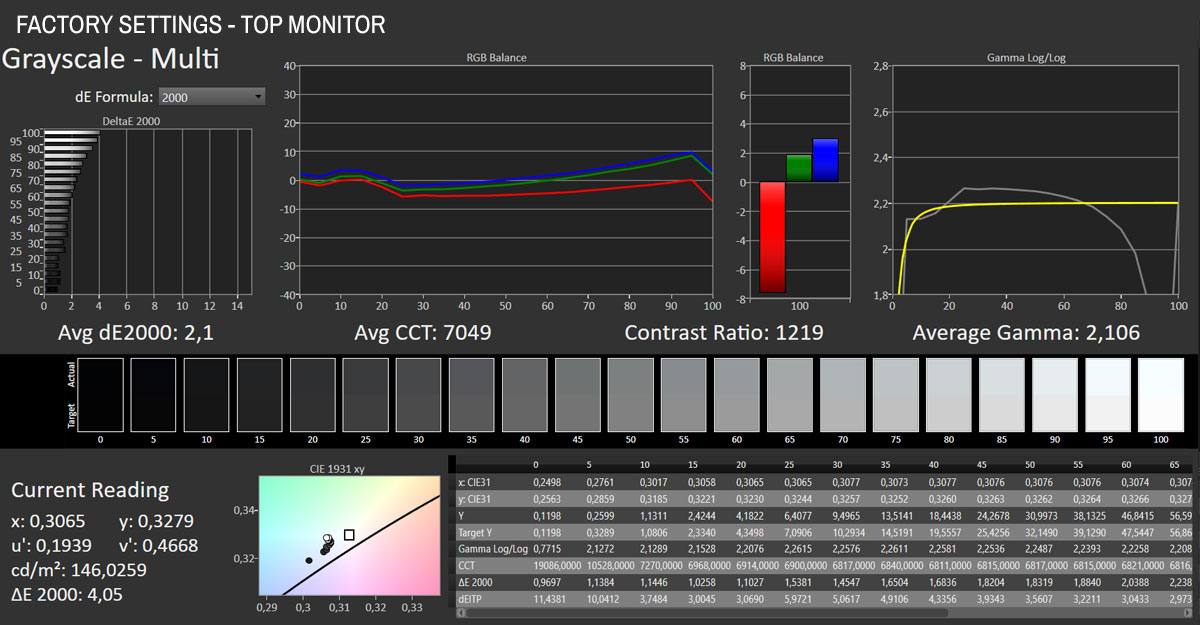
The panels are quite even in terms of color temperature, contrast ratio, and grayscale accuracy. The color temperature is too high in both cases - notice the significant red channel imbalance in both - and the gamma curve drops off a cliff past the 70% luminance mark on both monitors, although it stays close to the reference until that point. Where the monitors obviously differ is in brightness. As I've already mentioned when commenting on the power output of the UPERFECT UStation Delta Max, the bottom monitor is consistently brighter than the top one. The difference sits between 30 and 40 cd/m², which is easily noticeable to the naked eye.
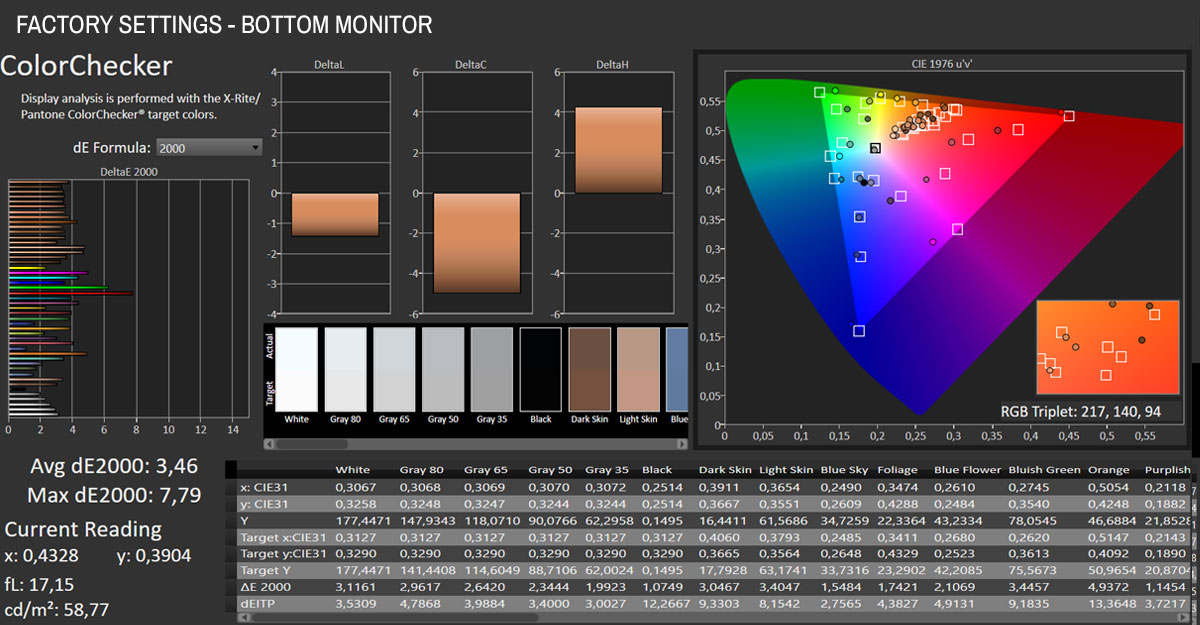
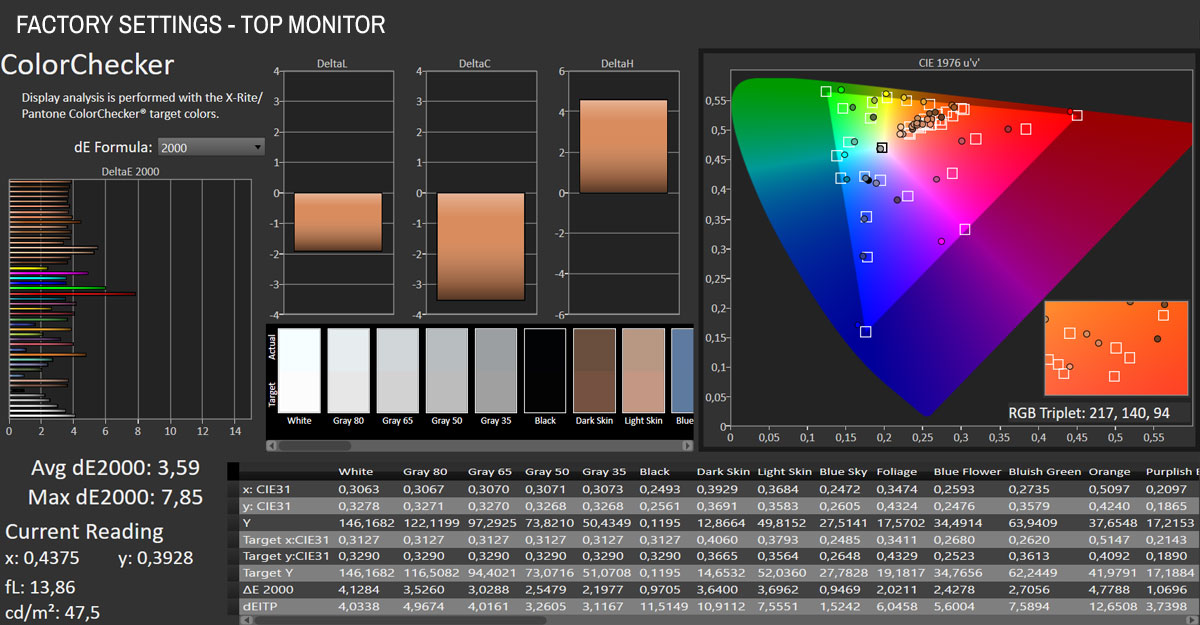
The color accuracy at factory defaults is equally off the mark on both panels. We're looking at an average ∆E of 3.46/3.59, reaching up to ∆E 7.79/7.85 for red tones. Green tones are out of place as well, which we'll look to improve by manually adjusting the RGB balance. The monitors offer an sRGB color temperature profile, which could, in theory, improve performance in the sRGB color space, but it completely misses the mark in terms of color temperature, so I don't recommend using it.

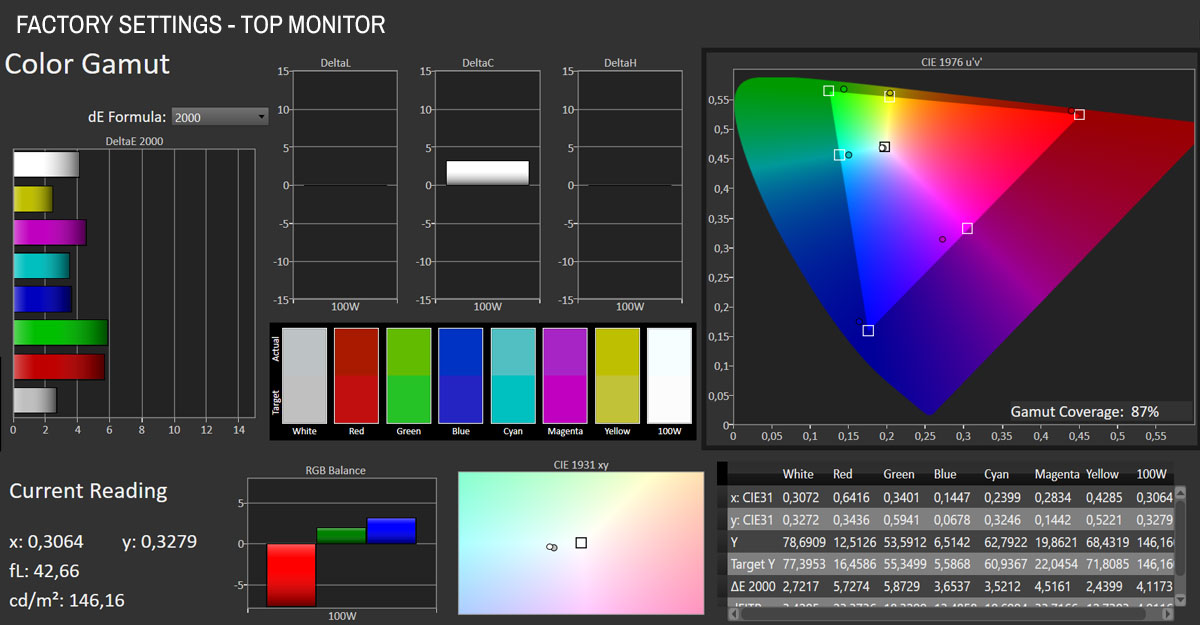
In terms of color gamut, both monitors cover around 87% of the sRGB spectrum.
In an attempt to get the most out of the panel without performing an actual hardware calibration, you can manually adjust the brightness and color temperature in the OSD. Most portable monitors have a simplified OSD, and the UPERFECT UStation Delta Max is no exception. You can adjust two settings to improve overall performance: color temperature (found in the Temperature menu) and brightness (found in the Picture menu). The monitors are mismatched in brightness and also respond somewhat differently to color temperature adjustments, so you can't just set them up identically and call it a day.
Here are the settings that worked best on my sample of the UPERFECT UStation Delta Max, resulting in a much more uniform experience when using the two screens. I aimed for a 6,500 K color temperature and 250 cd/m² brightness.
| Modified OSD Settings | ||
|---|---|---|
| Bottom Monitor | Top Monitor | |
| Color Temperature (Temperature > User) | Red 50 / Green 46 / Blue 46 | Red 50 / Green 47 / Blue 46 |
| Brightness (Picture > Brightness) | 84 | 100 |
Let's compare the measurements before and after doing the OSD tweaks.
| Factory vs Adjusted Settings | ||||
|---|---|---|---|---|
| Factory Defaults Bottom Monitor | Adjusted Settings Bottom Monitor | Factory Defaults Top Monitor | Adjusted Settings Top Monitor | |
| Measured Luminance | 177.12 cd/m² | 248.56 cd/m² | 146.03 cd/m² | 244.92 cd/m² |
| Measured Whitepoint | 7,063 K | 6,516 K | 7,049 K | 6,591 K |
| Measured Black Luminance | 0.1507 cd/m² | 0.2148 cd/m² | 0.1198 cd/m² | 0.2195 cd/m² |
| Contrast | 1,175:1 | 1,157:1 | 1,219:1 | 1,116:1 |
| Gamma | 2.078 | 2.251 | 2.106 | 2.303 |
| Average Color Accuracy (ΔE) | 3.46 | 2.65 | 3.59 | 2.95 |
| Maximum ΔE | 7.79 | 6.94 | 7.85 | 6.75 |
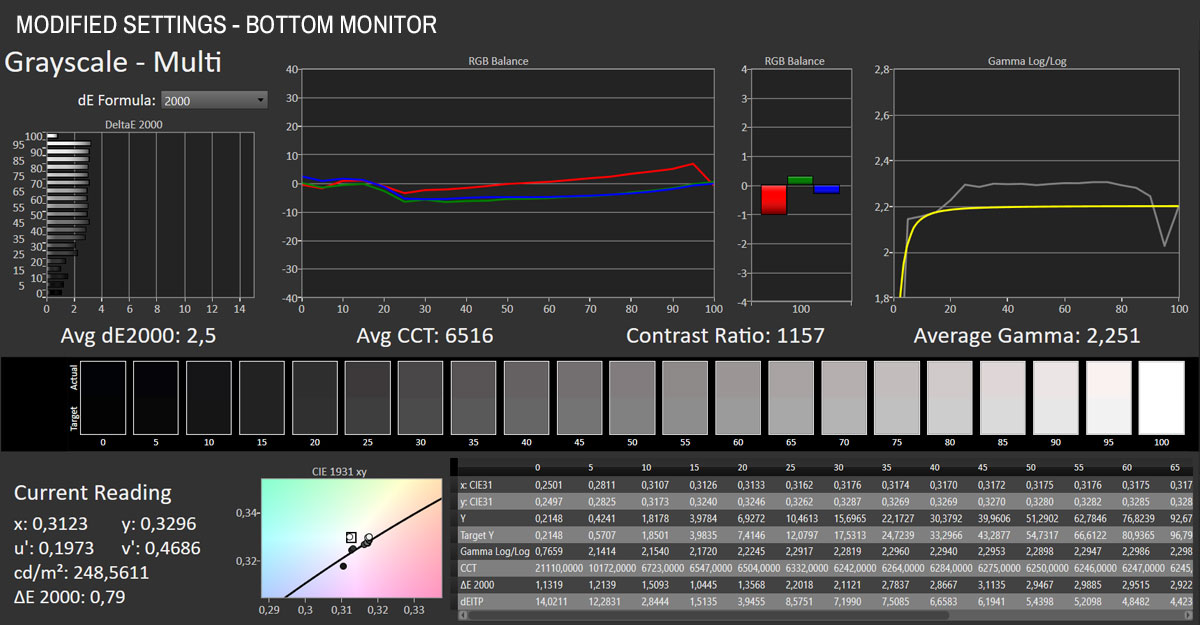
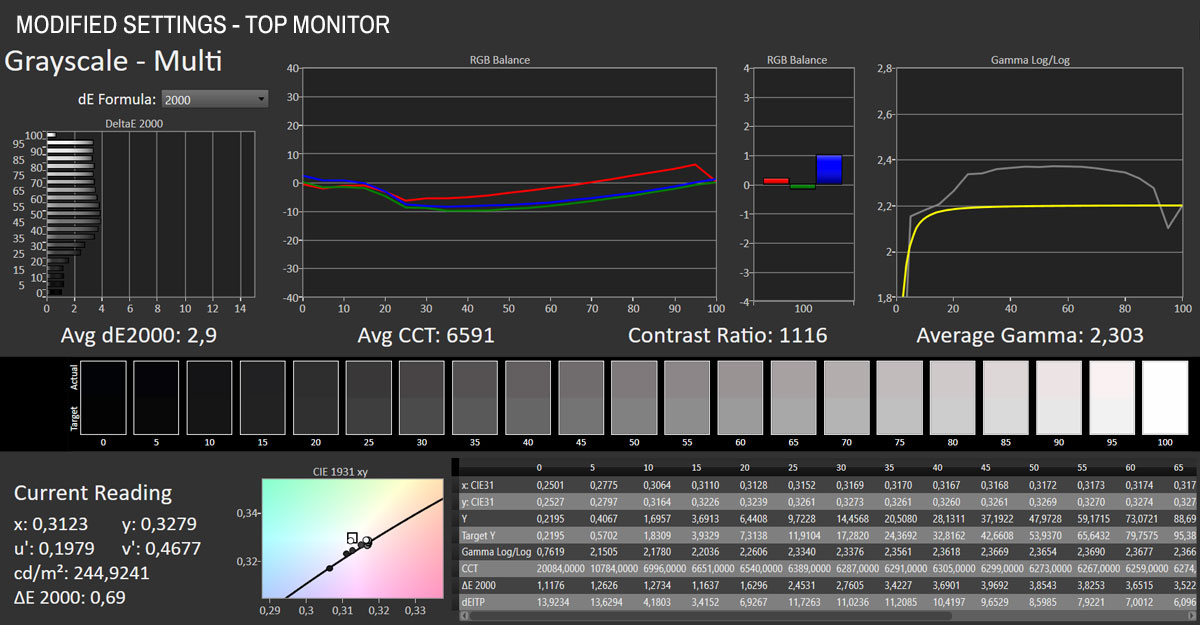
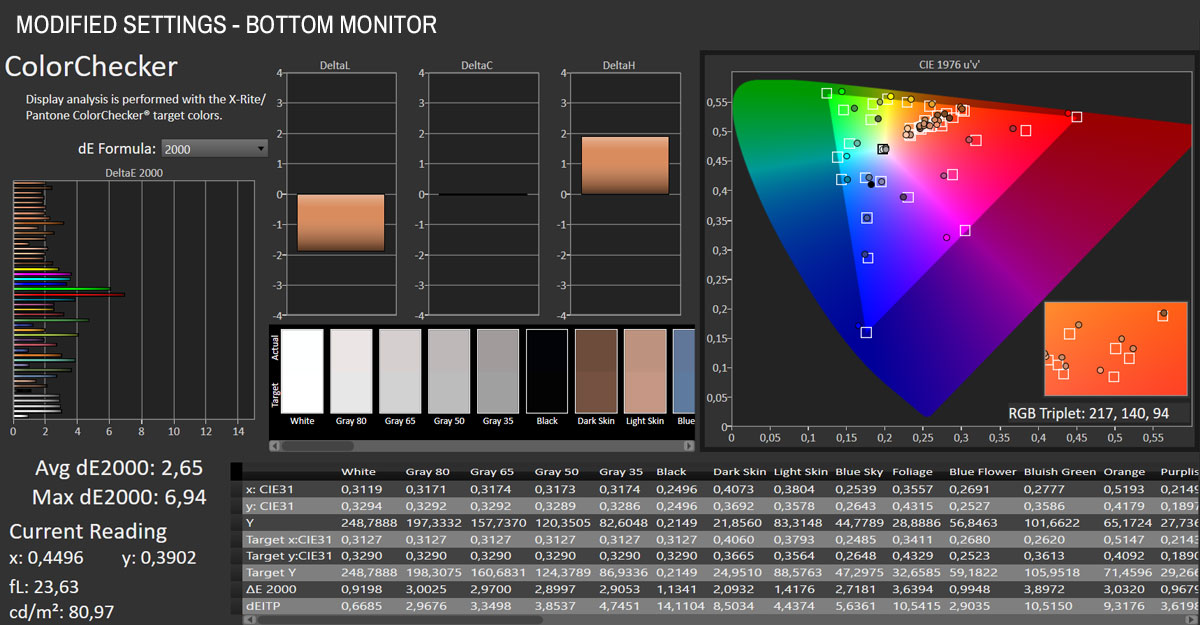
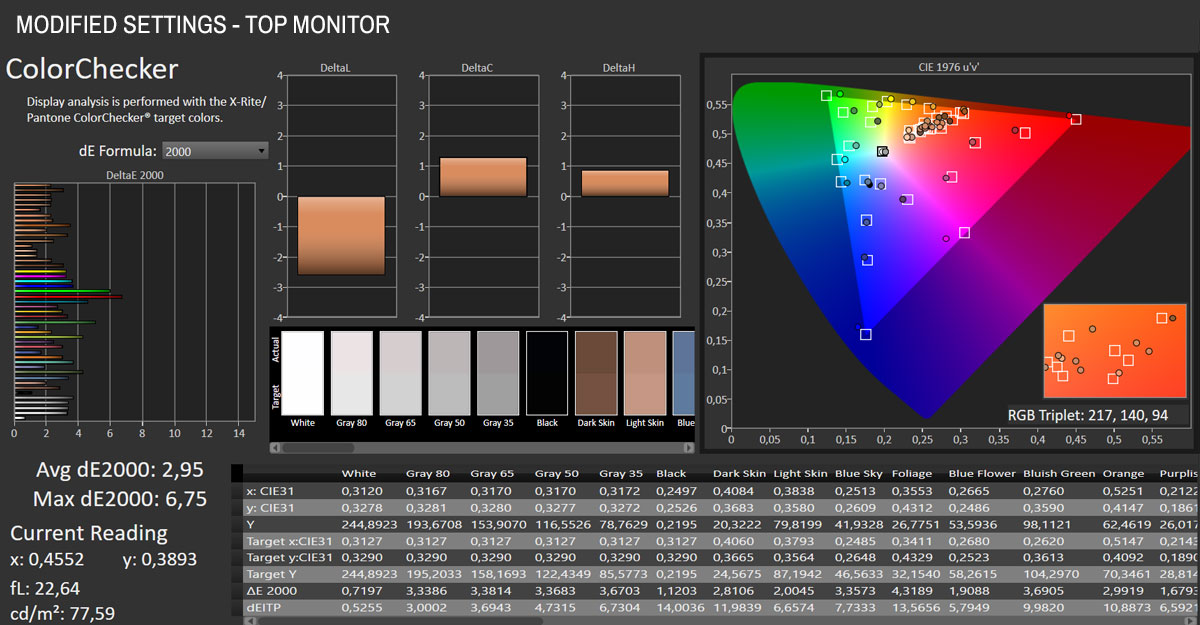
Analyzing the results, it's obvious that we were able to fix the RGB balance issues and correct the color temperature. In doing so, both monitors improved in terms of color and grayscale accuracy. The gamma curve remains less than ideal - a proper hardware calibration would be needed to fix it. However, that presents an issue, as the monitors are not perfectly matched, meaning a single ICC profile wouldn't be equally suitable for both. That said, after these adjustments, the images at least appear consistent across both monitors, which significantly improves the overall user experience for me.
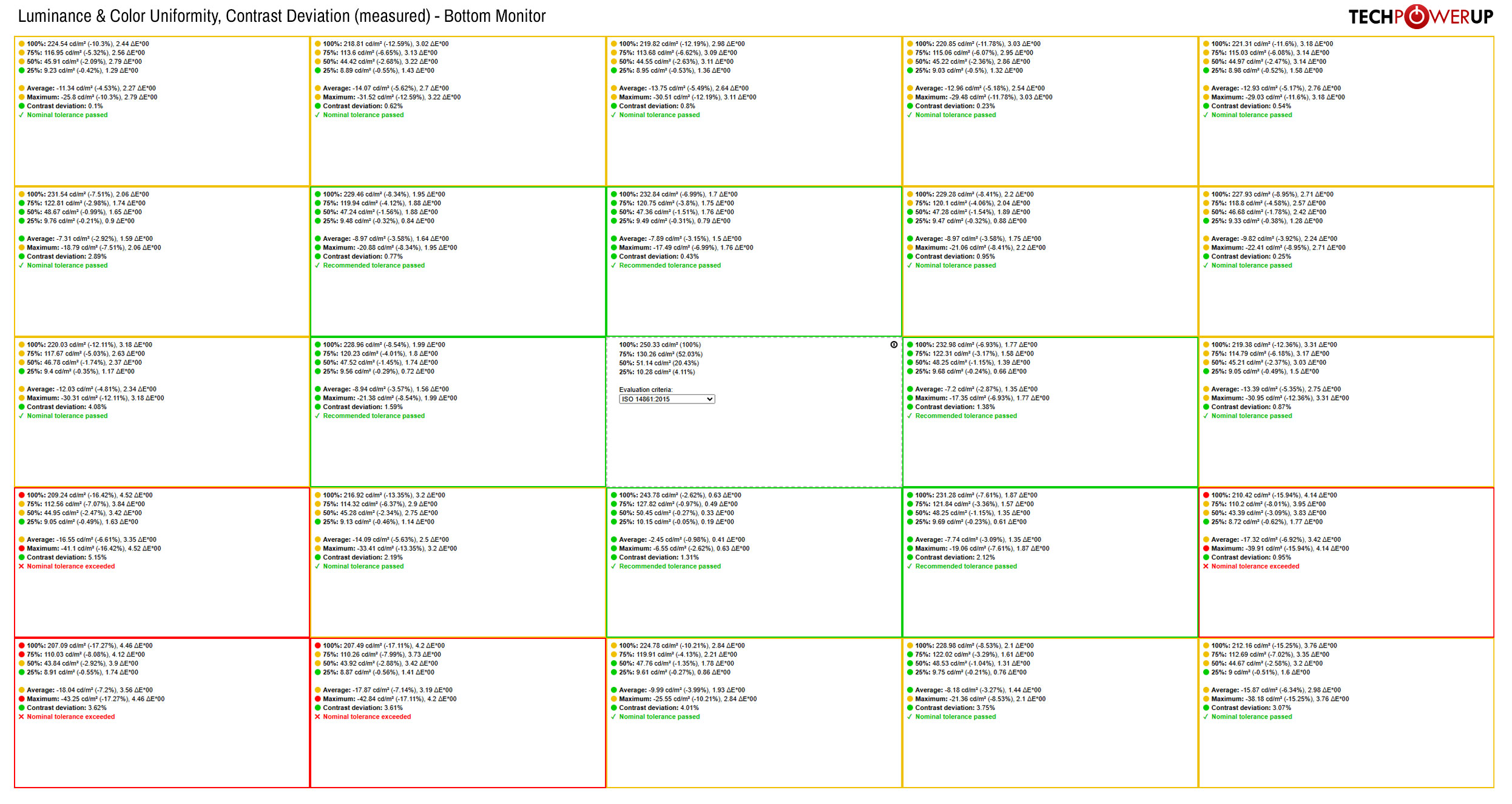
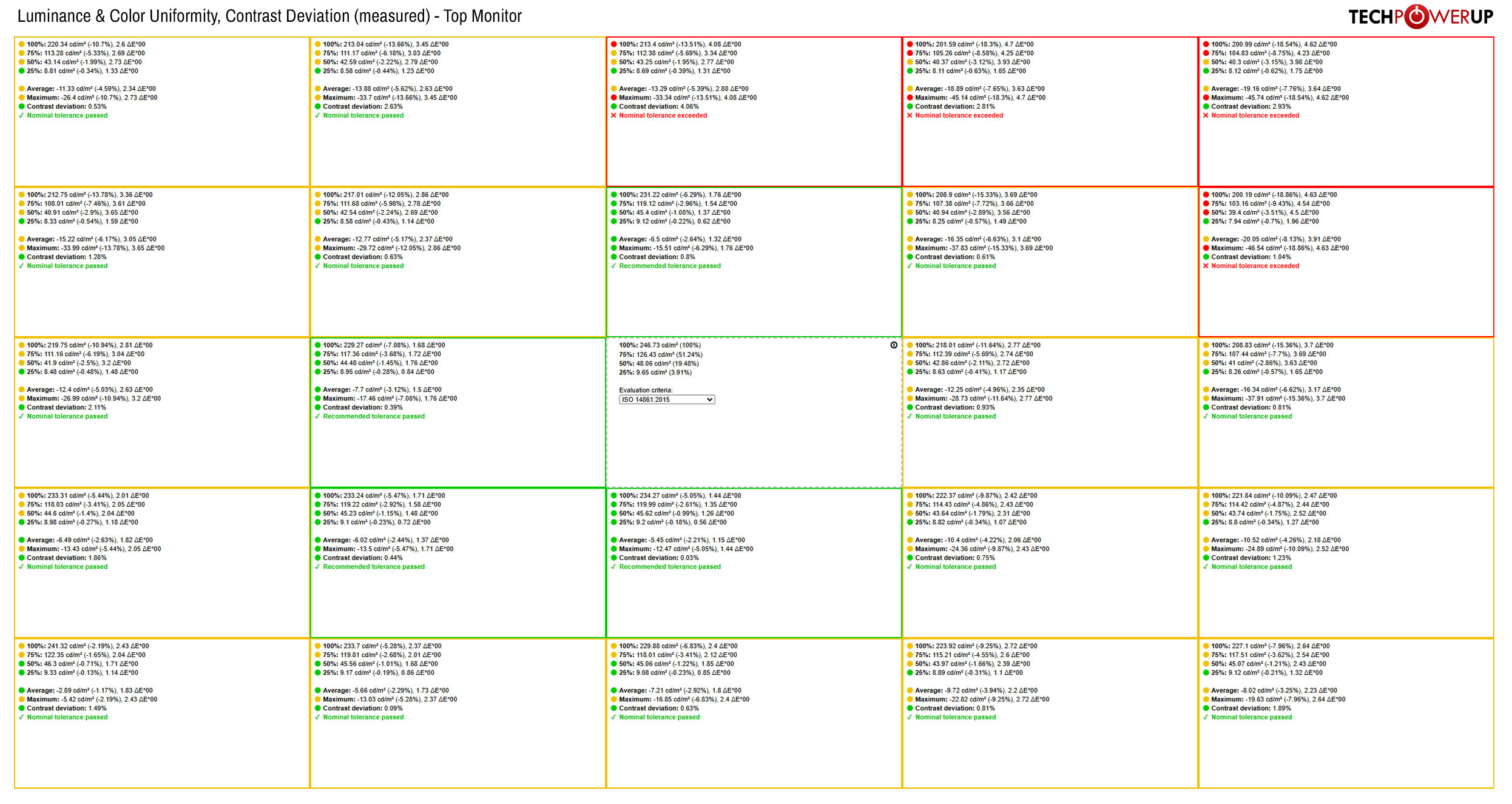
This is what the luminance and color uniformity of the UPERFECT UStation Delta Max look like when measured at 25 different points across both panels. Click on the images to view them in high resolution and examine the data in greater detail. While the colorimeter detected several noticeable drops in luminance - along the top edge of the top panel and the bottom left corner of the bottom panel - these do not impact the functionality of the UStation Delta Max. This is mainly because the monitor isn't intended for color-critical work.
Summing it all up - while the image quality of the UPERFECT UStation Delta Max is only decent, it is still "good enough" when considering the monitor's primary purpose. I'll expand on this point further in the conclusion of the review.
Backlight Uniformity
To give you an idea of the backlight's uniformity, I set the brightness of both monitors to 250 cd/m² before taking a photo of the panels in a completely dark room. I carefully adjusted the ISO value and shutter speed to capture the screens as accurately as possible, ensuring they appear as close as possible to what I saw in real life.
Due to the angled position of the bottom monitor, what appears to be backlight bleed is actually IPS glow. Some real backlight bleed is present in the corners of both panels, but it's not noticeable during regular use.
Viewing Angles
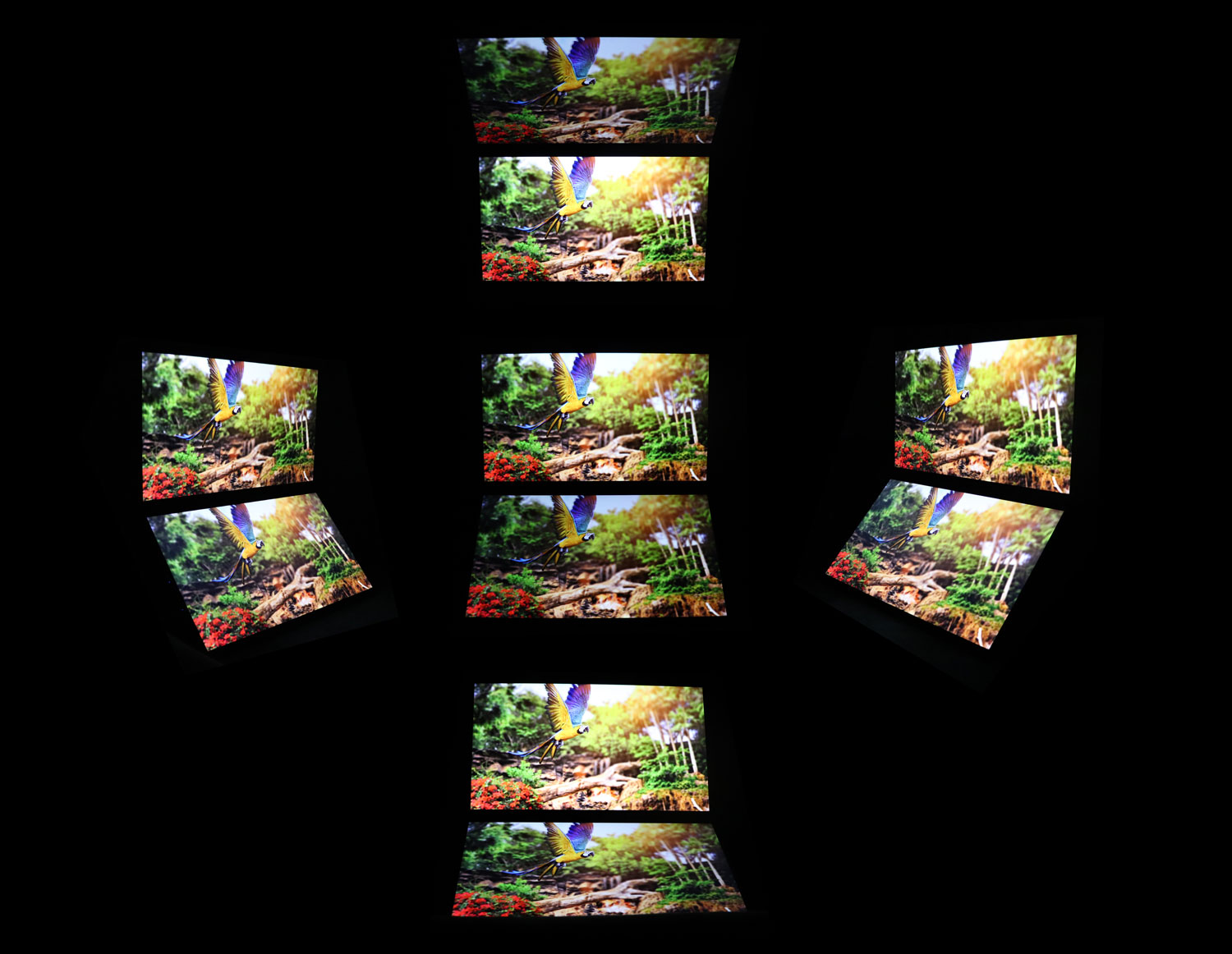
The viewing angles of the IPS panels in the UPERFECT UStation Delta Max are good, but some darkening may be visible around the edges in certain situations. For example, if you lean too far back in your chair, parts of the bottom monitor may appear dim. For the best experience, sit up as straight as possible and adjust the top monitor to a comfortable angle.
Nov 21st, 2026 07:42 PST
change timezone
Latest GPU Drivers
New Forum Posts
- Windows 11 General Discussion (7744)
- Cpu waterblock water shows some tinting = Bad? (19)
- Anthrophics IPO (33)
- Bought MAX-P495 - Which model? (33)
- RX 9000 series GPU Owners Club (2250)
- Honestly, do you care about GTA VI? (221)
- GeekMagic Ultra Smart WiFi Weather Station (9)
- What's your latest tech Freebie? (87)
- UPS what one to get? (3)
- Differences i might've missed between these ultrawides to decide which to buy during BF. (0)
Popular Reviews
- Microsoft Surface Laptop Ultra Review - The Next-gen Arm Laptop
- Ugreen NASync DXP4800 GT Review
- Corsair RM1200e (Second Generation) Review
- Pulsar Office Tour & First Look at P1 Dual-Sensor Mouse
- Upcoming Hardware Launches 2027 (Updated Nov 2026)
- Acemagic Retro X3 Review
- Biwin Black Opal NV7400 2 TB Review
- AMD Ryzen 7 9800X3D Review - The Best Gaming Processor
- AMD Zen 6 Technical Deep Dive
- Chieftec Iceberg PRO 360 DARK Review
TPU on YouTube
Controversial News Posts
- NVIDIA Co-Founder and CEO Jensen Huang Officially Resigns (492)
- Report: Jensen Huang Eyes NVIDIA Comeback (259)
- Open Letter Asking NVIDIA to Reinstate Jensen Huang Passes 115,000 Signatures (184)
- OpenAI CEO Argues Home PCs Waste the World's Limited DRAM Supply (152)
- NVIDIA Launches Investigation Into Jensen Huang's Relationship With Suspected Chinese Spy (136)
- Intel "Raptor Lake Next" 16-Core and 20-Core CPUs Surface (130)
- Legendary Game Studio BioWare Shuts Down Following EA Layoffs (104)
- NVIDIA GeForce RTX 50-Series Scheduled for up to $500 Price Hike This Week (89)