 2
VAXEE Zygen NP-01S V2 Wireless Review
Value & Conclusion »Software
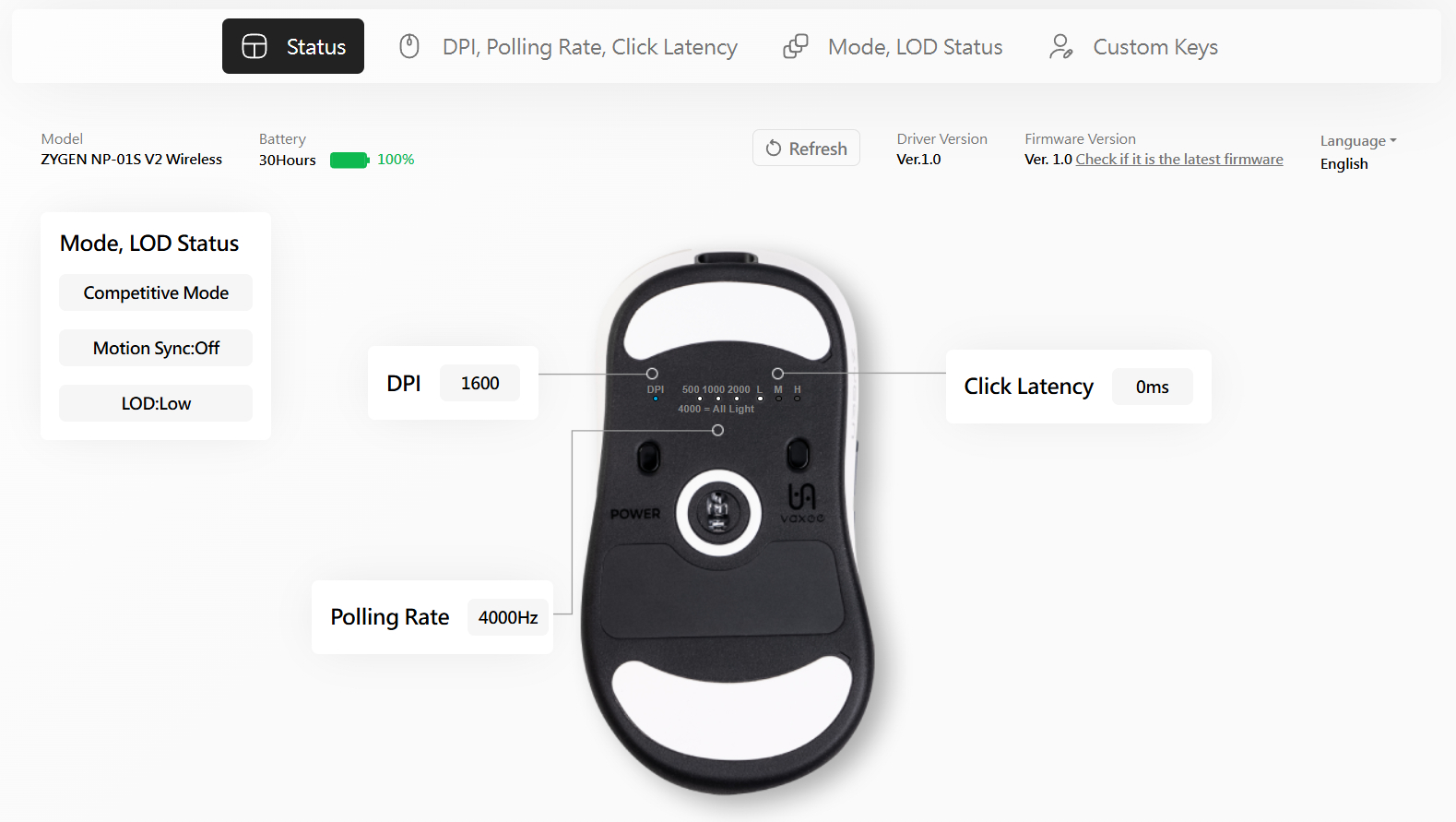
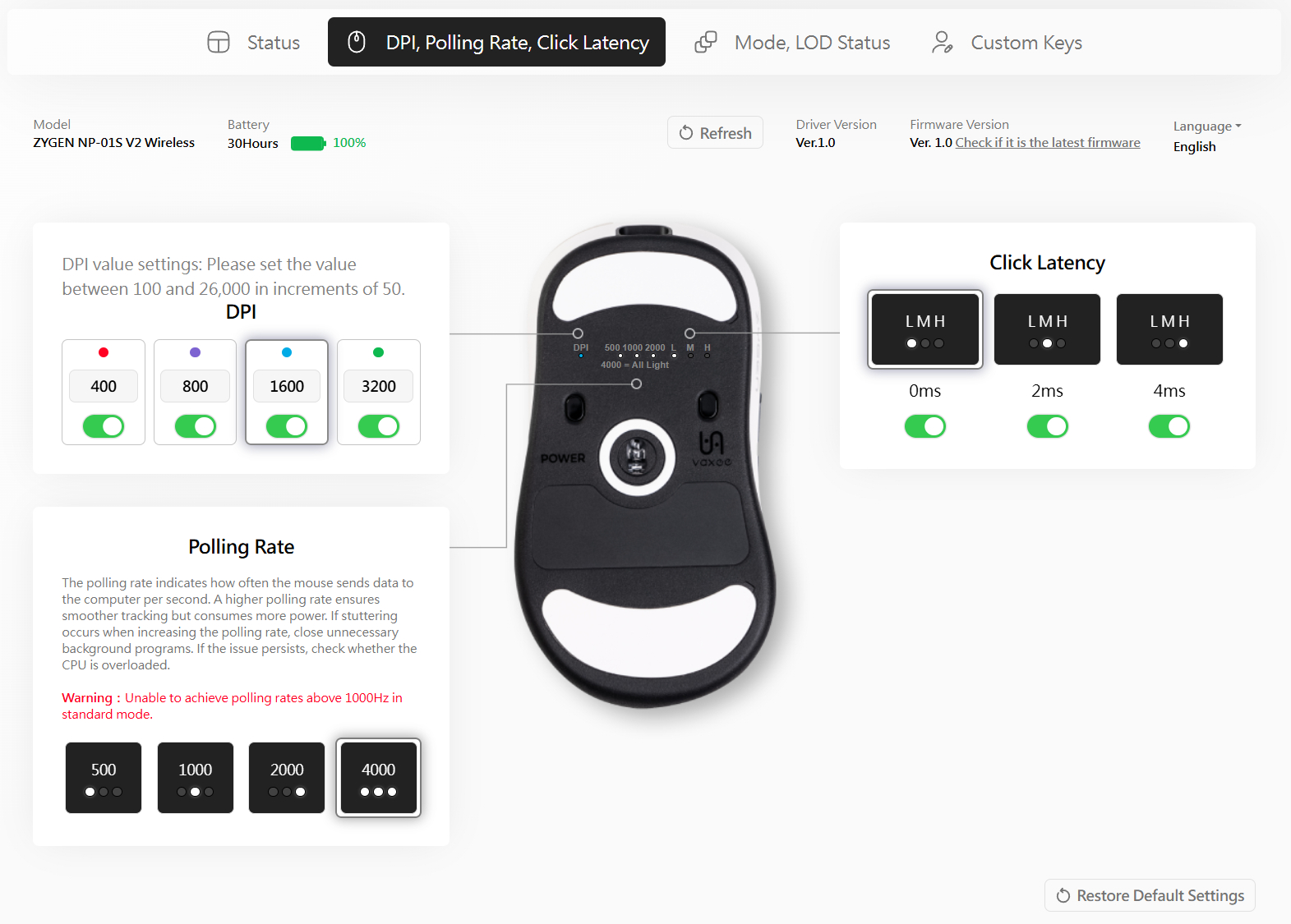


For the first time in VAXEE history, software configuration is possible on the NP-01S V2 Wireless through a web driver. Much like other web driver solutions, this one connects through WebHID and therefore will, at least as of now, only work on Chromium-based browsers such as Chrome, Edge, and Opera (desktop). To enable driver functionality, a firmware update is required first.
The driver allows both configuring settings and modifying the on-device settings (for instance, disabling certain steps). The first page houses CPI adjustment settings for up to four color-coded levels, ranging from 100 to 26,000 CPI, in increments of 50 CPI. Even though the 3950 supports up to 30,000 CPI, this restriction is intentional as only up to 26,000 CPI have been tested by VAXEE. Further options include polling rate (500, 1000, 2000, or 4000 Hz) and click latency (0, 2, or 4 ms). The second page includes settings such as competitive mode (on/off) and MotionSync (on/off), disabling the former of which prevents enabling polling rates above 1000 Hz. Additionally, lift-off distance may be set to "low" or "high." The third page allows for button remapping to mouse functions and a select few other ones, such as Page Down or Cut, Copy, and Paste.
All setting changes are saved live to the on-board memory, and the web driver is able to connect to both dongle and mouse.
On-device Settings
Compared to their previous 3395 wireless releases, VAXEE has partially revised how settings are adjusted on the NP-01S V2 Wireless. Instead of three buttons for CPI, polling rate, and button debounce time, there now is only a single button, which changes functionality when pressed and held. This way, one can adjust CPI (400, 800, 1600, 3200), polling rate (500 or 1000 Hz, with 2000 and 4000 Hz being exclusive to wireless operation), and button debounce time (0, 2, or 4 ms). In addition, MotionSync (on/off), lift-off distance (low/high), and competitive mode (on/off) can be adjusted by keeping two buttons pressed while turning the mouse on. Note that this is only possible if the mouse is not plugged in for charging. Selecting 2000 and 4000 Hz is only possible if competitive mode has been enabled.Battery Life
VAXEE states a maximum battery life of 110 hours when using the default run mode and 38 hours when using competitive mode, at a polling rate of 1000 Hz for each. Both 2000 and 4000 Hz already default to competitive mode, and 34 and 30 hours are cited for these, respectively. The web driver includes a percentage-based battery charge indicator using increments of 5%, and a battery life projection in hours is present as well. Alternatively, by using a button combination, the battery charge status can be displayed directly on the mouse. By pressing the right and middle buttons, the current charge status will be displayed through the LED at the front, with a green light signifying 100-61% charge, blue light 60-21%, red light 20-10%, and blinking red light a charge of less than 10%. Of course, this isn't granular enough to precisely gauge anything, but at least gives one an idea of when charging may be needed. For the record, after seven hours of continuous and mixed use at 4000 Hz and 1000 Hz in competitive mode, I only ever got to see the first charge stage.Using the included USB Type-A to Type-C charging cable, I also measured the charging speed during the constant current stage. When lifted, 0.326 A can be measured, which drops to 0.316 A when not lifted. The battery has a capacity of 400 mAh (3.7 V) and utilizes a 3-pin JST connector.
Nov 15th, 2026 08:55 CST
change timezone
Latest GPU Drivers
New Forum Posts
- budget home NAS – X79, X99 or another platform? (149)
- WireView Pro II GPU Alignment: Wired | Variant: Black (1)
- Planning for Prolonged High Prices and Maintaining What You Already Have (74)
- Technical Issues - TPU Main Site & Forum (2026) (409)
- What generation of Wi-Fi do you use at home (98)
- I'll flash a ASUS ROG Strix RX480 O8G in Cause of Code 43, as a Newbie (5)
- Honestly, do you care about GTA VI? (58)
- Recommendations Wanted - Affordable Enterprise SSD for Boot (4)
- Is this anyhow possible, that a GPU (ROG Strix RX480 O8G) can crash the whole PC after "ReFlash" in normal Mode? (2)
- WarpCoreBench scores! (47)
Popular Reviews
- AMD Zen 6 Technical Deep Dive
- ASUS ROG Strix B850-I Gaming Wi-Fi7 W Review
- Corsair HX1000i Shift Crystal Review
- Upcoming Hardware Launches 2027 (Updated Nov 2026)
- Montech King 95 3D PRO Review
- NZXT C1200 Platinum Review
- NZXT H7 RGB+ Review
- NZXT H5 Review
- Phantom Blade Zero Performance Benchmark Review - 35 GPUs Tested
- AMD Ryzen 7 9800X3D Review - The Best Gaming Processor
TPU on YouTube
Controversial News Posts
- NVIDIA Co-Founder and CEO Jensen Huang Officially Resigns (412)
- OpenAI CEO Argues Home PCs Waste the World's Limited DRAM Supply (152)
- NVIDIA Launches Investigation Into Jensen Huang's Relationship With Suspected Chinese Spy (136)
- Intel "Raptor Lake Next" 16-Core and 20-Core CPUs Surface (130)
- Open Letter Asking NVIDIA to Reinstate Jensen Huang Passes 115,000 Signatures (109)
- Legendary Game Studio BioWare Shuts Down Following EA Layoffs (104)
- Dell CEO Says the Memory Shortage Will Get Worse in 2027 (95)
- NVIDIA GeForce RTX 50-Series Scheduled for up to $500 Price Hike This Week (89)