 78
WD Blue SN5100 2 TB Review - Impressive QLC
Windows 11 Startup, Virtualization & File Compression »Thermal Throttling
Due to the compact form factor, M.2 drives lack the ability to actively cool themselves, usually having to rely on passive airflow instead. All vendors include some form of thermal throttling on their drives as a safeguard, which limits throughput once a certain temperature is exceeded.On this page, we will investigate whether the tested drive has such a mechanism, how high temperatures get, and what effect this has on performance. We will test the drive in a typical case, installed in the M.2 slot between the CPU and graphics card.
Each of the charts has time moving from left to right, showing transfer speeds in MB/s and also reporting the drive's temperature in degrees Celsius (measured using SMART).
Real-Life Temperatures
This new thermal testing approach simulates typical SSD workloads using PCMark10 storage traces, which replay real-world disk usage without executing the full applications. It helps us create consistent, realistic usage patterns, not just primitive synthetic "random read" or "random write" operations. We can also reduce idle gaps in the trace playback to make the SSD work harder, but not unrealistically so. The recorded activity comes from apps like Adobe and Office, as well as gaming and file transfers. We repeat the entire test sequence three times to extend the total workload duration, followed by a cool-down period to observe how the SSD dissipates heat.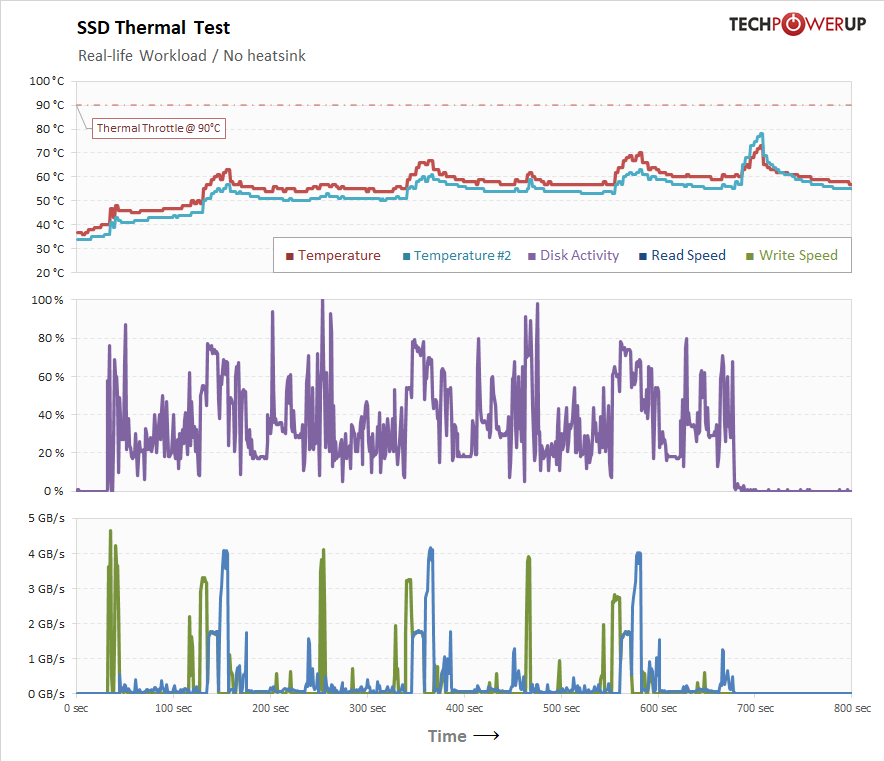
No thermal throttling.
Thermal Stress Test
In these tests, the SSD is hammered by nonstop incoming writes to simulate worst-case thermal stress under the heaviest possible load. The test also checks how the drive deals with thermal throttling and whether it continues to function normally.Bare Drive
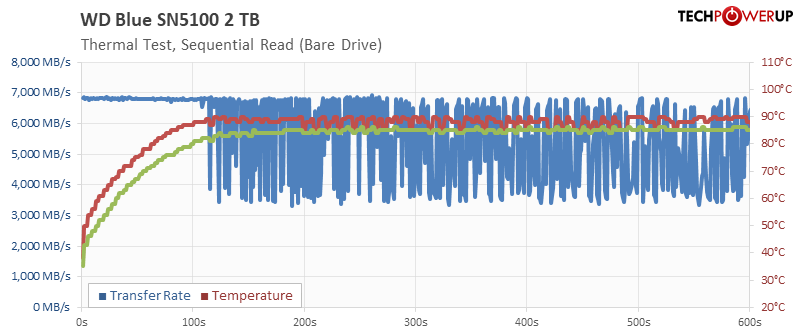
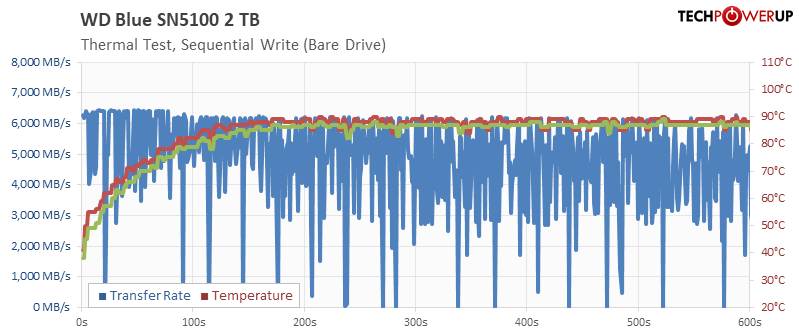
Sandisk ships their drive without a heatsink or heat spreader. The read chart shows that even the bare drive handles the heat of the stress test reasonably well. With reads it takes almost two minutes before any throttling, and the throttling is well-behaved. With writes, it's a bit hard to see the throttle point, because write rates are jittering a lot, probably due to the QLC design. So if you have only light workloads that last for just a few seconds, then throttling won't be an issue.
Drive with Thermalright Heatsink
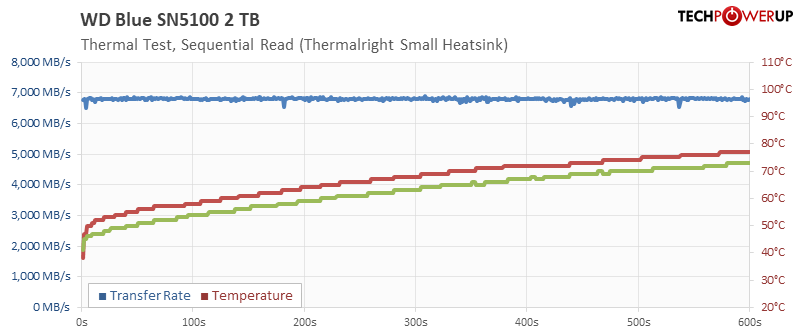
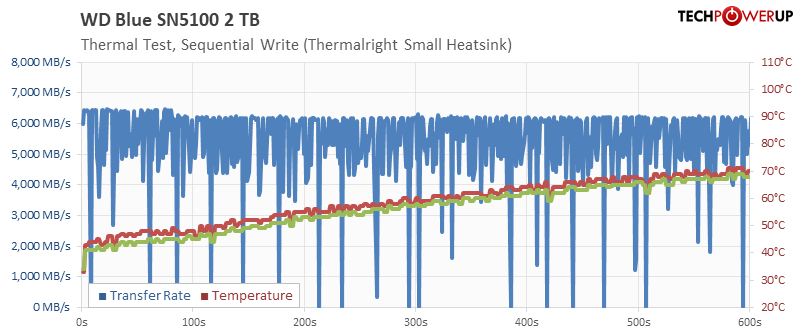
I also installed a Thermalright TR-M2, which is a compact full-metal heatsink. There's no more throttling, but the jittery chart for writes is still present, which confirms it's not a thermal issue.
Drive with big Thermalright Heatsink
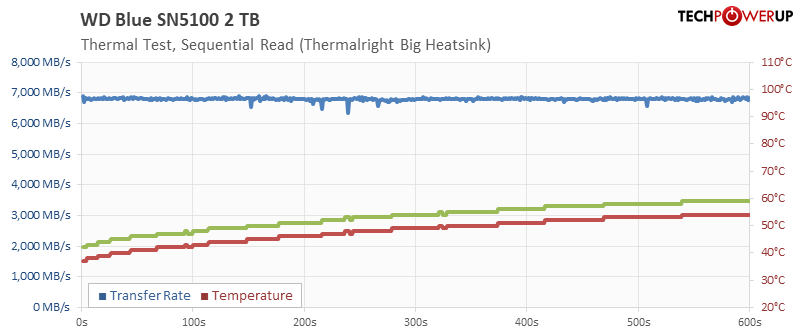
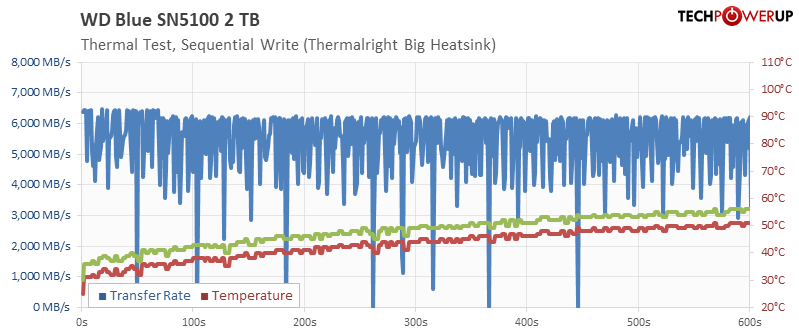
With the much bigger Thermalright HR-10, temps are not problem at all.
Thermal Image & Hot Spot
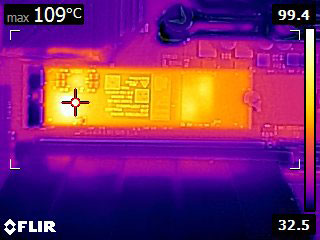
We recorded a thermal image of the running SSD as it was completing the thermal stress test. The surface temperature of the drive reached 109°C. This is a high but very reasonable maximum—the higher limit helps avoid thermal throttling. These chips are designed to run at even higher temperatures without issues.
Nov 19th, 2026 00:20 PST
change timezone
Latest GPU Drivers
New Forum Posts
- 3DMARK "LEGENDARY" (475)
- [Poll] 12V-2x6 Connector Protection: What Are You Using? (WireView / Ampinel / Equalizer / Other / Nothing) (43)
- Windows HDR on = Tinted colors (5)
- Time to upgrade CPU and MOBO (42)
- Without Jensen, PC gaming will be (47)
- WarpCoreBench scores! (68)
- Honestly, do you care about GTA VI? (155)
- Very unusual two gaming-pc scenarios. (13)
- TPU's Nostalgic Hardware Club (22168)
- Dual B70 or Dual R9700 Pro on Linux (7)
Popular Reviews
- Acemagic Retro X3 Review
- Ugreen NASync DXP4800 GT Review
- Upcoming Hardware Launches 2027 (Updated Nov 2026)
- AMD Zen 6 Technical Deep Dive
- Pulsar Office Tour & First Look at P1 Dual-Sensor Mouse
- Biwin Black Opal NV7400 2 TB Review
- Sapphire Radeon RX 7700 XT Pure Review
- Sapphire Radeon RX 7700 XT Pulse Review
- Chieftec Iceberg PRO 360 DARK Review
- ASUS ROG Strix B850-I Gaming Wi-Fi7 W Review
TPU on YouTube
Controversial News Posts
- NVIDIA Co-Founder and CEO Jensen Huang Officially Resigns (483)
- Report: Jensen Huang Eyes NVIDIA Comeback (196)
- Open Letter Asking NVIDIA to Reinstate Jensen Huang Passes 115,000 Signatures (184)
- OpenAI CEO Argues Home PCs Waste the World's Limited DRAM Supply (152)
- NVIDIA Launches Investigation Into Jensen Huang's Relationship With Suspected Chinese Spy (136)
- Intel "Raptor Lake Next" 16-Core and 20-Core CPUs Surface (130)
- Legendary Game Studio BioWare Shuts Down Following EA Layoffs (104)
- Dell CEO Says the Memory Shortage Will Get Worse in 2027 (95)