 5
XPG SPECTRIX D45G DDR4-4400 2x 8 GB Review
Value & Conclusion »Tweaking for Speed
With testing out of the way, I endeavored to see if these sticks have any headroom. For Intel, I kept the same procedure I have been using, leaving all settings at their XMP defaults and then increasing the frequency until the system loses stability. After finding that limit, I manually tweaked for the maximum frequency and lowest possible timings. Voltage modification from stock is allowed. After all, this is overclocking!A good starting point for Ryzen builds is 3600–4000 MT/s, it being optimal due to Infinity Fabric limitations. For those unaware, AMD Ryzen CPUs can in many applications benefit substantially from a 1:1 ratio being synchronized with the system memory and Infinity Fabric.
On the Intel side of things, 8th to 10th Generation Intel Core processors are going to benefit the most from the highest possible frequency with the lowest timings. That being said, 3733–4000 MT/s is the ideal target range since there is no need to play around with VCCSA/IO voltages, and it is mostly plug and play. Switch to an 11th Gen Intel Core processor and things change given the introduction of the memory controller Gear ratio similar to what AMD has done. Once you surpass the memory controller's ability to stay in synchronous 1:1 mode, most motherboards will automatically switch to the 2:1 ratio. If all else fails, you can manually set this in the BIOS.
For the 11th Gen Intel Core i9-11900K used in this test system, the 1:1 ratio stops at a messy DDR4 3600. No matter the VCCSA/IO voltage or memory kit I use, this is the limit for this CPU. Any higher and I must switch to 2:1. Some have reported upwards of 4000 MT/s 1:1 support, but I am not one of the lucky few.
This 4400 MT/s kit from XPG is in a sticky spot, being above what is optimal for AMD. For Intel, it will depend on which CPU you have. 9th and 10th Gen will benefit from higher-speed memory. DDR-4266+ will often need a bump to the VCCSA/IO voltage if the motherboard does not automatically take care of it for you. Switch over to the 11th Gen Intel Rocket Lake processor and Gear Ratio 2:1 will have to be enabled. My recommendation is to increase the speed to the highest you can achieve with overclocking or lower it until Gear Ratio 1:1 can be used for that particular CPU. It will not be the same for everyone as it highly depends on the CPU IMC.
Intel Results


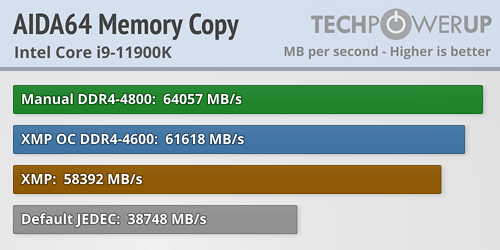
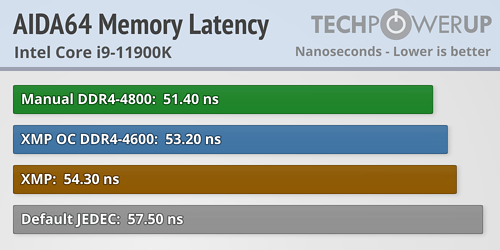
With the Intel Core i9-11900K, I was able to achieve 2300 MHz with all other XMP settings at their default, which is alright. It shows that this kit has a bit of headroom. While manually overclocking, I raised the CAS to 20 and reached 2400 MHz (DDR4-4800). The MSI Z590 ACE has a hard time with any kit above this frequency—it is not the maximum frequency this kit can achieve.


AMD Results
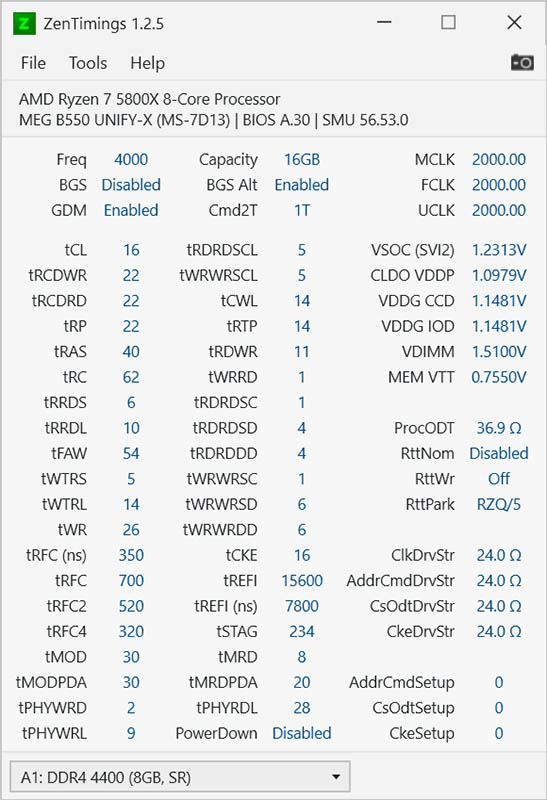
For AMD, I was able to achieve 2400 MHz stable on my MSI MEG B550 Unify-X with the XMP default timings. The technically gray area is where Command Rate 2T had to be enabled over Gear Down Mode. It might not be worth the effort to validate if that is where you plan to stop.
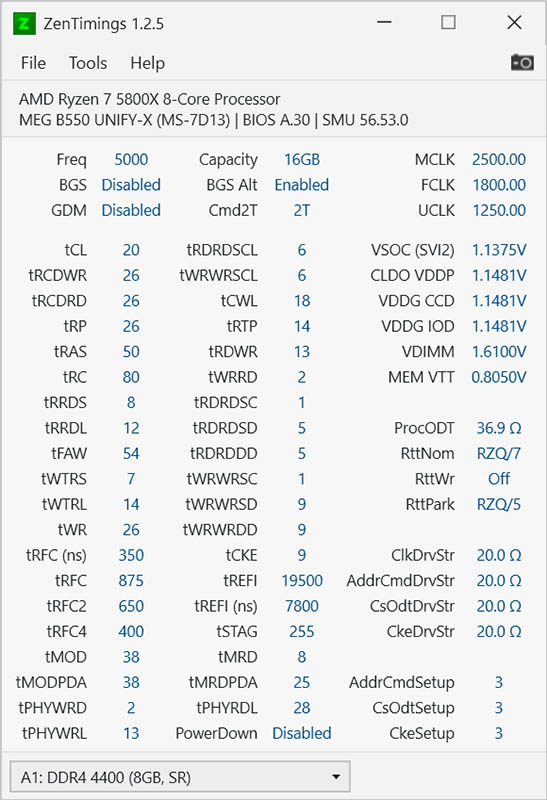
Next was my first manual overclock. After loosening the CAS to 20 and raising the voltage to 1.6, DDR5-5000 was validated after a few hours of trying to lower the timings. This was the hard limit, higher voltage or loosening the timings did not help. I know my current board limit is 5100 with Hynix-DJR for two DIMMs.
For my second attempt, I went ahead and lowered the speed to 2000 MHz and shored up the Primary timings to match the Infinity Fabric. Easy to do if you already have the the CPU mapped out with the required settings. It unfortunately could not match other retail kits of 16-19-19-39. If you are planning on going down, consider just buying the appropriate kit for your desired FCLK.


Nov 21st, 2026 13:22 PST
change timezone
Latest GPU Drivers
New Forum Posts
- Local LLM General Discussion (694)
- Can you guess Which game it is? (345)
- GeekMagic Ultra Smart WiFi Weather Station (10)
- RX 580 2048SP 8GB - SK Hynix - Ardiyes - BIOS Needed (1)
- UPS what one to get? (22)
- Zen 3 IF/IMC degradation (243)
- State of the HPC-AI Market 2026: Processing Elements (0)
- 1 - 5 person file storage server equivalent accasible from anywhere + general VM server. (3)
- Honestly, do you care about GTA VI? (225)
- RX 9000 series GPU Owners Club (2251)
Popular Reviews
- Microsoft Surface Laptop Ultra Review - The Next-gen Arm Laptop
- Ugreen NASync DXP4800 GT Review
- Corsair RM1200e (Second Generation) Review
- Pulsar Office Tour & First Look at P1 Dual-Sensor Mouse
- Upcoming Hardware Launches 2027 (Updated Nov 2026)
- Acemagic Retro X3 Review
- Biwin Black Opal NV7400 2 TB Review
- AMD Ryzen 7 9800X3D Review - The Best Gaming Processor
- AMD Zen 6 Technical Deep Dive
- Chieftec Iceberg PRO 360 DARK Review
TPU on YouTube
Controversial News Posts
- NVIDIA Co-Founder and CEO Jensen Huang Officially Resigns (492)
- Report: Jensen Huang Eyes NVIDIA Comeback (260)
- Open Letter Asking NVIDIA to Reinstate Jensen Huang Passes 115,000 Signatures (184)
- OpenAI CEO Argues Home PCs Waste the World's Limited DRAM Supply (152)
- NVIDIA Launches Investigation Into Jensen Huang's Relationship With Suspected Chinese Spy (136)
- Intel "Raptor Lake Next" 16-Core and 20-Core CPUs Surface (130)
- NVIDIA GeForce RTX 50-Series Scheduled for up to $500 Price Hike This Week (89)
- Intel Razor Lake Gets a 12 P-Core bLLC Chip With No E-Cores, Per Leak (86)