Monday, January 30th 2012

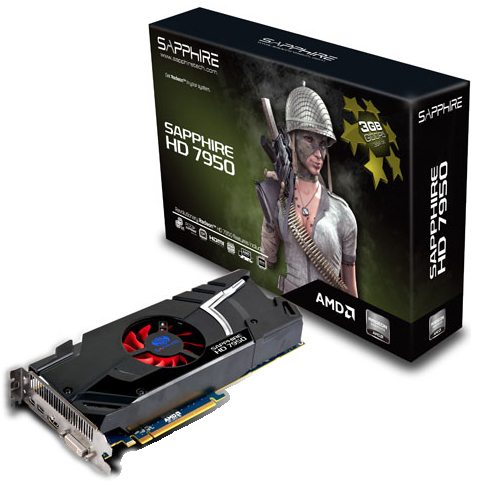
Single Fan Non-Reference Design Sapphire Radeon HD 7950 Pictured
A little earlier this month, we were treated to pictures of Sapphire's dual-fan Radeon HD 7950 OC graphics card. It appears that the card pictured earlier is not the only non-reference design HD 7950 from Sapphire, as it has a slightly more affordable single-fan model in the works. This model likely sticks to AMD reference clock speeds of 800 MHz core, 1250 MHz (5.00 GHz GDDR5 effective) out of the box.
The single-fan HD 7950 appears to have a blue-colored PCB that is likely to be AMD's cost-effective reference design. The cooler appears to have a compact heatsink that is cooled by a single central fan. Display outputs include two mini-DisplayPort, and one each of HDMI and DVI. We're also hearing from the source that 900 MHz core with unchanged (1250/5000 MHz) memory will be the maximum factory-OC permitted by AMD to AIB partners. That is not to say that the HD 7950's OC potential beyond that will be limited in any way.


Update: Augmented with more images from Expreview.
Sources:
OBR-Hardware, Expreview
The single-fan HD 7950 appears to have a blue-colored PCB that is likely to be AMD's cost-effective reference design. The cooler appears to have a compact heatsink that is cooled by a single central fan. Display outputs include two mini-DisplayPort, and one each of HDMI and DVI. We're also hearing from the source that 900 MHz core with unchanged (1250/5000 MHz) memory will be the maximum factory-OC permitted by AMD to AIB partners. That is not to say that the HD 7950's OC potential beyond that will be limited in any way.


61 Comments on Single Fan Non-Reference Design Sapphire Radeon HD 7950 Pictured
I want proof. I don't believe that for a second.:wtf:
How? You must have some pretty piss poor case airflow. I'm running an XFX 6950 2GB non-reference with the "shitty" cooler, and even with it pegged @ 99% usage, it never goes over 66C.
Something is seriously amiss.
@cadaveca: The 6970 isn't that far off from the gtx580 and is quite a bit cheaper so.... How much has the gtx dropped in price since it's release? Just since the 7970 i think it started coming down so thank you Nvidia for thinking of the end user charging full pop for a card for an entire year....
Anyways to each their own, the stock cooler on this particular 7950 is crap.
Then, of course, my reference card does the same as well, hitting 95c. Of cours,e the driver overrides the BIOS fan control, and I do not use 3rd party clocking utilities, nor do I adjsut fanspeed manually. There is no need...that's what wararnties are for.
Admittedly, temps are a bit lower when running jsut one monitor, but I also game @ 2560x1600 or 1920x1200, which is going to put significantly more workload then the average user.
Perosnally, I'd say you got lucky, and that is all.
Alas, jsut becuase something works for you, doesn't mean the same applies to all parts the same...it's no differnt than max overclocks of parts being different.
Also, you are running on AMD CPU, which will actually have less perforamnce than Intel-based rigs, even in singlecard configs, so your card doesn't even have the same load as mine do, for example.
Also don't forget some users read the forum at work. please be careful with your language.
Also why do people always say for example "AMD had 1 year to make the 7970 better than 580 and it only barely beats it." People need to realize that these have been in the making for a long time I bet you they're already working on 9*** they have to try and plan ahead for competition. Now they still could probably make tweaks in 1 year, but not ground breaking crazy and 28NM tech in new wait for 8*** to bring the performance. /end rant
Even though I am running a 1090T it is clocked @ 4GHz, I can guarantee there is no bottleneck there. 99% usage is 99% usage no matter what CPU you are using. Now perhaps if I was running crossfire, then yeah, but I'm not. But I suppose I can check that once I get my other PSU in.
And it's not luck, I quite honestly don't understand why people don't just run MSI's afterburner or Evga's precision. ALL factory cooling profiles suck --big time.
For the longest time I've been using a third party fan speed controller simply for the fact that I can't stand the noise that reference coolers pump out when they're running @ 100%.
Also, wouldn't it be better to simply set up a cooling profile than to RMA a card 9 times? You set it up once, it launches every time you start windows and you never have to worry about it again. The software is compatible with both Nvidia and AMD so there's no issues there either.
Personally, I don't like any of my GPUs' going over 75C. EVER! And I have yet had to RMA a GPU due to some sort of failure. (Had to RMA one because of one seriously loud capacitor).
So I suppose you're making it harder (and more expensive) on yourself (and your hardware) by not implementing a program that would not only make your rig run cooler, but would extend the life of your hardware. Remember, electronics hate heat.
For example, Furmark 100% load will draw signifcantly more power than a game. Both are 100% load. With the card drawing more power, clearly it's doing more work.(we can ignore how useful that work might be...:laugh:)
I spend a lot of time on TS with the BF3 regulars. In that group of users, we have had several users switch from AMD to Intel, Erocker and Crazyeyesreaper included. Both can confirm that AMD Phenom II CPUs create a bottleneck, even with single cards. It's not a "game-breaking" bottleneck, but you WIL Lget more FPS using a SKT 1155 CPU, even at stock, and the Phenom rig maxed out jsut cannot compare due to it's lack of memory bandwidth.
The issue is not with the CPU core..it's the memory performance. For example(one that I use commonly), Dirt3 performs nearly 50% faster on an APU...an APU!!!...vs an 1100T, with all things else remaining the same..same ram, same VGA, same drivers, etc.
And no, I do not agree that setting custom fan profiles is a way to avoid RMAs...this is why you have a warranty..the card either works in it's stock config, or it is broken. That's why XFX kept sending me new cards...and finally the 6950...because all the ones I sent in to them were broken. That said, it wasn't heat that was causing problems with those cards...I had purchased "XXX" 5870's, and repalcements after the first two were not "XXX"-level cards. As I purchased 1300 MHz mermoy cards, when the replacements failed @ 1300 MHz, they RMA'd, with basically no questions asked.
I only expect my computer stuff to last within warranty. I bought XFX cards because they have a lifetime warranty...which means the actual lifespan of those cards is not something I concern myself with. I paid extra for that warranty to remove the financial part.
That said, because I review hardware, I actually buy far less than I used to. IF you look at boomstik360's older GPU thread, you'll see I've posted many Crossfire paris..each I bought, and the boards and other hardware to go along. I don't tend to keep hardware long enough for anything like that be a concern.
In 2011, I purchased only CPUs to do reviews, and a few other odds and ends, a far cry from the $5k-$8k i used to spend every year. I won't have to buy further hardware for reviews now, either, as TPU takes care of that for me. The "old stuff", from past reviews, now gets handed down to my personal rigs.
Also, because I review hardware, using it at "stock" serves more purpose than it would for a normal user, as the problems that I run into are things that I relate in my reviews. If things break...my readers are gonna hear about it. That means you. ;)Well, I coudl care less about what happened. I care about what choices I have now, in retail, and what my dollar buys. You'll notice I personally make no mention of the 580, really..but instead I chose to look at 6950 Crossfire as the compare that makes the 7970 look bad...because both are from AMD, and cost about the same. It's not just the 580 that makes the 7970 look bad...
Nvidia is on the losing end here. They're reacting.
As a matter of fact, my x3 720 @ 3.6 with the exact same GPUs' (2x 4870 XXX) beat my i7 920 in 3dmark06 to the tune of almost 3000 points. The 720 scored 19950 points the 920 a mere 17000.
Now with this 1090T, which is running considerably faster, with a single GPU that's slightly more powerful than those 2 4870's, I highly doubt that there's a noticeable bottleneck.
Also, according to that Toms hardware article, in BF3, the speed of the CPU and the architecture played no significant role in BF3's performance and that it was more a GPU bound game. So I fail to see the relevance.
I can understand your point of view about not wanting to set a cooling profile up from a reviewers standpoint. However, I don't see that as a realistic demonstration of the cooling potential of the card. I really wish that manufacturers would automatically provide better cooling profiles at the BIOS level. It's something they could easily do.
To put in to perspective, my 4870 XXX's would IDLE @ 84C with no cooling profile. Then once the GPUs' were loaded, would eventually get to 100C and kick the fans on 100%. And man those suckers were LOUD @ 100% (as any reference cooler).
Now with a cooling profile, they'd idle @ ~62C and would almost never hit 75C. And then better yet, once I changed the silver TIM out for some white ceramique, they idled at 49C and loaded @ 62C.
But best of all, the noise level from those cards was kept to a minimum. (Since I don't use headphones anymore this is priceless now)
True most users aren't going to go through that hassle, but perhaps in your future reviews, you guys COULD set up a cooling profile to simply display what the factory coolers are actually capable of.
As for Dirt 3 performance, not sure what's going on there, I'm sure that's just an anomaly since it's the only game that does that.
But I'm also with you on using things at stock. I don't have nearly the time I used to to fine tune everything on my setups. I used to be pretty die hard about it and wrung every last little bit out, sometimes taking 3days to work all of the bugs out.
I only messed with this 1090T because I had time to do so, and I was just curious if it could do it. And it can, and quite honestly, I haven't noticed a tad bit of difference in gaming from running it at stock to running it @ 4GHz. And no noticeable difference in gaming from my i7 920 either (except I can run Dirt 1 and 2 now with out crashing or getting erky jerky gameplay).
Regardless, I'm building a Z68 machine and I have 2 fully unlocked 6950's so I'll do a comparison between the 1090T @ 4GHz and the 2600K (maybe 2700K) and I'll post my results with all of the benchmarks available to me.
Be sure to start a thread with your bench results...the more people that show this difference the better. ;) It's unreal. Those were but two users that have made that jump, not one regrets it so far.
I make a point of using benchmarks and settings that anyone can replicate in my reivews, so if you'd like to compare notes, I'm more than willing to help where I can. But at this point we've gone far off topic, which isn't such a good idea in the News section.;)
:(