Friday, October 2nd 2026
Sapphire Radeon RX 7000 Series Cards Get vBIOS Security Update
AMD Radeon RX 7000 series RDNA 3 graphics cards today received a new vBIOS security update. According to AMD's add-in card partner Sapphire, the update is now available for Sapphire's own Radeon RX 7600, RX 7600 XT, RX 7650 GRE, RX 7700 XT, RX 7800 XT, RX 7900 GRE, RX 7900 XT, and RX 7900 XTX models. This update covers all the desktop graphics cards that AMD released for the RDNA 3 lineup and marks one of the rare occurrences of GPU vBIOS updates in recent times. Typically, these vBIOS updates are reserved for security patches, and Sapphire confirms that the company has been working to address a security issue identified in partnership with AMD.
Before updating the GPU firmware, ensure that the AMD Adrenalin Edition graphics driver is installed and that you have about 15-20 minutes to complete the update. To update the GPU firmware, Sapphire provides links to the specific GPU model affected. Once downloaded, run the updater as an administrator, choose a folder to save the executable files, and locate that folder. Once inside, run the program as an administrator again, and the AMD Radeon Firmware Updater tool will start. This tool will detect any AMD GPU present and indicate if there is a new firmware update. As shown in the example below, select the GPU and run the update, which will prompt a reboot once it is finished. Note that for the Radeon RX/PRO 7000 Series, the tool automatically runs twice: once in regular mode and a second time in safe mode to complete the process.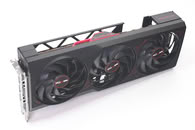
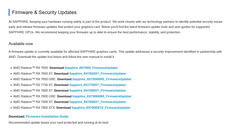 After installation, confirm that the new GPU vBIOS firmware update is completed using the AMD Adrenalin software, which will display the exact firmware version installed on your graphics card. For reference on the installation process, follow Sapphire's installation guide step-by-step, though it should be fairly straightforward.
Source:
Sapphire
Before updating the GPU firmware, ensure that the AMD Adrenalin Edition graphics driver is installed and that you have about 15-20 minutes to complete the update. To update the GPU firmware, Sapphire provides links to the specific GPU model affected. Once downloaded, run the updater as an administrator, choose a folder to save the executable files, and locate that folder. Once inside, run the program as an administrator again, and the AMD Radeon Firmware Updater tool will start. This tool will detect any AMD GPU present and indicate if there is a new firmware update. As shown in the example below, select the GPU and run the update, which will prompt a reboot once it is finished. Note that for the Radeon RX/PRO 7000 Series, the tool automatically runs twice: once in regular mode and a second time in safe mode to complete the process.

32 Comments on Sapphire Radeon RX 7000 Series Cards Get vBIOS Security Update
Security update? Surely if your Radeon is in a compromised machine, your whole machine is compromised. Radeons don't run an OS, do they?
Regards,
Fred.
@FR3D1 These are not my findings, i just verified it myself and wrote it a bit crypticFact is, this is the last firmware file which worked before i put the 7800xt in the cartoon box in may 2026,
-rw-r--r-- 1 root root 266K Apr 3 03:36 smu_13_0_10.bin
-- Anyway, when you are in the overclocking business or when you want higher resale value in the next few months for your graphic card, I would personally not flash the firmware. My graphic card is still not sold but will go to the 2nd hand market. Some forum indicate my current in use radeon 9070 has similar feature for much more fps, windows is already locked what i read.
My msi motherboard exposes now more clearly the hybrid graphics. I would also check when it is critical to use the motherboard cpu graphics, e.g. ryzen 7700x which works fine, and use via driver teh radeon 9070 OC graphics as support. basically run your secure os when you are not gaming on the cpu graphics and use the "security" not updated firmware gpu in your gaming installation.
You have been warned about my concern.
I assume software writes directly via hidden bus to certain hardware registers to set certain values which stay persistent and give you more heat on the graphic card and more fps. I do know about ucontroller, i was only reading a bit 01 / 2026 about it. the firmware blocks access to the hidden bus, which is when i am not wrong, a renamed i2c bus.
It's one of the reasons why they are so hesitant to push GPU firmware updates, and try to fix everything in software drivers. 99% of the time that's enough, but for example here, it isn't.
Lets hope XFX does the same for their models.
I still run a 6700XT and i'm "glad" it's one of the few generations that still works with MPT. You can easily increase the default 180W into a 300W card with clocks up to 2.8 ~ 2.9Ghz for quite the improvement.
www.gigabyte.com/Graphics-Card/GV-R76GAMING-OC-8GD-rev-10-11/support#Support-Bios
I just wonder if my 6900XT is effected, or if this card is even on their radar. 😣
That way, you would also have a clarification of it affects your card or not. It would put you in a position to ask the AIB for an update or an answer as to why not.
But yep, GPU bios updates are rare.
But considering I cross flashed my 7900xtx pulse to the nitro+ vbios. I'm less inclined to consider this update.
It was already a pain to get it to accept the bios and ignore the hardware ID mismatch, don't want it to flash it back to the pulse bios.
Haven't updated it yet, but hoping this "fix" is for this problem.
Will update if it is In fact a fix for the GOP signing keys.
Someone with a Sapphire RDNA 3 GPU that applied the update should be able to check if that was also updated or not.