Thursday, April 12th 2012
1366 x 768 Most Popular Screen Resolution, Overtakes 1024 x 768: StatCounter
1366 x 768 pixels overtook 1024 x 768 as the most popular screen resolution worldwide, for computers, according to the latest statistics by StatCount. This new dominant screen resolution is a particularly important statistic for web-developers, as they can now make their designs more optimized for at least 1366 pixels-wide screens. 1920 x 1080 and 1680 x 1050 hold less than 5% of the market-share each. The growth of 1366 x 768 could have been propelled by dominance in the notebook market (across almost all market-segments), and entry-level PC monitor market. The interactive screen resolution stats graph can be found here.
The press-release by StatCounter follows.
Screen Resolution Alert for Web Developers
A major milestone in screen resolution sizes has been passed according to independent web analytics company, StatCounter. The company's research arm, StatCounter Global Stats reports that for the first time 1366x768 has become the most popular screen resolution worldwide, having overtaken 1024x768.
"The data reflects a continuing trend of users moving to larger screen resolution sizes," commented Aodhan Cullen, CEO, StatCounter. "The screen resolution size people are using is a critical factor for developers when it comes to web design, particularly in the case of fixed width web pages."
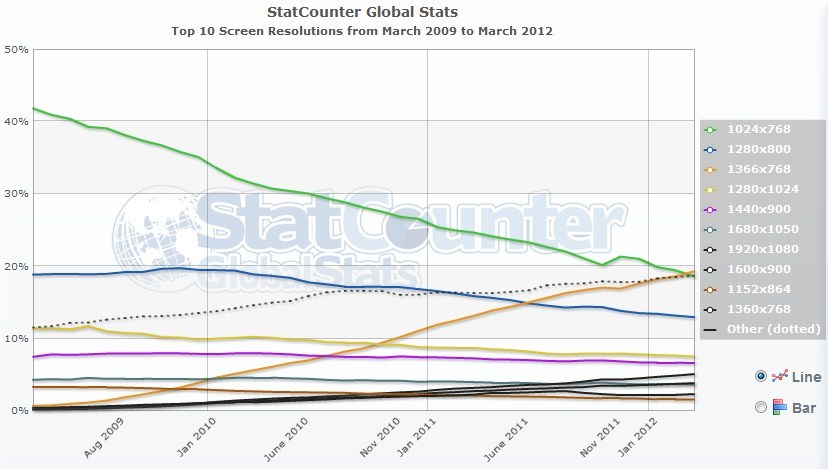
Since StatCounter began its tracking of screen resolution in March 2009, as a free service to developers and other users, 1024x768 has been the dominant screen size globally on the web (excluding mobile*). 1024x768 has fallen from 41.8% in March 2009 to 18.6% in March 2012. Over the same period 1366x768 has grown from 0.68% to 19.28%.The third most popular size is 1280x800 at 13%.
Cullen also said that while StatCounter Global Stats provides information on worldwide and regional trends, monitoring the specific screen resolutions being used to view individual sites is also very important.
StatCounter (statcounter.com/) provides free website traffic analysis. This allows web developers to capture screen resolution stats on their own and on their client websites in real time. Other information available includes search terms, download stats, exit links and other data.
StatCounter Global Stats data is based on over 15 billion page views per month (4 billion from the US) to the StatCounter network of more than three million websites.
Screen Resolution Alert for Web Developers
A major milestone in screen resolution sizes has been passed according to independent web analytics company, StatCounter. The company's research arm, StatCounter Global Stats reports that for the first time 1366x768 has become the most popular screen resolution worldwide, having overtaken 1024x768.
"The data reflects a continuing trend of users moving to larger screen resolution sizes," commented Aodhan Cullen, CEO, StatCounter. "The screen resolution size people are using is a critical factor for developers when it comes to web design, particularly in the case of fixed width web pages."
Since StatCounter began its tracking of screen resolution in March 2009, as a free service to developers and other users, 1024x768 has been the dominant screen size globally on the web (excluding mobile*). 1024x768 has fallen from 41.8% in March 2009 to 18.6% in March 2012. Over the same period 1366x768 has grown from 0.68% to 19.28%.The third most popular size is 1280x800 at 13%.
Cullen also said that while StatCounter Global Stats provides information on worldwide and regional trends, monitoring the specific screen resolutions being used to view individual sites is also very important.
StatCounter (statcounter.com/) provides free website traffic analysis. This allows web developers to capture screen resolution stats on their own and on their client websites in real time. Other information available includes search terms, download stats, exit links and other data.
StatCounter Global Stats data is based on over 15 billion page views per month (4 billion from the US) to the StatCounter network of more than three million websites.
75 Comments on 1366 x 768 Most Popular Screen Resolution, Overtakes 1024 x 768: StatCounter
You do have a valid and legitimate point that the card will last you for several years and remain able to play some of your games at high settings. But remember the ultra settings in some games will rely on GPU technology that may be implemented in the latest version of Direct X, Direct3D, or OpenGL which your card will not support, so no you will not always be able to run ultra settings in the latest games every year despite running a lower resolution. Some games today (I believe Shogun 2 is among them) require you to run DX11 mode to play the ultra detail settings and get tessellation, where as the high detail modes would be limited to DX10. So some doing what you have done and is still running an older card from a few years ago may still be running a very powerful DX10 card and running Shogun 2 smoothly at 1280x1024, but wont be getting the full detail experience because they dont have DX11 support.
Which is why, perhaps the better option for lower resolution gaming would be to buy the cheaper mid range cards every year or so? That way you get the latest tech every time, you take advantage of the latest processing (lower power, lower heat, lower noise), you get the latest features (directx, opengl, latest media acceleration, etc).
But honestly, resolution IS king. More pixels means more clarity, you get to see more detail, you're not running so much texture compression, and you don't have to rely on a lot of post processing or AA/AF to improve image quality. At 2560x1440 (or 4360x1440 depending if I want to run my triple panels in business mode or fun mode :toast: ) I really don't even need AA enabled because you can hardly tell the difference.
TheLostSwede is correct, at 1080p you DO NOT need a $400 gpu, pretty much anything in the $100 range will do. A GTX 460 will plow through any game at 1080p with high settings.
At this point the lowest resolution device I own is my 1080p TV. My ipad runs 2048x1536, my PC runs 4360x1440 (17" portrait, 27" landscape 17" portrait).
On an 16:10 or 16:9 monitor you can always split the screen in the middle with 2 pages , each page would look like if you were using an 4:3 monitor , well... more like two of them in fact...:laugh:
Anyhow i like my 16:9 because i can surf the web on half my screen & watch a movie on the other half or do something else at the same time :cool:They are both widescreen & the extras 120 pixels are not that much to go nuts over it IMO
How exactly you get more detail if you subsequently also have higher diagonal? You're just making image bigger, not more detailed. Because you're not increasing the pixel density. And pixel density is what is actually increasing visual detail.
Also if i'm not fully utilizing my HD6950, that means i can live with it easily till DX12 arrives and even past that point since DX12 games won't arrive immediately. Most of you will have to buy another DX11 card in order to even get properly playable games.
Basically i feel like i'm using a console. Whatever i throw at it works as intended. High framerate, max detail. No compromises for minimal cost. It's really a budget gamer's heaven.
I'll eventually go to 1920x1080 or whatever it will be at that point, but you'll all probably be at 2560x1920 or something at that point. And i don't mind that. It works great for me.
I hate when I am away from home and try to play at 1366x768:(
So bigger resolution doesn't necessary means better quality, ESPECIALLY for Microsoft OSes...Enjoy trolling? Are you playng Crysis of BF3 on your tablet?? Hmm?? :banghead::banghead:
Although speaking of gaming, I havent bought any games really in over a year since Id have to tone down res's and settings. I personally dont even want to see them in that state... Roll on new build in a few weeks =]
I can see the need for higher res in games, but everything else not so much, at least not until Windows gets better with DPI settings and scaling. I don't really need the space for the icons, i found an alternative to filling up the desktop. I'll post a vid a little later.
youtu.be/zbi1jMXNIKk?hd=1
after you get everything set up, right click the desktop and go to view then take the check off of "show desktop icons".
i can make a better "how to" video if anyone needs it.
The nicest screens I have seen to date are 2Kx2K. But they are industrial/avionic use and cost a fortune. If only I had deeper pockets...
What does a nice 1080P display generally cost in, say, Bangladesh?
Though I would also like to point out that if you're a gamer and you have the system power than at least 1080P widescreen is a no-brainer.