Wednesday, May 21st 2025

GIGABYTE Replaces DIMMs with CAMM2 on the AORUS Z890 Tachyon ICE Motherboard

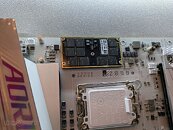
GIGABYTE has just rolled out its refreshed Z890 AORUS Tachyon ICE CAMM2 motherboard, designed to give overclockers and power users a serious edge. The biggest change is support for CAMM2 DDR5 memory modules, which offer cleaner signaling and much higher speeds compared to traditional DIMMs. At first glance, the new board looks a lot like the previous Tachyon ICE model. It still features the distinctive 90-degree rotated CPU socket and top-mounted memory slots. But instead of multiple DIMM slots, you now get a single CAMM2 connector. That slot comes with a toolless heatsink for better cooling—no fiddly screws required, just snap it on and you're ready to push your memory harder. If you're into extreme memory overclocking, the original Z890 AORUS Tachyon ICE recently set a world record at DDR5-12752 thanks to GIGABYTE's in-house expert, HiCookie, using V-Color's Manta Xfinity RGB modules. That achievement shows just how far this platform can be pushed. We recently reported on G.Skill offering a DDR5-10000, 64 GB of density (2-channels or 4 sub-channels), and timings of CL56-70-70 in CAMM2 form factor. That might be interesting to keep an eye on in the future, as it is definitely a new possible world-record contender.
Add your own comment

34 Comments on GIGABYTE Replaces DIMMs with CAMM2 on the AORUS Z890 Tachyon ICE Motherboard

#26
Unregistered
Hecate91but not for full size desktop motherboards.
Bro relax, the motherboards as you know them now are going to hit a very big overhaul in the near future (but not before 2029).
Posted on Edit | Reply
#27
Unregistered
rv8000camm should stay out of desktop and in laptops/mobile where it actually makes sense.
What if CAMM2/LPCAMM2 is faster than dimm, because the pcb layout on those yields a better signal integrity???
Posted on Edit | Reply
#28
rv8000
PizderkoWhy you're dead convinced that the classical ATX format will always be the same for decades to come????

For example: were you aware that VRM's are going away very soon, because of things like integrated power modules?

Were you aware that memories based on spintronics like Race Track & Ultra Ram based on compound semiconductors are coming very soon (2029) to completely eliminate the RAM as such???
thus your hard disc will play as local memory & RAM at the same time.
If you wanna put words in someone’s mouth go find someone else who cares about your crystal ball. Not once did I say motherboards would never change. I’ll repeat it, exhaustingly, camm/camm2 offer nothing for the desktop pc space except to arbitrarily change atx format for; no speed benefit, no latency benefit, no space savings, and only serve to increase costs for builders at this time. Not sure why theres such a cult following when the stuff is vaporware after three years of empty promises and big claims in news articles. Meanwhile news broke of cudimms in what 2024? A few months later and we already have kits posting WR, the same speeds/latencies, and you can even run the things as regular dimms in bypass mode.

But yea, Camm/cammA/CammB/Camm2/CammXYZ123bucklemyshoe is everywhere and revolutionizing the desktop space. Gimme a break…
Posted on Reply
#29
Unregistered
rv8000camm/camm2 offer nothing for the desktop pc space except to arbitrarily change atx format for; no speed benefit, no latency benefit, no space savings, and only serve to increase costs for builders at this time.
You concluded such thought by watching at your Crystal ball???

Also, figure this out, I'm waiting since 2017 to buy a new pc, because of the coming GAA-FET lithography ... so now what?

You don't like CAMM2/LPCAMM2?
then ignore it - What's the problem bro?
Posted on Edit | Reply
#30
snapdragon
I need a 96GB or better 128GB CAMM2 module.
Posted on Reply
#31
TheDeeGee
OneMoarAnd that is exactly the problem want to go from 32 to 64gb ? great throw out the module you have and replace it

dumb standard as far as desktops are concerned especially considering there is zero benefit atm
id be a different story if it was twice as fast or something but IMCS can't operate at the speeds required to care about it atm
Motherboard with two DIMMs have the same thing going on. And you don't "throw" it out, you just sell it second hand.

Benefits are better signal quality, better cooler compatibility, low profile, more board space.
Posted on Reply
#32
PixelTech
Area taken up by 4x DDR5 slots vs the largest CAMM2 "socket" dimensions:
133x120 vs 78x68
~16,000 mm² vs ~7,200 mm²
(24.8 in² vs 11.2in²)
Posted on Reply
#33
DudeBeFishing
Usually I'm against change, but this looks beneficial. Current DIMMs act like antennas and catch a lot of interference, and the modules are harder to shield. CAMM2 looks like you can easily add some shielding, that also functions as a heatsink. I'd slap a copper heatsink on it just for the looks.

Downsides for me are risk of more pins to break, and single module limit. You won't be able to add another cheap lower capacity module to double your RAM. At least you can swap it. It's better than the RAM being soldered to the motherboard.
Posted on Reply
#34
_roman_
That camm module needs to die. It needs too much space.

It seems gigabyte lost it'S engineering force. They should focus on the core products and on quality first. High price, nonsense and worst quality in the market so far over many years. Maybe their monitors are worth it - not sure.

5 pozi drive / philipps screws for a small pcb is a mega fail.
Posted on Reply
Add your own comment
Nov 23rd, 2026 17:04 CST change timezone

New Forum Posts

Popular Reviews

TPU on YouTube

Controversial News Posts