Monday, July 21st 2025

AMD and Stability AI Enable Local AI Image Generation on NPU-Powered Laptops
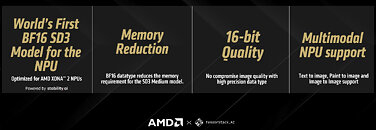
AMD and Stability AI made an announcement today about their joint effort to adapt Stable Diffusion 3.0 Medium for Stability Amuse AI art creator. This move allows for better picture generation and text handling abilities to run on Neural Processing Units (NPUs). Earlier, at Computex 2024, AMD showed off the first-ever block FP16 stable diffusion model in the world, SDXL Turbo, which they created with Stability AI. This new model reached FP16 accuracy at INT8 performance levels. The two companies now introduce their newest teamwork featuring the first block FP16 SD 3.0 Medium model. This step forward brings higher picture quality while being tailored for AMD Ryzen AI XDNA 2 NPUs. People can use this right away through Amuse 3.1 by Tensorstack running in HQ mode on Ryzen AI-powered laptops that support it.
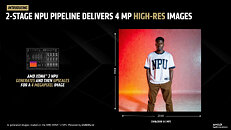
The new block FP16 SD 3 Medium model needs less memory than older versions as it works on 24 GB laptops while using up 9 GB of memory. This data type enables high-quality local AI image generation on laptops with less than 32 GB of memory using high precision format without excessive quantization. The system incorporates a two-stage pipeline powered by the AMD XDNA 2 NPU that enhances the standard 2 megapixel (1024 x 1024) output images to 4 megapixel (2048 x 2048) resolution. In the past, Amuse offered Stable Diffusion Medium, but it needed GPU processing, which held back widespread use. Now, users can pick between GPU or NPU processing. To test this new feature, users need to download and install the latest Adrenalin Driver, then the Amuse 3.1 Beta, and while in EZ Mode, move the slider to HQ and toggle XDNA 2 Stable Diffusion Offload.
Source:
AMD Blog
The new block FP16 SD 3 Medium model needs less memory than older versions as it works on 24 GB laptops while using up 9 GB of memory. This data type enables high-quality local AI image generation on laptops with less than 32 GB of memory using high precision format without excessive quantization. The system incorporates a two-stage pipeline powered by the AMD XDNA 2 NPU that enhances the standard 2 megapixel (1024 x 1024) output images to 4 megapixel (2048 x 2048) resolution. In the past, Amuse offered Stable Diffusion Medium, but it needed GPU processing, which held back widespread use. Now, users can pick between GPU or NPU processing. To test this new feature, users need to download and install the latest Adrenalin Driver, then the Amuse 3.1 Beta, and while in EZ Mode, move the slider to HQ and toggle XDNA 2 Stable Diffusion Offload.


6 Comments on AMD and Stability AI Enable Local AI Image Generation on NPU-Powered Laptops
I bet there are other options out there that work with Nvidia. Any suggestions from Nvidia owners of programs that install as easily as Amuse and are optimized for Nvidia? I would like to test the GTX 1660 that I have to see if it gets any performance boost.
I myself swapped Stability Matrix for EasyDiffusion since Stability Matrix seems to be unhappy with my Arch AMDGPU/ROCm install. It is a little less comprehensive compared to Stability Matrix but is easy to set up and use.