Thursday, March 12th 2026
Glorious Revives Original 69 g Model O Gaming Mouse With 19K Optical Sensor, Honeycomb Shell
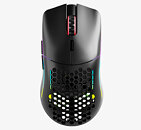
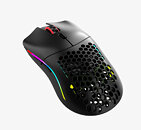
Glorious Model O was once held in high regard in the realm of gaming peripherals, but that design has since been surpassed by more modern designs with lighter shells and more responsive, accurate sensors. Apparently there is still a market for the original Glorious Model O gaming mouse, at least according to Glorious, who recently announced the Glorious Model O Classic. The Model O Classic is a rehash of the 2019 Glorious Model O design, replete with the RGB strips, original sensor hardware, and even the original honeycomb design that's largely fallen out of use except for in the most lightweight gaming mouse designs.
The Glorious Model O classic features the same BAMF sensor, based on the Pixart PAW 3370, as the original—although it's now simply called the "19K Optical Gaming Sensor," which means it has a maximum wireless polling rate of 1 kHz, tops out at 19,000 DPI, 400 IPS, and 40 G acceleration. Despite the honeycomb shell, the Model O Classic still weighs in at 69 g, whereas many solid-shell gaming mice released in the last year or two come in at 40-50 g, with some, like the Corsair Sabre V2 Pro even dipping into the mid-30s. Glorious also still uses the Glorious Core software to customize the Model O Classic, meaning customization requires installing software that is only available on Windows. The Model O Classic wireless gaming mouse is available on the Glorious online store at $89.99.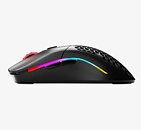

Source:
Glorious
The Glorious Model O classic features the same BAMF sensor, based on the Pixart PAW 3370, as the original—although it's now simply called the "19K Optical Gaming Sensor," which means it has a maximum wireless polling rate of 1 kHz, tops out at 19,000 DPI, 400 IPS, and 40 G acceleration. Despite the honeycomb shell, the Model O Classic still weighs in at 69 g, whereas many solid-shell gaming mice released in the last year or two come in at 40-50 g, with some, like the Corsair Sabre V2 Pro even dipping into the mid-30s. Glorious also still uses the Glorious Core software to customize the Model O Classic, meaning customization requires installing software that is only available on Windows. The Model O Classic wireless gaming mouse is available on the Glorious online store at $89.99.


20 Comments on Glorious Revives Original 69 g Model O Gaming Mouse With 19K Optical Sensor, Honeycomb Shell
This is 53 grams and still isn't the lightest mouse out there.
I've been using such mouses for years already and they don't get more dirty than my full cover mouses before, ya know as long as you have a basic personal hygiene and you don't behave like a pig around your PC/desk? 'like eating at the PC and then using the mouse with greasy hands and such..'
Also my hands used to sweat a lot more on full cover/shell mouses in the past so they ended up collecting more dirt/dead skin and whatever else than my hole mouses since my hand sweating is pretty much gone with these type of mouses so its not just a gimmick for some of us.
I guess having pets around could be an issue but that I can't speak for since we don't have any in our house.
By the way, here's my original (wired version). Looks like new, doesn't it?
With a friendly smile,
Fred.
Same as I hate "Nothing-phone" phones (for design) lol:D
No but for real I was also wary of this design when I've bought my first mouse like this but it worked out so well for me that I'm never going back to full cover mouses again.
Dust is also easy to deal with like all you have to do is blow into the mouse every now and then use a soft brush to clean the rest of the inside thru the holes and its all good. I've took apart my first hole mouse after nearly 3 years and it was surprisingly clean all things considered like I've found nastier stuff inside a full cover mouse after years of use.
I actually like those more recet Nothing Phone designs.:laugh: 'they are just too expensive for my usual phone budget..'
Rather than having to charge my mouse everyday it was still every other day. I actually started just using it wired. That's one thing GG got right because it's the best wire I've used. It's so light and the way it connects to the mouse makes it even better... but I ended up grabbing a Deathadder v3 Hyperspeed which beat the GG mouse on every level. Now I'm using a Viper v3 Pro.
smellalikeacheesegrater rodent.......
soundalikeacheesegrater rodent........
GUESS WHAT:
It IS a cheesegrater rodent...whodathunkit ?
Attached;
Ever heard of the “Mirai Super EMR”? It’s interesting to see where the journey with mice is headed.
With a friendly smile,
Fred.
It was so soft and light that it almost felt wireless to me.
Thought about trying out an actual wireless mouse but eh I just know that it would annoy me sooner or later so I rather look for a decently wired mouse and stick to that. 'So far my only wireless device is my headset but that only needs to be charged once every ~10 days with my use case so thats alright + it can be used wired just in case I forgot to charge it'
I tend to tell people interested in Glorious a couple things:
1. Don't ever buy it at full price. wait for a sale.
2. Don't expect the software to be able to control all the LEDs, the knobs, the sliders, etc. It can't (it might be able to do one option for slider or knob, but not the multiple it advertises, and it also must have the software running for those knobs and sliders to work at all).
With a friendly smile,
Fred.
With my numpad, there's "no hardware issue" so an RMA wouldn't have helped. They said sorry their new software doesn't work with the numpad, continue to use the old one. They said they'd look into a fix for the new software and would let me know when they fixed it. That was September 28th, 2024. They're not going to fix it. They closed my ticket. I've also had them delete my reviews from their site because they were not positive and also delete forum posts that ask for support on issues they don't intend to fix. It just tells me a lot about their company and makes me not want to buy from them again.
I also had an issue with the GMMK Pro keyboard with their new software as it doesn't allow control of the side RGB lighting and has no other functions you can use for the volume knob. As I bought the keyboard with knob, and the numpad with knob and slider, I was planning on programming them all to do different things (which is advertised as possible on their site). The only thing that actually works (if you use the old software because the new software does not support old hardware) is if you set all of them to system volume. So they become completely redundant. Also, they only function at all on the numpad if you have the software running. They don't do anything if you just boot into Windows and don't open the software.
Contrary to this, I have a Keychron K8 Pro and an Epomaker numpad at work and they both work flawlessly, with whatever LED profile/settings I want without even running software.
I did agree with you in part regarding the software, and yes; I won’t be buying a keyboard from them as long as I’m tied to their proprietary software.
Attached:Source
It sounds like they’ve now at least integrated the old devices that weren’t compatible before. I’ll take a look at that later!
With a friendly smile,
Fred.
I saved the “offline” profile for my mouse. As far as I know, for some reason, the saved profile gets reset the first time the program is launched.
With a friendly smile,
Fred.