Tuesday, March 24th 2026
Firefox 149.0 Stable Launches With Split View, Free VPN, Improved PDF Performance
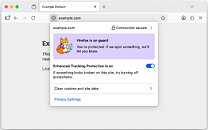
Mozilla has officially launched Firefox 149.0, which is now available for download in the release channel. Firefox 149 introduces a number of bug fixes, many of which were announced in previous beta versions, but there are also a handful of new features that may significantly impact the user experience. Mozilla has taken a page out of Zen Browser's books with a new split mode for loading two webpages side-by-side in split view, introduced a free VPN and added a new "share" button to the toolbar. Firefox will also now automatically block website notifications and revoke malicious websites—as flagged by SafeBrowsing—by default.
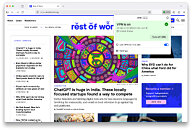
Split view can be triggered by right-clicking a link and selecting the split tabs option or by selecting two tabs and clicking the split tabs button in the address bar. Firefox's free built-in VPN, which is directed at security-conscious users, allowing users to mask their location, hide their IP, and protect their data for free. The VPN will require a Mozilla account, there is a data cap of 50 GB per month, and the rollout is starting with France, Germany, the UK, and the US as of version 149's release. Firefox Labs also now features a tab notes feature, for which the developers are seeking feedback during this release. Firefox has also officially implemented hardware acceleration for PDFs, which means documents should load significantly faster. As usual, there is also a stack of under-the-hood changes to Firefox 149, like modern API implementations and a new TrustPanel, and you can check those out in the official update notes.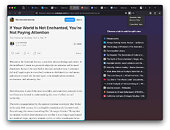
Source:
Mozilla
Split view can be triggered by right-clicking a link and selecting the split tabs option or by selecting two tabs and clicking the split tabs button in the address bar. Firefox's free built-in VPN, which is directed at security-conscious users, allowing users to mask their location, hide their IP, and protect their data for free. The VPN will require a Mozilla account, there is a data cap of 50 GB per month, and the rollout is starting with France, Germany, the UK, and the US as of version 149's release. Firefox Labs also now features a tab notes feature, for which the developers are seeking feedback during this release. Firefox has also officially implemented hardware acceleration for PDFs, which means documents should load significantly faster. As usual, there is also a stack of under-the-hood changes to Firefox 149, like modern API implementations and a new TrustPanel, and you can check those out in the official update notes.


12 Comments on Firefox 149.0 Stable Launches With Split View, Free VPN, Improved PDF Performance
ftp.mozilla.org/pub/firefox/releases/
I hope VPN will eventually become available elsewhere. Sometimes it can be handy to route traffic elsewhere. Split screen will be super useful at work where I often have to showcase two different products of ours and I can now do side by side comparison inside browser without having to open two separate windows. Minor but useful feature.
i experiment for weeks to get used to it. i do not see any benefits over i3wm default behaviour wiht www-client/vivaldi
it has more use on windows 11 pro where such advanced desktop environments do not exists for over 7 years.
i think that is a generic limitations of most likely most vpn. what i remember those vpn services were sold for lots of monthly fees and most likely require a login that way.
what is saved and stored over a certain time period when you use such services is out of scope anyway. and what certain agencies from certain countries can do when they get your billing information because you used a swiss country based it service with your real life bank account credentials. note: what i quick read on other webpages ...
This is what AI says