Firefox 160 Releases With New Mini Floating Windows and UI Improvements
Mozilla has officially released Firefox Browser version 160, which brings with it both a number of under-the-hood and user-facing changes to improve the average browsing experience. Aside from a few technical changes, like support for MKV playback with FLAC, MP3 or PCM audio, the biggest new user-facing changes are the new Mini Windows and an updated UI for the PiP (Picture-in-Picture) video player.
Mini Windows is a new early implementation of a feature that allows users to move a tab or a part of a page into an always-on-top window. To access Mini Windows, you right-click a tab, and select "Move to Mini Window," and you can then right-click any section of page content and select "Move Section to Mini Window," which will bring up a new UI to select and isolate a particular section of a page for use in the mini window.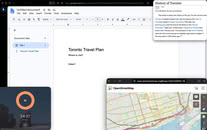
Mini Windows is a new early implementation of a feature that allows users to move a tab or a part of a page into an always-on-top window. To access Mini Windows, you right-click a tab, and select "Move to Mini Window," and you can then right-click any section of page content and select "Move Section to Mini Window," which will bring up a new UI to select and isolate a particular section of a page for use in the mini window.