Thursday, August 27th 2026

NVIDIA DLSS 5 DLL Leaked by NBA 2K27 Early Access Build, Here's Our Analysis
Earlier today, we reported that a DLSS 5 DLL has been leaked by an early access build of 2K's NBA2K27 early access. NVIDIA announced DLSS 5 earlier this year, and showed more details at SIGGRAPH this year, saying it would ship "this fall." However, we were surprised that it is shipping already, and with a title like NBA 2K27, without any major announcement or review coverage, pushing us to dig what is happening beneath the surface. Maybe the developers just put the wrong file into the release before pushing it out.
Copies of the DLL were mirrored by people and uploaded to Reddit, where we obtained ours. Just to be clear up front: NVIDIA didn't provide any information for this article, there was no briefing, no press build or anything. All findings reported here come from taking a publicly circulating file apart and trying to figure out what is inside it. Also, before you get too excited, the file cannot actually be used in the game—NBA 2K27 exposes no setting to turn it on, and nothing in the shipping build appears able to drive it. You also can't just drop it into any other game's folder—the game has to be coded specifically to load that DLL and feed it the right information, more on that later.
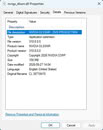 Properties of the File
As you can see, the file is digitally signed by NVIDIA, so it is authentic. The signing date is August 11th, so very recent, but it also most certainly means that this file is not the final DLSS 5 that we'll get to see on release day. The version number is also higher than any other DLSS DLL encountered yet. This week, DLSS 4.5 Ray Reconstruction launched, with version 310.7.129, this is 310.8.0, so one minor version higher (8 vs 7).
The DLL and all of its parameters use "DLSSNR," and the binary never spells out what NR stands for. There is no "Neural Rendering" anywhere, but we're quite confident that that's what it means. We also saw it on the GeForce 610.47 driver, which exposed a DLSS Neural Rendering profile settings earlier this year.
The "original filename" field reads "CL 38718415"—a Perforce changelist number, the internal source control revision this was built from.
158 MB, and Almost All of it is the Model
At 158.2 MB, this is the largest DLSS DLL NVIDIA has shipped to date—by a comfortable margin. The obvious question is whether that size is real or just development baggage: debug symbols, an unstripped build, that sort of thing. It is not. Breaking the file down by section makes the composition clear:
That blob turns out to be a named tensor map, structured much like a PyTorch state dictionary. We analyzed it a bit further and found 153 named tensors.
148 Million Parameters, in FP8
Byte count only becomes a parameter count if you know the precision, and that's where the GPU kernels from the previous list come in. 111 of the DLL's 231 CUDA kernels have "_fp8" in their naming, which is a strong hint. Analyzing the weights themselves and their statistical distribution confirms that these are not 16-bit floats—even-numbered bytes (exponents) and odd-numbered bytes (mantissas) would show visibly different statistical distributions. If they are 8-bit, there is no two-byte structure at all. The data is also not compressed based on a measurement of entropy per byte (how random each value looks).
So by our own analysis the model is roughly 148 million parameters, and it's running in FP8. For VRAM usage that means, you can expect to see it grow by around that amount—negligible on any modern GPU. On top of that you need some buffers, maybe several hundred MB more, depending on resolution and scale factors, but certainly not gigabytes. 148 million parameter model is also something that almost any modern GPU VRAM capacity can handle, as generally video generation models are significantly more resource intensive.
GeForce RTX 50 Only?
Inside the DLL there are "cubins," one set per architecture. We enumerated every one: 15 cubins containing 231 kernels, and each one targets "sm_120," which is GeForce RTX 50, Blackwell. There is no "sm_75" (Turing), no "sm_80" or "sm_86" (Ampere), no "sm_89" (Ada).
Missing cubins alone would not settle it, because CUDA code can also ship an intermediate form (PTX), but we couldn't find this in the DLL at all. The binary also carries an explicit runtime gate reporting an unsupported GPU architecture alongside the minimum required one.
While this means this one specific build, which is definitely not final, contains executable code only for GeForce RTX 50 and no other GeForce generation, and no fallback path that could generate it. It does not prove that at launch DLSS 5 will be RTX 50 exclusive. Logically it makes a lot of sense to build this feature for the most modern architecture first, and get it right, before worrying about porting it or trying to support multiple architectures at the same time, while things are still in flux.
Inputs from the Game
Games hand data to all DLSS algorithms through named parameters, so the parameter list is effectively the input specification, and we can fish that out of the file. For DLSS 5 it is short: the rendered image ("Backbuffer," "Color"), depth and motion vectors ("Depth," "MVec"), UI handling ("UI," "UIAlpha," "UICorrection"), masking ("ControlMask," "UseAutoMask"), some kind of bidirectional distortion field shared with Frame Generation ("BidirectionalDistortionField"), plus output and sizing parameters including a "ScalingRatio."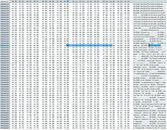 Interestingly, this is a much smaller set of inputs than with DLSS 4.5 Ray Reconstruction, which accepts roughly 25 buffers—diffuse and specular albedo, normals, roughness, ray hit distances, transparency layers, subsurface scattering guides. DLSS 5 accepts none of them.
At SIGGRAPH, NVIDIA said they used "the render's internal buffers such as albedos, surface normals, and some of the lighting information" so the model would know what to stay consistent with. This confused us at first, but then it became clear that the spokesperson framed this statement about training: "we trained the model in a way to..." We also checked whether DLSS 5 might receive G-buffer data by grabbing that data from DLSS Super Resolution or Ray Reconstruction—it does not reference either file.
Two further details. "UI," "UIAlpha" and "UICorrection" alongside "Backbuffer" place this at the very end of the frame pipeline, after tone mapping, with the interface potentially already composited—the model has to be told where the HUD is so it does not break it. And "ScalingRatio," together with log messages tracking network dimensions separately from output dimensions, shows DLSS 5 runs at its own separate resolution, i.e. it does some sort of scaling, too.
Game-Specific Tuning?
We looked for per-title machinery and found none. There is no profile table, no game whitelist, no embedded game names, and no engine detection. But here, too, you have to consider that this doesn't look like the final version, and NVIDIA has tuning mechanisms that live outside the DLL, in the driver profile database and NVIDIA App overrides. I suspect that DLSS 5 tuning actually happens on the developer-side, per scene, through masks and sliders passed at runtime. This also aligns with NVIDIA's focus on developer control in the SIGGRAPH presentation, where a still life had its pitcher, grapes and bottles masked separately, each with its own pair of intensity sliders. Definitely Unfinished
We found an error string left in the file, which reports a missing module, explains that the block in question is part of the skeleton but that no wrapper has been ported yet, and then it points at a file for the remaining to-do list: ".cursor/rules/crazy-cuckoo.mdc". Two things there. "crazy-cuckoo" sounds like an internal codename, and there's also "hnet-vigilant-squid," maybe the name of the model? ".cursor/rules/" is the configuration directory used by Cursor, an AI-assisted code editor.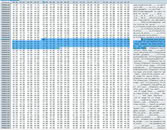 The SIGGRAPH demo showed a developer choosing between models A, B and C and switching per scene. It seems the build in this DLL ships just one network out of those three, and can log a message about a preset being unavailable in this build so it falls back to the default.
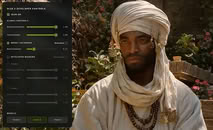 The control panel from that demo maps onto the parameter names in the DLL almost one for one: global "Structure Intensity" and "Tone Intensity" sliders, a "Model Automask" section with its own strength slider, a "Developer Masking" list of individual scene elements, and the Model A / B / C selector along the bottom.
Closing Thoughts
The single biggest takeaway from all of this is that DLSS 5 is real and it's close. It's no longer an internal research project, or a demo built for a conference. A finished, signed, shipping binary made it into a game months before anyone expected to see it—developers are using this, and building stuff for it, right now. What we found inside confirms that this is a completely different technology compared to what DLSS has been until now. Super Resolution, Ray Reconstruction and Frame Generation all try to reconstruct what the renderer was attempting to draw in the first place. This one adds something that has never existed in the scene before, using a real generative model, running locally.
It's also clearly not done yet, so don't judge DLSS 5 on any of that, and we're not going to. Actually, finding all this made us even more curious—we genuinely can't wait to get our hands on it, learn more details from NVIDIA, and run it through detailed testing.
Here's the SIGGRAPH Talk for your reference:
Sources:
@renan_maniero on X, NVIDIA DLSS 5 SIGGRAPH Presentation
Copies of the DLL were mirrored by people and uploaded to Reddit, where we obtained ours. Just to be clear up front: NVIDIA didn't provide any information for this article, there was no briefing, no press build or anything. All findings reported here come from taking a publicly circulating file apart and trying to figure out what is inside it. Also, before you get too excited, the file cannot actually be used in the game—NBA 2K27 exposes no setting to turn it on, and nothing in the shipping build appears able to drive it. You also can't just drop it into any other game's folder—the game has to be coded specifically to load that DLL and feed it the right information, more on that later.


As you can see, the file is digitally signed by NVIDIA, so it is authentic. The signing date is August 11th, so very recent, but it also most certainly means that this file is not the final DLSS 5 that we'll get to see on release day. The version number is also higher than any other DLSS DLL encountered yet. This week, DLSS 4.5 Ray Reconstruction launched, with version 310.7.129, this is 310.8.0, so one minor version higher (8 vs 7).
The DLL and all of its parameters use "DLSSNR," and the binary never spells out what NR stands for. There is no "Neural Rendering" anywhere, but we're quite confident that that's what it means. We also saw it on the GeForce 610.47 driver, which exposed a DLSS Neural Rendering profile settings earlier this year.
The "original filename" field reads "CL 38718415"—a Perforce changelist number, the internal source control revision this was built from.
158 MB, and Almost All of it is the Model
At 158.2 MB, this is the largest DLSS DLL NVIDIA has shipped to date—by a comfortable margin. The obvious question is whether that size is real or just development baggage: debug symbols, an unstripped build, that sort of thing. It is not. Breaking the file down by section makes the composition clear:
- Executable CPU code: 0.7 MB
- Read-only data: 0.2 MB
- Compiled GPU kernels and tables: 16.4 MB
- Trained model weights: 140.9 MB
That blob turns out to be a named tensor map, structured much like a PyTorch state dictionary. We analyzed it a bit further and found 153 named tensors.
148 Million Parameters, in FP8
Byte count only becomes a parameter count if you know the precision, and that's where the GPU kernels from the previous list come in. 111 of the DLL's 231 CUDA kernels have "_fp8" in their naming, which is a strong hint. Analyzing the weights themselves and their statistical distribution confirms that these are not 16-bit floats—even-numbered bytes (exponents) and odd-numbered bytes (mantissas) would show visibly different statistical distributions. If they are 8-bit, there is no two-byte structure at all. The data is also not compressed based on a measurement of entropy per byte (how random each value looks).
So by our own analysis the model is roughly 148 million parameters, and it's running in FP8. For VRAM usage that means, you can expect to see it grow by around that amount—negligible on any modern GPU. On top of that you need some buffers, maybe several hundred MB more, depending on resolution and scale factors, but certainly not gigabytes. 148 million parameter model is also something that almost any modern GPU VRAM capacity can handle, as generally video generation models are significantly more resource intensive.
GeForce RTX 50 Only?
Inside the DLL there are "cubins," one set per architecture. We enumerated every one: 15 cubins containing 231 kernels, and each one targets "sm_120," which is GeForce RTX 50, Blackwell. There is no "sm_75" (Turing), no "sm_80" or "sm_86" (Ampere), no "sm_89" (Ada).
Missing cubins alone would not settle it, because CUDA code can also ship an intermediate form (PTX), but we couldn't find this in the DLL at all. The binary also carries an explicit runtime gate reporting an unsupported GPU architecture alongside the minimum required one.
While this means this one specific build, which is definitely not final, contains executable code only for GeForce RTX 50 and no other GeForce generation, and no fallback path that could generate it. It does not prove that at launch DLSS 5 will be RTX 50 exclusive. Logically it makes a lot of sense to build this feature for the most modern architecture first, and get it right, before worrying about porting it or trying to support multiple architectures at the same time, while things are still in flux.
Inputs from the Game
Games hand data to all DLSS algorithms through named parameters, so the parameter list is effectively the input specification, and we can fish that out of the file. For DLSS 5 it is short: the rendered image ("Backbuffer," "Color"), depth and motion vectors ("Depth," "MVec"), UI handling ("UI," "UIAlpha," "UICorrection"), masking ("ControlMask," "UseAutoMask"), some kind of bidirectional distortion field shared with Frame Generation ("BidirectionalDistortionField"), plus output and sizing parameters including a "ScalingRatio."
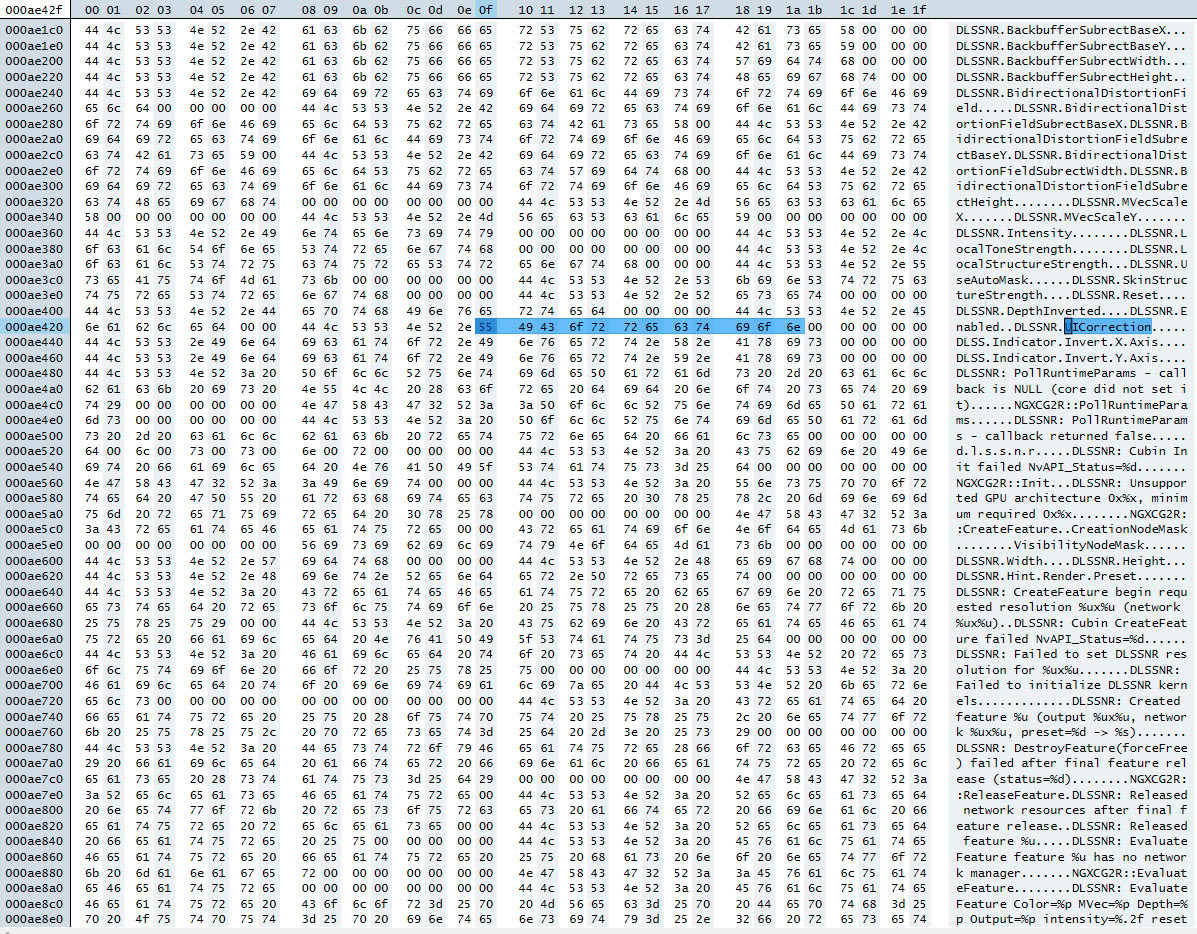
At SIGGRAPH, NVIDIA said they used "the render's internal buffers such as albedos, surface normals, and some of the lighting information" so the model would know what to stay consistent with. This confused us at first, but then it became clear that the spokesperson framed this statement about training: "we trained the model in a way to..." We also checked whether DLSS 5 might receive G-buffer data by grabbing that data from DLSS Super Resolution or Ray Reconstruction—it does not reference either file.
Two further details. "UI," "UIAlpha" and "UICorrection" alongside "Backbuffer" place this at the very end of the frame pipeline, after tone mapping, with the interface potentially already composited—the model has to be told where the HUD is so it does not break it. And "ScalingRatio," together with log messages tracking network dimensions separately from output dimensions, shows DLSS 5 runs at its own separate resolution, i.e. it does some sort of scaling, too.
Game-Specific Tuning?
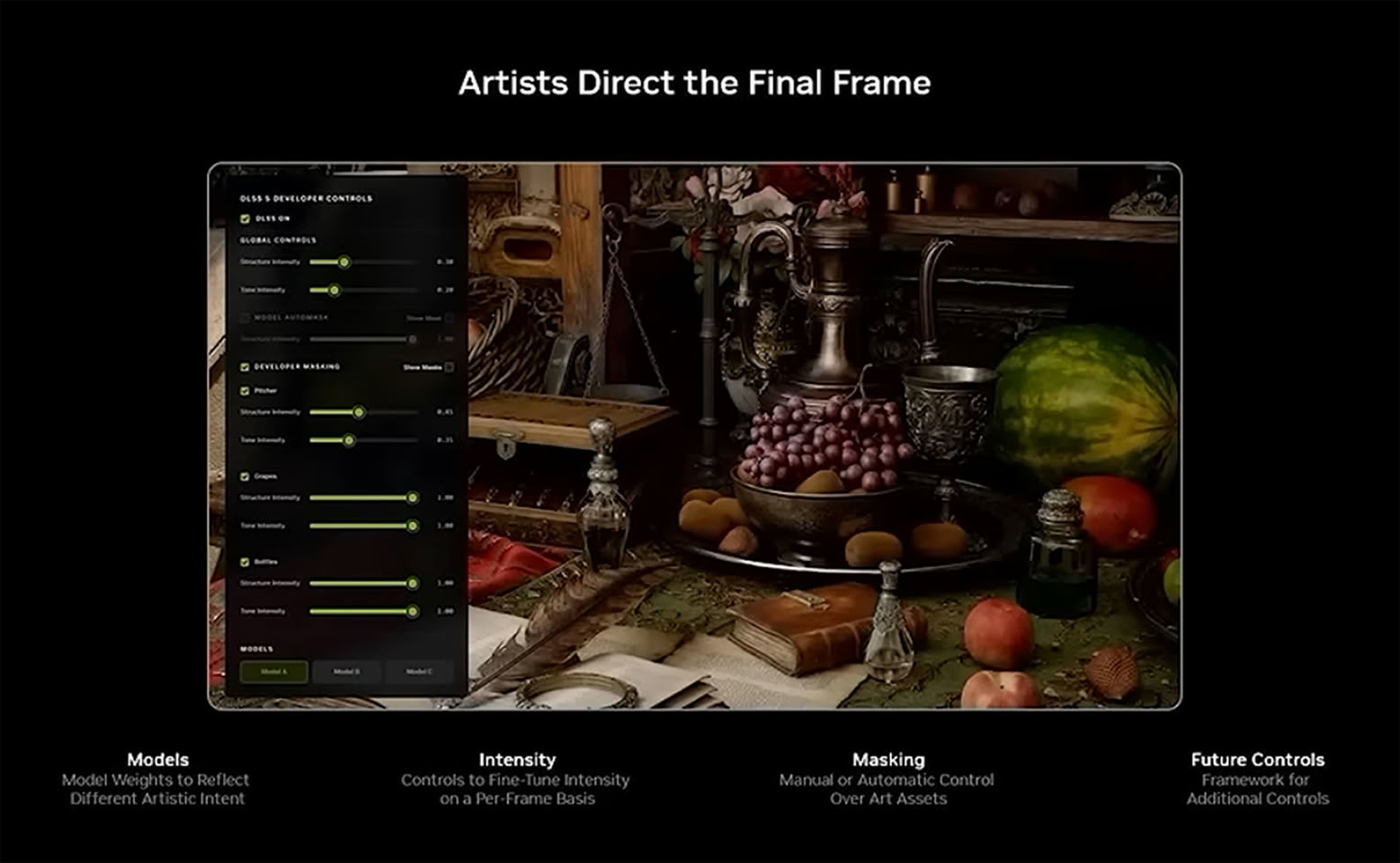
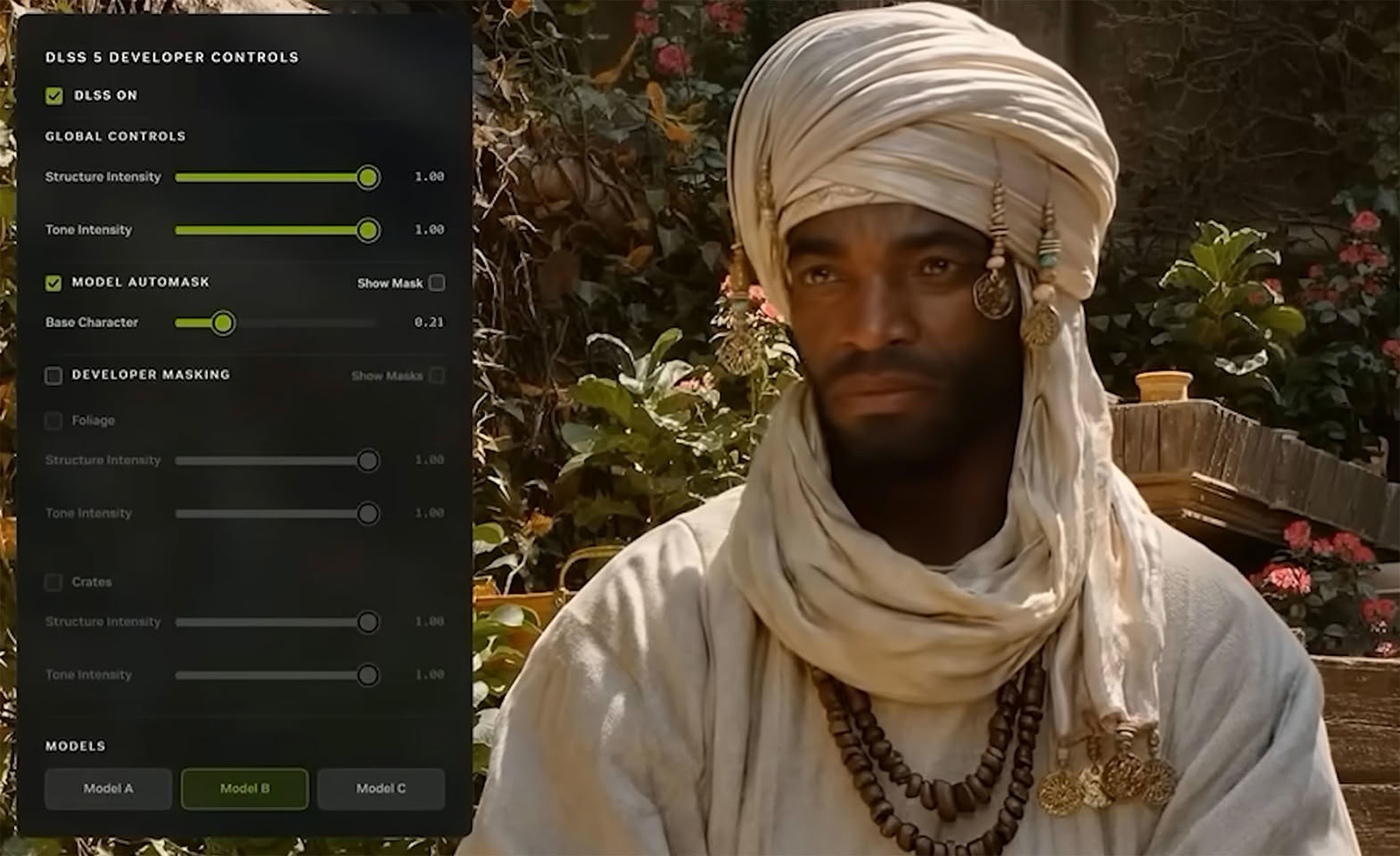
We looked for per-title machinery and found none. There is no profile table, no game whitelist, no embedded game names, and no engine detection. But here, too, you have to consider that this doesn't look like the final version, and NVIDIA has tuning mechanisms that live outside the DLL, in the driver profile database and NVIDIA App overrides. I suspect that DLSS 5 tuning actually happens on the developer-side, per scene, through masks and sliders passed at runtime. This also aligns with NVIDIA's focus on developer control in the SIGGRAPH presentation, where a still life had its pitcher, grapes and bottles masked separately, each with its own pair of intensity sliders.
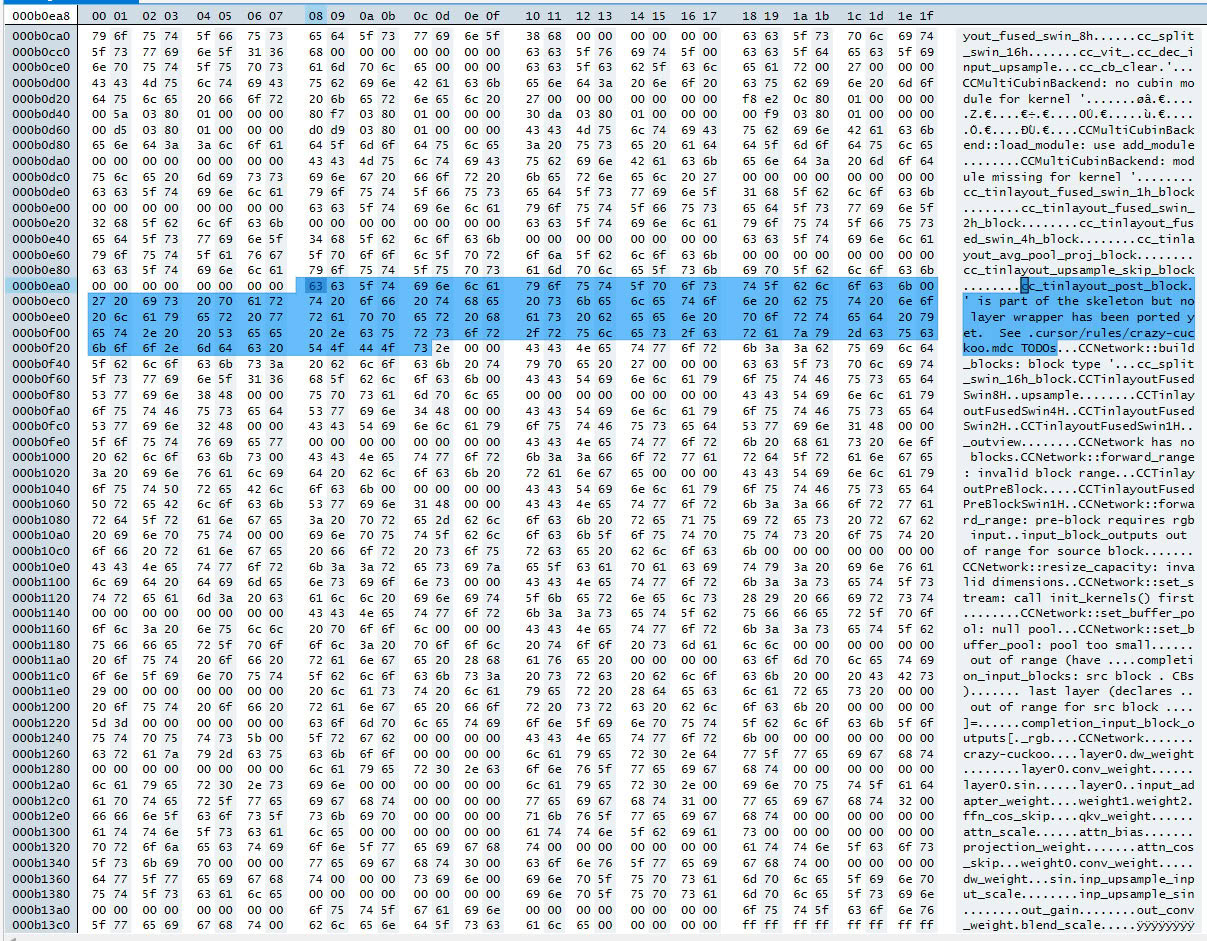
We found an error string left in the file, which reports a missing module, explains that the block in question is part of the skeleton but that no wrapper has been ported yet, and then it points at a file for the remaining to-do list: ".cursor/rules/crazy-cuckoo.mdc". Two things there. "crazy-cuckoo" sounds like an internal codename, and there's also "hnet-vigilant-squid," maybe the name of the model? ".cursor/rules/" is the configuration directory used by Cursor, an AI-assisted code editor.
Closing Thoughts
The single biggest takeaway from all of this is that DLSS 5 is real and it's close. It's no longer an internal research project, or a demo built for a conference. A finished, signed, shipping binary made it into a game months before anyone expected to see it—developers are using this, and building stuff for it, right now. What we found inside confirms that this is a completely different technology compared to what DLSS has been until now. Super Resolution, Ray Reconstruction and Frame Generation all try to reconstruct what the renderer was attempting to draw in the first place. This one adds something that has never existed in the scene before, using a real generative model, running locally.
It's also clearly not done yet, so don't judge DLSS 5 on any of that, and we're not going to. Actually, finding all this made us even more curious—we genuinely can't wait to get our hands on it, learn more details from NVIDIA, and run it through detailed testing.
Here's the SIGGRAPH Talk for your reference:
26 Comments on NVIDIA DLSS 5 DLL Leaked by NBA 2K27 Early Access Build, Here's Our Analysis
You're confusion is warranted, the general sentiment after SIGGRAPH 2026 was that Nvidia was actually listening and adding more imputs for consistency and to make DLSS less of s screen space effect.
Turns out that was false and they've not addressed those issues. Everyone who thought DLSS 5 was getting better got played, myself included.
it's approximately a 37.5% performance hit on a 5090.
So basically a xx90 only class feature.
It does alter the game's color grading, it does alter shadows (even adding shadows to whole objects). It does give every face that front lighting look:
For example:
Note the flickering of 80% of the floor surface at 1:09 of the video. You'll see it elsewhere as well.
At 1:36, DLSS 5 changes the color of light the lamp on the desk is emitting.
At 2:14, you can actually see DLSS5 changing the colors as the camera moves. Both the hair and especially the face make it obvious. Nvidia appear to be applying those changes over time instead of all at once to hide it but light sources coming in and out of view make the issue obvious. It's yet another visual artifact being added to games. The downside of DLSS5 not having access to off-screen lighting information while itself being in charage of generating lighting and whole shadows, is that it won't be accurate and it will be forced to adjust lighting on the fly as the camera moves. You can see this throughout the video but certain parts it becomes obvious (4:25, look at her neck).
Character faces are definitely not consistent (or at the very least, the artistic intent is completely different). Compare image 1 to this:
There's something like a 20 year age gap between the two.
Here's a good example of AI face:
The half the face pointed away from the light source is receiving light here. With DLSS 5 off, it appears as it should only receiving indirect lighting from either light bounches off the floor / wall or from ambient light in the game:
Not sure this is from DLSS 5 but either way, this is a messy presentation:
Grain everywhere.
Oh wait sorry, I got it all backwards.
The more you buy the more you save
DLSS5 is adding detail to Jensen's leather jackets
what am I missing.... oh right, Ngreedia!
Control
From a non human / android / robot looking character to a full fledged human. This is going to sell a lot of GPUs.
Cyberpunk
This is a feature that sells 5k$ GPUs. Now of course some people don't like that it changes artistic intent, they prefer the below
The HDR Gaming Interview – Veteran Developer Explains Its Sad State and How He’s Coming to Its Rescue
wccftech.com/the-hdr-gaming-interview-veteran-developer-explains-its-sad-state-and-how-hes-coming-to-its-rescue/*I also like that AMD's Ray Regeneration works completely independently of upscaling, whereas NVIDIA's Ray Reconstruction forces you to turn on DLSS Upscaling before you can use it. AMD's approach gives both developers and players much more flexibility in how they structure their rendering pipeline. The biggest problem here is game support—at this time just a single game is supported.*
www.techpowerup.com/review/amd-fsr-4-redstone/7.html
I mean as a remaster features for older game when framerate is plenty, why not. But as another developer crutch for AAA title, hell no. Or at least make AAA game way cheaper to offset how much we have to spend in overpriced hardware.