Thursday, September 24th 2026

Gigabyte Details 32-inch AORUS FO32U24G OLED Gaming Monitor With Dual Mode 4K 240 Hz and 1080p 480 Hz

Gigabyte has revealed more information about its latest high-end OLED gaming monitor, the AORUS FO32U24G. The 31.5-inch display combines a 4K resolution and 240 Hz refresh rate with a Dual Mode that switches the panel to 1920x1080 resolution but raises the refresh rate at up to 480 Hz, giving users the option to trade image quality for higher refresh rates for competitive games.

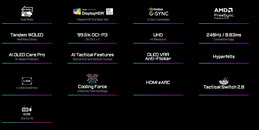
The Gigabyte AORUS FO32U24G is based on LG Display's fourth-generation Tandem WOLED panel technology. It features a 3840x2160 native resolution, has 240 Hz refresh rate, and a quoted 0.03 ms GtG response time. Gigabyte is also using a glossy RealBlack surface treatment, while the panel covers 99.5% of the DCI-P3 color gamut. Gigabyte is listing the peak brightness at 1500 nits, and it comes with DisplayHDR True Black 500 certification. It is also NVIDIA G-SYNC Compatible certified.
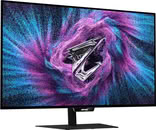
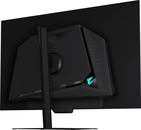
Gigabyte also included several of its own gaming oriented features, like the Tactical Switch, Tactical HUD, Tactical Crosshair, AI Black Equalizer, VRR Anti-Flicker and AI OLED Care Pro, while connectivity options include DisplayPort 2.1, two HDMI 2.1 inputs, USB-C with up to 65 W Power Delivery, USB-A and USB-B connectivity, eARC, a headphone output and an integrated KVM switch (Gigabyte One for All feature). There are also two 5 W integrated speakers, while the stand supports tilt, swivel, pivot and 130 mm height adjustments. Gigabyte was also keen to note its new enhanced thermal design which should further protect the OLED panel during extended gaming sessions.

Gigabyte has yet to announce final pricing and availability for the FO32U24G in all markets. The monitor is expected to become available later in 2026.
Sources: Gigabyte, via Videocardz
Add your own comment

19 Comments on Gigabyte Details 32-inch AORUS FO32U24G OLED Gaming Monitor With Dual Mode 4K 240 Hz and 1080p 480 Hz

#1
jesdals
dont care about dual mode. but nice with displayport 2.1 - just need more
Posted on Reply
#2
Inverted Polarity
I bought a 43" LG gaming monitor a couple of years ago and it was the best purchase by far for my computer gaming experience.

Don't even talk to me unless the monitor you are releasing is at least 45".
Posted on Reply
#3
lepudruk
jesdalsdont care about dual mode. but nice with displayport 2.1 - just need more
TFT Central claims its UHBR13.5 with the FO32U24G model and UHBR20 in the FO32U24GP model.
What I am happy about is that it is finally a glossy one! All they make these days are matte, duh.
Posted on Reply
#4
W4llBangdMyself
There seems to be a disconnect between display manufacturers releasing faster and faster displays while game devs keep targeting lower and lower FPS (and optimizing less and less) and all that while GPU prices are getting crazier and crazier. Do monitors like these actually sell? Who buys them? The few 5090 owners whose power connectors haven't burned yet and e-sports gamers?
Posted on Reply
#5
Chrispy_
How aggressive is the panel-refresh algorithm on 4th-gen LG WOLED?

I'm on 3rd-gen WOLED (RGWB with MLA) and I find the hard shutdown after 4 hours to run its 90-second panel care routine rather annoying. I think my next panel will probably be multi-layer Samsung QD-OLED.
Posted on Reply
#6
Chomiq
W4llBangdMyselfThere seems to be a disconnect between display manufacturers releasing faster and faster displays while game devs keep targeting lower and lower FPS (and optimizing less and less) and all that while GPU prices are getting crazier and crazier. Do monitors like these actually sell? Who buys them? The few 5090 owners whose power connectors haven't burned yet and e-sports gamers?
You're surprised that high end display requires high end GPU to run games? I mean, this isn't a $200 display we're talking about here, it's probably going to be priced well above $1000.
Posted on Reply
#7
Wirko
What's the difference between Gigabyte's FO and MO monitors? I see MO models have a non-spiky stand and an integrated power supply, is there anything more substantial? Does the spiky stand make the monitor more stable on the desk?
Posted on Reply
#8
Chomiq
WirkoWhat's the difference between Gigabyte's FO and MO monitors? I see MO models have a non-spiky stand and an integrated power supply, is there anything more substantial? Does the spiky stand make the monitor more stable on the desk?
It varies, it's not only styling. In case of 32" models all MO oleds use Samsung Display QD-OLED panels, this one uses LG Display Tandem WOLED. It's best to compare individual model specs.
Posted on Reply
#9
MikOnTopGG
This monitor deserves a better stand in my opinion. Those flat ones look like cheap office monitors.
Posted on Reply
#10
Chomiq
MikOnTopGGThis monitor deserves a better stand in my opinion. Those flat ones look like cheap office monitors.
Honestly? Just get a solid monitor arm if you don't want it to look like cheap office monitor. Also, flat stand is much better than some silly designs like the ones from Asus or Acer "gamer" monitors where stand takes a ton of the desk space.

Case in point:


I wish more manufacturers would offer a stand-less variants that would drop the price a little bit. The last two monitors I purchased were both used with monitor arms instead of provided stands.
Posted on Reply
#11
MikOnTopGG
ChomiqHonestly? Just get a solid monitor arm if you don't want it to look like cheap office monitor. Also, flat stand is much better than some silly designs like the ones from Asus or Acer "gamer" monitors where stand takes a ton of the desk space.

Case in point:


I wish more manufacturers would offer a stand-less variants that would drop the price a little bit. The last two monitors I purchased were both used with monitor arms instead of provided stands.
I mean, in a way you are right, buy the Asus ROG Strix stand does look much better... But does take up much more desk space.
Posted on Reply
#12
Chrispy_
ChomiqI wish more manufacturers would offer a stand-less variants that would drop the price a little bit. The last two monitors I purchased were both used with monitor arms instead of provided stands.
Hell yeah!

I have to keep the boxes as I cycle through a lot of monitors as an SI. The box could be half the size without the stand in it and I'd appreciate that. It also saves the manufacturer money on inventory storage and shipping costs, so for the small effort of creating a different SKU, they could offer to customers for $10 less and probably still break even or possibly net themselves more profit.
Posted on Reply
#13
Event Horizon
Dual mode without integer scaling seems to be extremely common and it looks really bad to me. I'm guessing this is yet another example.
Posted on Reply
#14
Chomiq
Event HorizonDual mode without integer scaling looks really bad to me.
AFAIK sadly no one provides integer scaling on their dual mode displays. Due to this using dual mode always comes with sharpness drop. Honestly, with 24" 1080p 720 Hz RGB stripe OLEDs around the corner that dual mode won't be needed soon.
Posted on Reply
#15
Chrispy_
Event HorizonDual mode without integer scaling seems to be extremely common and it looks really bad to me. I'm guessing this is yet another example.
Yep, I don't use my 480Hz mode because bilnear interpolation is disgusting.
Integer scaling is easier to implement than bilinear, yet here we are - still fighting a 25-year-old problem that was solved 25 years ago with manufacturers too lazy to implement the fix.
Posted on Reply
#16
Tinchouru1
MikOnTopGGI mean, in a way you are right, buy the Asus ROG Strix stand does look much better... But does take up much more desk space.
That's the key: save on expensive design and aesthetic materials so you can sell the monitor with good resolution and performance for gaming. Giga has been revolutionizing the monitor market for some time by reducing prices for users. Therefore, this monitor is an excellent addition, as long as it is competitive in all aspects.
Posted on Reply
#17
PixelTech
ChomiqI wish more manufacturers would offer a stand-less variants that would drop the price a little bit.
Me too! These projectors on ASUS stands are so dumb. /ns
Honestly I wouldn't mind if the whole monitor market just changed to not selling stands and sold just one good stand separately.
I'd also like to see variants of monitors that don't have HDMI ports, as those cost royalty fees for the manufacturers and I never use them, that and the speakers. Hate when Windows sets my default device back to the monitor speakers.
Posted on Reply
#18
Chomiq
PixelTechMe too! These projectors on ASUS stands are so dumb. /ns
Honestly I wouldn't mind if the whole monitor market just changed to not selling stands and sold just one good stand separately.
I'd also like to see variants of monitors that don't have HDMI ports, as those cost royalty fees for the manufacturers and I never use them, that and the speakers. Hate when Windows sets my default device back to the monitor speakers.
Best part is when it sets it to High Definition Audio Device when the monitor has no speakers to output the sound.
Posted on Reply
#19
Event Horizon
ChomiqBest part is when it sets it to High Definition Audio Device when the monitor has no speakers to output the sound.
Hate it when that happens. Almost as bad is when output switches to a controller that was just plugged in.
Posted on Reply
Add your own comment
Nov 23rd, 2026 23:31 CST change timezone

New Forum Posts

Popular Reviews

TPU on YouTube

Controversial News Posts