Monday, September 28th 2026

Mozilla Releases Firefox 157 with Nova UI
Hot on the heels of the release of Firefox 156, which introduced a number of improvements to online file and image handling, as well as better video decoding for Arm users, Mozilla has officially started the roll-out of Firefox 157 via its FTP server. While the actual update notes have yet to drop, we know all about the changes in Firefox 157 thanks to earlier beta and alpha updates and Mozilla's earlier roadmap detailing the UI changes slated to arrive in the Nova design.
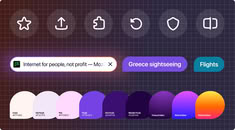
Technically the Nova UI has been included in Firefox before this update, but version 157 enables it by default, where it was an experimental flag before. The Nova theme gives Firefox an overall rounder, softer look—with rounder pop-over boxes, tabs, menus, address bars, search boxes, and sidebars—and it adds pastel colors and tint to the browser's UI. It also reintroduces compact mode and reduces visual clutter, according to Mozilla. Build 157 also improves HDR video playback, video and audio synchronization with varying playback speeds, and removes the built-in Amazon search engine. Building on the WebRTC improvements from the previous version, Firefox 157 adds hardware AV1 video decoding for WebRTC video calls, where software AV1 decoding was previously used.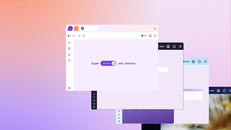


Sources:
Firefox on X, via Phoronix
Technically the Nova UI has been included in Firefox before this update, but version 157 enables it by default, where it was an experimental flag before. The Nova theme gives Firefox an overall rounder, softer look—with rounder pop-over boxes, tabs, menus, address bars, search boxes, and sidebars—and it adds pastel colors and tint to the browser's UI. It also reintroduces compact mode and reduces visual clutter, according to Mozilla. Build 157 also improves HDR video playback, video and audio synchronization with varying playback speeds, and removes the built-in Amazon search engine. Building on the WebRTC improvements from the previous version, Firefox 157 adds hardware AV1 video decoding for WebRTC video calls, where software AV1 decoding was previously used.


57 Comments on Mozilla Releases Firefox 157 with Nova UI
I wonder how and where I can enable new local Ai speech recognition and what exactly is this feature? My guess is to have for example a real-time transcription (like subtitles) of speech on Youtube done locally in browser, but I can't figure out how to enable it...
Block generative AI features with Firefox AI controls
The same applies to the mobile version.
By the way:
The translator, for example, is sluggish and prone to errors.
Regards,
Fred.
Here you go:
Supermium
winget install -e --id win32ss.SupermiumAnd much more.
Regards,
Fred.
Can anyone guess why the NovaUI would very much piss me off?You're joking? You call THAT progress? Minimalist? Sure. Functional? Only in the wet dreams of a complete simpleton. The rest of us need and require usable functionality we have instant access to.Oh dear goodness no.
However, this doesn't seem to be a problem unique to Mozilla.
Regards,
Fred.
Like, minimalist can work and be done well (Apple, MacOS for instance) but when it feels like a downgrade from something functional; why?
Regards,
Fred.
To:
OMG what will I do?!
If it does i dunno what browser to use anymore that supports uBlock Origin. I already tried Brave, but that one doesn't allow you to recolor the title bar.