Monday, September 28th 2026

Mozilla Releases Firefox 157 with Nova UI
Hot on the heels of the release of Firefox 156, which introduced a number of improvements to online file and image handling, as well as better video decoding for Arm users, Mozilla has officially started the roll-out of Firefox 157 via its FTP server. While the actual update notes have yet to drop, we know all about the changes in Firefox 157 thanks to earlier beta and alpha updates and Mozilla's earlier roadmap detailing the UI changes slated to arrive in the Nova design.
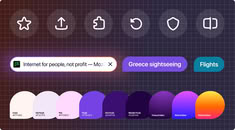
Technically the Nova UI has been included in Firefox before this update, but version 157 enables it by default, where it was an experimental flag before. The Nova theme gives Firefox an overall rounder, softer look—with rounder pop-over boxes, tabs, menus, address bars, search boxes, and sidebars—and it adds pastel colors and tint to the browser's UI. It also reintroduces compact mode and reduces visual clutter, according to Mozilla. Build 157 also improves HDR video playback, video and audio synchronization with varying playback speeds, and removes the built-in Amazon search engine. Building on the WebRTC improvements from the previous version, Firefox 157 adds hardware AV1 video decoding for WebRTC video calls, where software AV1 decoding was previously used.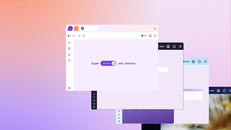


Sources:
Firefox on X, via Phoronix
Technically the Nova UI has been included in Firefox before this update, but version 157 enables it by default, where it was an experimental flag before. The Nova theme gives Firefox an overall rounder, softer look—with rounder pop-over boxes, tabs, menus, address bars, search boxes, and sidebars—and it adds pastel colors and tint to the browser's UI. It also reintroduces compact mode and reduces visual clutter, according to Mozilla. Build 157 also improves HDR video playback, video and audio synchronization with varying playback speeds, and removes the built-in Amazon search engine. Building on the WebRTC improvements from the previous version, Firefox 157 adds hardware AV1 video decoding for WebRTC video calls, where software AV1 decoding was previously used.


57 Comments on Mozilla Releases Firefox 157 with Nova UI
Squared corners wouldn’t have fixed the top and bottom padding. It’s a separate issue: rounded corners only takes away a bit of space in the corners, but the bounding box is identical. Mozilla actually increased the top and bottom padding, you would have had the same issue with squared corners.
github.com/black7375/Firefox-UI-Fix
Now let's enter the 21th century and add or bring back web-panels and other features that are standard in every other browser.
There is no need to use third party fixes until Mozilla removes the pref to disable Nova down the line.
In the meantime disable this to get back the v156 and earlier UI from about:config:
Right?
Regards,
Fred.
Firefox is unique in a sense that it's possible to change almost everything if the user desires (custom CSS rules). Most other browsers dont offer this option.
Been using it for years and cant imagine FF without it 👍
Why do you constantly have your bookmarks open? You have a lot of empty space up in the top right.
You seem very stuck in early 2000's.
Sensing a theme yet?
Thankfully its can be reverted via "about:config", look for "browser.nova.enabled" < change to disabled. And alternatively its also possible to install the Proton UI/theme - support.mozilla.org/en-US/questions/1608377?utm_campaign=questions-reply&utm_source=notification&utm_medium=email#answer-1851901This 100%Hmm, how ever you have FF configured, 157 somehow didn't mess with your UI. Interesting. For me as a windows user it compley change how the UI looked, as lots of colour outlines and aroudned tabs - both of which I zero interest in.Also this.