News Posts matching #ergo keyboard

Return to Keyword Browsing

Epomaker Launches Alice40 40% Mechanical Keyboard With Ergonomic Layout and $70 Pricetag

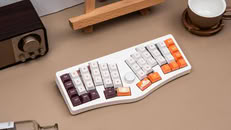
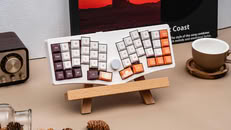
Epomaker has officially unveiled the Alice40 as its latest foray into the world of 40% mechanical keyboards—after the TH40 we reviewed previously and the Luma40 after that—and this time, the brand has gone for yet another unique layout option. As the name suggests, the Alice40 is based on the Alice layout that is commonly recommended to first-time ergonomic keyboard buyers, for its similarity to a regular unibody keyboard, although the Alice40 has a few features that set it apart from other mechanical keyboards in the same $69.99 price bracket.

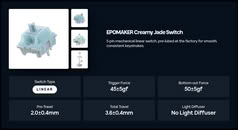
For starters, the Alice40 modifies the traditional Alice layout with columnar stagger, meaning the columns are vertically offset from one another instead of the rows being horizontally offset. This is meant to make the keys align more appropriately to the natural movement of your fingers while you're typing. Another interesting quirk of the Alice40 is the knob between the two halves of the alpha cluster. As expected from a $69.99 mechanical keyboard, it has a plastic case, but it also has flip-out feet that allow users to adjust the typing angle between 5° and 8.5°. The case also features a gasket mount design, much like the Epomaker TH40, and it is stuffed with sound-damping materials to cut down on echoes and reverberation inside the case.
Framework Kills One Key Module Customizable Laptop Keyboard Program

Framework's One Key Module is a project that Framework announced when it launched the Laptop 16 2nd-gen with the goal of creating an ecosystem for developers to design their own keyboard layouts that tinkerers could put together from parts and schematics, or that could be turned into commercial products. Unfortunately, Framework has just announced that it would be ending the One Key Module program, citing manufacturing complexity and yield issues for the cessation.
First, despite heroic efforts from our engineering and supply chain team members along with their counterparts at our partner Lite-On, we weren't able to bring material and assembly costs along with manufacturing yield to a place where the product economics worked. The per-key costs resulted in breakeven pricing too high to reasonably enable high volume sales, and neither we nor our suppliers can take on the overhead of manufacturing a product of this complexity at low volumes.

Perixx Unveils Periboard-535 II, a Low-Profile Ergonomic Mechanical Keyboard

Perixx introduces the new PERIBOARD-535 II, a full-size wired ergonomic mechanical keyboard designed to deliver long-hour typing comfort for office work, coding, and everyday productivity without sacrificing the responsive feel of mechanical switches. Inspired by the company's flagship ergonomic keyboard lineup, the second-generation model combines upgraded productivity features with a refined ergonomic design for modern workspaces.

Ergonomic Split Design for Everyday Comfort
Unlike traditional flat keyboards, the PERIBOARD-535 II features a split and curved key layout that encourages a more natural hand and wrist position while typing. Combined with an integrated palm rest, the keyboard is designed to reduce strain and improve comfort during extended daily use, making it suitable for programmers, office professionals, writers, and users who spend hours at their desks.

Keychron Launches Q11 Ultra Split Wireless Mechanical Keyboard

Keychron has been busy updating its mechanical keyboard line-up over the last few months switching to hyperefficient firmware and its updated Silk POM mechanical switches. Now, the Keychron Q11 gets the same treatment, with the Q11 Ultra being a much bigger improvement over the original Q11 than the other keyboards Keychron has recently updated. The reason for this is that Keychron's only split keyboard was the Q11, with no Max or Pro variants to add wireless connectivity into the mix. This time, though Keychron has gone one step further with the Q11 Ultra, not only eliminating the USB-C cable to the PC, but also making the two halves of the split keyboard communicate wirelessly as well. Keychron claims that the dual batteries in the Q11 Ultra are capable of delivering 300 hours on a single charge, and the keyboard connects via Bluetooth, 2.4 GHz, or via the USB-C cable on the left half. With 2.4 GHz and the wired connection, the polling rate can go as high as 8 kHz, even though that's hardly necessary for a mechanical switch. The Q11 Ultra is available for $239.99 from Keychron's online store.

The Q11 Ultra is a 75% split keyboard, meaning the keyboard splits in half for ergonomic purposes, although it still maintains the row staggered layout, so it should feel familiar for most users coming from a regular mechanical gaming keyboard. Despite the 75% layout, the Q11 Ultra has an additional five-key macro column on the left edge of the left side of the keyboard, and there are two programmable knobs—one on each half of the keyboard. The keyboard cases are constructed from CNC aluminium with an integrated top plate, and the keyboard uses double-shot PBT keycaps in Keychron's KSA profile. The Q11 Ultra is only available in black with blue accent keycaps, and it seems to miss out on the decorative bottom panel found on the likes of the Keychron Q1 Ultra. It comes with a choice of Keychron Silk POM Red (linear), Brown (tactile), and Banana (sharp tactile) switches, but the PCB is hot-swap compatible, so you can bring your own switches and keycaps if you don't like the stock experience. The Q11 Ultra has south-facing per-key RGB backlighting, which, along with the layout, is fully programmable in Keychron Launcher.
Return to Keyword Browsing
Nov 11th, 2026 17:59 CST change timezone

New Forum Posts

Popular Reviews

TPU on YouTube

Controversial News Posts