 153
AMD Ryzen 7 5800X3D 10th Anniversary Review
Overclocking, Boost & Clock Frequencies »Temperatures
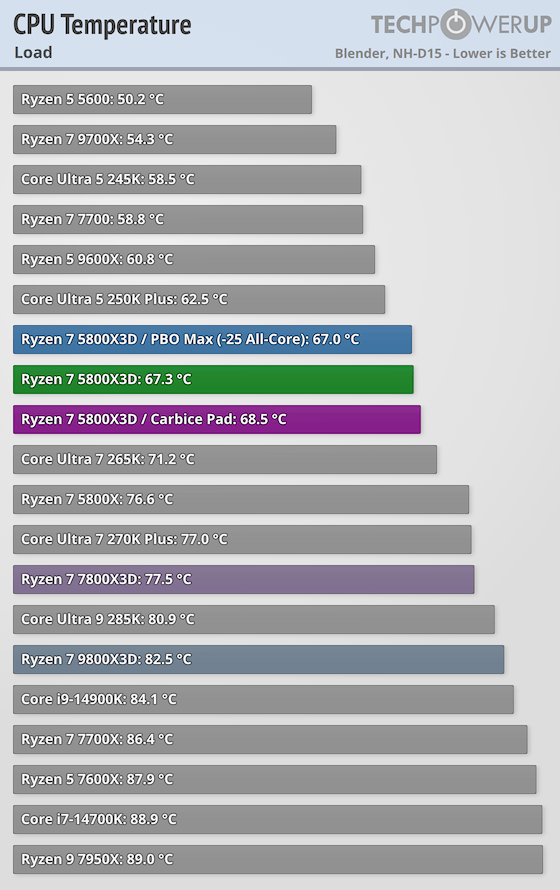
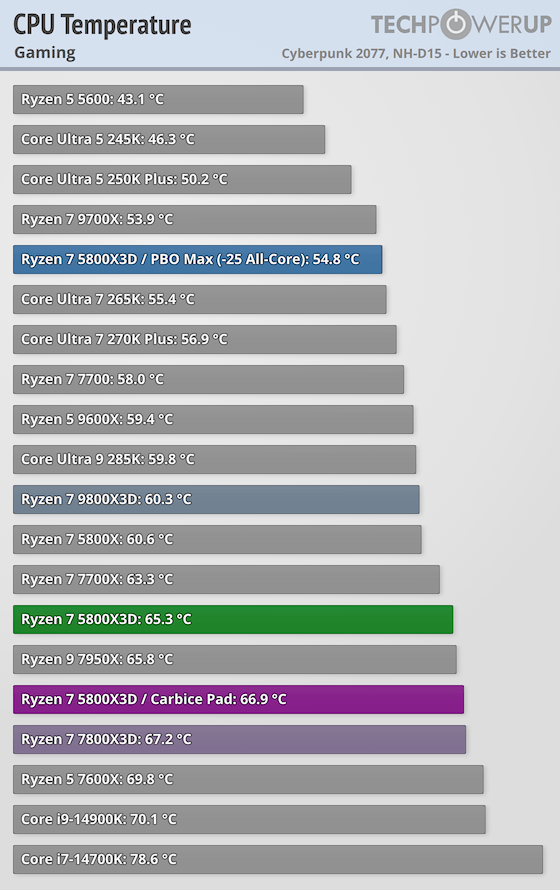
Application temperatures are measured using Blender, a highly demanding rendering load, which will load all cores completely, but that's still realistic and is not a synthetic stress test such as Prime95. For gaming, we picked Cyberpunk 2077, its modern engine is multi-thread aware and will try to spread as many tasks as possible over many CPU cores, when available. Even when a game uses multiple threads it doesn't load each CPU core as heavily as rendering, for example, so there's some scope for power savings here.Note that unless indicated otherwise, all processors are tested at stock conditions with their power limit active, which is why some Intel temperatures are surprisingly low. As designed by Intel, these CPUs can exceed their TDP for a few seconds (PL2), but in the long term, the power limit (PL1) is respected, which brings temperatures down considerably. Both tests report the steady-state temperature after an extended runtime of at least 10 minutes. Temperatures are based on delta T, normalized to 25°C, that's why the temperature of some CPUs is higher than their throttle point, because the room temperature was below 25°C.
The Ryzen 7 5800X3D runs at a 90°C thermal limit, the same as other Zen 3 desktop parts. Because the 3D V-Cache is stacked on top of the cores and can't tolerate as much heat, AMD is careful with voltages here, but the clocks and power profile mean that in practice any decent cooler can keep the 5800X3D well clear of throttling. As on other AM4 processors, this limit can't be raised, unlike Intel, which allows adjusting the limit upward, too.
The Carbice Thermal Pad
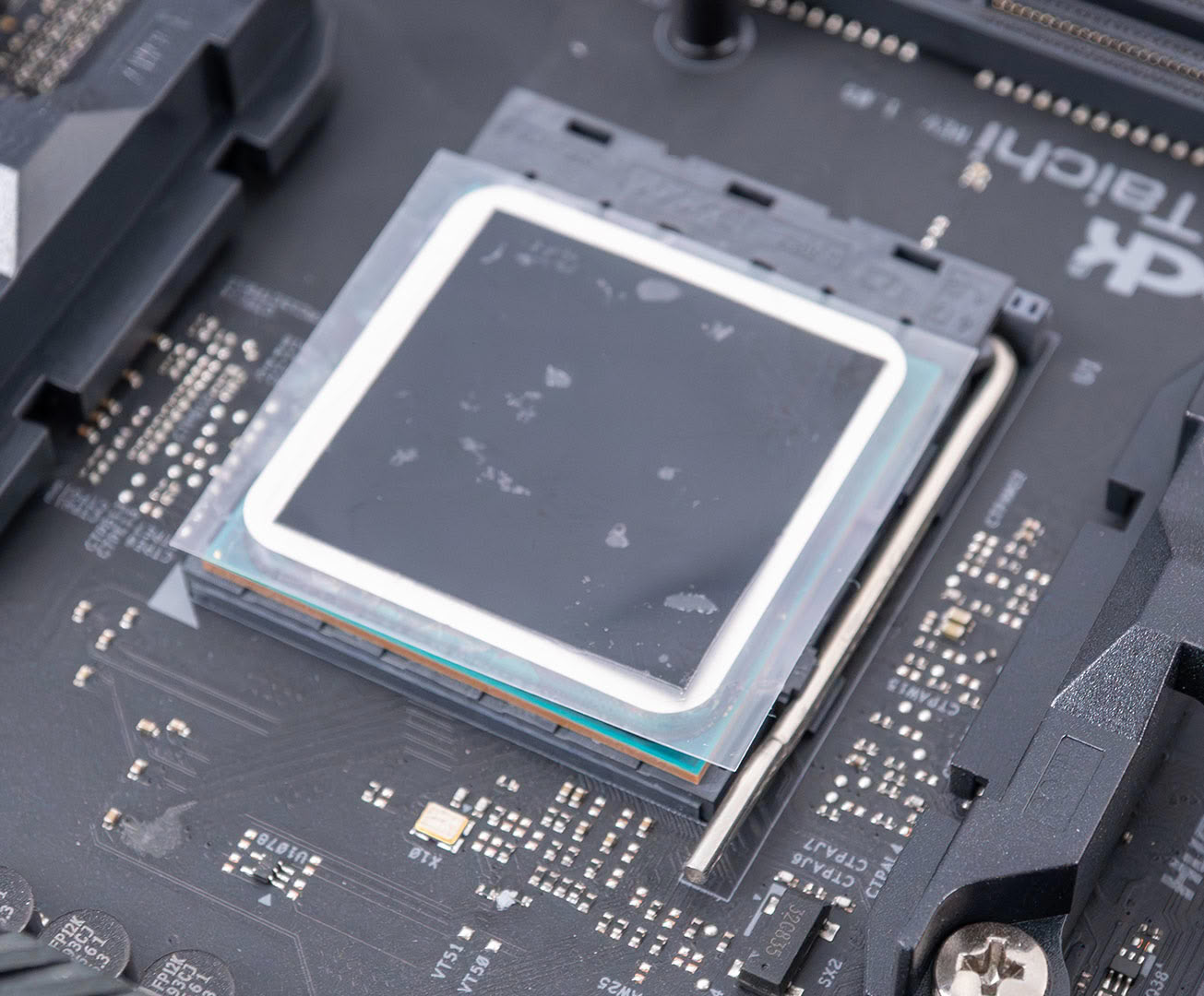
The AMD 10th Anniversary Edition comes bundled with a Carbice carbon-nanotube thermal pad, which is designed to replace thermal paste. It doesn't suffer from pump out or degradation, so it should last many years. The photo above shows the size of the thermal pad—note that it is slightly smaller than the CPU heat spreader. In the photo you can make out a transparent foil that protects the pad—remove that before use, you want just the black thermal pad. It's not extremely brittle, so it's reasonably easy to handle and install.

I also took a photo of the pad after our back-to-back heat cycle tests. Note here that the pad isn't completely dry as you would assume. Rather it seems that some transparent filler material was squeezed out, which helps cover the microscopic surface area of the IHS and heatsink. Also note that some of that material reached the area outside the pad, but it's not runny, so it didn't make it into the CPU substrate or the motherboard.
You can also see a clear imprint of the laser markings on the CPU, which means it was able to fill that volume to improve heat transfer.
Burn-In Performance
It is recommended to run the Carbice pad for a break-in period, to reach optimal cooling performance. I think this is something that most people don't get right, and they look at the temperatures right after installation, which are not that good. That's why I've thoroughly tested it. We ran 450 back-to-back Blender thermal cycles, each followed by a 60-second cooldown, for roughly 18 hours of continuous cycling. The dotted line is our reference point—the exact same chip and cooler with a normal application of Arctic MX-6 paste.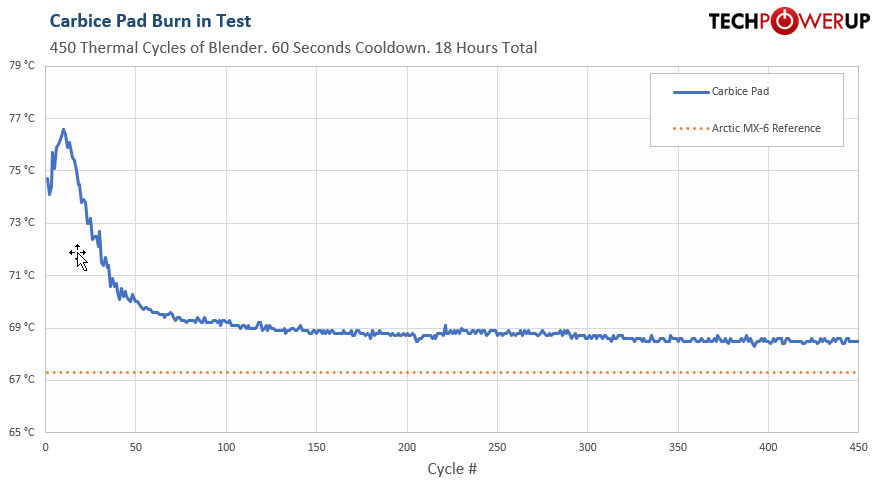
The result is pretty interesting. Straight out of the box the pad performs poorly: load temperature starts at 74°C and spikes to almost 77°C within the first few cycles, roughly 9°C worse than paste. It then "burns in" exactly as Carbice claims—over the first hundred or so cycles the temperature drops steadily, and by around cycle 120 it drops below 69°C and eventually settles at about 68.5°C and holds there, dead flat, for the remaining 300 cycles. That's only around 1.5°C behind a fresh paste application, close enough that you'd never feel the difference in practice, and just as importantly there's no sign of degradation across the full 18-hour run—once broken in, it's rock stable.
It's worth explaining what that stability actually buys you, because it's the whole reason a pad like this exists. Traditional paste slowly degrades through a process called "pump-out." Every time the CPU heats up and cools down, the chip and the cooler's baseplate expand and contract by slightly different amounts, and that constant micro-movement gradually squeezes paste outward from the center of the heat spreader—exactly where it matters most. Over months and years the layer thins, tiny air gaps form, and temperatures slowly creep upward; it's one reason why a system that ran cool the day you built it can end up noticeably hotter a few years later, and why re-pasting brings it right back. A pad like Carbice doesn't flow, so it physically can't pump out. That's the entire trade it offers: slightly higher temperatures than fresh paste, in exchange for performance that essentially never gets worse.
Overall, I'd say it's a solid option, and we can confirm the claims. But who it's for depends entirely on how you treat your cooler. The Carbice pad is clearly worse than paste, but only by a negligible amount for most users. If you're a hardcore overclocker and every degree matters, then thermal paste is the better choice.
If you build a machine and never touch it again, the pad is definitely valuable: your temperatures after a while are also your temperatures five years down the road—so your parents won't call you wondering why their computer is running slowly and the fan is so loud. On the other hand, if you're the kind of person who's happy to re-paste every few years—a ten-minute job—then pump-out simply isn't a problem you have, and a fresh application of good paste will keep you those couple of degrees cooler the entire time. There are also alternatives, like PTM7950 phase change pads of course.
Nov 14th, 2026 11:33 CST
change timezone
Latest GPU Drivers
New Forum Posts
- Ddr4 instead of ddr5 for 9060xt 8 gb over 5060 8 gb (7)
- Your PC ATM (36414)
- What can the FX 8320 do today? Here is the answer. (22)
- TPU's Nostalgic Hardware Club (22161)
- What card do I get for VR? (27)
- Microsoft Exchange/365 outages? (62)
- Tell me about your favourite graphics card (54)
- Opinion on Monitor Replacement (7)
- Slow SSD read speeds - help! (5)
- Show us your collections thread!! (366)
Popular Reviews
- AMD Zen 6 Technical Deep Dive
- Corsair HX1000i Shift Crystal Review
- ASUS ROG Strix B850-I Gaming Wi-Fi7 W Review
- NZXT C1200 Platinum Review
- Upcoming Hardware Launches 2027 (Updated Nov 2026)
- Montech King 95 3D PRO Review
- NZXT H7 RGB+ Review
- NZXT H5 Review
- Phantom Blade Zero Performance Benchmark Review - 35 GPUs Tested
- XPG NIMBUS PLUS Review - Mid-range Chair With Strong Competitors
TPU on YouTube
Controversial News Posts
- NVIDIA Co-Founder and CEO Jensen Huang Officially Resigns (398)
- OpenAI CEO Argues Home PCs Waste the World's Limited DRAM Supply (152)
- NVIDIA Launches Investigation Into Jensen Huang's Relationship With Suspected Chinese Spy (136)
- Intel "Raptor Lake Next" 16-Core and 20-Core CPUs Surface (130)
- Legendary Game Studio BioWare Shuts Down Following EA Layoffs (104)
- Dell CEO Says the Memory Shortage Will Get Worse in 2027 (95)
- NVIDIA GeForce RTX 50-Series Scheduled for up to $500 Price Hike This Week (89)
- Modder Fits RTX 5090 With Four 8-Pin Connectors, Halving Current per Wire (80)