 91
AMD Ryzen 7 7700X3D Review
Performance Summary »Clock Frequencies
The following chart shows how well the processor sustains its clock frequency and which boost clock speeds are achieved at various thread counts. This test uses a custom-coded application that mimics real-life performance—it is not a stress test like Prime95. Modern processors change their clocking behavior depending on the type of load, which is why we provide three plots with classic floating point math, SSE SIMD code, and modern AVX vector instructions. Each of the three test runs calculates the same result using the same algorithm, just with a different CPU instruction set.
The most important takeaway is the ceiling: the Ryzen 7 7700X3D tops out at 4550 MHz, and it reaches that maximum almost immediately, even under light multithreaded load, holding it in a complete flat line. This 4550 MHz limit is set deliberately by AMD—the platform has a mechanism to cap the maximum boost frequency, and on the 7700X3D it is locked to 4550 MHz. There is nothing you can do to push past it: not on a single core, not on all cores, not with overclocking or PBO. That's essentially the entire story of this processor in one chart. The 7800X3D uses exactly the same single-CCD, 8-core, 3D V-Cache design and the same boosting mechanics—its ceiling simply sits 500 MHz higher, at 5050 MHz. Everything the 7700X3D gives up to its more expensive sibling traces back to this one number.
Overclocking
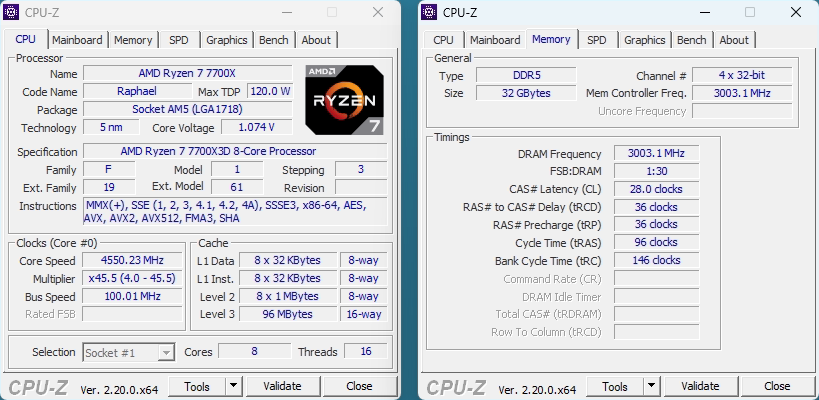
Overclocking works on the 7700X3D exactly as on any other Ryzen—Precision Boost Overdrive (PBO) and Curve Optimizer are both available—but there is nothing to gain in performance, and we confirmed it both ways: by removing all power and current limits, and by PBO overclocking with a Curve Optimizer offset. Neither moved performance over stock. Because the 4550 MHz ceiling is already reached at stock, lifting the power and current limits does nothing—a full "PBO Max" run came out identical to stock, within run-to-run noise—and a positive frequency offset does nothing either, since the chip is already sitting at its cap.
Curve Optimizer is still worth setting, just not for speed. It's an undervolt: it lets the CPU hold that same 4550 MHz at lower voltage. Our sample ran fully stable at -30 all-core (-35 was slightly unstable), which dropped load temperature by about 10°C and per-test power by roughly 15%—but performance stayed flat. So you can tune it for efficiency and noise, not for frames. The one knob that does move performance is memory, but it won't be a monumental difference.
Nov 14th, 2026 11:43 CST
change timezone
Latest GPU Drivers
New Forum Posts
- What can the FX 8320 do today? Here is the answer. (24)
- Ddr4 instead of ddr5 for 9060xt 8 gb over 5060 8 gb (7)
- Your PC ATM (36414)
- TPU's Nostalgic Hardware Club (22161)
- What card do I get for VR? (27)
- Microsoft Exchange/365 outages? (62)
- Tell me about your favourite graphics card (54)
- Opinion on Monitor Replacement (7)
- Slow SSD read speeds - help! (5)
- Show us your collections thread!! (366)
Popular Reviews
- AMD Zen 6 Technical Deep Dive
- Corsair HX1000i Shift Crystal Review
- ASUS ROG Strix B850-I Gaming Wi-Fi7 W Review
- NZXT C1200 Platinum Review
- Upcoming Hardware Launches 2027 (Updated Nov 2026)
- Montech King 95 3D PRO Review
- NZXT H7 RGB+ Review
- NZXT H5 Review
- Phantom Blade Zero Performance Benchmark Review - 35 GPUs Tested
- XPG NIMBUS PLUS Review - Mid-range Chair With Strong Competitors
TPU on YouTube
Controversial News Posts
- NVIDIA Co-Founder and CEO Jensen Huang Officially Resigns (399)
- OpenAI CEO Argues Home PCs Waste the World's Limited DRAM Supply (152)
- NVIDIA Launches Investigation Into Jensen Huang's Relationship With Suspected Chinese Spy (136)
- Intel "Raptor Lake Next" 16-Core and 20-Core CPUs Surface (130)
- Legendary Game Studio BioWare Shuts Down Following EA Layoffs (104)
- Dell CEO Says the Memory Shortage Will Get Worse in 2027 (95)
- NVIDIA GeForce RTX 50-Series Scheduled for up to $500 Price Hike This Week (89)
- Modder Fits RTX 5090 With Four 8-Pin Connectors, Halving Current per Wire (80)