 40
AMD Ryzen AI Halo Review - Local-AI Powerhouse with 128 GB of Memory
AI Agents »Advanced LLM Usage
Running a bigger model is the obvious thing to do with 128 GB. It is not the only one. When you have plenty of memory, some things become available that are hard or impossible on a 32 GB card.Big context windows
A model's weights are only part of what sits in memory. The other part is the KV cache, the model's memory of the current chat, and it grows with every word you feed in. Give it a long document, a whole codebase, or a book-length prompt and that cache can reach tens of gigabytes on top of the weights. On a 32 GB card you have to pick: a big model or a big context, not both. Here you can load a good model and still keep a whole codebase in context, then ask questions that need the model to have read all of it.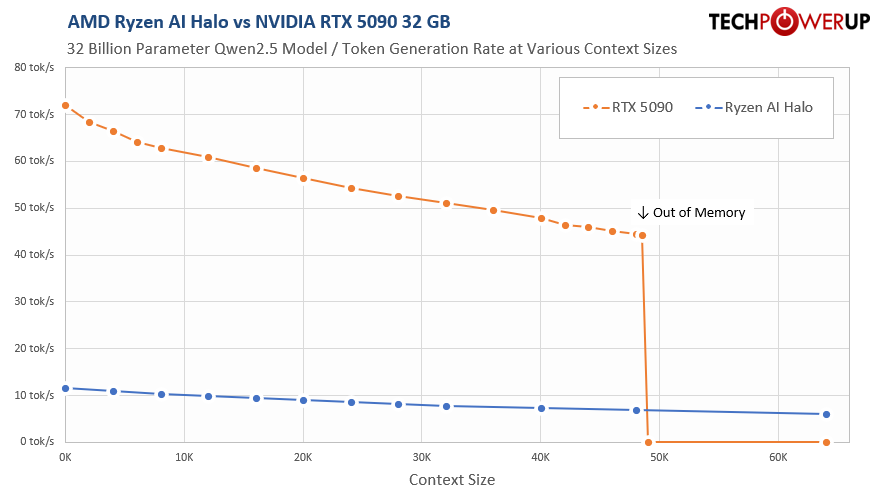
We measured this with the same 32B model on both systems. The model alone occupies just 18 GB of VRAM due to 4-bit quantization, so it's not a case of "it fits barely." Each 1K tokens of context (what the LLM remembers for the session between each prompt) requires another 256 MB of memory. For the test we started with no context and increased it gradually. At first, the RTX 5090 is far faster while the model and its context fit in 32 GB, starting at 70 tokens/s and gradually dropping to about 45 tokens/s right up to roughly 50K tokens, where the cache no longer fits, and it stops completely with no way to run at bigger contexts. The Ryzen AI Halo is slower per token, but its 128 GB never hits that wall and keeps answering well past where the 5090 gives up. A context of 50K isn't enormous in any way; with cloud models like Claude you're getting context sizes of up to 1 million tokens, so 20x the 50K limit that we hit on the 5090.
Several models loaded at once
When memory is not tight, you can keep more than one model loaded. You might run a coding model, a speech-to-text model, a small chat model and a vision model at the same time, each ready to answer without the wait a low-memory system takes to swap models in and out. AMD's Lemonade supports this directly. It turns the box from something that runs one model at a time into a small AI server for your desk.Speculative decoding
A common speed trick runs a big, accurate model next to a tiny, fast one that guesses the next few words, which the big model then checks in a single pass. It speeds things up nicely, but it means keeping two models in memory at once—which a 32 GB card usually can't do, no problem with 128 GB.Model teams
With memory to spare you can run several models together (one writing, another checking, another deciding), which is how the agent test on the next page works. None of that is possible if you can only hold one model.The point is simple: memory decides how much you can do at once, not just how big a model you can load. That is the part of 128 GB no single benchmark number shows.
Nov 13th, 2026 21:57 CST
change timezone
Latest GPU Drivers
New Forum Posts
- no "PhysX" workable (8)
- AI generated images... (224)
- Tell me about your favourite graphics card (28)
- Crimson Desert (31)
- RenoDX HDR - how to view the differnce Before&After in game? (0)
- Displayport DP80 3M (10ft) cable that can achieve 80gbps stable? (5)
- I'll flash a ASUS ROG Strix RX480 O8G in Cause of Code 43, as a Newbie (1)
- Opinion on Monitor Replacement (6)
- TMOG - post your benchmark results here (16)
- Microsoft Exchange/365 outages? (61)
Popular Reviews
- AMD Zen 6 Technical Deep Dive
- Corsair HX1000i Shift Crystal Review
- NZXT C1200 Platinum Review
- Upcoming Hardware Launches 2027 (Updated Nov 2026)
- ASUS ROG Strix B850-I Gaming Wi-Fi7 W Review
- Montech King 95 3D PRO Review
- NZXT H7 RGB+ Review
- NZXT H5 Review
- Phantom Blade Zero Performance Benchmark Review - 35 GPUs Tested
- XPG NIMBUS PLUS Review - Mid-range Chair With Strong Competitors
TPU on YouTube
Controversial News Posts
- NVIDIA Co-Founder and CEO Jensen Huang Officially Resigns (379)
- OpenAI CEO Argues Home PCs Waste the World's Limited DRAM Supply (152)
- NVIDIA Launches Investigation Into Jensen Huang's Relationship With Suspected Chinese Spy (136)
- Intel "Raptor Lake Next" 16-Core and 20-Core CPUs Surface (130)
- Legendary Game Studio BioWare Shuts Down Following EA Layoffs (104)
- Dell CEO Says the Memory Shortage Will Get Worse in 2027 (95)
- NVIDIA GeForce RTX 50-Series Scheduled for up to $500 Price Hike This Week (89)
- Modder Fits RTX 5090 With Four 8-Pin Connectors, Halving Current per Wire (80)