 11
ASUS GeForce RTX 3080 Ti STRIX LC Liquid Cooled Review
(11 Comments) »Introduction

The ASUS ROG STRIX LC GeForce RTX 3080 Ti is the company's flagship custom-design RTX 3080 Ti graphics card, characterized by its factory-fitted, all-in-one liquid cooling solution. The cooler combines an AIO liquid cold-plate to pull heat from the GPU and memory, while a set of heatsinks and lateral blower provide additional cooling. Interestingly, this cooler debuted with the Radeon RX 6800 XT STRIX LC, which along with the RX 6900 XT are believed to have triggered product-stack updates among NVIDIA's ranks.

The GeForce RTX 3080 Ti replaces the RTX 3080 as NVIDIA's new flagship gaming product. The RTX 3090 is still positioned higher, but that SKU is more of a TITAN-like halo product, with its massive 24 GB memory favoring certain professional use-cases when paired with Studio drivers. The RTX 3080 Ti utilizes the same GA102 silicon, maxing out its 384-bit memory interface with 12 GB. There are more CUDA cores on offer—10,240 vs. 8,796 on the RTX 3080, and a proportionate increase in Tensor cores, RT cores, and other components. The GeForce RTX 3080 Ti is based on the new Ampere graphics architecture, which debuts the 2nd generation of NVIDIA's path-breaking RTX real-time raytracing technology combining third-generation Tensor cores with second-generation RT cores and faster Ampere CUDA cores.
As mentioned earlier, the ASUS ROG STRIX LC lugs a bulky all-in-one liquid cooling and air hybrid solution without it coming across as ugly and tacked on. ASUS appears to have taken a keen interest in adding to the industrial design of the card and radiator. The cooler also supports a major factory-overclock to 1830 MHz, compared to the 1665 MHz reference. This puts its performance well above even the RTX 3090, while also costing more than its MSRP. In this review, we show you whether it's worth just picking this card over an RTX 3090, if available.
| Price | Cores | ROPs | Core Clock | Boost Clock | Memory Clock | GPU | Transistors | Memory | |
|---|---|---|---|---|---|---|---|---|---|
| RTX 3060 Ti | $1300 | 4864 | 80 | 1410 MHz | 1665 MHz | 1750 MHz | GA104 | 17400M | 8 GB, GDDR6, 256-bit |
| RX 6700 XT | $1000 | 2560 | 64 | 2424 MHz | 2581 MHz | 2000 MHz | Navi 22 | 17200M | 12 GB, GDDR6, 192-bit |
| RTX 2080 Ti | $1400 | 4352 | 88 | 1350 MHz | 1545 MHz | 1750 MHz | TU102 | 18600M | 11 GB, GDDR6, 352-bit |
| RTX 3070 | $1300 | 5888 | 96 | 1500 MHz | 1725 MHz | 1750 MHz | GA104 | 17400M | 8 GB, GDDR6, 256-bit |
| RX 6800 | $1400 | 3840 | 96 | 1815 MHz | 2105 MHz | 2000 MHz | Navi 21 | 26800M | 16 GB, GDDR6, 256-bit |
| RX 6800 XT | $1700 | 4608 | 128 | 2015 MHz | 2250 MHz | 2000 MHz | Navi 21 | 26800M | 16 GB, GDDR6, 256-bit |
| RTX 3080 | $1500 | 8704 | 96 | 1440 MHz | 1710 MHz | 1188 MHz | GA102 | 28000M | 10 GB, GDDR6X, 320-bit |
| RTX 3080 Ti | $2000 MSRP: $1200 | 10240 | 112 | 1365 MHz | 1665 MHz | 1188 MHz | GA102 | 28000M | 12 GB, GDDR6X, 384-bit |
| ASUS RTX 3080 Ti STRIX LC | $2200 MSRP: $2100 | 10240 | 112 | 1365 MHz | 1830 MHz | 1188 MHz | GA102 | 28000M | 12 GB, GDDR6X, 384-bit |
| RX 6900 XT | $2100 | 5120 | 128 | 2015 MHz | 2250 MHz | 2000 MHz | Navi 21 | 26800M | 16 GB, GDDR6, 256-bit |
| RTX 3090 | $2900 | 10496 | 112 | 1395 MHz | 1695 MHz | 1219 MHz | GA102 | 28000M | 24 GB, GDDR6X, 384-bit |
Packaging


The Card

The most obvious characteristic is its two-piece design—a card and a liquid-cooling radiator joined at the hip with pre-filled coolant tubing.


Visually, the ASUS STRIX uses a mixture of black and various shades of gray, nice shininess there indeed. The front of the cooler shroud is made out of plastic, while the backplate is metal.


Dimensions of the card are 29 x 11 cm, and it weighs 1364 g, but this is only for the business end of the card. One has to factor in the dimensions of the 240 mm x 120 mm radiator and a pair of 120 mm fans, not to mention the tubing.


Installation requires three slots in your system and a spot for a 240 mm x 120 mm radiator.


The 240 mm radiator is of standard thickness and includes a pair of 25 mm-thick 120 mm fans.

Display connectivity includes three standard DisplayPort 1.4 and two HDMI 2.1. The DisplayPort 1.4a outputs support Display Stream Compression (DSC) 1.2a, which lets you connect 4K displays at 120 Hz and 8K displays at 60 Hz. Ampere can drive two 8K displays at 60 Hz with just one cable per display.
Ampere is the first GPU to support HDMI 2.1, which increases bandwidth to 48 Gbps to support higher resolutions, like 4K144 and 8K30, with a single cable. With DSC, this goes up to 4K240 and 8K120. NVIDIA's new NVENC/NVDEC video engine is optimized to handle video tasks with minimal CPU load. The highlight here is added support for AV1 decode. Just like on Turing, you may also decode MPEG-2, VC1, VP8, VP9, H.264, and H.265 natively, at up to 8K@12-bit.
The encoder is identical to Turing. It supports H.264, H.265, and lossless at up to 8K@10-bit.

This switch lets you select between the "P" (performance) and "Q" (quiet) BIOSes.

The card puts out two 4-pin PWM case fan headers, which are running at a speed that's synchronized with the graphics card fan. This makes it extremely easy to build a low-noise case. When not gaming, and heat is low, the case fans will be stopped. Once your gaming sessions starts and the card heats up, the case fans will start spinning, to exhaust hot air from the graphics card out of the case.

Unlike the fancy 12-pin connector on the Founders Edition, ASUS sticks to conventional PCIe connectors. Three of them add up to 525 W of power input capacity.

The GeForce RTX 3080 Ti does not support SLI.
Teardown


The plastic top-shroud of the cooler pops right out, and holds an RGB element.


The main liquid-cooling component is a Gen 7 Asetek AIO pump-block, which pulls heat from the GPU and memory chips through a large, square copper base. A secondary aluminium heatsink ventilated by a lateral-blower cools other components, such as the VRM.


The large square copper base makes contact with the GPU and memory chips surrounding it. It also shoulders some cooling of the secondary heatsink. The thermal pads on the memory are 2.0 mm thick, VRM pads are 1.5 mm thick, and the backplate pads are 2.5 mm.


A high-quality aluminium backplate finishes things off.
High-resolution PCB Pictures
These pictures are for the convenience of volt modders and people who would like to see all the finer details on the PCB. Feel free to link back to us and use these in your articles, videos or forum posts.
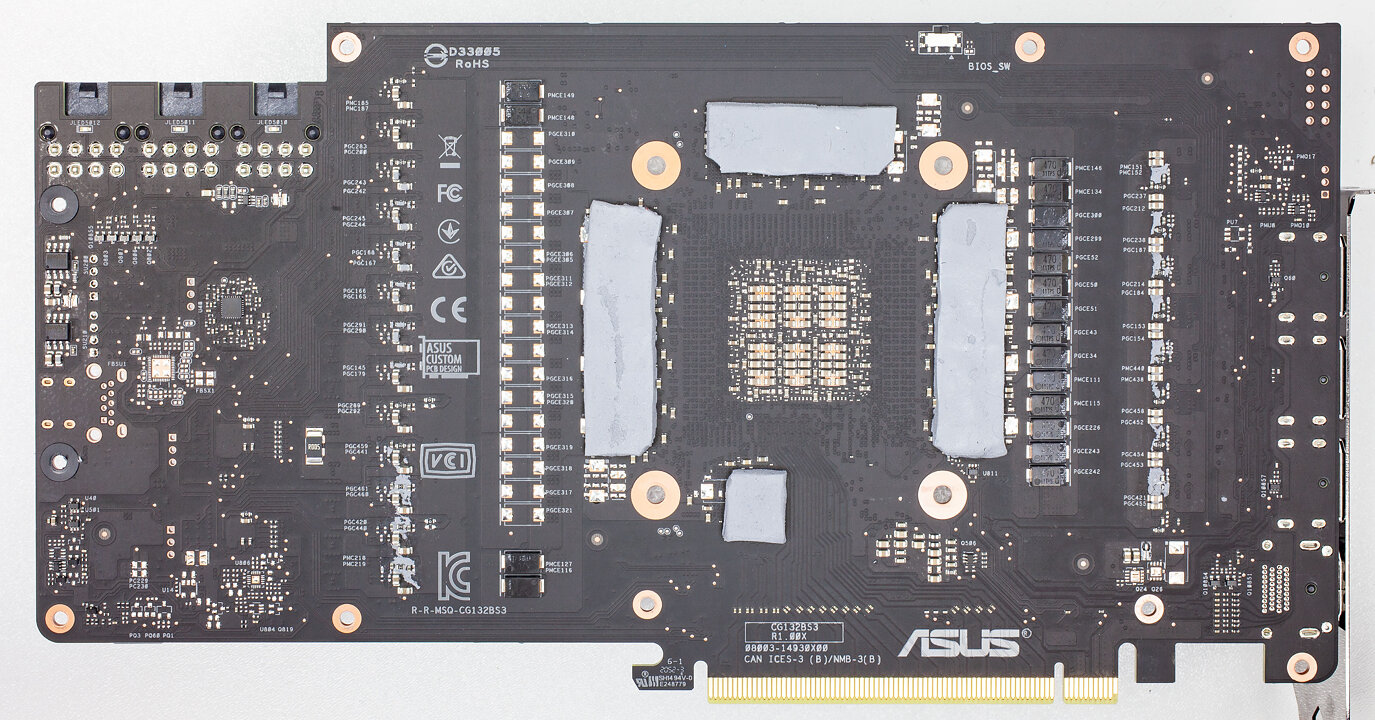
High-res versions are also available (front, back).
Our Patreon Silver Supporters can read articles in single-page format.
Nov 11th, 2026 03:05 CST
change timezone
New Forum Posts
- I cannot download games that are larger than 30–40 GB. (82)
- Meeting point of those who broke their GPUs. Please share what GPUs you've burned, shattered, ionized or melted accidentally. (33)
- Excessively high prices for RAM (88)
- Warning for Windows 10 and 11 users running newer AMD GPU drivers (42)
- budget home NAS – X79, X99 or another platform? (126)
- What are you playing? (26204)
- When you could finally run Crysis maxed out? (19)
- What Speakers Are You You Using For Your Computer (346)
- Lets talk PC Audio (388)
- Current Sales, Bundles, Giveaways (10445)
Popular Reviews
- AMD Zen 6 Technical Deep Dive
- Upcoming Hardware Launches 2027 (Updated Nov 2026)
- Gigabyte Z890I Aorus Ultra Review
- INNOCN 45C1R Review - Two QHD Screens, Zero Bezels
- XPG NIMBUS PLUS Review - Mid-range Chair With Strong Competitors
- Phantom Blade Zero Performance Benchmark Review - 35 GPUs Tested
- Gears of War: E-Day Performance Benchmark Review - 35 GPUs Tested
- NZXT H7 RGB+ Review
- be quiet! Light Mount TKL Keyboard Review
- NZXT H5 Review
TPU on YouTube
Controversial News Posts
- OpenAI CEO Argues Home PCs Waste the World's Limited DRAM Supply (152)
- NVIDIA Launches Investigation Into Jensen Huang's Relationship With Suspected Chinese Spy (136)
- Intel "Raptor Lake Next" 16-Core and 20-Core CPUs Surface (130)
- Legendary Game Studio BioWare Shuts Down Following EA Layoffs (104)
- Dell CEO Says the Memory Shortage Will Get Worse in 2027 (95)
- NVIDIA GeForce RTX 50-Series Scheduled for up to $500 Price Hike This Week (88)
- Modder Fits RTX 5090 With Four 8-Pin Connectors, Halving Current per Wire (80)
- AMD Radeon Owners Can Now Run Nearly Every DLSS Feature Through Fan-Made Mod (80)