 76
ASUS GeForce RTX 5080 Noctua OC Review - Amazing Cooling
Overclocking & Power Limits »Energy Efficiency
Energy Efficiency calculations are based on measurements using Cyberpunk 2077, Stalker 2 and Spider-Man 2. We record power draw and FPS rate to calculate the energy efficiency of the graphics card as it operates.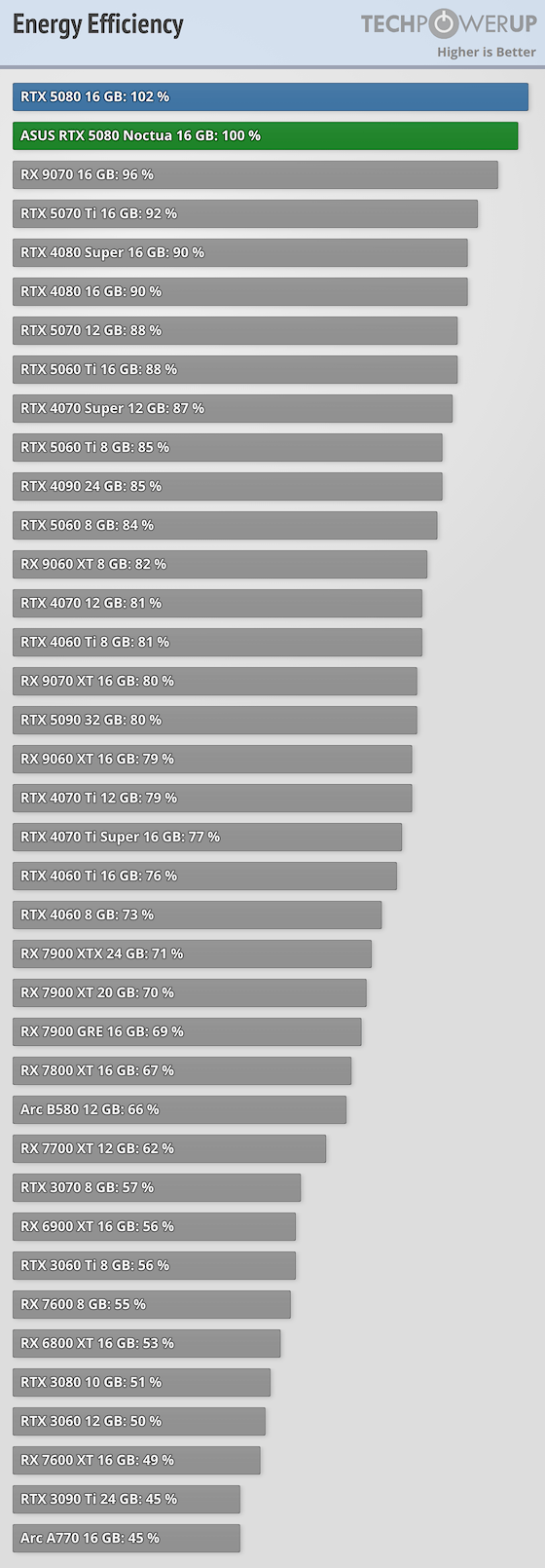
Voltage Frequency Curve
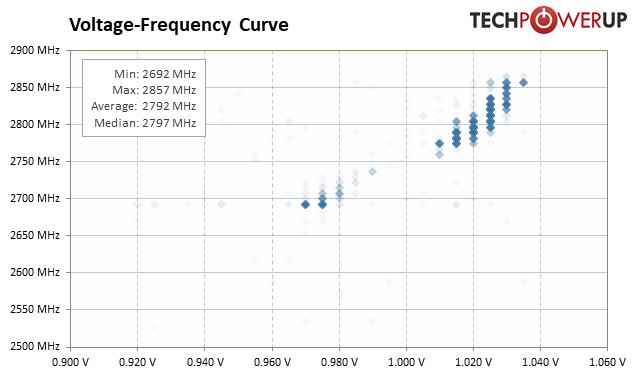
The card will dynamically adjust clocks and voltage based on render load, temperature, and other factors.For the graph below, we recorded all GPU clock and GPU voltage combinations of our 1440p resolution benchmarking suite. The plotted points are transparent, which allows them to add up to indicate more often used values. A light color means the clock and voltage combination is rarely used, and a dark color means it's active more often. The minimum and maximum values are 99th and 1st percentile, so outliers are excluded.
Clock States
| Clock Frequencies & Voltage | |||
|---|---|---|---|
| GPU Clock | Memory Clock | GPU Voltage | |
| Idle | 196 MHz 187 to 232 MHz | 51 MHz | 0.800 V 0.795 to 0.800 V |
| Multi-Monitor | 196 MHz 187 to 225 MHz | 51 MHz | 0.800 V |
| Video Playback | 575 MHz 540 to 622 MHz | 51 MHz | 0.830 V 0.825 to 0.830 V |
| Furmark | 2458 MHz 2437 to 2475 MHz | 1875 MHz | 0.907 V 0.900 to 0.910 V |
| Gaming (Cyberpunk 2077) | 2812 MHz | 1875 MHz | 1.020 V |
| Gaming (Stalker 2) | 2790 MHz | 1875 MHz | 1.015 V |
| Gaming (Spider-Man 2) | 2812 MHz | 1875 MHz | 1.025 V |
| Ray Tracing (Cyberpunk 2077) | 2784 MHz 2782 to 2790 MHz | 1875 MHz | 1.015 V 1.010 to 1.015 V |
| V-Sync (Cyberpunk 2077) | 1823 MHz 1785 to 1882 MHz | 1875 MHz | 0.831 V 0.830 to 0.835 V |
| Gaming (25 Games) | 2792 MHz 2692 to 2857 MHz | 1875 MHz | 1.011 V 0.915 to 1.035 V |
Nov 14th, 2026 03:17 CST
change timezone
Latest GPU Drivers
New Forum Posts
- Ryzen 7 8700G OC (7)
- What are you playing? (26217)
- Post your Cinebench R23 Score (3172)
- Tell me about your favourite graphics card (38)
- AI generated images... (225)
- 3D Printer Club (850)
- Browser Bechmark scores (132)
- MSI RTX 4090 SUPRIM X: FBPA5 training failure; seeking signed 20 GB VBIOS with 0x20 mask (0)
- Requesting original VBIOS for Gigabyte RX 5700 XT GAMING OC 8G Rev 2.0 (Micron) (1)
- no "PhysX" workable (9)
Popular Reviews
- AMD Zen 6 Technical Deep Dive
- Corsair HX1000i Shift Crystal Review
- NZXT C1200 Platinum Review
- ASUS ROG Strix B850-I Gaming Wi-Fi7 W Review
- Upcoming Hardware Launches 2027 (Updated Nov 2026)
- Montech King 95 3D PRO Review
- NZXT H7 RGB+ Review
- NZXT H5 Review
- Phantom Blade Zero Performance Benchmark Review - 35 GPUs Tested
- XPG NIMBUS PLUS Review - Mid-range Chair With Strong Competitors
TPU on YouTube
Controversial News Posts
- NVIDIA Co-Founder and CEO Jensen Huang Officially Resigns (382)
- OpenAI CEO Argues Home PCs Waste the World's Limited DRAM Supply (152)
- NVIDIA Launches Investigation Into Jensen Huang's Relationship With Suspected Chinese Spy (136)
- Intel "Raptor Lake Next" 16-Core and 20-Core CPUs Surface (130)
- Legendary Game Studio BioWare Shuts Down Following EA Layoffs (104)
- Dell CEO Says the Memory Shortage Will Get Worse in 2027 (95)
- NVIDIA GeForce RTX 50-Series Scheduled for up to $500 Price Hike This Week (89)
- Modder Fits RTX 5090 With Four 8-Pin Connectors, Halving Current per Wire (80)